I have been through something similar, where many of my VA albums were filed under some random artist… And that artist was perfectly organized and tagged and didn’t have a single track in the VA albums. So why the crossover? This is what I wrote upthread:
If there are still problems you should look at your OTHER files. I cannot prove it but I think that if you have other artists messed up, like inconsistent Album Artist tags… I think the fallout may be visible in the Various Artists area. I have seen some weird stuff .
Your VA files may be all buttoned up… But check the rest of your library.
It feels like black magic, I know. It will work out.
Oh man…that would be a humongous task considering the size of my library!
It’s shame nobody from Plex chimes in since it’s definitely an issue at their end…they very rarely do unfortunately.
I don’t understand what you mean by that.
“Various Artists”, when used without errors, is supposed to appear as one artist in your Plex library. Not as 100 different “Various Artists”.
Inside this one Various Artists are then all albums by, err, Various Artists.
This can be caused by one single track, either without AlbumArtist tag, or with a different AlbumArtist tag than “Various Artists”.
All tracks which are stored inside your folder VARIOUS ARTISTS must only have “Various Artists” as their AlbumArtist tagged.
If there is a track stored outside of VARIOUS ARTISTS which also has its AlbumArtist tagged as “Various Artists”, it must not share its $artist folder with tracks which have a different AlbumArtist.
Keep in mind that Plex cannot read embedded metatags from some file types, like WAV, MKA, or DTS. It will treat these files as if they had no meta tags at all. Which means it is relying solely on folder structure and file names. Which is why I recommend you to always stick to the folder structure laid out in here: https://support.plex.tv/articles/200265296-adding-music-media-from-folders/
I mean I have ± 100 albums which have in the ‘Album Artist’ tag, the value ‘Various Artists’, does that clear it up?
Well, if that’s the case, that’s really messed up and Plex should address this! Doesn’t make any sense that dozens of other properly tagged albums be affected by one album with a bad tag!
Anyway, I checked all ±100 ‘Various Artists’ albums (±1300 files) and ALL have the proper ‘Various Artists’ info in the ‘Album Artist’ tag.
To add to the weirdness, I Plex Danced one more time, removing all ‘Various Artists’ albums, rescanning, emptying the trash and then did a search for ‘Cornbread Red’…no results! I thought great, hopefully I fixed my problem!
I then just added one album and rescanned just to see what would happen…you guessed it, ‘Cornbread Red’ was back on that ‘Various Artists’ album I had just added!?
So I guess there’s something really corrupt in the Plex database.
Damn, I wish Plex employees would be a bit more involved with their customers’ problem!
I imagine there is some techy manipulation that could be done to resolve this.
If I were to have to rescan my entire library from scratch…it would be a disaster as I had to fix so many, mislabellings, merge split albums and split merged albums.
It would involve days of work to get it back to where it is now!
How about inspecting that one album a little more in detail?
For instance, what file format does it use?
If it’s in a file format which uses “Vorbis comments” as meta tags (opus, ogg, flac), does it have multiple tags for Albumartist (‘ALBUM ARTIST’ vs ‘ALBUMARTIST’)?
It will eventually boil down to exactly this, if you want to use Plex for your music.
Except that you won’t perform splits and merges. But instead bring the folder structure, file names, and embedded meta tags of your files in order, until there are no splits and merges necessary.
Create a new folder, add it to a new music library in Plex.
Add your music step by step. Either by Artist or even by Album if necessary.
Investigate immediately if something doesn’t conform to expectations in Plex.
No, I just can’t afford the time that would take to do that. And seeing how unreliable Plex is with handling of music files, who’s to say it wouldn’t get messed again by one small accidental mistake which can so easily happen.
I won’t be singing my praise for Plex, that’s for sure. As a Plex Pass member, I certainly can’t say I feel like a valued customer. One more disappointment.
If your embedded metatags are already in pristine condition, you can automate much of the necessary work to rename the files and put them into the necessary folder structure.
(I have a hunch that this [or rather the lack of] is at the core of your troubles.)
MP3tag has support for this, among other, similar apps.
My naming, tagging and folder structure are fine for the most part. Sure, as I browse my library, I can still see errors from time to time but that’s fine (it probably accounts of 5-10% or less). When it’s my fault and my tags or naming is incorrect, then it’s on me and I’d never come here to complain. I just fix it and move on.
Here the problem is completely different. Nobody can argue with the fact that Plex is entirely the problem here. It’s such a weird problem, it can’t be anything else.
I bet there is a +90% chance that if I brought you my ±100 Various Artists albums, put them in your library, all would be fine. That would prove nothing is wrong with my naming and tagging and points to something corrupt in the Plex database.
And this is where I would expect some Plex employee to come forward to fix a problem in their product to help their paying customer.
Here and on reddit you can find posts of people who have the knowledge and skills to manipulate the database using SQL and other things I absolutely don’t understand but my point is, I’m pretty confident there’s a fairly ‘easy’ fix for someone in the know-how…as in a Plex employee!
With just that statement as basis, no bug fixing is possible. All you’re saying so far is basically “It’s broken. Fix it.”
No Plex employee will be able to come forward and wave their magic coding wand to make your issues disappear.
Doing that would require at least plex “debug” server logs, taken immediately after adding the problematic album to your library.
Hmm…I don’t see the contradiction? Yes, I’m saying there is definitely a problem that needs fixing.
As for bug fixing…I’m all for it! Let’s do it! Who’s up for the job?..nobody .
Why not?
Sure, let’s do it! No problem. Of course I realise it would require my active participation and send logs, test and try things…I’m all for it! I’ve been asking for that for the last couple of posts!
Again…nobody from Plex is offering that kind of help.
There is only one way to use Plex for music and that is to follow all of the organization and naming rules all the time. Being right “for the most part” is just not enough.
I’m not saying I like it or that improvements can’t be made. But it’s just how it is.
Use a tool like mp3tag. Make sure all your tags are kosher and mp3tag can write out new filenames and directories that are compliant with Plex’s requirements. It might be a lot of work but if you do it once and then stick to the rules when adding new music, you’ll be all set.
If doing that work is out of the question, then Plex is not the right music server.
A rather unsatisfying end to this thread then. Tough luck, Plex has many flaws when it comes to handling music files. and it doesn’t look like anyone at Plex is going to address them anytime soon so suck it up or move on. Yikes, I didn’t expect it to end that way.
Thanks anyway to everyone who chimed in to try and help.
To the Plex folks, you’re a disappointment for not even getting involved in the conversation and even more for not doing anything about it as it seems this has been a problem for a while now.
It’s seems a power outage has helped my problem!
This afternoon my street lost power for 30 min and when my NAS restarted, I decided to give this problem a go again so I added some ‘Various Artists’ and surprise surprise…no more Cornbread Red!
Still, I decide to tread cautiously and add them by small batches and some 25 albums in, it’s looking good!
However, I’m faced with another change in the way the ‘Various Artists’ are displayed. Under ‘Various Artists’, I have many albums under the heading ‘xx Albums’ (xx being the quantity), but then I have 3 other categories lower down on the page I’d like to get rid of under which a whole bunch of ‘Various Artists’ albums are filed: ‘Live Albums’, ‘Compilations’, ‘Remixes’.
This makes it very messy since the way it seems to assign one or the other albums appears to be sometimes quite random and wrong. For ex., I have a series of albums of which there are 8 volumes, so named: Bass Talk Vol 1, Bass Talk Vol 2, etc…
Oddly, 2 of those albums end up in the Compilation section instead of the main album section??
And to add further to the inconvenience - something I’ve found elsewhere in Plex and find very irritating -, the ‘Compilations’ section is displayed on a single horizontal line that you need to scroll right-left to see all the content. Who wants that? Really annoying.
How can I simply just have one big ‘Various Artists’ section with no sub-categories?
Or if they have to be there, how can I have them empty and all my albums simply in the main category?
Thx!
This can’t be changed, unless you also disable these categories for all other artists in your library.
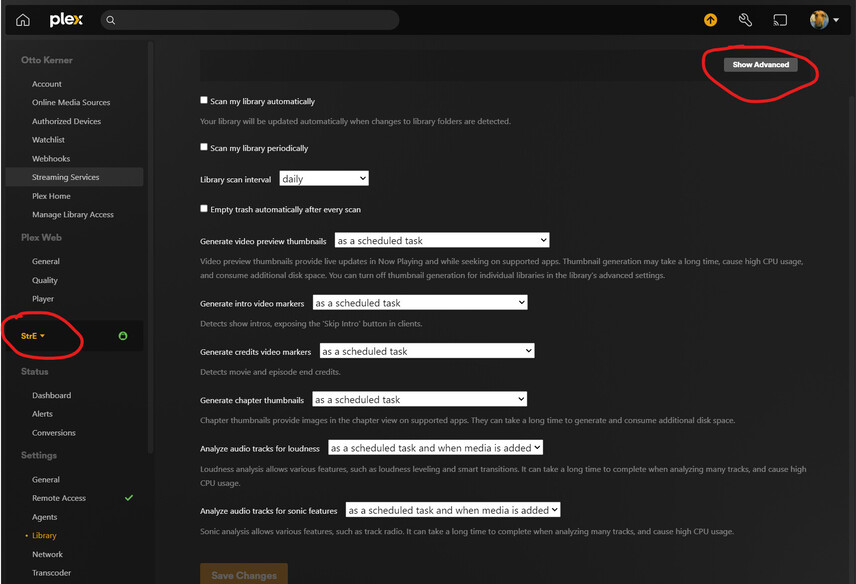
Settings - Server - ‘Show Advanced’ - Library - “Group albums by type”
You would have to override each album’s category by embedding the “releasetype” meta tag and set it to album;album.
I don’t see that in my Settings? I don’t have a ‘Server’ section, nor an ‘Advanced’?
If the first solution works, I’m fine with that. Unless there is a way of correcting/controlling how Plex decides what is a Live Album, Compilation or Remix since it does get it wrong quite a bit?
I have used “Server” as a place holder for the “friendly name” of your server, which appears in the side bar under Settings. If you don’t see that when using the web app, it means that you’ll have to re-authenticate your server.
You can forcibly change the release types with tags in the album, but you will quickly find that Plex does not support all of the release types you may wish to use. So if you are super picky about that kind of sub-category detail, you may be better off turning it off.
 .
.