I would like to offer a development build to to try and see how the remote access settings page looks and what IP gets displayed
If you are interested, please let me know the package you need - you can give me the platform and also indication as to which of the downloads files on https://plex.tv/downloads you would use
Hi, thanks for following up! I just installed the latest release that got pushed out (non-beta) and I didn’t have the problem… fingers crossed maybe it’s resolved now.
That is the randomness and unpredictability of what might happen.
In version 1.13.9, the Network Interface to listen on server setting introduced in version 1.13.5 of Plex Media Server has now been superseded by a new setting. Any old setting for this will no longer be active.
In version 1.13.9 there is a new Networks Advanced Server Setting, named Preferred Network Interface and this will result in apps connecting to the server locally to use this preferred interface. (At this moment, a restart is needed for any change to take effect)
In version 1.13.9 the interface used for port mapping is as before
The development build I have available to try out, has changes to do the following
no longer necessary to restart after setting / changing the Preferred Network Interface server setting
Attempt to ensure the correct IP that is used for mapping is displayed on the Remote Access setting page
there is also a fix for lockout seen on some systems when the server is communicating with the router
Oh yes I just noticed when I updated to 1.13.9.5456 it changed back from my selected network interface to ‘any’. I’m happy to try a development build if you think it would be helpful.
I have a synology 1812+ and am using Synology intel 64 bit package
too bad this `Preferred Network Interface does not work. i can only see my external network(public ip). my hosted wifi network (soft AP) is not listed.
And its so nice to see your server being access over the internet by some random tv.
Edit: it seems that in linux i can use the soft AP. Strange (or not) its not working on windows
Edit II: big disappointment. Even with the local network selected in preferred network it seem my server is still being access over the internet on my public ip. is this a security risk considering that your shared media is being so easily accessed by other tv on the internet?
If you have your server enabled for remote access when you go through initial setup or later on by enabling remote access in server settings, then the server will be accessible from the outside but all access is authenticated and any attempt to go to your public WAN IP and public port used for remote access, will be challenged and a login is required. Access is restricted to the plex.tv owning account of the server - and any users you decided to share your server libraries with
I cannot see any server attached to your plex.tv account. Do you have multiple accounts?
of course you don’t see any because i didn’t add any.
i just wanted to use plex for DLNA and ONLY DLNA.
but the logs for DLNA shows that some tv over the internet is accessing my server over my public IP.
And yes i have public ip on my computer (network cable is directly plugged in computer). and i also have a wireless card that i want to use it for DLNA. but surprisingly whatever i’ve tried i can’t make plex to stop being accessed over the internet.
The only solution i can think of is to block my entire computer behind a router. that is unacceptable for me.
so yes, i will call it a security problem unless you have some hidden option to bind plex to only 1 ip/network card. unfortunately i don’t have it install it on linux since i’ve reinstall the entire os. but i still have it on windows.
the problem is that in windows, Plex server is incapable to see the hosted network.
For a noob here. How do i make my Plex server on my IP when using VPN on my nas? Could use a really easy explanation because I’m so bad with these things. Thanks!
Sorry even after some back and forth with support we never able to get this working.
One workaround is shut down your VPN, start up plex so it binds to the non-VPN IP then restart the VPN after plex starts. Huge pain and you have to do it all over again if VPN loses connection.
I was able to find my non-vpn address on my synology box with this command but no idea how to make plex use it.
curl ifconfig.me --interface eth0
My smart tv client cant find plex server on local network.
I have 2 interfaces in plex machine, working on windows2012r2 .
One interface assigned to local network, 2-nd to world, i have no local interface in plex settings, only auto and wan, no lan.
How i can tell to PMS use correct interface?
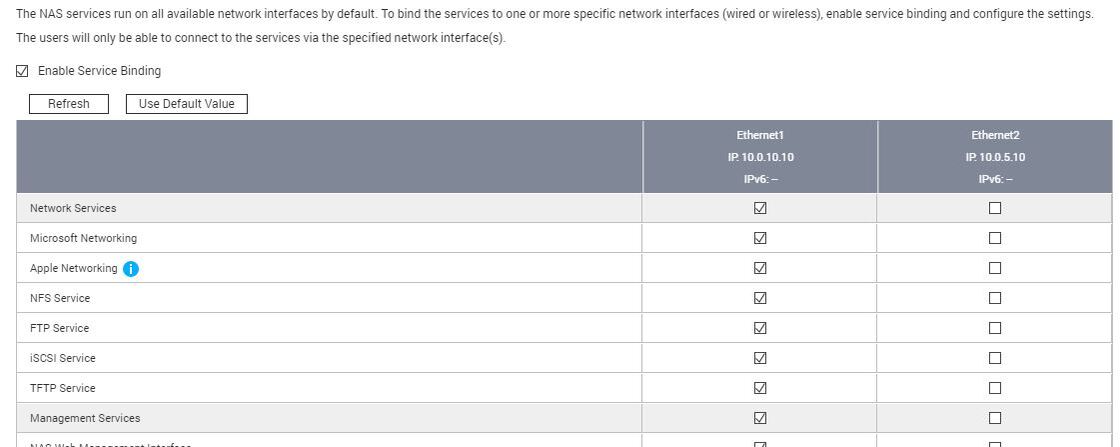
Wow, this thread is incredible. 4+ years and Plex devs still have not figured it out? To the the best of my knowledge and testing, the advanced ‘preferred network interface’ setting does absolutely nothing. Everything can be accessed from anywhere, and nothing can be specified. Great… Devs, what we want is to be able to bind everything Plex to a specific interface, or even a specific set of interfaces. Possibly even bind specific services to different interfaces. This is definitely possible. Heck, even my QNAP NAS lets me do exactly that. I can listen for TCP 22 on both interfaces, one interface, or none. I can listen for TCP 80 on one interface, and TCP 443 on another. Use QNAP’s OS as a model if needed. Check out my visio and screenshot.