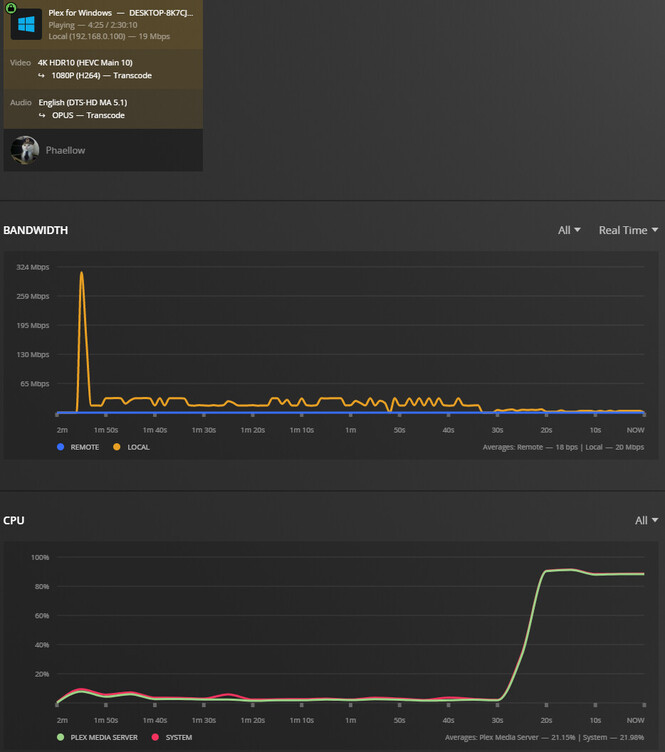
Interesting… I didn’t think it would make a difference since the subtitles are SRT, I thought those were rendered in the client. In any case, it still doesn’t work 
Let me be clear that the tone mapping works, it’s just not hardware accelerated. I can see this is the case since theres no (hw) marker on the dashboard, and the CPU usage is pegged at 100%.
Here’s the new logs (around 21:16):
Plex Media Server Logs_2022-04-19_21-16-49.zip (3.7 MB)
The lack of a (hw) marker on the dashboard has been reported but to confirm this,
Check the CPU utilization.
The log files show that it is using the HW
Sorry, my phrasing must have been weird.
In any case, I did mention that the CPU usage was maxed out. It can’t even transcode a file from 4K HDR HEVC to 1080p without hitching every couple of seconds. I think the hardware should be more than able to handle a single tone mapped transcode…
Those ratios are not bad for this CPU.
You’re converting audio DTS → Opus which takes a fair 30%-ish.
The actual HW decode & HW encode is about 15%.
The CPU shuffling data in and out of the GPU for the tonemapping is harder on these J & N series CPUs than it is on the “Intel Core” processors because of the internal PCI bus bandwidth.
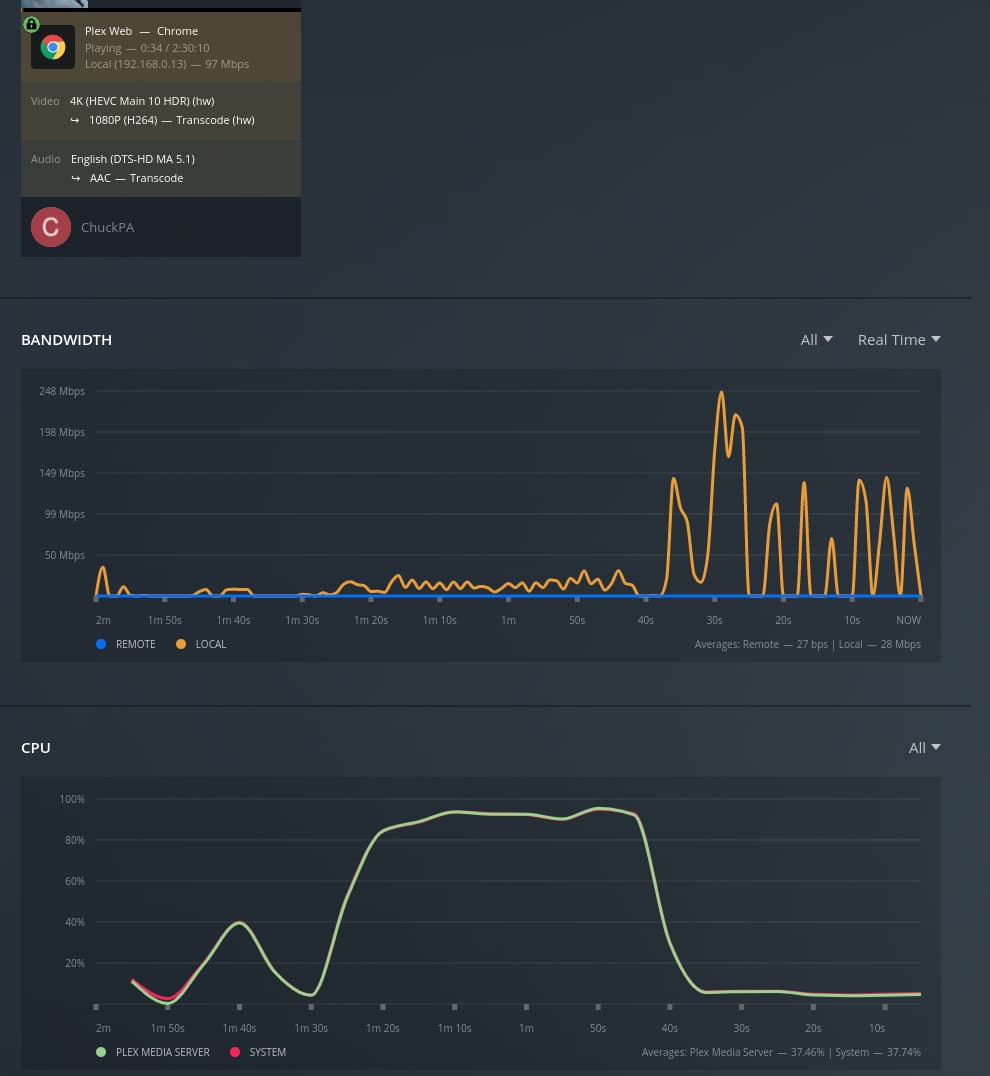
Here is your same movie playing on a NUC8i7HVK (i7-8809G CPU) (8900 Passmarks)
Even here, with hardware tone mapping, You can see the load.
Just to chime in - Ubuntu Server 22.04 LTS didn’t work with the enable_guc=2 parameter on the default 5.15 kernel.
I had updated to 5.17.4 kernel from Ubuntu mainline kernel PPA (Index of /~kernel-ppa/mainline) and hardware transcoding works now.
@ChuckPa I understand that the ratios seem normal, and I do believe that these are normal usage levels when tone-mapping.
However, I’m sure it is not using hardware acceleration:
- For starters, if I disable hardware acceleration, the CPU usage profile is identical to when I have it enabled when tone-mapping.
- Secondly, the performance is equal, and the stream needs to buffer every two seconds. I would expect that if it were using hardware tone-mapping, the performance would result in, at least, a watchable stream.
- Finally, and most importantly, using
intel_gpu_top from intel-gpu-tools, I can actually confirm that no GPU activity is going on in the alleged hardware transcoded tone-mapping.
Here’s the output for intel_gpu_top when doing the tone-mapping with hardware acceleration disabled on the server, and the same exact output when doing the tone-mapping with hardware acceleration enabled:
intel-gpu-top -    0/   0 MHz;  100% RC6; ----- (null);        0 irqs/s

      IMC reads:   ------ (null)/s
     IMC writes:   ------ (null)/s

          ENGINE      BUSY                                                                              MI_SEMA MI_WAIT
     Render/3D/0    0.00% |                                                                           |      0%      0%
       Blitter/0    0.00% |                                                                           |      0%      0%
         Video/0    0.00% |                                                                           |      0%      0%
  VideoEnhance/0    0.00% |                                                                           |      0%      0%
For comparison, here’s the output of the tool when hardware transcoding SDR 4K (HEVC Main 10) to 1080p HD (High):
intel-gpu-top -  678/ 679 MHz;   21% RC6; ----- (null);      554 irqs/s

      IMC reads:   ------ (null)/s
     IMC writes:   ------ (null)/s

          ENGINE      BUSY                                                                              MI_SEMA MI_WAIT
     Render/3D/0   13.10% |█████████▊                                                                 |      0%      0%
       Blitter/0    0.00% |                                                                           |      0%      0%
         Video/0   73.73% |███████████████████████████████████████████████████████▎                   |      0%      0%
  VideoEnhance/0    0.00% |                                                                           |      0%      0%
Very interested in this topic as well as I’m considering moving my PMS from my Synology DS918+ (Celeron J3455) to a Intel NUC 11 NUC11ATKPE (Pentium Silver N6005) for increased transcoding performance.
If I may?
There is a bit of confusion about terms here.
HEVC MAIN 10 == HDR
HEVC MAIN == SDR
There is VERY little content anymore which is HEVC 8-bit (MAIN) profile
I made a couple typos above and would like to clear these:
This transcode action is HEVC HDR → H264 SDR
- Plex doesn’t transcode to HEVC output
- Plex doesn’t output HDR content unless it’s DirectStreaming (no video transcoding)
According to this FFMPEG invocation in the logs:
Apr 19, 2022 20:03:01.999 [0x7f652290cb38] DEBUG - [Transcode] TPU: hardware transcoding: final decoder: vaapi, final encoder: vaapi
Apr 19, 2022 20:03:02.000 [0x7f652290cb38] DEBUG - [Transcode/JobRunner] Job running: EnableExtendedVaFormats=‘1’ FFMPEG_EXTERNAL_LIBS=‘/var/lib/plexmediaserver/Library/Application\ Support/Plex\ Media\ Server/Codecs/62cc2bc-4278-linux-x86_64/’ LIBVA_DRIVERS_PATH=‘/usr/lib/plexmediaserver/lib/dri’ NEOReadDebugKeys=‘1’ X_PLEX_TOKEN=‘xxxxxxxxxxxxxxxxxxxx’ ‘/usr/lib/plexmediaserver/Plex Transcoder’ ‘-codec:0’ ‘hevc’ ‘-hwaccel:0’ ‘vaapi’ ‘-hwaccel_fallback_threshold:0’ ‘10’ ‘-hwaccel_output_format:0’ ‘vaapi’ ‘-hwaccel_device:0’ ‘vaapi’ ‘-codec:1’ ‘dca’ ‘-analyzeduration’ ‘20000000’ ‘-probesize’ ‘20000000’ ‘-i’ ‘/media/rafael/MediaStorage/Movies/Tenet (2020)/Tenet.2020.IMAX.2160p.UHD.BluRay.x265.10bit.HDR.DTS-HD.MA.5.1-SWTYBLZ.mkv’ ‘-filter_complex’ ‘[0:0]hwupload[0];[0]scale_vaapi=w=1920:h=1080:format=p010[1];[1]hwmap=derive_device=opencl[2];[2]tonemap_opencl=tonemap=mobius:format=nv12:m=bt709:p=bt709:r=tv[3];[3]hwmap=derive_device=vaapi:reverse=1[4];[4]hwupload[5]’ ‘-map’ ‘[5]’ ‘-metadata:s:0’ ‘language=eng’ ‘-codec:0’ ‘h264_vaapi’ ‘-b:0’ ‘13682k’ ‘-maxrate:0’ ‘18243k’ ‘-bufsize:0’ ‘36486k’ ‘-r:0’ ‘23.975999999999999’ ‘-filter_complex’ ‘[0:1] aresample=async=1:ocl=’'‘5.1’'‘:rematrix_maxval=0.000000dB:osr=48000[6]’ ‘-map’ ‘[6]’ ‘-metadata:s:1’ ‘language=eng’ ‘-codec:1’ ‘libopus’ ‘-b:1’ ‘687k’ ‘-map’ ‘0:3’ ‘-metadata:s:2’ ‘language=eng’ ‘-codec:2’ ‘copy’ ‘-map’ ‘0:t?’ ‘-codec:t’ ‘copy’ ‘-f’ ‘segment’ ‘-segment_format’ ‘matroska’ ‘-segment_format_options’ ‘live=1’ ‘-segment_time’ ‘1’ ‘-segment_header_filename’ ‘header’ ‘-segment_start_number’ ‘0’ ‘-segment_list’ ‘http://127.0.0.1:32400/video/:/transcode/session/p0of56tdoipbz5y144tljp3j/4d935a48-97d5-4dbb-bd91-9df163e780bb/manifest?X-Plex-Http-Pipeline=infinite’ ‘-segment_list_type’ ‘csv’ ‘-segment_list_unfinished’ ‘1’ ‘-segment_list_size’ ‘5’ ‘-segment_list_separate_stream_times’ ‘1’ ‘-avoid_negative_ts’ ‘disabled’ ‘-map_metadata:g’ ‘-1’ ‘-map_metadata:c’ ‘-1’ ‘-map_chapters’ ‘-1’ ‘chunk-%05d’ ‘-start_at_zero’ ‘-copyts’ ‘-init_hw_device’ ‘vaapi=vaapi:’ ‘-filter_hw_device’ ‘vaapi’ ‘-y’ ‘-nostats’ ‘-loglevel’ ‘quiet’ ‘-loglevel_plex’ ‘error’ ‘-progressurl’ ‘http://127.0.0.1:32400/video/:/transcode/session/p0of56tdoipbz5y144tljp3j/4d935a48-97d5-4dbb-bd91-9df163e780bb/progress’
- HW transcoding of HEVC HDR → H264 SDR is being performed
- It is calling out for OpenCL to perform the tone mapping
[0]scale_vaapi=w=1920:h=1080:format=p010[1];[1]hwmap=derive_device=opencl[2];[2]tonemap_opencl=tonemap=mobius:format=nv12:m=bt709:p=bt709:r=tv[3];[3]hwmap=derive_device=vaapi:reverse=1[4];[4]hwupload[5]’ ‘-map’
PMS will not try to tonemap if it doesn’t see the API as present.
In this case, it is seeing the API.
As we’ve found out, any version of Intel Compute Runtime on 10th Generation and higher CPUs OTHER THAN 21.49.21786 will not work. It will try but nothing happens.
Which version of Intel Compute Runtime is installed?
From my own perspective, is it possible my 8th Gen CPU is so dated as it’s not valid to compare to 10th Gen and above ? – Absolutely.
Sure! Let’s break it down:
If I hadn’t searched the internet I would tend to agree with you. Alas, I think we were both wrong, since Main 10 can definitely serve SDR content and I only clarified the SDR part since it’s the nomenclature Plex uses on its client. Here’s two examples (first an SDR movie, then an HDR one):


In any case, it’s irrelevant to the point I was making which is that when not tone mapping, intel_gpu_top shows the transcode loads that are happening, but when tone mapping, it reports no load at all, which can only mean that it is not hardware transcoding/tone mapping.
Secondly, I can understand that ffmpeg is being invoked with arguments that indicate it to tone map using VAAPI, and I do see it in the logs. However, it is different from it meaning that it is actually using the hardware to perform the task.
About the ICR version… I had a more recent one. In the process of trying to downgrade, I ended up breaking my entire machine  I will report back when I restore it.
Yes, GOOD STUFF HERE 
-
YES, MAIN10 (HDR) Profile can carry MAIN (SDR) content but that shouldn’t be happening unless someone re-encoded it and artificially promoted the profile.
-
I’m not 100% convinced about intel_gpu_top for this reason on NUC8i7HVK. Do you know what I’m doing wrong?
chuck@papyplex:~$ sudo intel_gpu_top
Failed to initialize PMU! (No such file or directory)
chuck@papyplex:~$ ls -la /dev/dri
total 0
drwxr-xr-x  3 root root        140 Mar 27 14:32 .
drwxr-xr-x 18 root root       4160 Apr  5 04:12 ..
drwxr-xr-x  2 root root        120 Mar 27 14:32 by-path
crw-rw----  1 root render 226,   0 Apr 26 13:25 card0
crw-rw----  1 root render 226,   1 Apr 19 18:31 card1
crw-rw----  1 root render 226, 128 Apr 19 18:31 renderD128
crw-rw----  1 root render 226, 129 Apr 19 18:31 renderD129
chuck@papyplex:~$
This is Plex/Web – definitely tone mapping.
Sadly, I have no idea why intel_gpu_top isn’t working for you
In any case, I have to thank you. One broken Ubuntu system later, I have been greeted with this message in my dashboard:
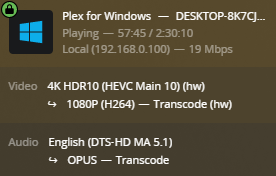
The reason this wasn’t working before is I had installed a more recent ICR directly from Intel’s GitHub repository. If I instead follow their instructions here, the version matches the one you have mentioned and everything works as it should.
Thanks a lot for bearing with me and helping me solve the issue 
As a sidenote, CPU load for the hardware accelerated tone mapping is only around 20% 
That looks SO much nicer 
In the PMS installer for Ubuntu/Debian, I try to take all the guesswork out of what to install.
I believe, as of 1.26.1, you will now see the updated instructions which coincide with a transcoder fix.
Specifically, I provide the links to download and install the needed packages. (21.49.21786)
Congratulations on getting this working. Am I reading this correctly that you have your max bitrate for transcodes set to 20 Mbps? Would you mind testing the CPU load of transcoding a 4K HDR movie to 1080p SDR 8 Mbps, with SRT subtitles enabled if you have them?
All,
Thanks for all details… and it helped me to get HW transcoding up and running on N5105 running Debian 11.3 with OMV6.
Its not straight forward… but want to give highlights if some one else is looking for details.
- Update Kernel from Debian backports - Updated it to 5.16. This is not stable version
- Update FFMPEG to v5 - This is not stable version again
- Update I915 firmware files and run update-initramfs -u
And then HW transcoding started working… Except when you have HDR10 video, it works fine and my CPU usuage is around 30-40% even when transcoding multiple 4k files.
@ChuckPa I’ve been reading threads about HW transcoding in other recent Intel architectures spectacularly failing to work. Rrevisiting this one, I have too failed to get it to work again, even when following the steps we have in this thread.
For reference, what I did was exactly this:
- Install Ubuntu 20.04.4 LTS
- Run
echo "options i915 enable_guc=2" > /etc/modprobe.d/i915.conf and update-initramfs -u
- Install the necessary ICR from Release 21.49.21786 · intel/compute-runtime · GitHub
- Install plexmediaserver_1.28.1.6018-c1f308c6a_amd64.deb
I get no HW transcoding whatsoever. This is severely hurting my other loads since Plex is constantly hammering away… Is there anything I can do to solve this in the meantime, or what’s the status if not? What can I do differently?
@Phaellow
As I’ve been sharing in other threads, a regression occurred in 1.28.1 with transcoding.
Installing 1.28.1, because of the packaging, secured your Intel Compute Runtime libraries.
With them now secured, you are free to downgrade to 1.28.0 until the BETA 1.28.1 gets repaired/replaced
Thanks for your reply.
What’s the best way to downgrade PMS? As of now, I have used 1.28.0.5999-97678ded3 from the repository, because it’s the only one available, but should I want to downgrade to a different version, it doesn’t seem it’s available there (and the website just points to the 1.28.1 .deb).
EDIT: I’ve found a GitHub repository with links for all deb files.
However, HW transcoding still doesn’t work with both 1.28.0.5999-97678ded3 nor 1.27.2.5929-a806c5905:
I will also attach the full logs.
Plex Media Server Logs_2022-08-08_09-30-23.zip (358.2 KB)
At this point, I have tried a bunch of different things. I installed 22.04, 20.04.4. I always started by forcing the guc. I installed the ICR with the necessary version. I tried installing non-free drivers, I tried removing them. I tried upgrading the kernel. I tried dowgrading or starting by installing an older PMS version (down to 1.27). In any of this combinations, I have not once managed to get HW transconding working (which is super sad, considering the first time I interacted here I was wanting to get HW tone-mapping working  ).
).
@ChuckPa Do you have any sort of recommendation or step-by-step list with versions that I can follow to get HW transcoding working on a Debian/Ubuntu based machine?
As a reminder, this is my HW:
rafael@upsilon:~$ cat /proc/cpuinfo | grep 'model name' | head -1
model name      : Intel(R) Celeron(R) N5095 @ 2.00GHz
@Phaellow
You turned off DEBUG logging. There is nothing there for me to look at.
(DEBUG logging shows as PMS & Transcoder look for the hardware).
I know that on any arbitrary N5xxx, Ubuntu 20.04.4, ICR 21.49.21786 works.
No special forcing is required.
22.04 changed the whole game because they now distribute their own (newer) library versions which cause breakage.
@ChuckPa Extremely sorry about the debug logging, it should have been enabled. It has been a long night
In any case, absolutely fresh install, and I don’t have hardware transcoding working. This is absolutely everything I did to the machine after the install:
rafael@upsilon:~/Downloads$ history
    1  exit
    2  cd Downloads/
    3  wget https://github.com/intel/compute-runtime/releases/download/21.49.21786/intel-gmmlib_21.3.3_amd64.deb
    4  wget https://github.com/intel/intel-graphics-compiler/releases/download/igc-1.0.9441/intel-igc-core_1.0.9441_amd64.deb
    5  wget https://github.com/intel/intel-graphics-compiler/releases/download/igc-1.0.9441/intel-igc-opencl_1.0.9441_amd64.deb
    6  wget https://github.com/intel/compute-runtime/releases/download/21.49.21786/intel-opencl-icd_21.49.21786_amd64.deb
    7  sudo dpkg -i *.deb
    8  sudo reboot
    9  sudo apt-get install openssh-server
   10  cd Downloads/
   11  wget https://downloads.plex.tv/plex-media-server-new/1.28.0.5999-97678ded3/debian/plexmediaserver_1.28.0.5999-97678ded3_amd64.deb
   12  sudo dpkg -i plexmediaserver_1.28.0.5999-97678ded3_amd64.deb
   13  sudo systemctl stop plexmediaserver.service
   14  sudo rm -rf /var/lib/plexmediaserver/Library/Application\ Support/Plex\ Media\ Server/
   15  tar -xzf plexmediaserver.tar.gz
   16  sudo mv var/lib/plexmediaserver/Library/Application\ Support/Plex\ Media\ Server/ /var/lib/plexmediaserver/Library/Application\ Support/
   17  sudo chown -R plex:plex /var/lib/plexmediaserver/Library/Application\ Support/Plex\ Media\ Server/
   18  sudo setfacl -m u:plex:rx /media/rafael/
   19  sudo systemctl start plexmediaserver.service
   20  history
Device information:
rafael@upsilon:~$ uname -a
Linux upsilon 5.15.0-43-generic #46~20.04.1-Ubuntu SMP Thu Jul 14 15:20:17 UTC 2022 x86_64 x86_64 x86_64 GNU/Linux
rafael@upsilon:~$ lsb_release -a
No LSB modules are available.
Distributor ID: Ubuntu
Description:    Ubuntu 20.04.4 LTS
Release:        20.04
Codename:       focal
rafael@upsilon:~$ cat /proc/cpuinfo | grep 'model name' | head -1
model name      : Intel(R) Celeron(R) N5095 @ 2.00GHz
plexinstaller.log:
# Plex Media Server installation configuration info:  seg 08 ago 2022 19:31:23 WEST
Init=0
Systemd=1
Custom=0
LinuxContainer=0
NewInstall=1
HaveOverride=0
OverrideFile=""
PlexUser="plex"
PlexGroup="plex"
VideoGroup="render"
AppSuppDir="/var/lib/plexmediaserver/Library/Application Support"
PlexTempDir="/tmp"
LangEncoding="en_US.UTF-8"
ExistingVersion=0
DistroName="ubuntu"
DistroVersion="2004"
HaveHardware=1
HaveTranscoderPref=0
NeedUser=1
NeedGroup=1
NeedVideo=1
Verbose=1
Running=0
Errors=0
Warnings=0
HaveIntel=1
HaveIntelCore=0
HaveIntelXeon=0
HaveIntelCeleron=1
HaveIntelPentium=0
Havei915=1
HaveNvidia=0
CPUSKU=5095
NeedOpenCL=0
NeedBeignet=0
NeedIntelCompute=1
HaveBeignet=0
HaveOpenCL=1
HaveIntelGmmlib=1
HaveIntelIGCCore=1
HaveIntelIGCOpenCL=1
HaveIntelOpenCL=1
HaveIntelCompute=1
RequiredIntelGmmlib="21.3.3"
RequiredIntelIGCCore="1.0.9441"
RequiredIntelIGCOpenCL="1.0.9441"
RequiredIntelOpenCL="21.49.21786"
VersionIntelGmmlib="21.3.3"
VersionIntelIGCCore="1.0.9441"
VersionIntelIGCOpenCL="1.0.9441"
VersionIntelOpenCL="21.49.21786"
Platform="U59"
Processor="N5095"
Distro="Ubuntu 20.04.4 LTS"
Kernel="Linux upsilon 5.15.0-43-generic #46~20.04.1-Ubuntu SMP Thu Jul 14 15:20:17 UTC 2022 x86_64 x86_64 x86_64 GNU/Linux"
Memory="15783 681 14386"
This is the error I see in the console:
I will attach the logs, this time hopefully with debug enabled (I checked manually).
Plex Media Server Logs_2022-08-08_19-35-59.zip (378.8 KB)
Let me know what I can possibly do to get things working. It’s been quite a pain having things break when they were working so well before. Again, thank you for your endless support.