No hardware transcoding in Ubuntu server

I bought a new computer and installed Ubuntu just to run plex server, so I’m pretty chagrined that HW transcoding doesn’t appear to be happening.

CPU is i5-10400. No Graphics card.

     *-cpu
          description: CPU
          product: Intel(R) Core(TM) i5-10400 CPU @ 2.90GHz
          vendor: Intel Corp.
          physical id: 51
          bus info: cpu@0
          version: Intel(R) Core(TM) i5-10400 CPU @ 2.90GHz
          serial: To Be Filled By O.E.M.
          slot: U3E1
          size: 2599MHz
          capacity: 4300MHz
          width: 64 bits
          clock: 100MHz
          capabilities: lm fpu fpu_exception wp vme de pse tsc msr pae mce cx8 apic sep mtrr pge mca cmov pat pse36 clflush dts acpi mmx fxsr sse sse2 ss ht tm pbe syscall nx pdpe1gb rdtscp x86-64 constant_tsc art arch_perfmon pebs bts rep_good nopl xtopology nonstop_tsc cpuid aperfmperf pni pclmulqdq dtes64 monitor ds_cpl vmx est tm2 ssse3 sdbg fma cx16 xtpr pdcm pcid sse4_1 sse4_2 x2apic movbe popcnt tsc_deadline_timer aes xsave avx f16c rdrand lahf_lm abm 3dnowprefetch cpuid_fault epb invpcid_single ssbd ibrs ibpb stibp ibrs_enhanced tpr_shadow vnmi flexpriority ept vpid ept_ad fsgsbase tsc_adjust bmi1 avx2 smep bmi2 erms invpcid mpx rdseed adx smap clflushopt intel_pt xsaveopt xsavec xgetbv1 xsaves dtherm ida arat pln pts hwp hwp_notify hwp_act_window hwp_epp md_clear flush_l1d arch_capabilities cpufreq
          configuration: cores=6 enabledcores=6 threads=12

Intel ARK says this chip supports QuickSync.

The Plex Install process says that “Intel QSV Hardware: Found”

$ sudo dpkg -i ~/Downloads/plexmediaserver_1.21.4.4079-1b7748a7b_amd64.deb 
Selecting previously unselected package plexmediaserver.
(Reading database ... 142648 files and directories currently installed.)
Preparing to unpack .../plexmediaserver_1.21.4.4079-1b7748a7b_amd64.deb ...
PlexMediaServer install: Pre-installation Validation.
PlexMediaServer install: Pre-installation Validation complete.
Unpacking plexmediaserver (1.21.4.4079-1b7748a7b) ...
Setting up plexmediaserver (1.21.4.4079-1b7748a7b) ...
PlexMediaServer install: PlexMediaServer-1.21.4.4079-1b7748a7b - Installation starting.
PlexMediaServer install: 
PlexMediaServer install: Now installing based on:
PlexMediaServer install:   Installation Type:   Update
PlexMediaServer install:   Process Control:     systemd
PlexMediaServer install:   Plex User:           plex
PlexMediaServer install:   Plex Group:          plex
PlexMediaServer install:   Video Group:         render
PlexMediaServer install:   Metadata Dir:        /var/lib/plexmediaserver/Library/Application Support
PlexMediaServer install:   Temp Directory:      /tmp 
PlexMediaServer install:   Lang Encoding:       en_US.UTF-8
PlexMediaServer install:   Intel QSV Hardware:  Found
PlexMediaServer install:   Nvidia GPU card:     Not Found
PlexMediaServer install:  
PlexMediaServer install:   OpenCL library:      Installed
PlexMediaServer install:   Beignet package:     Installed
PlexMediaServer install:  
PlexMediaServer install: Completing final configuration.
PlexMediaServer install: Starting Plex Media Server.
PlexMediaServer install: PlexMediaServer-1.21.4.4079-1b7748a7b - Installation successful.  Errors: 0, Warnings: 0
Processing triggers for libc-bin (2.31-0ubuntu9.2) ...
Processing triggers for gnome-menus (3.36.0-1ubuntu1) ...
Processing triggers for desktop-file-utils (0.24-1ubuntu3) ...
Processing triggers for mime-support (3.64ubuntu1) ...

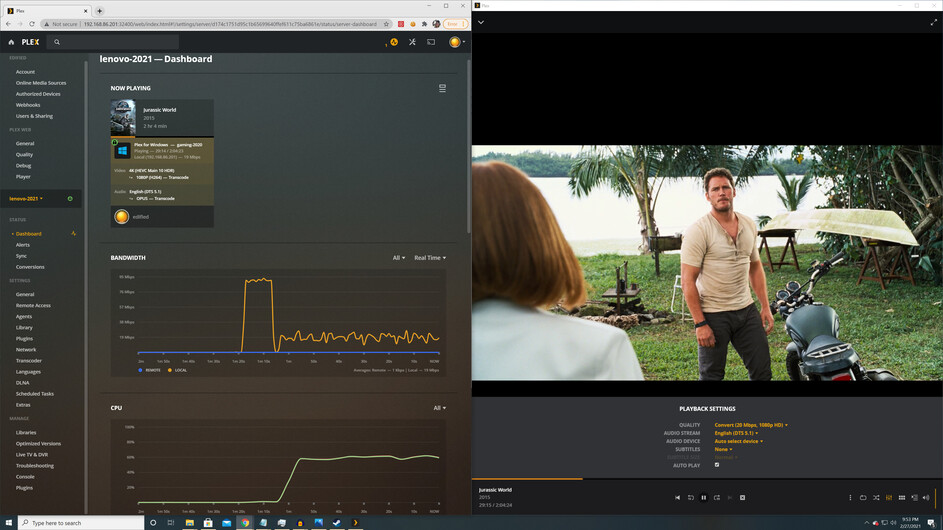
Symptoms: when I play a 4k remux and tell it to transcode down to 1080p, the cpu shows very high usage (60% across all cores, as a general observation). In addition, the web dashboard indicates transcode, but does NOT say “(hw)” as I would expect.

Logs attached.

Plex Media Server Logs_2021-02-26_09-29-24.zip (1.7 MB)

Additional info:

$ sudo ls -al /dev/dri
total 0
drwxr-xr-x   3 root root        100 Feb 26 09:11 .
drwxr-xr-x  20 root root       4420 Feb 26 09:26 ..
drwxr-xr-x   2 root root         80 Feb 26 09:11 by-path
crw-rw----+  1 root render 226,   0 Feb 26 09:16 card0
crw-rw----+  1 root render 226, 128 Feb 26 09:16 renderD128

and

$ sudo id plex
uid=998(plex) gid=998(plex) groups=998(plex),44(video),109(render)

On another post I read that there should be renderD128 as well as renderD129, is that true? Mine only shows renderD128.

When I installed Ubuntu, I hadn’t yet plugged in a digital monitor – I was only using analog VGA output from the mainboard. This shouldn’t matter, right? I read in another topic that only Windows cares about having a plug in the digital output… When I installed Plex this time around, I was using the HDMI output instead…

The renderDxxx nodes are based on the number of rendering devices in the system.

The first is 128, second is 129, etc.

First things to check when you’re not getting HW transcoding is the settings.

Settings - Server - Transcoder – SHOW ADVANCED.

Now, also take into consideration – Use of subtitles.
Subtitles are the bane of HW transcoding. They cannot be done in HW (Intel didn’t provide that). The CPU must slug through and burn them in IFF the player can’t support them. PGS, VOBSUB, and DVDRIP must always be burned. Text based can usually be sent as a third stream (video, audio, subtitle-text)

I made sure to test with subtitles off. Still no “(hw)”.

Oh, and I ensured that the all ‘hardware acceleration’ or ‘hardware encoding’ related checkboxes were checked. What about tone mapping? Does QuickSync not support Tone Mapping?

I will double check the settings, and the subtitles, and test again.

@edified

I’m sorry about earlier. I was still trying to rebuild/recover a damaged workstation.
I wasn’t able to see logs normally.

In reviewing yours, the client disconnects. Are you certain it can handle the 60+ Mbps?

This excerpt shows PMS starts transcoding with hardware and the cient disconnects.

Feb 26, 2021 09:17:39.090 [0x7f94fbfff700] DEBUG - [Transcode] [FFMPEG] - Param buffer (type 0, 604 bytes) is 0.
Feb 26, 2021 09:17:39.090 [0x7f94fbfff700] DEBUG - [Transcode] [FFMPEG] - Slice 0 param buffer (264 bytes) is 0x1.
Feb 26, 2021 09:17:39.090 [0x7f94fbfff700] DEBUG - [Transcode] [FFMPEG] - Slice 0 data buffer (47 bytes) is 0x2.
Feb 26, 2021 09:17:39.090 [0x7f94fbfff700] DEBUG - [Transcode] [FFMPEG] - Decode to surface 0x13.
Feb 26, 2021 09:17:39.090 [0x7f94fbfff700] DEBUG - [Transcode] Codecs: 10-bit HEVC test succeeded
Feb 26, 2021 09:17:39.091 [0x7f94fbfff700] DEBUG - [Transcode] Scaled up video bitrate to 252495Kbps based on 4.500000x fudge factor.
Feb 26, 2021 09:17:39.091 [0x7f94fbfff700] DEBUG - [Transcode] Scaled maximum bitrate for resolution reduction to 63123Kbps.
Feb 26, 2021 09:17:39.091 [0x7f94fbfff700] DEBUG - [Transcode] MDE: Jurassic World (2015): Audio Direct Streaming is disabled, so video's audio stream will be transcoded
Feb 26, 2021 09:17:39.091 [0x7f94fbfff700] DEBUG - [Transcode] MDE: Cannot direct stream audio stream due to profile or setting limitations
Feb 26, 2021 09:17:39.091 [0x7f94fbfff700] DEBUG - [Transcode] MDE: Jurassic World (2015): selected media 0 / 1
Feb 26, 2021 09:17:39.091 [0x7f94fbfff700] DEBUG - [Transcode] Streaming Resource: Session 0x7f94d0060900:2whp862nngimftxy70jkbiyk changed transcode slot usage to used.  Used slots is now 1
Feb 26, 2021 09:17:39.091 [0x7f94fbfff700] DEBUG - [Transcode] Streaming Resource: Reached Decision id=1 codes=(General=1001,Direct play not available; Conversion OK. Direct Play=3000,App cannot direct play this item. Direct play is disabled. Transcode=1001,Direct play not available; Conversion OK.) media=(id=1 part=(id=1 decision=transcode container=mkv protocol=http streams=(Video=(id=1 decision=transcode bitrate=18243 encoder=h264_vaapi width=1920 height=1080) Audio=(id=3 decision=transcode bitrate=687 encoder=libopus channels=6 rate=48000))))
Feb 26, 2021 09:17:39.091 [0x7f94fbfff700] VERBOSE - [Transcode] It took 0.0 sec to serialize a list with 1 elements.
Feb 26, 2021 09:17:39.091 [0x7f955affd700] DEBUG - Completed: [192.168.86.200:51933] 200 GET /video/:/transcode/universal/decision?hasMDE=1&path=%2Flibrary%2Fmetadata%2F1&mediaIndex=0&partIndex=0&protocol=http&fastSeek=1&directPlay=0&directStream=1&subtitleSize=100&audioBoost=100&location=lan&maxVideoBitrate=20000&addDebugOverlay=0&autoAdjustQuality=0&directStreamAudio=1&advancedSubtitles=text&session=w9mx0v8jsr9vnpzstwkhktxz&offset=1262&subtitles=auto&copyts=1&Accept-Language=en (8 live) TLS GZIP 36ms 3690 bytes (pipelined: 7)
Feb 26, 2021 09:17:39.191 [0x7f955b7fe700] DEBUG - Failed to stream media, client probably disconnected after 90914816 bytes: 104 - Connection reset by peer
Feb 26, 2021 09:17:39.191 [0x7f955b7fe700] DEBUG - Completed after connection close: [192.168.86.200:51950] 206 GET /library/parts/1/1614272907/file.mkv (8 live) TLS 7564ms 90914816 bytes (range: bytes=9627870839-) 
Feb 26, 2021 09:17:39.191 [0x7f955b7fe700] VERBOSE - [IDLE] Removing (1->0) work item http_download - /library/parts/1/1614272907/file.mkv?X-Plex-Session-Identifier=2whp862nngimftxy70jkbiyk&X-Plex-Product=Plex%20for%20Windows&X-Plex-Version=1.28.0.1681-cc6e807c&X-Plex-Client-Identifier=kadn5x1a2jg9keh0dbjrewe9&X-Plex-Platform=windows&X-Plex-Platform-Version=10.0.19042&X-Plex-Sync-Version=2&X-Plex-Features=external-media%2Cindirect-media&X-Plex-Model=standalone&X-Plex-Device-Name=asus-2013&X-Plex-Device-Screen-Resolution=1920x1137%2C1920x1200&X-Plex-Client-Profile-Name=Plex%20Desktop&X-Plex-Token=xxxxxxxxxxxxxxxxxxxx&X-Plex-Language=en&Accept-Language=en
Feb 26, 2021 09:17:39.191 [0x7f955b7fe700] VERBOSE - [IDLE] Server is now idle
Feb 26, 2021 09:17:39.286 [0x7f955affd700] VERBOSE - Auth: We found auth token (xxxxxxxxxxxxxxxxxxxx), enabling token-based authentication.
Feb 26, 2021 09:17:39.286 [0x7f955affd700] DEBUG - Auth: authenticated user 1 as edified
Feb 26, 2021 09:17:39.286 [0x7f955affd700] VERBOSE - Auth: Came in with a super-token, authorization succeeded.
Feb 26, 2021 09:17:39.286 [0x7f94fbfff700] DEBUG - Request: [192.168.86.200:51951 (Subnet)] GET /video/:/transcode/universal/start

I would appreciate turning off VERBOSE logging. It only makes noise in the logs and more difficult for me.

Token (edified) (range: bytes=0-) 
Feb 26, 2021 09:17:39.315 [0x7f94fa7fc700] VERBOSE -  * Accept => */*
Feb 26, 2021 09:17:39.315 [0x7f94fa7fc700] VERBOSE -  * Connection => keep-alive
Feb 26, 2021 09:17:39.315 [0x7f94fa7fc700] VERBOSE -  * Host => 127.0.0.1:32400
Feb 26, 2021 09:17:39.315 [0x7f94fa7fc700] VERBOSE -  * Icy-MetaData => 1
Feb 26, 2021 09:17:39.315 [0x7f94fa7fc700] VERBOSE -  * Range => bytes=0-
Feb 26, 2021 09:17:39.315 [0x7f94fa7fc700] VERBOSE -  * User-Agent => Lavf/58.27.104
Feb 26, 2021 09:17:39.315 [0x7f94fa7fc700] VERBOSE -  * X-Plex-Http-Pipeline => infinite
Feb 26, 2021 09:17:39.315 [0x7f94fa7fc700] VERBOSE -  * X-Plex-Token => xxxxxxxxxxxxxxxxxxxx
Feb 26, 2021 09:17:39.315 [0x7f94fa7fc700] VERBOSE -  * status => startup
Feb 26, 2021 09:17:39.315 [0x7f955affd700] DEBUG - Completed: [127.0.0.1:34308] 204 PUT /video/:/transcode/session/w9mx0v8jsr9vnpzstwkhktxz/2b9afc0f-920c-4126-aadd-97cf9c42e7e0/progress?status=startup (9 live) 0ms 203 bytes (pipelined: 1) (range: bytes=0-) 
Feb 26, 2021 09:17:39.319 [0x7f955b7fe700] VERBOSE - Auth: We found auth token (xxxxxxxxxxxxxxxxxxxx), enabling token-based authentication.
Feb 26, 2021 09:17:39.319 [0x7f955b7fe700] VERBOSE - Auth: Came in with the master token, authorization succeeded.
Feb 26, 2021 09:17:39.319 [0x7f94fa7fc700] DEBUG - Request: [127.0.0.1:34308 (Loopback)] PUT /video/:/transcode/session/w9mx0v8jsr9vnpzstwkhktxz/2b9afc0f-920c-4126-aadd-97cf9c42e7e0/progress?status=startup (9 live) Signed-in Token (edified) (range: bytes=0-) 
Feb 26, 2021 09:17:39.319 [0x7f94fa7fc700] VERBOSE -  * Accept => */*

^^ these are unnecessary – HTTP keepalive

I disabled VERBOSE logging, then tried a few different clients. Never have I seen “(hw)” appear. One client was firefox plex web, on the ubuntu server (no network involved). One client was a highly capable i7-8700k, plex for windows app. Another was the Plex Media Player (formerly PHT) on windows, run on an older computer. On these clients, the default is consistently to NOT transcode. I have to keep choosing “1080p 20Mbps” after I start the video. I also tried the Roku 3. It defaulted to 1080p 12Mbps, still no “(hw)” in the dashboard, and there was punishing CPU usage.

In all cases, I never saw “(hw)”, and CPU usage was very high. See attached logs for the tests I ran after I disabled VERBOSE logging.

Plex Media Server Logs_2021-02-27_09-52-19.zip (3.1 MB)

All connections are wired. Including the Roku 3.

Do you have Plex Pass?

@edified

I’m seeing several issues going on here.

  1. PMS starts up but can’t resolve hostname plex.tv (DNS failure)
Feb 27, 2021 09:32:42.998 [0x7f5cb89dd700] ERROR - Error issuing curl_easy_perform(handle): 6
Feb 27, 2021 09:32:42.998 [0x7f5cb89dd700] WARN - HTTP error requesting GET https://plex.tv/api/v2/server/access_tokens?auth_token=xxxxxxxxxxxxxxxxxxxx (6, Couldn't resolve host name) (Could not resolve host: plex.tv)
Feb 27, 2021 09:32:42.998 [0x7f5cb89dd700] DEBUG - MyPlex: using cached data for request for https://plex.tv/api/v2/server/access_tokens?auth_token=xxxxxxxxxxxxxxxxxxxx
Feb 27, 2021 09:32:42.999 [0x7f5cb89dd700] DEBUG - MyPlex: updating with 33 access tokens
Feb 27, 2021 09:32:42.999 [0x7f5cb89dd700] DEBUG - HTTP requesting GET https://plex.tv/api/v2/server/users?auth_token=xxxxxxxxxxxxxxxxxxxx
Feb 27, 2021 09:32:42.999 [0x7f5cb89dd700] ERROR - Error issuing curl_easy_perform(handle): 6
Feb 27, 2021 09:32:42.999 [0x7f5cb89dd700] WARN - HTTP error requesting GET https://plex.tv/api/v2/server/users?auth_token=xxxxxxxxxxxxxxxxxxxx (6, Couldn't resolve host name) (Could not resolve host: plex.tv)
  1. Somehow, it eventually does resolve via IPv6 ( You really need the IPv4 turned on as well. I have the same ISP as you. Run IPv4 and IPv6)

  2. Along the way, some playback has HW, some doesn’t.

I m seeing the 2160p 7.1 channel → 1080p in hardware (hw) here.
Look at the `TPU

Feb 27, 2021 09:38:40.838 [0x7f5c437fe700] DEBUG - [Transcode] [FFMPEG] - Format 0x30313050 -> p010le.
Feb 27, 2021 09:38:40.838 [0x7f5c437fe700] DEBUG - [Transcode] [FFMPEG] - Created surface 0.
Feb 27, 2021 09:38:40.838 [0x7f5c437fe700] DEBUG - [Transcode] [FFMPEG] - Direct mapping possible.
Feb 27, 2021 09:38:40.839 [0x7f5c437fe700] DEBUG - [Transcode] TPU: hardware transcoding: final decoder: vaapi, final encoder: vaapi
Feb 27, 2021 09:38:40.840 [0x7f5c437fe700] DEBUG - [Transcode/JobRunner] Job running: EnableExtendedVaFormats='1' FFMPEG_EXTERNAL_LIBS='/var/lib/plexmediaserver/Library/Application\ Support/Plex\ Media\ Server/Codecs/367b3d4-3673-linux-x86_64/' LIBVA_DRIVERS_PATH='/usr/lib/plexmediaserver/lib/dri' NEOReadDebugKeys='1' X_PLEX_TOKEN=xxxxxxxxxxxxxxxxxxxxx' '/usr/lib/plexmediaserver/Plex Transcoder' '-codec:0' 'hevc' '-hwaccel:0' 'vaapi' '-hwaccel_fallback_threshold:0' '10' '-hwaccel_output_format:0' 'vaapi' '-hwaccel_device:0' 'vaapi' '-codec:2' 'dca' '-ss' '1772' '-analyzeduration' '20000000' '-probesize' '20000000' '-i' '/home/eddie/Videos/Jurassic World (2015).mkv' '-filter_complex' '[0:0]hwupload[0];[0]scale_vaapi=w=1920:h=1080:format=p010[1];[1]hwmap=derive_device=opencl[2];[2]tonemap_opencl=tonemap=mobius:format=nv12:m=bt709:p=bt709:r=tv[3];[3]hwmap=derive_device=vaapi:reverse=1[4];[4]hwupload[5]' '-map' '[5]' '-metadata:s:0' 'language=eng' '-codec:0' 'h264_vaapi' '-b:0' '13682k' '-maxrate:0' '18243k' '-bufsize:0' '36486k' '-r:0' '23.975999999999999' '-filter_complex' '[0:2] aresample=async=1:ocl='\''5.1'\'':rematrix_maxval=0.000000dB:osr=48000[6]' '-map' '[6]' '-metadata:s:1' 'language=eng' '-codec:1' 'libopus' '-b:1' '687k' '-f' 'segment' '-segment_format' 'matroska' '-segment_format_options' 'live=1' '-segment_time' '1' '-segment_header_filename' 'header' '-segment_start_number' '0' '-segment_list' 'http://127.0.0.1:32400/video/:/transcode/session/sn7djuzxha0d9dd209tn5qao/f5427bf3-1001-445b-a81c-25ed51e14063/seglist?X-Plex-Http-Pipeline=infinite' '-segment_list_type' 'csv' '-segment_list_unfinished' '1' '-segment_list_size' '5' '-segment_list_separate_stream_times' '1' '-avoid_negative_ts' 'disabled' '-map_metadata:g' '-1' '-map_metadata:c' '-1' '-map_chapters' '-1' 'chunk-%05d' '-start_at_zero' '-copyts' '-init_hw_device' 'vaapi=vaapi:' '-filter_hw_device' 'vaapi' '-y' '-nostats' '-loglevel' 'quiet' '-loglevel_plex' 'error' '-progressurl' 'http://127.0.0.1:32400/video/:/transcode/session/sn7djuzxha0d9dd209tn5qao/f5427bf3-1001-445b-a81c-25ed51e14063/progress'
Feb 27, 2021 09:38:40.840 [0x7f5c437fe700] DEBUG - [Transcode/JobRunner] Jobs: Starting child process with pid 3751
Feb 27, 2021 09:38:40.846 [0x7f5c917fa700] DEBUG - Request: [127.0.0.1:56586 (Loopback)] PUT /video/:/transcode/session/sn7djuzxha0d9dd209tn5qao/f5427bf3-1001-445b-a81c-25ed51e14063/progress?status=startup (16 live) Signed-in Token (edified) (range: bytes=0-) 

As soon as subtitles are enabled, HW is disabled because Intel doesn’t support that in hardware. The CPU must perform the overlay

Feb 27, 2021 09:38:54.568 [0x7f5c42ffd700] DEBUG - [Transcode] Created thumbnail of size 360x360, has pixels: 1
Feb 27, 2021 09:38:54.573 [0x7f5cba9e1700] DEBUG - Completed: [192.168.86.201:60672] 200 GET /photo/:/transcode?width=360&height=360&minSize=1&upscale=1&url=https%3A%2F%2Fmetadata-static.plex.tv%2Fpeople%2F5d7768273c3c2a001fbcb217.jpg (11 live) TLS GZIP 119ms 14614 bytes (pipelined: 6)
Feb 27, 2021 09:38:54.597 [0x7f5c917fa700] DEBUG - [Transcode] Transcoder segment range: 0 - 1 (1)
Feb 27, 2021 09:38:54.597 [0x7f5c437fe700] DEBUG - [Transcode] Transcoder segment range: 0 - 2 (1)
Feb 27, 2021 09:38:54.601 [0x7f5cba1e0700] DEBUG - Auth: authenticated user 1 as edified
Feb 27, 2021 09:38:54.601 [0x7f5c427fc700] DEBUG - Request: [192.168.86.200:61145 (Subnet)] GET /video/:/transcode/universal/start?hasMDE=1&path=%2Flibrary%2Fmetadata%2F1&mediaIndex=0&partIndex=0&protocol=http&fastSeek=1&directPlay=0&directStream=1&subtitleSize=100&audioBoost=100&location=lan&maxVideoBitrate=20000&directStreamAudio=1&mediaBufferSize=76800&session=sn7djuzxha0d9dd209tn5qao&offset=1535&subtitles=auto&copyts=1&Accept-Language=en (12 live) TLS Signed-in Token (edified) (range: bytes=0-) 
Feb 27, 2021 09:38:54.601 [0x7f5c427fc700] DEBUG - [Transcode] Found session GUID of sn7djuzxha0d9dd209tn5qao in session start.
Feb 27, 2021 09:38:54.601 [0x7f5c427fc700] DEBUG - [Transcode] TranscodeUniversalRequest: using augmented profile Konvergo
Feb 27, 2021 09:38:54.601 [0x7f5c427fc700] DEBUG - [Transcode] Downloading document http://127.0.0.1:32400/library/metadata/1?checkFiles=1&includeBandwidths=1&offset=1535&X-Plex-Client-Capabilities=protocols%3dshoutcast%2chttp-video%3bvideoDecoders%3dh264%7bprofile%3ahigh%26resolution%3a2160%26level%3a52%7d%3baudioDecoders%3dmp3%2caac%2cdts%7bbitrate%3a800000%26channels%3a2%7d%2cac3%7bbitrate%3a800000%26channels%3a2%7d&X-Plex-Incomplete-Segments=1&X-Plex-Session-Identifier=rlmnxtm3kpfz4p39nxldte29
Feb 27, 2021 09:38:54.601 [0x7f5c427fc700] DEBUG - [Transcode] Auth: authenticated user 1 as edified
Feb 27, 2021 09:38:54.604 [0x7f5c427fc700] DEBUG - [Transcode] It took 0.000000 ms to retrieve 102 items.
Feb 27, 2021 09:38:54.605 [0x7f5c427fc700] DEBUG - [Transcode] Audio Stream: 3, Subtitle Stream: 0
Feb 27, 2021 09:38:54.605 [0x7f5c427fc700] DEBUG - [Transcode] Destroying existing session, reference count = 5
Feb 27, 2021 09:38:54.605 [0x7f5c427fc700] DEBUG - [Transcode] Cleaning directory for session sn7djuzxha0d9dd209tn5qao ()
Feb 27, 2021 09:38:54.605 [0x7f5c427fc700] DEBUG - [Transcode] Killing job.
Feb 27, 2021 09:38:54.605 [0x7f5c427fc700] DEBUG - [Transcode] Signalling job ID 3789 with 9
Feb 27, 2021 09:38:54.606 [0x7f5c427fc700] DEBUG - [Transcode] Job was already killed, not killing again.
Feb 27, 2021 09:38:54.606 [0x7f5c427fc700] DEBUG - [Transcode] Stopping transcode session sn7djuzxha0d9dd209tn5qao
Feb 27, 2021 09:38:54.606 [0x7f5c677fe700] DEBUG - [Transcode] Cleaning directory for session sn7djuzxha0d9dd209tn5qao (/var/lib/plexmediaserver/Library/Application Support/Plex Media Server/Cache/Transcode/Sessions/plex-transcode-sn7djuzxha0d9dd209tn5qao-f5427bf3-1001-445b-a81c-25ed51e14063)
Feb 27, 2021 09:38:54.606 [0x7f5c427fc700] DEBUG - [Transcode] Starting a transcode session sn7djuzxha0d9dd209tn5qao at offset -1.0 (state=3)
Feb 27, 2021 09:38:54.606 [0x7f5c927fc700] DEBUG - [Transcode] Job was already killed, not killing again.
Feb 27, 2021 09:38:54.606 [0x7f5c927fc700] DEBUG - [Transcode] Whacked session sn7djuzxha0d9dd209tn5qao, 1 remaining.
Feb 27, 2021 09:38:54.607 [0x7f5c427fc700] DEBUG - [Transcode] TPU: hardware transcoding: enabled, but no hardware decode accelerator found
Feb 27, 2021 09:38:54.607 [0x7f5c427fc700] DEBUG - [Transcode] [Universal] Using local file path instead of URL: /home/eddie/Videos/Jurassic World (2015).mkv
Feb 27, 2021 09:38:54.607 [0x7f5c427fc700] DEBUG - [Transcode] TPU: hardware transcoding: final decoder: , final encoder: 
Feb 27, 2021 09:38:54.607 [0x7f5c427fc700] DEBUG - [Transcode/JobRunner] Job running: FFMPEG_EXTERNAL_LIBS='/var/lib/plexmediaserver/Library/Application\ Support/Plex\ Media\ Server/Codecs/367b3d4-3673-linux-x86_64/' X_PLEX_TOKEN=xxxxxxxxxxxxxxxxxxxxx' '/usr/lib/plexmediaserver/Plex Transcoder' '-codec:0' 'hevc' '-codec:2' 'dca' '-ss' '1535' '-analyzeduration' '20000000' '-probesize' '20000000' '-i' '/home/eddie/Videos/Jurassic World (2015).mkv' '-filter_complex' '[0:0]scale=w=1920:h=1080[0];[0]format=p010,tonemap=mobius[1];[1]format=pix_fmts=yuv420p|nv12[2]' '-map' '[2]' '-metadata:s:0' 'language=eng' '-codec:0' 'libx264' '-crf:0' '17' '-maxrate:0' '18243k' '-bufsize:0' '36486k' '-r:0' '23.975999999999999' '-preset:0' 'veryfast' '-x264opts:0' 'subme=0:me_range=4:rc_lookahead=10:me=hex:8x8dct=0:partitions=none' '-filter_complex' '[0:2] aresample=async=1:ocl='\''5.1'\'':rematrix_maxval=0.000000dB:osr=48000[3]' '-map' '[3]' '-metadata:s:1' 'language=eng' '-codec:1' 'libopus' '-b:1' '687k' '-f' 'segment' '-segment_format' 'matroska' '-segment_format_options' 'live=1' '-segment_time' '1' '-segment_header_filename' 'header' '-segment_start_number' '0' '-segment_list' 'http://127.0.0.1:32400/video/:/transcode/session/sn7djuzxha0d9dd209tn5qao/8476a147-229f-492c-a6f3-43f56f69c138/seglist?X-Plex-Http-Pipeline=infinite' '-segment_list_type' 'csv' '-segment_list_unfinished' '1' '-segment_list_size' '5' '-segment_list_separate_stream_times' '1' '-avoid_negative_ts' 'disabled' '-map_metadata:g' '-1' '-map_metadata:c' '-1' '-map_chapters' '-1' 'chunk-%05d' '-start_at_zero' '-copyts' '-y' '-nostats' '-loglevel' 'quiet' '-loglevel_plex' 'error' '-progressurl' 'http://127.0.0.1:32400/video/:/transcode/session/sn7djuzxha0d9dd209tn5qao/8476a147-229f-492c-a6f3-43f56f69c138/progress'
Feb 27, 2021 09:38:54.607 [0x7f5c427fc700] DEBUG - [Transcode/JobRunner] Jobs:

Suggestions:

  1. Go into the network settings
  2. Enable IPv4
  3. Get the machine dual stack running.
  4. Verify you’re getting both V4 & V6 from the modem/router. (I can see both in mine)
  5. Restart PMS
  6. Play something without subtitles – You should see (hw).
  7. After 20 seconds, stop playback.
  8. Download and attach those logs if you don’t see it.

Yes, I have lifetime Plex Pass

Thanks for looking at my logs!

I still do not see “(hw)” in Ubuntu. I understand that it looks like I have subtitles enabled but I assure you, I do not. (Screenshot coming soon). I don’t see ipv4 issues now. I’ve completely re-installed Ubuntu and plex just to see if that would help—but it did not. (I even remembered to check the hardware encoding boxes in the transcoder settings. Since it was a new install, I had to re-enabled it).

Since I reinstalled, I attempted to play from my iPhone. Logs of iPhone play are attached.

The screenshot in the next post shows no “(hw)” even though the subtitles are off… but that was before I reinstalled Ubuntu, so those logs won’t be in the attached file.

One thing to note, I’m dual-booting this machine with Windows. I installed Plex Media Server on Windows, and it does show “(hw)” . Ie, using the exact same hardware, I’m getting “(hw)” showing up pretty easily–but in Windows. (I’d prefer to run it under Ubuntu server though)

Plex Media Server Logs_2021-03-01_22-21-33.zip (384.1 KB)

Screenshot showing that subtitles are off – yet no “(hw)”.

Maybe I should try the latest version of Ubuntu, instead of the LTS version?

Or maybe I’m missing some command during install that would be pretty obvious to everyone else?

GIve me some time to review please? Local time is 01:44a .
I will address it when back at my desk.

@edified

Would you mind conducting a regression test for me ?

Downgrade (uninstall then install) using this:

Please let me know how HW transcoding behaves

Sure, take your time.

I tried a different file… This time, a non-4k Blu-Ray remux. This one DOES transcode with “(hw)”.
The test was to run a 1080p down to 720p transcode to the iPhone Plex app, and this one does in fact show “(hw)” in Ubuntu 20.04!!
A second test, with the same file as above, also shows “(hw)” when converting from the source 1080p “down” to “Convert (20 Mbps, 1080p HD)”.

So could it be that there is an issue with HDR that occurs under Ubuntu, but not under Windows? (Again, please take your time, no rush. I’m happy to take any help at all that you offer–I’m willing to wait a few days, no problem!)

I just saw your message about regression. I will be glad to try it later today–or some other time this week–I have to go to work now :slight_smile:

@edified

Thanks.

After you return home and test that way,

I have a test with PMS build 4079 and a likely solution.