@ChuckPa, I should have been more clear. My DVR services (nzbget/radarr/sonarr) are in /opt (/opt/nzbget, /opt/radarr, /opt/nzbdrone, respectively)
I don’t fuss with those ownerships. I let the container do the mapping.
If I’m using the terms correct (big caveat here)
Internal UID <- PUID
Internal GID <- PGID
Sonarr is sensitive to PUID/PGID and use them if supplied.
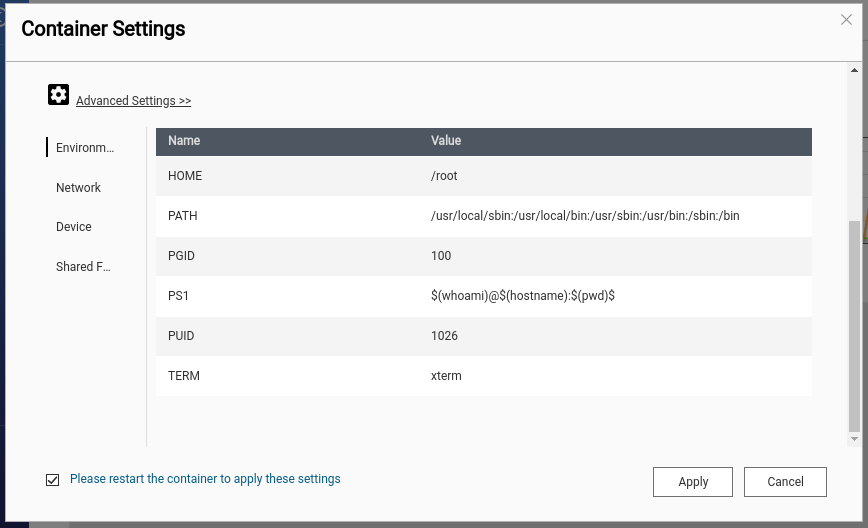
UID 1026 is my username’s UID.
On the QNAP, default GID = 100 (users). I have edited my UID to map to my desktop’s UID (1026).
Therefore:
- Desktop = 1026:1026
- QNAP = 1026:100
- Containers write as 1026:100
- Inheritance takes care of the group.
- File permissions fall right into line.
Oh, you’re using containers. I never sat down to figure that out. I guess I’m doing it old school…
If you want them as a service, it’s even easier. I can write that up if you’d like.
The service file for Sonarr is straight forward. This is as I have it. It might have updated so please mind the /bin/mono startup. In my container, I now launch the binary directly.
[chuck@lizum sonarr.375]$ cat sonarr.service
[Unit]
Description=Sonarr Daemon
After=syslog.target network.target

[Service]
User=chuck
Group=chuck

Type=simple
WorkingDirectory=/home/sonarr
ExecStart=/bin/mono /home/sonarr/NzbDrone/NzbDrone.exe -nobrowser -data /home/sonarr
TimeoutStopSec=20

[Install]
WantedBy=multi-user.target
[chuck@lizum sonarr.376]$
Somehow I’m back to where I started. I’m running the plex service as ‘plex:plex’ and all my media is ‘root;media’, and the ‘plex’ user is in the ‘media’ group. I can’t delete files anymore. Inheritance is still working. This is really frustrating…
Any thoughts?
Please show me
- A
ls -laof a directory containing media you should be able to delete. - Group entries
I think what may have happened is the setgid might be missing for directories and files. As verification, you did remember to propagate the new flags with chmod -R ?
The first part you were looking for:
root@plexms:/mnt# ls -al
total 28
drwxr-xr-x 7 root root 4096 Jan 31 14:14 .
drwxr-xr-x 25 root root 4096 Jan 29 02:26 …
drwxr-sr-x 4 root media 4096 Sep 11 18:30 hdd0
drwxr-sr-x+ 7 root media 4096 Jan 31 18:12 hdd1
drwxr-sr-x+ 6 root media 4096 Jan 27 19:30 hdd2
drwxr-sr-x+ 5 root media 4096 Aug 5 23:20 hdd3
drwxr-xr-x 2 root root 4096 Jan 31 02:28 xfer
The second part you were looking for (from cat /etc/group):
plexms:x:1000:
plex:x:999:
media:x:1001:plexms,root,plex
root@plexms:/mnt#
And no, I followed your tutorial, and it did not have the ‘-R’ flag for the ‘chmod’ function. I mean, it makes total sense when you say it now. I will rerun that command on the pertinent directories. And I will look for your reply. Thanks!
I ran the ‘-R’ flag to the ‘chmod’ command. No dice. Still cannot delete files. One thing to admit, something got hosed on the plex last night. It game me an error saying a major plex ‘component’ was corrupted. Uninstalled, deleted /var/lib/plexmediaserver and reinstalled plex. When I went to ‘su’ into that user to do some testing, it said that "this account is currently not available’. I fixed that, and on a hunch, removed and re-added the ‘plex’ user from the ‘media’ group. Still not working. That was before your reply. So not sure where we’re at right now.
Notice the + ?
Somewhere you have enabled ACLs (Access Control Lists)
The + suffix means the file has an access control list, and is common in any *nix that supports ACLs. Giving ls the -e flag will make it show the associated ACLs after the file, and chmod can be used to modify then. Most of this is from the chmod man page:
Is this what’s preventing you from deleting?
Oh man, you’re correct. I followed some other tutorial when I started the rebuild process. It said to use ‘setfacl’ rather than your method. Any idea how to undo the ACL in place?
I’ve tried ls -e and it return an error that the option is not available.
You need -b (blank)
I recommend using getfacl first to see what it is.
Remove
Use getfacl and ls -la again to confirm they are removed.
Okay, I ran ‘getfacl’ on one of the drive mounts (/mnt/hdd3). This was the result:
root@plexms:~# getfacl /mnt/hdd3
getfacl: Removing leading ‘/’ from absolute path names
file: mnt/hdd3
owner: root
group: media
flags: -s-
user::rwx
user:plex:r-x
group::r-x
mask::r-x
other::r-x
After running ‘setfacl -bR /mnt/hdd3’ my new output is:
root@plexms:~# getfacl /mnt/hdd3
getfacl: Removing leading ‘/’ from absolute path names
file: mnt/hdd3
owner: root
group: media
flags: -s-
user::rwx
group::r-x
other::r-x
So it removed the line ‘user:plex:r-x’. I assume that’s good???
I will test the results as soon as I can (the wife has the plex tied up watching her lady shows…).
Results of ls -al:
root@plexms:~# ls -al /mnt/hdd3
total 48
drwxr-sr-x 5 root media 4096 Aug 5 23:20 .
drwxr-xr-x 7 root root 4096 Jan 31 14:14 …
drwx–S— 2 root media 16384 Aug 1 2019 lost+found
drwxr-sr-x 255 root media 20480 Feb 1 22:27 saved_movies
drwxr-sr-x 12 root media 4096 Jan 23 15:12 saved_tv
root@plexms:~# ls -al /mnt/hdd2
total 40
drwxr-sr-x 7 root media 4096 Feb 1 19:46 .
drwxr-xr-x 7 root root 4096 Jan 31 14:14 …
drwxr-sr-x 4 root media 4096 Jan 31 17:53 denver_tv
drwxr-sr-x 3 root media 4096 Feb 1 19:47 gd_tv
drwxr-sr-x 40 root media 4096 Jan 31 15:31 kids
drwxr-sr-x 2 root media 16384 May 14 2019 lost+found
drwxr-sr-x 14 root media 4096 Feb 1 19:47 tv
root@plexms:~# ls -al /mnt/hdd1
total 56
drwxr-sr-x 7 root media 4096 Jan 31 18:12 .
drwxr-xr-x 7 root root 4096 Jan 31 14:14 …
drwxr-sr-x 14 root media 4096 Jan 26 20:11 afi
drwxr-sr-x 5 root media 4096 Jan 29 15:39 denver_movies
drwx–S— 2 root media 16384 May 13 2019 lost+found
drwxr-sr-x 22 root media 12288 Jan 31 15:04 movies
drwxr-sr-x 249 root media 12288 Dec 22 17:54 music
Now for the fun.
- Unmount the drives
- Verify there are no ACLs defined. Only default permissions should exist for the mount points.
- Set
g+sand group ownership for the mount point directory (while still unmounted). - Remount.
- Verify the mount points match again (no acls) after being mounted.
I’m getting sick of this. I tried to change the service user back to plex:plex. It totally hosed the Plex. My server disappeared. It had to be rediscovered. Now I have to log all the clients back in. How does that happen? It’s maddening. This was a fresh Ubuntu install. Fresh plex install. How? What logs can I send? This is getting ridiculous
This topic was automatically closed 90 days after the last reply. New replies are no longer allowed.
