My clients can no longer connect. Recently we did a migration and we changed servers. The new server ip is : 91.134.17.212
Can you possibly reset the certificates as done previously in my other tickets?
Thank you
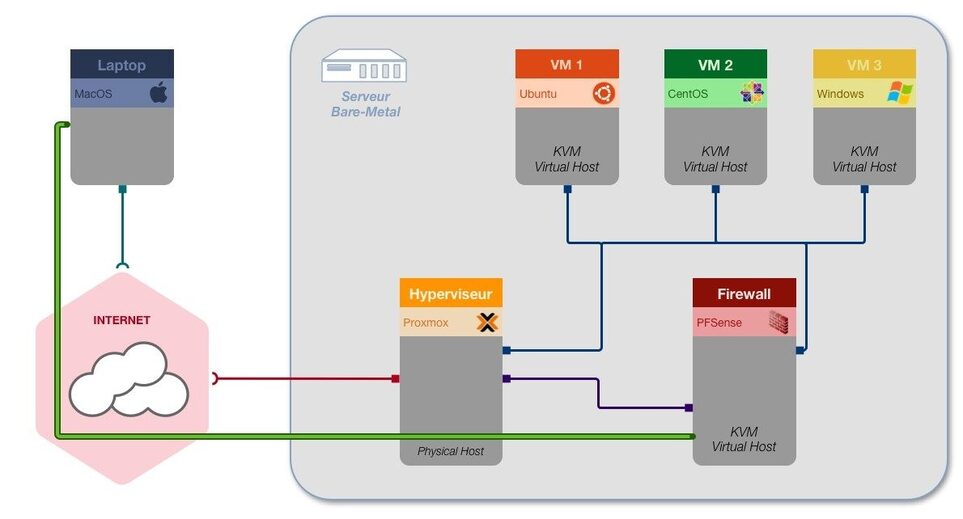
I’m running behind pfsense firewall.
My pfsense dns resolver already have this parameter : server: private-domain: “plex.direct”.
Now i have this WARN:
CERT] TLS connection from 176.140.185.197:35164 came in with unrecognized plex.direct SNI name ‘91-134-17-212.fc8c80255f2e42988fc6864d5d07618b.plex.direct’; using installed plex.direct cert
Did you restart the server after I reset your certificate ?
→ Yes
Are you using your own certificate somewhere?
→ No
but Im using HAPROXY on pfsense with letsencrypt acme cert.
On my old server, before the migration I had exactly the same configuration and I had no problem
Please correct me if wrong, but HAProxy is a load balancer / high performance proxy and best used with multiple targets. If correct, are you using multiple servers?
I ask this because:
Each server has its own ‘plex.direct’ certificate.
If server “A” is interacting with a player app and then the HAProxy forwards the next client reply to server “B” (which will include the SNI from server “A”), the error being seen makes sense.
Concerning HAPROXY I have just deactivated it to exclude any problem.
It doesn’t come from there.
HAPROXY is installed on pfsense. It’s simply loadbalancer of web servers.
This allows front-end access accessible via a domain name to a backend service such as an apache server installed on a hypervisor VM (example: https///toto.com → backendVM1-https://192.168 .10.57)
With ProxMox as the hypervisor, there is very little which we can do.
This is a tough problem which isn’t seen often.
I run 4 PMS servers in ESXi and don’t have this problem.
Given it did work, and knowing what PMS is looking for; which is the networking,
I need to ask if anything in the network settings changed?
Are the hosts setup in Bridge mode, meaning they each have their own LAN IP, or are they NAT addressed and exist as part of the Proxmox host IP address ?
Proxmox is installed on a physical server.
PFsense is the gateway for all VMs on the hypervisor. The pfsense WAN card is connected to a public failover ip.
The LAN card is used by the VMs. I specify once again that this configuration works perfectly.
We have been experimenting with it for 2 years now or more.
This problem occurred after the migration of our hypervisor.
What information do you have on my plexserver please?
Network etc
Yes, since we changed servers and migrated the data, the MAC address of the plexserver VM has changed.
The local ip address 192.168.10.20 has remained the same.
On the other hand, the WAN address and the gateway have changed.
Plex VM:
Before migration:
LAN ip : 192.168.10.20
WAN ip : 62.210.147.77
After migration:
LAN ip : 192.168.10.20
WAN ip : 91.134.17.212
We can clearly see that the default plex certificate and what is sent does not match
So the error message makes sense.
I also still have this one:
Apr 15, 2022 13:42:08.067 [0x7f4c148f7b38] DEBUG - CERT: incomplete TLS handshake from 192.168.10.254:28776: sslv3 alert certificate expired
Seems to not be working, same error as
un 02, 2022 21:48:01.901 [0x1493a4e47b38] WARN - [CERT] TLS connection from [::ffff:192.168.1.124]:51922 came in with unrecognized plex.direct SNI name ‘192-168-1-195.38922eeefe3a4c8689b67652ca246218.plex.direct’; using installed plex.direct cert
Jun 02, 2022 21:48:01.923 [0x1493a4e6ab38] DEBUG - CERT: incomplete TLS handshake from [::ffff:192.168.1.124]:51919: stream truncated
Thank you
[::ffff:192.168.1.124]:51922 came in with unrecognized plex.direct SNI name ‘192-168-1-195.38922eeefe3a4c8689b67652ca246218.plex.direct’; using installed plex.direct cert
Something wasn’t rebooted.
This is because the SNI (Server Name Identifier) is included in the certificate
If need be, we can force PMS to retrieve the certificate again (manually remove the local copy) but app devices need to be restrarted after the server is.
sudo rm "/var/lib/plexmediaserver/Library/Application Support/Plex Media Server/Cache/cert-v2.p12"
Start PMS
Give it a minute to download the server again.
As FYI… RFC-1918 (LAN) addresses are safe to publish openly.
The RFC stipulates, which is obeyed by everyone, these addresses are not publicly routable. This means I can safely tell you my server is at 192.168.0.20 and it means nothing without knowing my public IP