Certificate issue old smart tv's work arounds and testing

Server Version#: 1.25.2.5319
Player Version#: 4.66.1

I have a server with family and friends connecting remotely. (just bought a ds1621xs+)

my family have the old tv, Samsung 2016 and lg 2018 (maybe 17) so both affected by the expired certificate change.

for me the only they what they can get a remote connection (without using relay) is for them to follow the steps to allow insecure connections on their tv Plex player app.
for me the secure connections options has to be disabled for it to work. preferred does not work.

I wanted to ask, would creating and adding a ssl via ‘lets encrypt’ be a valid work around. I have a nas, mentioned, Synology ds1621xs+, and it has the ability to add a certificate and believe Synology gives me a domain to use for free.

if so I would like to try create a ssl cert and apply it to my nas and Plex Server to allow secured remote access for these devices with expired ssl certs. (smart tv owners)

hope this makes sense and hope someone could assist in this experiment.

You need the certificate in the television. Your server already has a certificate (provided by Plex)

I have a HITACHI smart tv 2015 or 2016.
I was using plex with no problem at all until recently.
I have the Plex Media Server installed to my computer and is in local network with the tv
The message i get is : “There is a problem with the website’s certificate Error: 2 Would you like to preceed”
Is there a way to fix the problem? I tried everything in network settings in my server
but at no success

Thank you in advance!

@eirini_chat

Does October 1, 2021 sound about right ?

This is not the exhaustive list but does give a sense of scope and things to check in your TV firmware version info.

If the TV is local (in your home), you can mitigate most of it but might not be able to get all of it.

Actually the problem came up about a week ago…that is why I am very confused.
I have already changed the setting to the ones specified above but to no avail.
I guess I will lose my lovely Plex relationship!
Thank you for your time replying to me

@eirini_chat

No need to go that far.

FWIW, In anticipation of helping folks

I went to Amazon and purchased their Fire Stick TV Max

It arrived last night.

In two words IT WORKS

It works so DARN WELL..

  • It’s plugged into my LG C1 OLED and natively outputs DV video!
  • It’s pulling 150+ Mbps over WiFi with NO pause / stutter
  • It’s $35 USD – You CAN NOT beat the price.

The only concern point / caution I had and have for anyone –

When it does its first firmware update - BE PATIENT

That first firmware update takes a long time after it downloads to VERIFY the image. They do not tell you either until AFTER it starts updating :roll_eyes:

All you see is that “Powering off to update”

Then it acts like it became a brick.

This is where we need be patient. It will restart

1 Like

Thank you for your quick answer!
I guess I will have to try your solution then!

@eirini_chat

My “solution” is just an idea.

I decided to share it because of the holidays and people wanting their servers up and running ASAP

My only caution (if anyone does this)… BE PATIENT during the firmware updates.

I might have missed the info about it being slow.

When it does the first update… WAIT. It will restart. Don’t unplug it after 10 minutes. (that slow). It’s a BIG update.

After that, mine did 2 smaller ones ( one for remote and another small firmware )

That was it.

I ran speedtest perf on it. Raw speedtest pulled 430 Mbps . I am using WiFi 6

Your TV likely still has a valid root certificate for ZeroSSL. So you can add a secondary ZeroSSL certificate on your server. This will allow you to use secure connections (at least for a few more years until that root certificate also expires).

See my Reddit post here.

@SwiftPanda16

How does that address Client - Plex.tv communications ?

It doesn’t. Only client - server.

Then it’s not really going to matter for remote TVs which need the server IP or watching from Plex streaming, is it ?

( wanting to manage expectations of those who read this later on )

Only Samsung TVs are affected by the plex.tv TLS “issue”. The LG TV would still work.

Edit: The TLS proxy application for Samsung TVs combined with the custom server certificate should also work together for secure connections, but the proxy needs to be installed in the remote network.

Hello again!
I am back trying to make my plex work with my TV. I am stuborn.
The thought of fire tv stick is still pending.
But what I discovered yesterday got me really confused. Thats why I writr again in case you need to see any log so you can have an idea of the problem.
As I said, I was trying to connect my tv to my plex media server. The same message comes


After pressing yes for countless times my file starts playing!!! Success!!
BUT only this low quality, SD (H.264).
When I try with 1080p files , nothing happens.
So I only write here bacause I think my problem is different?
Please give me your lights!

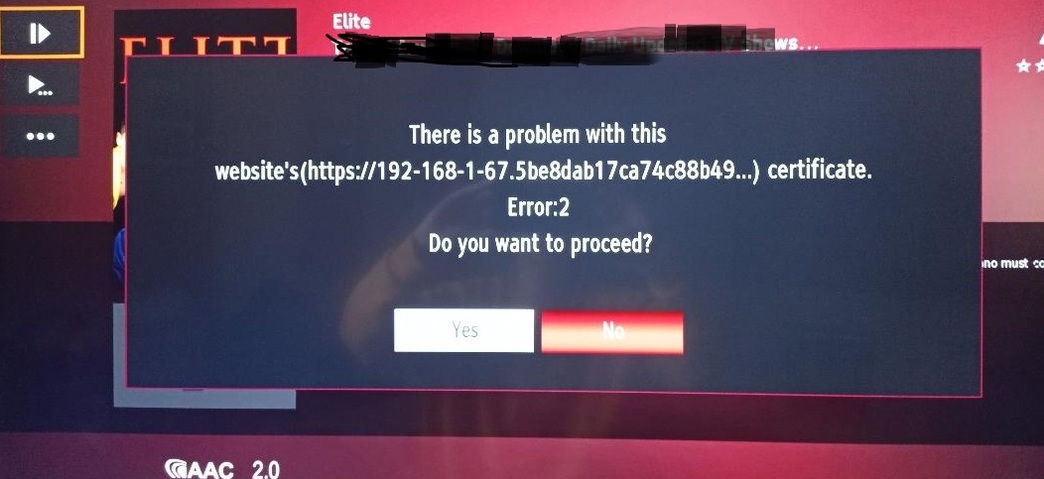
The problem still exists.

You may have gotten past the menu (TV → Server) but when playback starts, it must establish another connection (from Server → TV)

When the television’s certificate expires, without an update from the manufacturer, there is no ‘bypass’.

I see.
But why the connection (from Server → TV) is established for a specific file?And it doent happen for another?

Can you please capture this for me in a DEBUG log file set?

  1. Verify DEBUG logging is enabled, VERBOSE is disabled.
  2. Play the one which works,
  3. Attempt the one which fails
  4. Wait 20 seconds after the failure.
  5. Download the Logs ZIP file
  6. Attach it here please

Good afternoon!
I am anxious. Did not the log show the problem? It is all because of the certificate then?
Is it time to buy the tv stick?

This topic was automatically closed 90 days after the last reply. New replies are no longer allowed.
