No, they don’t need to match, but you may see some oddities. Shouldn’t be a show stopper.
So one more question. Thank you for your patience. Is there a way to get Plex to create a new database that is not corrupt? The reason why I am asking is I share my server with my father who due to a heart attack awhile back doesn’t do well with change. When I restored my database using my old backups from a year ago he of course lost all of his current data so didn’t know what shows he had watched and where he had left off. This messed him up to the point where I ended up rolling back Plex to the previous version with the corrupt database so it wouldn’t mess him. up.
Thank you again for your time and patience. I really appreciate it.
Sean
Just rename/remove/delete the current database file. Plex Media Server will start over with a blank database when it can’t find the database at all.
Sorry I realized I wasn’t clear as soon as I went to bed. Is there a way to get Plex to create a new database that is not corrupt while keeping all the users information and watch history?
That’s what the repair instructions are for, but if it didn’t work, then something is really bad with your file that the file couldn’t be recreated with only good data.
You could try to export each table individually then import those back into a blank database, but that’s quite involved and still may not work.
Are there instructions for exporting each table somewhere? My other question is when you’ve attempted to repair your database there is the recover file left over. It says this file isn’t to be used for anything but can this file help me in any way?
Thanks again for your time.
Sean
No. It’s basically following the steps for exporting and importing the watched status but for each table in the database.
No.
Have you tried the steps under “Manually Repair the Database”
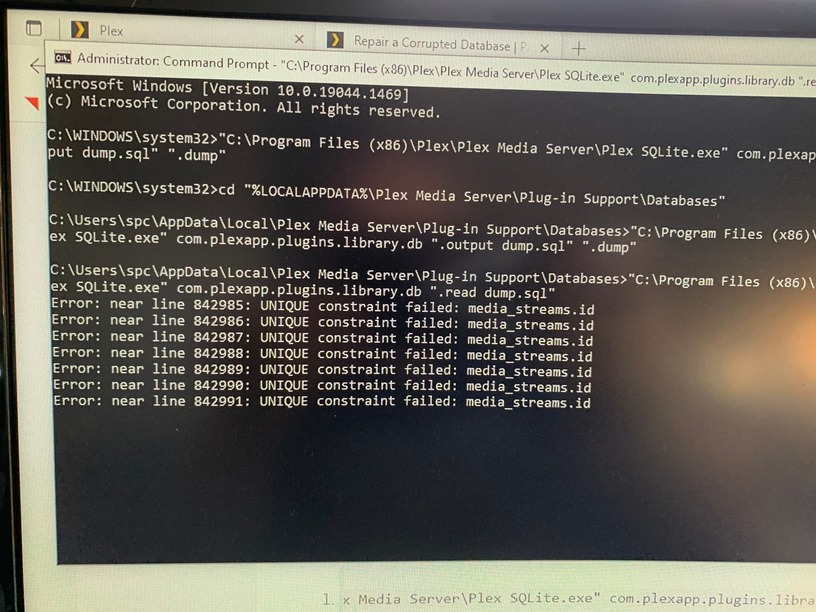
Did you see step (2), del com.plexapp.plugins.library.db?
If the old database file isn’t deleted between steps (1) and (3), the command will fail.
If you want to keep the old file as a backup, you can rename it instead of deleting it.
I did delete it. There is still the library.db.original file left if that might make a difference?
But you didn’t delete the file between those 2 steps in your screenshot. So you basically imported the data back into the original database. That’s why you get those error messages. You need to perform the dump, then delete or rename the database file, then read the dump file.

Is there any other way to get Plex to create a new uncorrupted backup in a different folder so that I don’t lost all my user data?
thanks
You could move the existing data… though if the current database is corrupted, there’s little chance you’ll get that information back.
I don’t care about having to rebuild where my libraries are, just looking for any way to save my user playlist data so my poor father doesn’t stroke out. 
Otherwise it will be a summer project going through everything he’s ever watched of mine and logging in as him and marking it all watched. Ughhh!
Even if the rest of the database has issues, you may be able to extract the watch history. Have you attempted the Source Install step from these instructions, by any chance?
https://support.plex.tv/articles/201154527-move-viewstate-ratings-from-one-install-to-another/
You could extract the watch history, delete the old databases, recreate them, and then perform the Destination Install step.
I looked at this article before I just realized, but didn’t really understand it. Working through this whole process I can actually follow this now. Thanks for pointing this out. I’ll give it a shot. Much appreciated!
Send me your database file and I’ll see if I can fix it for you.
@anon18523487 @Volts while a little off topic its somewhat related to said I’d ask on this thread. The move viewstate works very well but one thing that ends up missing which is really annoying if someone needs to do this procedure is the play history is not carried over.
Has a procedure ever been created so play history could be moved from one db to another ?
Do you mean the play history on the Dashboard?
I think that’s metadata_item_views. I suspect the same process would work. I can test tomorrow.
