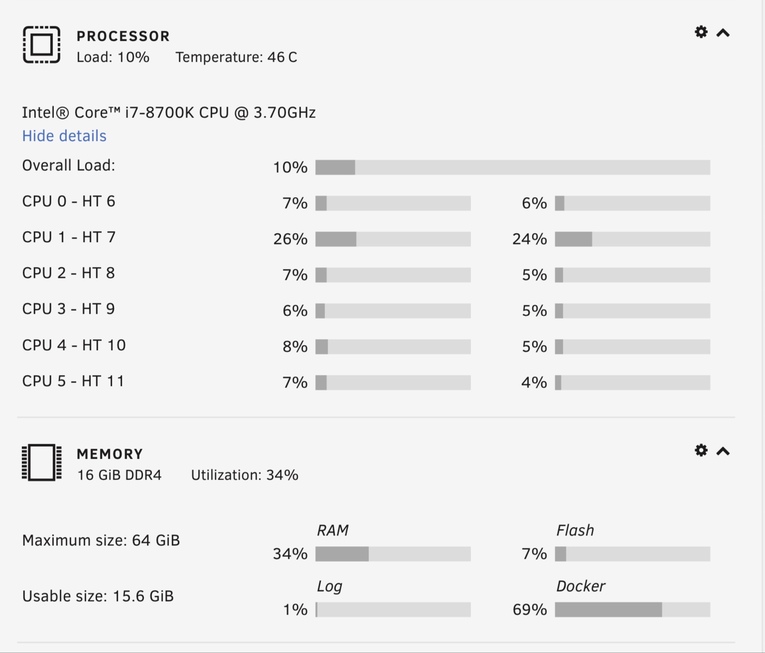
Ok some more info to help hopefully!
My server cpu is an i7 8700K 6 core so reasonably powerful! Server OS is Unraid, PMS runs in docker with HW GPU enabled
I only have this issue when one of the kids watches something on their Xbox that has forced subtitles (don’t use them otherwise) all the videos are h.264 in MKV containers, so the Xbox requires the container to be transcoded and then the video is direct streamed, the audio is DTS and that gets transcoded to stereo, on a video without subtitles this is all fine and the CPU stays at less than 10% usage even with other stuff running on server! When there are subtitles they need transcoding from srt to ass and it’s instant 100% CPU on all cores! This just playing the video no seeking etc.
Cheers,
Tim
The i7-6700K CPU is a 100w package, not a 65w package.
Therefore I ask: Is the thermal solution adequate and properly applied to the CPU (air pockets, too thick, too thin, or incomplete coverage will wreak havoc)
well yeah except subtitles are supposed to be single threaded ?!?!, and the fact the problem manifests as an increasing load over time/iterations and seems to be specific to audio+srt to ass subtitles
also, the OP said laptop overheating, not something cobbled together, obviously not something designed as a server with long term thermal limits.
I’m not very tech savvy, so I’m no expert here, but I’m assuming the OP here mentioned overheating due to CPU being maxed out
But just as @TeknoJunky mentioned, its not just about overheating, its directly on CPU where PMS is taxing its usage, i’m referring it to a leak as its rising to abnormal behavior, its stuck in a render loop.
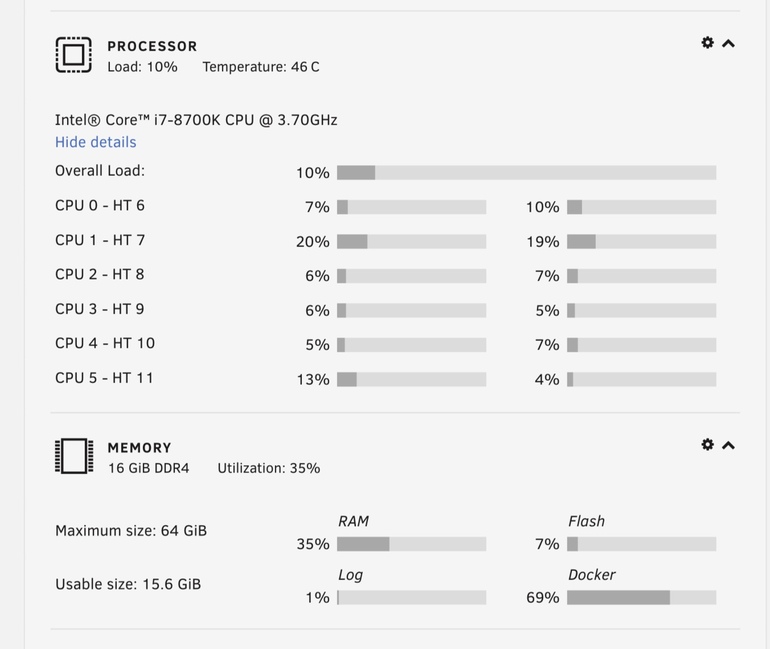
@ChuckPa I’m not familiar with containers, but you’re showing CPU usage of 19% in your Resource Monitor, is this constant? While playing the movie, start it randomly in any chapter, and while subtitle is enabled (and shows in tautulli its actually transcoded to ASS and audio transcoding from DTS (DCA) 5.1 to aac stereo similar to your test here) try using keyboard arrows to rewind it several times and let it play out, you’ll notice your CPU is getting taxed constantly not by transcode, but by the actual plex media server.
as I see your SRT is being converted to ASS, see what is taxing your CPU, you’ll see Plex Media Server using most of your CPU % constantly, with the occasion of “Transcode” for transcoding your audio (which shouldn’t really use much CPU as your processor is powerful enough)
As for “taxing” my CPU, no, you are mistaken. SRT -> ASS text format conversion is trivial. Audio codec processing can account for up to 12% of a quad core CPU which also has hyperthreading ( 1 core of 8 = 12.83% ). This is by no measure whatsoever “taxing”.
Nothing wrong with the thermal solution here!
I can run Windows 10 in a VM and Adobe Premier Pro rendering 4K video and it doesn’t kill the CPU like Plex does when transcoding subtitles!
At the moment two of my stepsons are watching videos and it’s not stressing the server at all because neither video has subtitles!
Two iPads and the web browser. I can run a total of 9 playback sessions if I continue before reaching 90% of the CPU. No VMs or other abstractions wasting CPU cycles
Having achieved steady-state with the players (buffers full), I switched to PGS subtitles for one which requires burning and not just translating the format.
Grab logs for @ChuckPa. Ive been trying to reproduce but cant locally for some reason. I know when my brother plays anything subs on Xbox One (SRT to ASS), My PC (Has P400 with HW enabled) goes to 100% within a few minutes & sounds like its about to take off & fly away.
That is UNRAID’s dasboard.
I also run PMS in the official docker on UNRAID with QuickSync. But thankfully, conversions of SRT->ASS subtitles pegs only one thread on poor Pentium G5600.
NAS processor: - It’s a dual core with HT (2x2), not a real quad with HT (4x2).
It is a Pentium CPU with a KabyLake ASIC glued on. It’s no different than the J3455 / J4005 in that the CPU is weak while the ASIC provides QSV. It is still a Pentium at heart. It’s a budget CPU used in NAS systems. NAS boxes aren’t intended to be crunchers unless you buy one, like a QNAP, with such a CPU.
Its Pentium foundation yields 5600 Passmarks compared to the 10,727 passmarks
My output above is from an i7-7700. 12% of the i7-7700 would be equivalent to 25% of the Pentium G5600 under optimum circumstances.
Hyperthreading is not 100% efficient as it makes use of otherwise idle core ALUs. It’s a secondary instruction decoder and not a real processor core.
A dual core NAS processor (Pentium) having a one of those cores fully utilized is completely logical and normal. The same would happen with the Atom D2700 CPU.
This thread has two major issues which needs to be spit.
The strange behavior with the i7-8700
Managing expections of a budget CPU with subtitles (which always suffer due to low CPU passmarks)