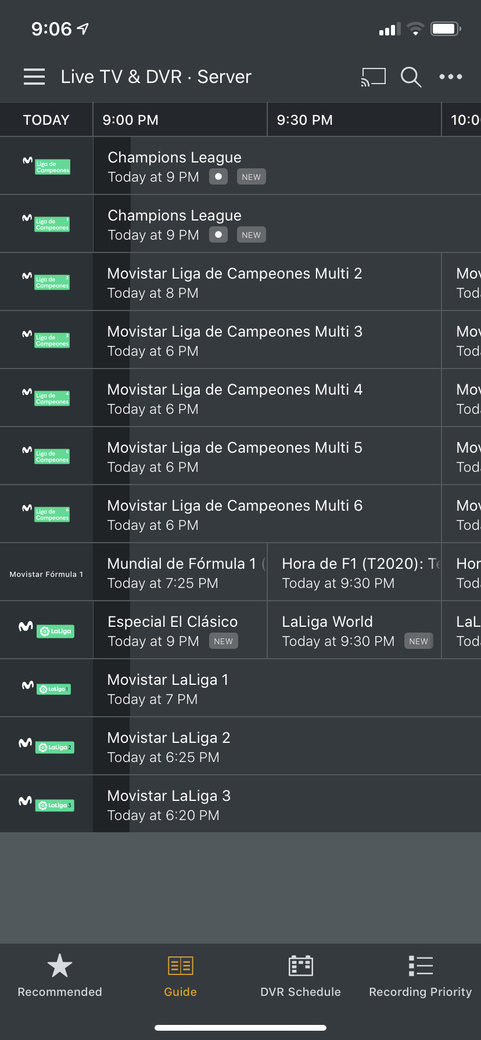
How does one get to the synopsis/Programme description on iPhone (latest iOS and latest Plex for iOS version) in the EPG for the currently running program ?
If I:
1, click - program start to play
2, hold+click - i get couple of options but none of them show me info/details about the program.
For the program in the future, i get pre-play screen with details about the program but this is not the case for currently running program.
Would be nice to either be consistent and click would ALWAYS give you pre-play screen (no matter if it’s currently running program or in the future) - just like in web UI or at least add an option for program details in submenu for click+hold.
Yes, there is go to show. This allows me to go to show.
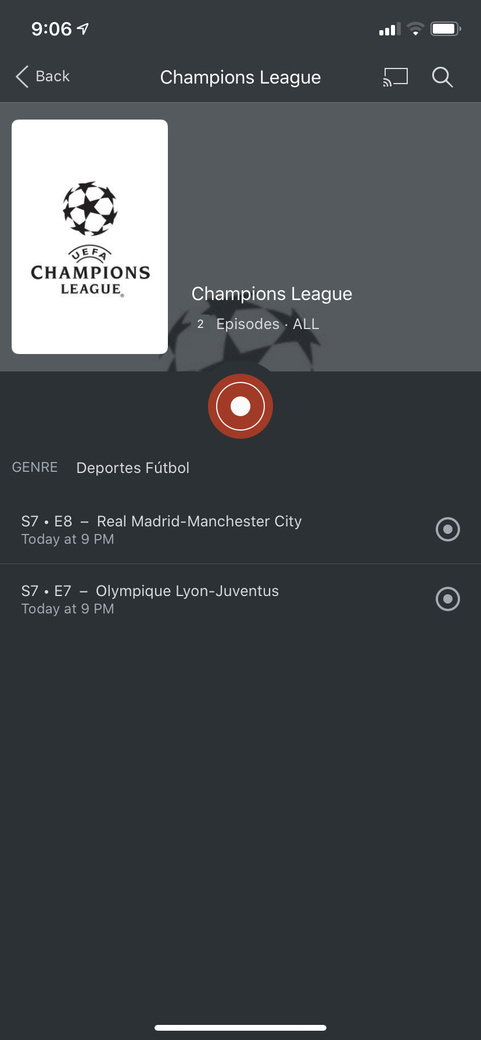
Once in the show, i see list of episodes. How do i know which one of them is that one i was looking at ?
especially if same show is on mutiple channels (like pepa pig on 3 channels right now or sport events like tonight - Champions League (show) - lists 2 episodes both starting at the same time at 9pm
What version of the Plex app do you have installed?
Are you using your own XMLTV feed or the EPG from Plex?
The one that’s on now? Per your first post:
When I see multiple episodes, that list includes the date/time/title of each episode
If I then tap on an individual episode at that point, I get the show details screen/view which include episode description and airing time and channel.
I’m using XMLTV since Plex EPG is next to useless.
I’m not sure what you mean “The one that’s on now? Per your first post”
I hold+clicked on the episode - then I chose go to show -> then i get the list of episodes with their sub-title, time and Season and Episode.
In the EPG i can not see subtitle nor Season and Episode so i cant identify which episode it is from the list. Starting time is same for 3 episodes. Maybe pictures would help ?
Sorry , if i have to hold and click -> go to show -> guess which episode -> then click again just to see description of whats currently airing - this isnt very user friednly now is it ?!
In Web UI you click on future or currently playing item - you ALWAYS get description along with RECORD button - or in case of currently playing item - also WATCH NOW button.
If you dont want to change the current behavior , then simply adding Episode/Movie details in the HOLD+CLICK submenu would definitely help a lot.
(The Channels app does a good job of this, actually, by bringing up an individual episode screen with all details and a choice to watch or record; not sure how that would be any better for the case of two shows on two different channels on at the same time.)
but to be frank, the info you need is there so I suspect it would likely be a very low priority.
Alternatively, you could use the web app on your iOS device but then you’ll probably end up zooming in and out a lot.
Also, if I may ask, at the point that you see the list of two episodes on at the same time, what does the next screen give you that you can’t make a recording decision? Are the team names not enough?
Yes, i can make the decision from show screen - because subtitle is enough this time - but nevertheless i find it really strange that it takes an investigation or clicking about to get to the currently playing item description.
Every other media type gives you pre-play screen, TV shows, Movies, Home Movies, DVR future programs… all EXCEPT currently playing program. I would think Plex devs would want consistency across the app(s).
"but to be frank, the info you need is there so I suspect it would likely be a very low priority. "
Actually, for movie types of programming (anything but a TV show really ) , there is no way to see details/description of the currently playing programme in the grid guide on iOS
For tv show type, you have to go thru handful of screens to get to the description/details screen.
if this isnt a bug - it’s terrible usability choice.