Nope, it is located on /dev/sdb
If you
- stop the container,
- Create the systemd override (or refresh what you had)
- Run the native host package
what happens?
It doesn’t create the missing files (Plex Media Scanner.log) or update any of the previous existing files (the ones last updated on May 15th).
andrew@apollo:~$ sudo dpkg -i plexmediaserver_1.19.3.2793-36efde971_amd64.deb
(Reading database ... 73847 files and directories currently installed.)
Preparing to unpack plexmediaserver_1.19.3.2793-36efde971_amd64.deb ...
PlexMediaServer install: Pre-installation Validation.
PlexMediaServer install: Warning:  "/mnt/plex/config/Library/Application Support" isn't owned by "andrew", UID: 1000.  Found "root", UID: 0 instead. Continuing.
PlexMediaServer install: Pre-installation Validation complete.  Errors: 0, Warnings: 1
Unpacking plexmediaserver (1.19.3.2793-36efde971) over (1.19.3.2793-36efde971) ...
Setting up plexmediaserver (1.19.3.2793-36efde971) ...
PlexMediaServer install: PlexMediaServer-1.19.3.2793-36efde971 - Installation starting.
PlexMediaServer install:
PlexMediaServer install: Now installing based on:
PlexMediaServer install:   Installation Type:   Update
PlexMediaServer install:   Process Control:     systemd
PlexMediaServer install:   Plex User:           andrew
PlexMediaServer install:   Plex Group:          andrew
PlexMediaServer install:   Video Group:         render
PlexMediaServer install:   Metadata Dir:        /mnt/plex/config/Library/Application Support
PlexMediaServer install:   Temp Directory:      /tmp
PlexMediaServer install:   Lang Encoding:       en_US.UTF-8
PlexMediaServer install:   Config file used:    /etc/systemd/system/plexmediaserver.service.d/override.conf
PlexMediaServer install:   Transcoding HW:      Found
PlexMediaServer install:
PlexMediaServer install: Completing final configuration.
Created symlink /etc/systemd/system/multi-user.target.wants/plexmediaserver.service → /lib/systemd/system/plexmediaserver.service.
PlexMediaServer install: Starting Plex Media Server.
PlexMediaServer install: PlexMediaServer-1.19.3.2793-36efde971 - Installation successful.  Errors: 0, Warnings: 1
Processing triggers for libc-bin (2.31-0ubuntu9) ...
Processing triggers for mime-support (3.64ubuntu1) ...
andrew@apollo:~$ tail -f /mnt/plex/config/
.bash_history  Library/
andrew@apollo:~$ tail -f /mnt/plex/config/Library/Application\ Support/Plex\ Media\ Server/Logs/Plex\ Media\ Scanner
Plex Media Scanner Analysis.1.log            Plex Media Scanner Chapter Thumbnails.3.log  Plex Media Scanner Deep Analysis.5.log       Plex Media Scanner.1.log
Plex Media Scanner Analysis.2.log            Plex Media Scanner Chapter Thumbnails.4.log  Plex Media Scanner Deep Analysis.log         Plex Media Scanner.2.log
Plex Media Scanner Analysis.3.log            Plex Media Scanner Chapter Thumbnails.5.log  Plex Media Scanner Matcher.1.log             Plex Media Scanner.3.log
Plex Media Scanner Analysis.4.log            Plex Media Scanner Chapter Thumbnails.log    Plex Media Scanner Matcher.2.log             Plex Media Scanner.4.log
Plex Media Scanner Analysis.5.log            Plex Media Scanner Deep Analysis.1.log       Plex Media Scanner Matcher.3.log             Plex Media Scanner.5.log
Plex Media Scanner Analysis.log              Plex Media Scanner Deep Analysis.2.log       Plex Media Scanner Matcher.4.log
Plex Media Scanner Chapter Thumbnails.1.log  Plex Media Scanner Deep Analysis.3.log       Plex Media Scanner Matcher.5.log
Plex Media Scanner Chapter Thumbnails.2.log  Plex Media Scanner Deep Analysis.4.log       Plex Media Scanner Matcher.log
andrew@apollo:~$ tail -f /mnt/plex/config/Library/Application\ Support/Plex\ Media\ Server/Logs/Plex\ Media\ Scanner
Plex Media Scanner Analysis.1.log            Plex Media Scanner Chapter Thumbnails.3.log  Plex Media Scanner Deep Analysis.5.log       Plex Media Scanner.1.log
Plex Media Scanner Analysis.2.log            Plex Media Scanner Chapter Thumbnails.4.log  Plex Media Scanner Deep Analysis.log         Plex Media Scanner.2.log
Plex Media Scanner Analysis.3.log            Plex Media Scanner Chapter Thumbnails.5.log  Plex Media Scanner Matcher.1.log             Plex Media Scanner.3.log
Plex Media Scanner Analysis.4.log            Plex Media Scanner Chapter Thumbnails.log    Plex Media Scanner Matcher.2.log             Plex Media Scanner.4.log
Plex Media Scanner Analysis.5.log            Plex Media Scanner Deep Analysis.1.log       Plex Media Scanner Matcher.3.log             Plex Media Scanner.5.log
Plex Media Scanner Analysis.log              Plex Media Scanner Deep Analysis.2.log       Plex Media Scanner Matcher.4.log
Plex Media Scanner Chapter Thumbnails.1.log  Plex Media Scanner Deep Analysis.3.log       Plex Media Scanner Matcher.5.log
Plex Media Scanner Chapter Thumbnails.2.log  Plex Media Scanner Deep Analysis.4.log       Plex Media Scanner Matcher.log
andrew@apollo:~$ tail -f /mnt/plex/config/Library/Application\ Support/Plex\ Media\ Server/Logs/Plex\ Media\ Scanner.
Plex Media Scanner.1.log  Plex Media Scanner.2.log  Plex Media Scanner.3.log  Plex Media Scanner.4.log  Plex Media Scanner.5.log
andrew@apollo:~$ tail -f /mnt/plex/config/Library/Application\ Support/Plex\ Media\ Server/Logs/Plex\ Media\ Scanner.
Plex Media Scanner.1.log  Plex Media Scanner.2.log  Plex Media Scanner.3.log  Plex Media Scanner.4.log  Plex Media Scanner.5.log
andrew@apollo:~$ tail -f /mnt/plex/config/Library/Application\ Support/Plex\ Media\ Server/Logs/Plex\ Media\ Scanner.
Plex Media Scanner.1.log  Plex Media Scanner.2.log  Plex Media Scanner.3.log  Plex Media Scanner.4.log  Plex Media Scanner.5.log
andrew@apollo:~$ ls -al /mnt/plex/config/Library/Application\ Support/Plex\ Media\ Server/Logs/Plex\ Media\ Scanner*
-rw-r--r-- 1 andrew andrew   35966 May 17 15:52 '/mnt/plex/config/Library/Application Support/Plex Media Server/Logs/Plex Media Scanner Analysis.1.log'
-rw-r--r-- 1 andrew andrew    5506 May 17 15:50 '/mnt/plex/config/Library/Application Support/Plex Media Server/Logs/Plex Media Scanner Analysis.2.log'
-rw-r--r-- 1 andrew andrew   18115 May 17 15:50 '/mnt/plex/config/Library/Application Support/Plex Media Server/Logs/Plex Media Scanner Analysis.3.log'
-rw-r--r-- 1 andrew andrew   18087 May 17 15:49 '/mnt/plex/config/Library/Application Support/Plex Media Server/Logs/Plex Media Scanner Analysis.4.log'
-rw-r--r-- 1 andrew andrew   10699 May 17 15:48 '/mnt/plex/config/Library/Application Support/Plex Media Server/Logs/Plex Media Scanner Analysis.5.log'
-rw-r--r-- 1 andrew andrew   25567 May 17 15:52 '/mnt/plex/config/Library/Application Support/Plex Media Server/Logs/Plex Media Scanner Analysis.log'
-rw-r--r-- 1 andrew andrew  236157 May 17 05:02 '/mnt/plex/config/Library/Application Support/Plex Media Server/Logs/Plex Media Scanner Chapter Thumbnails.1.log'
-rw-r--r-- 1 andrew andrew  328655 May 17 05:01 '/mnt/plex/config/Library/Application Support/Plex Media Server/Logs/Plex Media Scanner Chapter Thumbnails.2.log'
-rw-r--r-- 1 andrew andrew  379467 May 17 05:01 '/mnt/plex/config/Library/Application Support/Plex Media Server/Logs/Plex Media Scanner Chapter Thumbnails.3.log'
-rw-r--r-- 1 andrew andrew  261307 May 17 05:01 '/mnt/plex/config/Library/Application Support/Plex Media Server/Logs/Plex Media Scanner Chapter Thumbnails.4.log'
-rw-r--r-- 1 andrew andrew  350803 May 17 05:00 '/mnt/plex/config/Library/Application Support/Plex Media Server/Logs/Plex Media Scanner Chapter Thumbnails.5.log'
-rw-r--r-- 1 andrew andrew  308068 May 17 05:02 '/mnt/plex/config/Library/Application Support/Plex Media Server/Logs/Plex Media Scanner Chapter Thumbnails.log'
-rw-r--r-- 1 andrew andrew   23710 May 17 03:43 '/mnt/plex/config/Library/Application Support/Plex Media Server/Logs/Plex Media Scanner Deep Analysis.1.log'
-rw-r--r-- 1 andrew andrew    3138 May 17 03:05 '/mnt/plex/config/Library/Application Support/Plex Media Server/Logs/Plex Media Scanner Deep Analysis.2.log'
-rw-r--r-- 1 andrew andrew    3132 May 17 03:05 '/mnt/plex/config/Library/Application Support/Plex Media Server/Logs/Plex Media Scanner Deep Analysis.3.log'
-rw-r--r-- 1 andrew andrew    2902 May 17 03:03 '/mnt/plex/config/Library/Application Support/Plex Media Server/Logs/Plex Media Scanner Deep Analysis.4.log'
-rw-r--r-- 1 andrew andrew    3088 May 17 03:01 '/mnt/plex/config/Library/Application Support/Plex Media Server/Logs/Plex Media Scanner Deep Analysis.5.log'
-rw-r--r-- 1 andrew andrew   70516 May 17 11:14 '/mnt/plex/config/Library/Application Support/Plex Media Server/Logs/Plex Media Scanner Deep Analysis.log'
-rw-rw-r-- 1 andrew andrew    5262 May 17 15:58 '/mnt/plex/config/Library/Application Support/Plex Media Server/Logs/Plex Media Scanner Matcher.1.log'
-rw-rw-r-- 1 andrew andrew   11831 May 17 15:58 '/mnt/plex/config/Library/Application Support/Plex Media Server/Logs/Plex Media Scanner Matcher.2.log'
-rw-rw-r-- 1 andrew andrew    4612 May 17 15:58 '/mnt/plex/config/Library/Application Support/Plex Media Server/Logs/Plex Media Scanner Matcher.3.log'
-rw-rw-r-- 1 andrew andrew    4379 May 17 15:58 '/mnt/plex/config/Library/Application Support/Plex Media Server/Logs/Plex Media Scanner Matcher.4.log'
-rw-rw-r-- 1 andrew andrew    7773 May 17 15:58 '/mnt/plex/config/Library/Application Support/Plex Media Server/Logs/Plex Media Scanner Matcher.5.log'
-rw-rw-r-- 1 andrew andrew    7869 May 17 15:58 '/mnt/plex/config/Library/Application Support/Plex Media Server/Logs/Plex Media Scanner Matcher.log'
-rw-r--r-- 1 andrew andrew 4209670 May 15 13:20 '/mnt/plex/config/Library/Application Support/Plex Media Server/Logs/Plex Media Scanner.1.log'
-rw-r--r-- 1 andrew andrew 5368149 May 15 13:00 '/mnt/plex/config/Library/Application Support/Plex Media Server/Logs/Plex Media Scanner.2.log'
-rw-r--r-- 1 andrew andrew 4140331 May 15 10:45 '/mnt/plex/config/Library/Application Support/Plex Media Server/Logs/Plex Media Scanner.3.log'
-rw-r--r-- 1 andrew andrew 1536971 May 15 10:13 '/mnt/plex/config/Library/Application Support/Plex Media Server/Logs/Plex Media Scanner.4.log'
-rw-r--r-- 1 andrew andrew 4114899 May 15 10:11 '/mnt/plex/config/Library/Application Support/Plex Media Server/Logs/Plex Media Scanner.5.log'
I started a media scan immediately after the installation.
Pull the updated logs. (make a tar.gz) and attach
Something stupid happening
This is from the Web UI - Plex Media Server Logs_2020-05-17_17-22-44.zip (7.1 MB)
Will take a bit to grab the tar.gz file (with all the logs attached).
I also tried to remove the docker image, and redownload latest, it didn’t rebuild the log files either. I have not run chmod or chown on this folder since I initially created the files, and the other files are getting updated. Makes me think there is a bug somewhere here.
Here is the tar.gz
plex-log-dir.tar.gz (7.9 MB)
Any idea here? I don’t really want to start over from scratch, but, I can.
How many items are indexed?
Are there any CPU/memory limits on this machine?
How much memory is available to PMS?
May 17, 2020 22:56:16.344 [0x7fa7fffff700] DEBUG - Auth: authenticated user 1 as savantali
May 17, 2020 22:56:16.344 [0x7fa76cff1700] DEBUG - Request: [192.168.2.1:50124 (WAN)] GET /library/metadata/70525 (14 live) TLS Signed-in Token (savantali)
May 17, 2020 22:56:16.345 [0x7fa7fffff700] DEBUG - Completed: [192.168.2.1:50124] 404 GET /library/metadata/70525 (14 live) TLS 1ms 288 bytes (pipelined: 1)
May 17, 2020 22:56:16.527 [0x7fa76bfef700] WARN - Waited one whole second for a busy database.
May 17, 2020 22:56:16.593 [0x7fa76d7f2700] WARN - Waited one whole second for a busy database.
May 17, 2020 22:56:17.204 [0x7fa76e7f4700] WARN - Waited one whole second for a busy database.
May 17, 2020 22:56:17.335 [0x7fa7707f8700] WARN - Waited one whole second for a busy database.
May 17, 2020 22:56:17.335 [0x7fa7ceffd700] WARN - Waited one whole second for a busy database.
May 17, 2020 22:56:17.739 [0x7fa76bfef700] ERROR - Exception loading item 'Daði Freyr' from bundle: sqlite3_statement_backend::loadOne: database is locked
May 17, 2020 22:56:17.739 [0x7fa76bfef700] DEBUG - Done with metadata update for 70489
May 17, 2020 22:56:17.739 [0x7fa76bfef700] DEBUG - Queueing up Daði Freyr for refreshing children, there are 0 items in the queue.
May 17, 2020 22:56:17.739 [0x7fa76c7f0700] DEBUG - Refreshing child items for item 70489 (Daði Freyr) force: 1
May 17, 2020 22:56:17.739 [0x7fa76c7f0700] DEBUG - Refreshing child item '& Co.' with agent plex
This is telling me that an activity has accessed the database (to perform a write operation) and the queued operations were unable to gain access even after several seconds of waiting.

This is the library so far, I have been scanning the music library which all in all, has ~3300 artists, and an unknown amount of albums and songs. So it still has about 3000 artists to go.
Again, no limits on the machine, the CPU and RAM availability has not changed. Unlimited amount of memory to plex
The scanner is stuck searching on a bunch of old Mozart albums.
Apart from that, however, the logs are still not being generated even when searching new libraries. So the files are not being created.
Certain files won’t be created until the appropriate agents are activated.
(No TMDB log until TMDB is activated, etc)
I am genuinely concerned otherwise
If you have the time,
- Stop
- Slide it off to the side
- Spin fresh – with an obvious “TESTING” friendly name (ease of identification) which can be renamed / deleted later without interfering with current.
- Do music LAST
- Compare results.
I hear you, you want to learn k8s. I know kube clustering already, and GKE and GCE just make it easy. you don’t get billed if you autoscale up/down. I don’t plan on streaming from GCS so egress isn’t an issue. Honestly I don’t think it will work well with the way plex is architected, but I used anthos migrate to move it in anyway… working on the streaming now.
I am trying to wait till Music finishes to stop the plex server. Right now it is day 5 and I am 75% of the way finished.
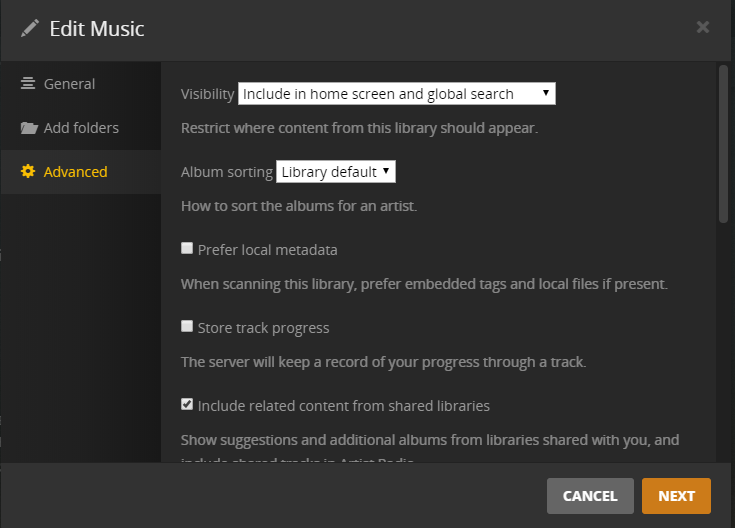


Really wish this would go faster. 
So eventually (again 5 days later) the .log file did get created.
I think the issue here is mainly just this music library. As every time something comes up, it pertains or points back to this specific library.
There is either too many files for Plex to handle while scanning.
3300+ artists
~120,000 files
Either the audio analysis tagging is causing the slow down.
Apart from the settings shown above is there some other way to either:
- Speed up the scan for music files
- Optimize Plex for larger music libraries
OUCH!!!
It’s not a “too many to handle” but it is “Too many to handle at one shot”.
Since there is no limit to how many folders/directories you can add to a library, is there any chance of you being able to break them out a bit?
As example /music/A, /music/B, or by genre, or year? Something to take the clump size down to about 10,000 files at a time?
I can separate the folders without an issue, but, wouldn’t that still require separating out the music library itself?
for performance reasons you are probably just better of separating music into a different plex server instance, this way the music server can take as long/slow as it needs to.
as you can see, scanning music will block all other rescans from happening until the music completes.
with UNO, multiple servers is less of a headache, you can have a video plex server instance and music plex instance both ‘pinned’ to your clients UI.
when your library database file starts getting large, you will always have some kind of ‘slow query’ log entries.
since plex is sqlite file based db, it is extremely sensitive to IO latency (not total speed, but how fast the disk can read/write in ms).
further, as the db grows larger, you need more single core cpu power, not more multiple cores. (minimal concurrency/threads in db access)
The technique I’m eluding to is:
- Music semi-clustered
- Add the initial group to the library
- Allow it to finish
- Add the next group and allow to finish
- Repeat step 4 until all groups added and music library fully built up.
sure but adding music piece meal is a kludgy work around.
ideally plex would parallelized background content scanning so they do not block each other…
ie movie scan/refresh, does not block tv scan/refresh, does not block music scan/refresh.
large library music scanning/refreshing takes a magnitude longer amount of time and resources than movies/tv.
I finally got around to doing the PRAGMA default_cache_size = trick as the thread linked above talks about, and anecdotally it was an impressive change in scan time and watching the log with tail -F the lines are seemingly flying by noticeably faster.
my database size for reference is
1.4G May 22 16:33 '/dataplex/pms/Library/Application Support/Plex Media Server/Plug-in Support/Databases/com.plexapp.plugins.library.db'
I changed to PRAGMA default_cache_size = 32768; to align with my raid and file system cache settings.
My concern here is that even with separating out the music library (into it’s own or multiple sub libraries) is still going to cause slowdowns due to the nature of Plex and music scanning.
Since the PRAGMA trick doesn’t work for the music issues, my question is what further can be done?
I don’t have an issue with creating a new plex instance, but, the real question I have is - will it actually make a difference due to the music library itself.
I completely agree that some parallelization would help with this in the long run.
As a comparison against the music libraries:
$ ls -hal /mnt/plex/config/Library/Application\ Support/Plex\ Media\ Server/Plug-in\ Support/Databases/com.plexapp.plugins.library.db
342M May 22 14:42 '/mnt/plex/config/Library/Application Support/Plex Media Server/Plug-in Support/Databases/com.plexapp.plugins.library.db'
