Docker Install Fails

I realized that my previous post went in the wrong topic.

Basically I am attempting ‘containerize’ my Mac media server. I am using Docker-Compose to establish the various containers necessary. I have listed the code that I’m using for Plex below:

  plexms:
    container_name: plexms
    hostname: plexms_docker
    restart: always
    image: plexinc/pms-docker:plexpass
    volumes:
      - ${USERDIR}/docker/plexms:/config
      - ${DATADIR_2}/downloaded/plex_tmp:/transcode
      - ${DATADIR_1}/Public/iMac\ Movies:/media
      - ${DATADIR_1}/Public/iMac\ Music:/media
      - ${DATADIR_1}/Public/BBC\ TV\ Orig:/media
      - ${DATADIR_1}/Public/TV:/media
      - ${DATADIR_1}/Public/iMac\ Pictures:/media 
      - ${USERDIR}/docker/shared:/shared

# changed all 32xxx ports to 38xxx ports to see if it negates port in use
# errors
    ports:
      - "38400:32400/tcp"  # use 33400
      - "3005:3005/tcp"
      - "8324:8324/tcp"
      - "38469:32469/tcp" # complains already in use - switch to 32470
      - "1900:1900/udp"
      - "38410:32410/udp"
      - "38412:32412/udp"
      - "38413:32413/udp"
      - "38414:32414/udp"
    environment:
      - TZ=${TZ}
      - HOSTNAME="Docker Plex"
      - PLEX_CLAIM="claim-RGoFsAskLZDycTztPLf2"
      - PLEX_UID=${PUID}
      - PLEX_GID=${PGID}
      - ADVERTISE_IP="http://192.168.10.26:38400/"

I can’t attach to the Plex front-end using localhost:38400 and the log shows the following:

[s6-init] making user provided files available at /var/run/s6/etc...exited 0.,
[s6-init] ensuring user provided files have correct perms...exited 0.,
[fix-attrs.d] applying ownership & permissions fixes...,
[fix-attrs.d] done.,
[cont-init.d] executing container initialization scripts...,
[cont-init.d] 40-plex-first-run: executing... ,
Attempting to obtain server token from claim token,
                                 Dload  Upload   Total   Spent    Left  Speed,
  % Total    % Received % Xferd  Average Speed   Time    Time     Time  Current,

  0     0    0     0    0     0      0      0 --:--:-- --:--:-- --:--:--     0
  0     0    0     0    0     0      0      0 --:--:-- --:--:-- --:--:--     0
100     1  100     1    0     0      1      0  0:00:01 --:--:--  0:00:01     1,
Plex Media Server first run setup complete,
[cont-init.d] 40-plex-first-run: exited 0.,
[cont-init.d] 50-plex-update: executing... ,
Attempting to upgrade to: 1.13.5.5332-21ab172de
[s6-init] making user provided files available at /var/run/s6/etc...exited 0.,
[s6-init] ensuring user provided files have correct perms...exited 0.,
[fix-attrs.d] applying ownership & permissions fixes...,
[fix-attrs.d] done.,
[cont-init.d] executing container initialization scripts...,
[cont-init.d] 40-plex-first-run: executing... ,
Attempting to obtain server token from claim token,
                                 Dload  Upload   Total   Spent    Left  Speed,
  % Total    % Received % Xferd  Average Speed   Time    Time     Time  Current,

  0     0    0     0    0     0      0      0 --:--:-- --:--:-- --:--:--     0
  0     0    0     0    0     0      0      0 --:--:-- --:--:-- --:--:--     0
100     1  100     1    0     0      1      0  0:00:01 --:--:--  0:00:01     1,
Plex Media Server first run setup complete,
[cont-init.d] 40-plex-first-run: exited 0.,
[cont-init.d] 50-plex-update: executing... ,
Attempting to upgrade to: 1.13.5.5332-21ab172de,
Selecting previously unselected package plexmediaserver.,
(Reading database ... 7553 files and directories currently installed.),
Preparing to unpack /tmp/plexmediaserver.deb ...,
Unpacking plexmediaserver (1.13.5.5332-21ab172de) ...,
Setting up plexmediaserver (1.13.5.5332-21ab172de) ...,
,
#  NOTE: Your system does not have udev installed. Without udev  #,
##################################################################,
#        you won't be able to use DVBLogic's TVButler for DVR    #,
#        or for LiveTV                                           #,
#                                                                #,
#        Please install udev and reinstall Plex Media Server to  #,
#        to enable TV Butler support in Plex Media Server.       #,
#        To install udev run: sudo apt-get install udev          #,
[cont-init.d] 50-plex-update: exited 0.,
Processing triggers for systemd (229-4ubuntu21.4) ...,
[cont-init.d] done.,
[services.d] starting services,
[services.d] done.,
Starting Plex Media Server.,
[FMovies]: Error client.py>request : https://docs.google.com/get_video_info?docid=0B6VYU2mjTdy0WVRjb1BJUU1hYXM,
[FMovies]: Error client.py>request : [SSL: CERTIFICATE_VERIFY_FAILED] certificate verify failed (_ssl.c:590),
ERROR: 'NoneType' object is not iterable,
entering checkGetLinkAPI,
http://api.getlinkdrive.com Response: 200,
Adding Host gvideo to Interface

Hopefully someone will advise what I’m doing wrong in the Docker configuration file.
So in continuing my search to have Plex run in a container on a Mac (running High Sierra), I found this post from 9th March where the OP seems to have successfully deployed a Plex container.

I shamelessly copied his Docker-Compose file, modifying it only to specify the Latest tag rather than Beta, modifying the UID and GUID parameters to match my machine, and changing the 32xxx ports to 38xxx as I got a port bind error when trying to run with the 32xxx ports specified. The resulting file is provided below:

version: '3'
services:
  plex:
    container_name: plex
    image: plexinc/pms-docker:latest
    restart: unless-stopped
    environment:
      - TZ=America/Chicago
#      - PLEX_CLAIM=claim-###############
      - PLEX_UID=503
      - PLEX_GUID=503
    network_mode: bridge
    hostname: PlexDocker
    ports:
      - "38469:32469"
      - "38400:32400"
      - "38401:32401"
      - "3005:3005"
      - "8324:8324"
      - "1900:1900/udp"
      - "38410:32410/udp"
      - "38412:32412/udp"
      - "38413:32413/udp"
      - "38414:32414/udp"
    volumes:
      - $PWD/config/:/config
      - $PWD/transcode:/transcode
      - $PWD/media:/data

Once again the container starts and this time I do not see any errors in the log file:

[s6-init] making user provided files available at /var/run/s6/etc...exited 0.,
[s6-init] ensuring user provided files have correct perms...exited 0.,
[fix-attrs.d] applying ownership & permissions fixes...,
[fix-attrs.d] done.,
[cont-init.d] executing container initialization scripts...,
[cont-init.d] 40-plex-first-run: executing... ,
Creating pref shell,
Plex Media Server first run setup complete,
[cont-init.d] 40-plex-first-run: exited 0.,
[cont-init.d] 50-plex-update: executing... ,
[cont-init.d] 50-plex-update: exited 0.,
[cont-init.d] done.,
[services.d] starting services,
[services.d] done.,
Starting Plex Media Server.,

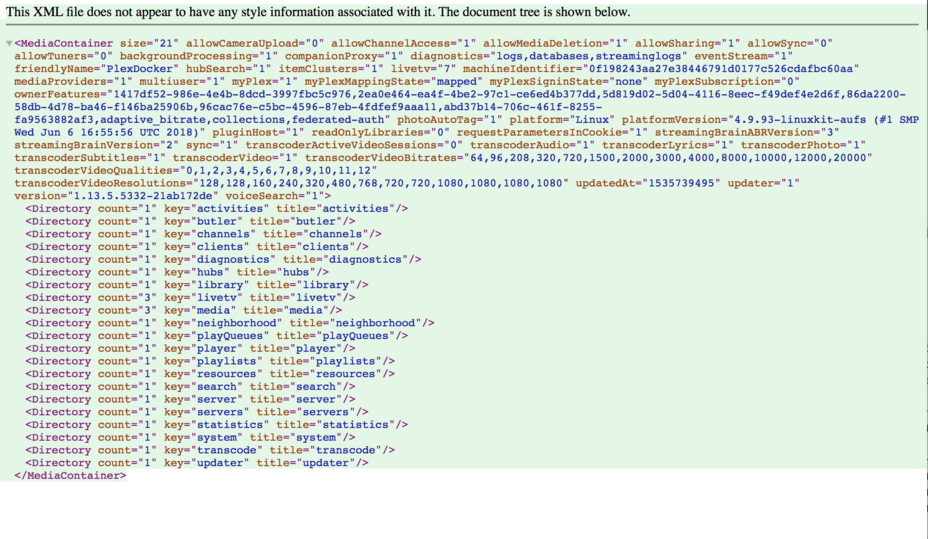
When I connect to localhost:38400 I get the screen shown in the uploaded picture. The Plex /config folder does contain a few log files although I’m unable to interpret them very effectively. The Plex Media Server log contains the following errors:

Aug 31, 2018 13:16:54.303 [0x7f14efda6800] ERROR - SQLITE3:0x10, 1, duplicate column name: grandparent_guid
Aug 31, 2018 13:16:54.306 [0x7f14efda6800] ERROR - SQLITE3:0x10, 1, duplicate column name: originally_available_at
Aug 31, 2018 13:16:58.416 [0x7f14efda6800] ERROR - SQLITE3:0x10, 1, duplicate column name: grandparent_guid
Aug 31, 2018 13:16:58.416 [0x7f14efda6800] ERROR - SQLITE3:0x10, 1, duplicate column name: originally_available_at
Aug 31, 2018 13:17:03.692 [0x7f14efda6800] ERROR - Transcoder: Error cleaning old transcode sessions: boost::filesystem::directory_iterator::construct: No such file or directory: "/transcode/Transcode/Sessions"
Aug 31, 2018 13:17:03.776 [0x7f14ddffd700] ERROR - SQLITE3:0x10, 14, cannot open file at line 34876 of [fc49f556e4]
Aug 31, 2018 13:17:03.776 [0x7f14ddffd700] ERROR - SQLITE3:0x10, 14, os_unix.c:34876: (2) open(/config/Library/Application Support/Plex Media Server/Cache/gn_lists.gdb) - No such file or directory
Aug 31, 2018 13:17:04.781 [0x7f14ddffd700] ERROR - SQLITE3:0x10, 14, cannot open file at line 34876 of [fc49f556e4]
Aug 31, 2018 13:17:04.782 [0x7f14ddffd700] ERROR - SQLITE3:0x10, 14, os_unix.c:34876: (2) open(/config/Library/Application Support/Plex Media Server/Cache/gn_lists.gdb) - No such file or directory
Aug 31, 2018 13:17:09.259 [0x7f14e1fff700] ERROR - Error issuing curl_easy_perform(handle): 7
Aug 31, 2018 13:17:09.260 [0x7f14d77fc700] ERROR - Error issuing curl_easy_perform(handle): 7
Aug 31, 2018 13:17:09.260 [0x7f14cdbfe700] ERROR - Error issuing curl_easy_perform(handle): 7

I’m not quite sure what to try next - I guess I should take a look at the SQLITE3 installation on my machine as that is what the majority of the errors identify. I’ve attached the full set of log files as a zip file.

However I’d surely appreciate any insights or guidance that folks may have that will help me get this working. It’s driving me crazy!

Logs.zip (88.0 KB)

Is there a reason you can not just use Host networking?

I was under the impression that ‘host’ networking does not work on Docker for Mac. From Docker documentation:

* The host networking driver only works on Linux hosts, and is not supported on Docker for Mac, Docker for Windows, or Docker EE for Windows Server.

Well, I asked if there was a reason…looks like that’s one.

As a PlexPass member I’m more than a little disappointed that no-one from Plex has attempted to respond to my query. I am, after all, attempting to use the ‘officially supported’ docker image for MacOs.

I’m a PlexPass sub as well and I find the Plex support woeful. I don’t think they understand docker as they just forked the Linuxserver image.
Good Luck

That XML is actually the correct response to /. You likely want /web/index.html.

That’s a funny comment. Someone who understands docker would look at the Dockerfiles and see that the official container and the linuxserver container are completely unrelated. Furthermore the official container supports several scenarios the linuxserver one does not.

This topic was automatically closed 90 days after the last reply. New replies are no longer allowed.
