Then SOMEBODY better tell Intel they got it wrong for the chip THEY designed.
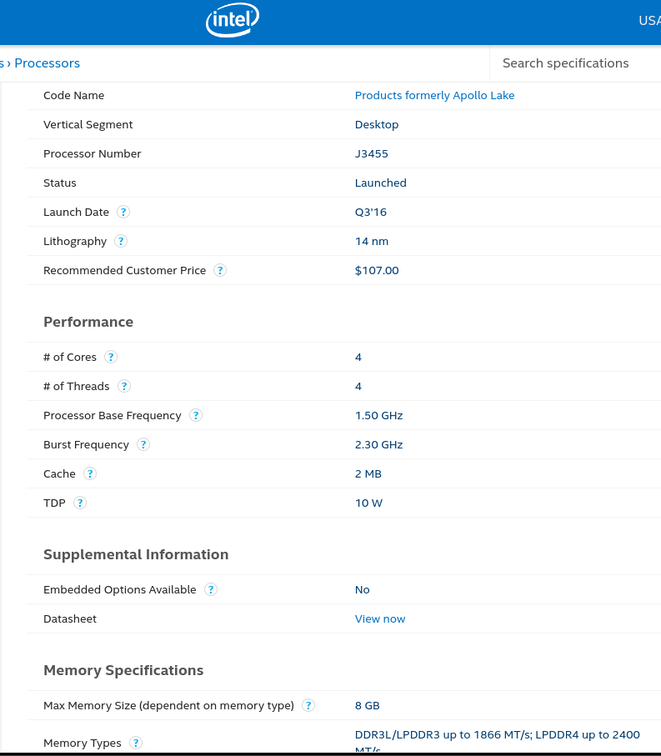
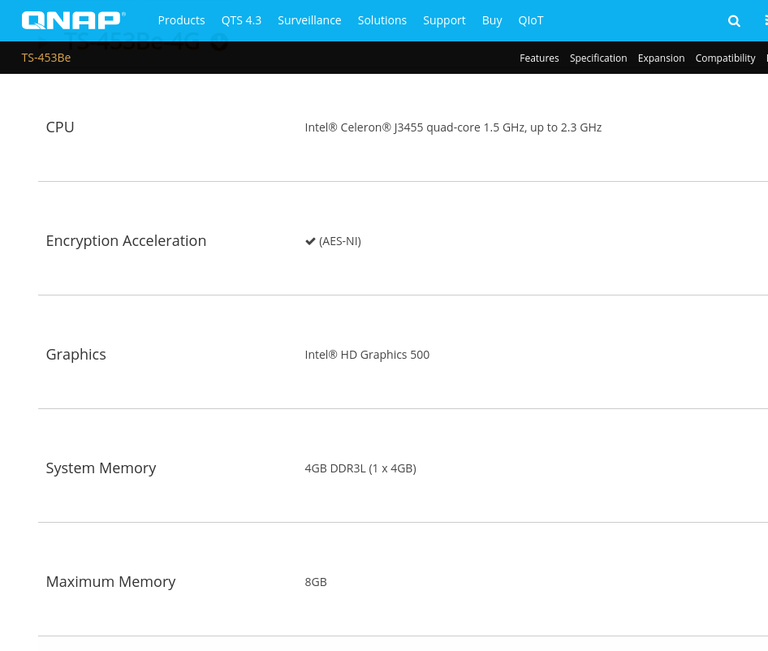
I’ve now removed the extra RAM module and running on 4GB stock memory. Problem remains. Sending log to ChuckPA in a few minutes. Took three times to be able to play a movie, two times gave an error after awhile, and third time it just started almost instantly.
so there is something else happening. Now to find out what.
Let’s enable debug transcoder output.
either with curl (command line) or in a browser tab.
curl ‘http://ip.of.syno.box:32400/:/prefs/set?TranscoderLogLevel=debug&X-Plex-Token=Your_token_here’
If using your browser, use the quoted HTTP part only.
Now please recreate the condition and we will see more
How do I see my token?
EDIT: Ah got it
Sent you another log, file refused to play with an error and then played the next time I tried. Hope you find anything useful in the log, I’d be happy to solve this, it has haunted me quite some time now…
I can’t explain it. Plus, it’s 1.13.9. Nobody is around until next week to look at it.
Back down to an earlier version until then.
Which version do you recommend?
@ChuckPa, this debugoption you wanted me to enable, should I disable it when “not in use” (and if so, how?)… Just curious so it isn’t something that might prevent hibernation or so…
PMS will never allow the drives to hibernate. It is always doing something.
We requested long ago but it will never happen.
Leave Debug on. it only uses 30MB total for everything (rollover)
@ChuckPa, so anyone in place yet to be able to checkout my logs I sent you?
There is work being done now that everyone is back.
IMO, for Synology, 1.13.4 is the most stable version to run until such time as they have it resolved.
A lot of data has been collected already so there is little to be gained, if anything, by collecting more.
Your logs are 100% normal when using OVS
I do therefore recommend you stay 1.13.4 until such time as there is some resolution.
Where do I get 1.13.4, I can only see 1.13.8…? And I bet I can’t install an older version that I already have installed without uninstalling the previous version? Don’t I loose my settings/data?
1.13.4 x86_64 for Synology.
https://drive.google.com/open?id=1bHDRz0IBDDSRs3jEv6Kchwl5GUZq7pfN
On Synology,
- Your data is in the Plex share.
- The software is in the package center area
- You can uninstall safely. I don’t delete the Plex share contents
Have tried it a little while now… The “slow start” issue is still there sometimes, a minute or so for a movie to start even if there’s no video transcoding required… Haven’t got any errormessages yet however.
If you aren’t getting error messages, with no warnings in your logs, there is nothing I can do further without being ‘hands on’ in the box (which isn’t in scope of Plex support policy)
Everything should probably be in the logs you’ve already got. Got any other hints for me perhaps? Any routersettings that should be avoided?
I would go into the box, at the shell, and run top. See specifically what is happening.
Next, I would pull up resource monitor and repeat the starting, for each resource, with “Actual” value, not “utilization”. Something must be spiking.
@ChuckPa not to beat a dead horse but it does seem that Intel’s spec is, umm, somewhat inconclusive…
-
There’s this thread on Intel forums, where an Intel rep mumbles something incoherent about how despite CPU only allowing 8Gb, motherboard manufacturers can legitimately define their own limits: https://forums.intel.com/s/question/0D50P0000490JmbSAE/celeron-j3455-supports-16gb-of-ram?language=en_US
-
Since I happen to be running 918+ with 16 Gb RAM, I decided to test the theory that those 16Gb are cosmetic/imaginary and only 8Gb are actually being used. To that end, I mounted a 12 Gb RAM disk, copied a 12 Gb movie file onto it, copied it back to disk with a different name, and did a binary compare with the original. It matched. Doesn’t that more or less prove that the box is correctly working with, well, at least 12+ Gb of RAM? If not, how can this test be modified to provide definitive proof?
root@ShragoDrive:/volume1/share/Movies/#Movies# mkdir -p /volume1/share/ramdisk
root@ShragoDrive:/volume1/share/Movies/#Movies# mount -t ramfs -o size=12000m ramfs /volume1/share/ramdisk
root@ShragoDrive:/volume1/share/Movies/#Movies# ls -l test.mkv
-rw-r--r-- 1 root root 11104659307 Jan  4 00:15 test.mkv
root@ShragoDrive:/volume1/share/Movies/#Movies# cp test.mkv /volume1/share/ramdisk/
root@ShragoDrive:/volume1/share/Movies/#Movies# cp /volume1/share/ramdisk/test.mkv test2.mkv
root@ShragoDrive:/volume1/share/Movies/#Movies# cmp test.mkv test2.mkv
(FYI I am by no means trying to be difficult or smartass - just want to get to the bottom of the issue. Quite a few people made this upgrade, so having a definitive answer on whether it actually works would be useful)
