Failed to start — Read/write access Plex Media Server dir

Server Version#:1.20.3.3483
Player Version#:1.21.0.1410-50a34597

Ubuntu 20.04.1 LTS

Suddenly after reboot, plexmediaserver stop working. Service wont stop, returning an error. Something happened with permissions in lib folder.

/etc/systemd/system/plexmediaserver.service is in place.

localhost 32400 is not used by anything else, according to netstat -anp | grep N

journalctl -u plexmediaserver

окт 25 01:13:51 PLEX systemd[1]: Starting Plex Media Server...
окт 25 01:13:51 PLEX systemd[1]: Started Plex Media Server.
окт 25 01:13:51 PLEX Plex Media Server[1591]: **PMS: failure detected. Read/write access is required for path: /var/lib/plexmediaserver/Library/Application Support/Plex Media Server**
окт 25 01:13:51 PLEX systemd[1]: plexmediaserver.service: Main process exited, code=exited, status=1/FAILURE
окт 25 01:13:51 PLEX systemd[1]: plexmediaserver.service: Failed with result 'exit-code'.
окт 25 01:13:56 PLEX systemd[1]: plexmediaserver.service: Scheduled restart job, restart counter is at 1.

ls -la /var/lib/plexmediaserver

total 12
drwxr-xr-x  3 plex plex 4096 окт 25 16:41 .
drwxr-xr-x 72 root root 4096 окт 26 14:06 ..
drwxrwxr-x  3 plex plex 4096 окт 25 16:41 Library

ls -l /usr/lib/plexmediaserver/

total 42500
-rwxr-xr-x  1 root root  1583120 окт 22 00:23  CrashUploader
drwxr-xr-x  3 root root     4096 окт 25 16:41  lib
-rwxr-xr-x  1 root root   408520 окт 21 23:56 'Plex Commercial Skipper'
-rwxr-xr-x  1 root root  4502968 окт 22 00:19 'Plex DLNA Server'
-rwxr-xr-x  1 root root   138072 окт 21 23:56 'Plex Media Fingerprinter'
-rwxr-xr-x  1 root root  7381232 окт 22 00:23 'Plex Media Scanner'
-rwxr-xr-x  1 root root 23763120 окт 22 00:24 'Plex Media Server'
-rwxr-xr-x  1 root root   746768 окт 21 23:56 'Plex Relay'
-rwxr-xr-x  1 root root    12576 окт 21 23:56 'Plex Script Host'
-rwxr-xr-x  1 root root   271440 окт 21 23:56 'Plex Transcoder'
-rwxr-xr-x  1 root root  4679448 окт 21 23:56 'Plex Tuner Service'
drwxr-xr-x 10 root root     4096 окт 25 16:41  Resources
● plexmediaserver.service - Plex Media Server
     Loaded: loaded (/lib/systemd/system/plexmediaserver.service; enabled; vendor preset: enabled)
     Active: failed (Result: exit-code) since Tue 2020-10-27 13:59:20 MSK; 2min 39s ago
    Process: 4573 ExecStartPre=/bin/sh -c /usr/bin/test -d "${PLEX_MEDIA_SERVER_APPLICATION_SUPPORT_DIR}" || /bin/mkdir -p "${P>
    Process: 4576 ExecStart=/bin/sh -c  export PLEX_MEDIA_SERVER_INFO_VENDOR="$(grep ^NAME= /etc/os-release | awk -F= "{print \>
   Main PID: 4576 (code=exited, status=1/FAILURE)

окт 27 13:59:15 PLEX systemd[1]: plexmediaserver.service: Main process exited, code=exited, status=1/FAILURE
окт 27 13:59:15 PLEX systemd[1]: plexmediaserver.service: Failed with result 'exit-code'.
окт 27 13:59:20 PLEX systemd[1]: plexmediaserver.service: Scheduled restart job, restart counter is at 3.
окт 27 13:59:20 PLEX systemd[1]: Stopped Plex Media Server.
окт 27 13:59:20 PLEX systemd[1]: plexmediaserver.service: Start request repeated too quickly.
окт 27 13:59:20 PLEX systemd[1]: plexmediaserver.service: Failed with result 'exit-code'.
окт 27 13:59:20 PLEX systemd[1]: Failed to start Plex Media Server.

sudo journalctl -xe | grep -i plexmediaserver

окт 27 13:56:06 PLEX sudo[4348]:     plex : TTY=pts/0 ; PWD=/home/plex ; USER=root ; COMMAND=/usr/sbin/service plexmediaserver stop
окт 27 13:59:04 PLEX sudo[4389]:     plex : TTY=pts/0 ; PWD=/home/plex ; USER=root ; COMMAND=/usr/sbin/service plexmediaserver start
-- Subject: A start job for unit plexmediaserver.service has begun execution
-- A start job for unit plexmediaserver.service has begun execution.
-- Subject: A start job for unit plexmediaserver.service has finished successfully
-- A start job for unit plexmediaserver.service has finished successfully.
окт 27 13:59:05 PLEX systemd[1]: plexmediaserver.service: Main process exited, code=exited, status=1/FAILURE
-- An ExecStart= process belonging to unit plexmediaserver.service has exited.
окт 27 13:59:05 PLEX systemd[1]: plexmediaserver.service: Failed with result 'exit-code'.
-- The unit plexmediaserver.service has entered the 'failed' state with result 'exit-code'.
окт 27 13:59:06 PLEX systemd[929]: gnome-launched-plexmediaserver.desktop-4431.scope: Succeeded.
окт 27 13:59:10 PLEX systemd[1]: plexmediaserver.service: Scheduled restart job, restart counter is at 1.
-- Automatic restarting of the unit plexmediaserver.service has been scheduled, as the result for
-- Subject: A stop job for unit plexmediaserver.service has finished
-- A stop job for unit plexmediaserver.service has finished.
-- Subject: A start job for unit plexmediaserver.service has begun execution
-- A start job for unit plexmediaserver.service has begun execution.
окт 27 13:59:10 PLEX systemd[929]: gnome-launched-plexmediaserver.desktop-4125.scope: Succeeded.
-- Subject: A start job for unit plexmediaserver.service has finished successfully
-- A start job for unit plexmediaserver.service has finished successfully.
окт 27 13:59:10 PLEX systemd[1]: plexmediaserver.service: Main process exited, code=exited, status=1/FAILURE
-- An ExecStart= process belonging to unit plexmediaserver.service has exited.
окт 27 13:59:10 PLEX systemd[1]: plexmediaserver.service: Failed with result 'exit-code'.
-- The unit plexmediaserver.service has entered the 'failed' state with result 'exit-code'.
окт 27 13:59:15 PLEX systemd[1]: plexmediaserver.service: Scheduled restart job, restart counter is at 2.
-- Automatic restarting of the unit plexmediaserver.service has been scheduled, as the result for
-- Subject: A stop job for unit plexmediaserver.service has finished
-- A stop job for unit plexmediaserver.service has finished.
-- Subject: A start job for unit plexmediaserver.service has begun execution
-- A start job for unit plexmediaserver.service has begun execution.
-- Subject: A start job for unit plexmediaserver.service has finished successfully
-- A start job for unit plexmediaserver.service has finished successfully.
окт 27 13:59:15 PLEX systemd[1]: plexmediaserver.service: Main process exited, code=exited, status=1/FAILURE
-- An ExecStart= process belonging to unit plexmediaserver.service has exited.
окт 27 13:59:15 PLEX systemd[1]: plexmediaserver.service: Failed with result 'exit-code'.
-- The unit plexmediaserver.service has entered the 'failed' state with result 'exit-code'.
окт 27 13:59:20 PLEX systemd[1]: plexmediaserver.service: Scheduled restart job, restart counter is at 3.
-- Automatic restarting of the unit plexmediaserver.service has been scheduled, as the result for
-- Subject: A stop job for unit plexmediaserver.service has finished
-- A stop job for unit plexmediaserver.service has finished.
окт 27 13:59:20 PLEX systemd[1]: plexmediaserver.service: Start request repeated too quickly.
окт 27 13:59:20 PLEX systemd[1]: plexmediaserver.service: Failed with result 'exit-code'.
-- The unit plexmediaserver.service has entered the 'failed' state with result 'exit-code'.
-- Subject: A start job for unit plexmediaserver.service has failed
-- A start job for unit plexmediaserver.service has finished with a failure.

Also i attached Log Logs.zip (585.6 KB) s folder from /var/lib/plexmediaserver/Library/Application Support/Plex Media Server
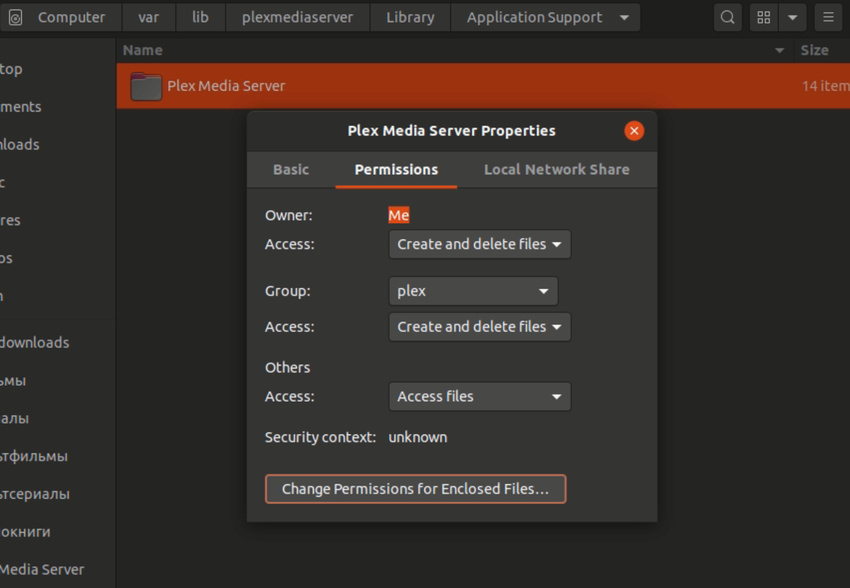
Problem solved — manually readded read/write permissions to /var/lib/plexmediaserver/Library/Application Support/Plex Media Server
Why this happened — i do not know.

  1. /etc/systemd/system/plexmediaserver.service does not belong . You have a full service override which will block any future changes I make. I suspect you still have the leftover from when Ubuntu made the mistake in Ubuntu 16.

  2. the proper location is /lib/systemd/system/plexmediaserver.service with any customization in /etc/systemd/system/plexmediaserver.service.d/override.conf

  3. I will assist cleaning up if you wish it.

1 Like

Yes please

have you made any customizations to /etc/systemd/system/plexmediaserver.service?

I suspect you’re also still using the older PMS versions?
I say this because, in the new installer, I specifically stop installation in these cases.

If you’ve made any customizations, please show me.

No, i didn’t customise anything. I don’t have any other PMS versions, i did fresh install from .deb packet from official site a week ago. All this time server was running 24/7 without any issues.

Here is my /etc/systemd/system/plexmediaserver.service

# DO NOT EDIT THIS FILE DIRECTLY!
#
# Plex Media Server's variables can be customized by creating an 'overide.conf'
# file using 'systemctl edit plexmediaserver' which will create the following;
# /etc/systemd/system/plexmediaserver.service.d/override.conf
#
# An example of the override.conf would be as follows if you wished to edit
# your user, group, temp directory, or app support directory (without the leading #)
#
# [Service]
# Environment="TMPDIR=/path/to/new/tmp"
# Environment="PLEX_MEDIA_SERVER_APPLICATION_SUPPORT_DIR=/home/myusername/Library/Application Support"
# User=myusername
# Group=mygroup
#

[Unit]
Description=Plex Media Server
After=network.target network-online.target

[Service]
Environment="PLEX_MEDIA_SERVER_APPLICATION_SUPPORT_DIR=/var/lib/plexmediaserver/Library/Application Support"
Environment=PLEX_MEDIA_SERVER_HOME=/usr/lib/plexmediaserver
Environment=PLEX_MEDIA_SERVER_MAX_PLUGIN_PROCS=6
ExecStartPre=/bin/sh -c '/usr/bin/test -d "${PLEX_MEDIA_SERVER_APPLICATION_SUPPORT_DIR}" || /bin/mkdir -p "${PLEX_MEDIA_SERVER_APPLICATION_SUPPORT_DIR}"'
ExecStart=/bin/sh -c '\
export PLEX_MEDIA_SERVER_INFO_VENDOR="$(grep ^NAME= /etc/os-release | awk -F= "{print \\$2}" | tr -d \\" )"; \
export PLEX_MEDIA_SERVER_INFO_DEVICE="PC"; \
export PLEX_MEDIA_SERVER_INFO_MODEL="$(uname -m)"; \
export PLEX_MEDIA_SERVER_INFO_PLATFORM_VERSION="$(grep ^VERSION= /etc/os-release | awk -F= "{print \\$2}" | tr -d \\" )"; \
export LD_LIBRARY_PATH=/usr/lib/plexmediaserver/lib; \
exec "/usr/lib/plexmediaserver/Plex Media Server"'
Type=simple
User=plex
Group=plex
Restart=on-failure
RestartSec=5
StartLimitInterval=60s
StartLimitBurst=3
SyslogIdentifier=Plex Media Server
StandardOutput=journal
StandardError=journal

[Install]
WantedBy=multi-user.target

When you ran the installer, it should have complained loudly – to the point of aborting – because of that file.

Which version did you install?

before proceding further with the cleanup, (this is harmless)
would you

  1. Stop Plex
  2. Uninstall & reinstall the package file you have
  3. Show me the console output and the contents of /tmp/plexinstaller.log ?

The cleanup is easy:
You can do the following:

sudo bash
systemctl stop plexmediaserver
rm /etc/systemd/system/plexmediaserver.service
systemctl daemon-reload
systemctl start plexmediaserver

Everything you are showing me above tells me that /lib/systemd/system/plexmediaserver.service was copied to /etc/systemd/system after installation --or-- this is not a Ubuntu system 16+ ?

I have:

I’m having a major problem understanding what is happening.
Please allow me to explain.

  1. I’m the engineer who wrote and maintains the installer for Debian/Ubuntu (DEB)
  2. I know what I do and don’t do in the scripts.
  3. At no time do I put anything in /etc/systemd/system/plexmediaserver.service
  4. I specifically test for and error if a file is found in /etc/

Here is the actual code.

  if [ $Systemd -eq 1 ]; then

    # if there is a lingering /etc/systemd/system/plexmediaserver.service, this is wrong.  Flag the PlexUser to correct
    if [ -e /etc/systemd/system/plexmediaserver.service ]; then

      Output "Systemd configuration error detected:"
      Output "File \"/etc/systemd/system/plexmediaserver.service\" is leftover from an earlier Debian/Ubuntu bug."
      Output "Please transfer any customizations \(APP_DIR, User, Group, TMPDIR, and/or UMask\) to a proper \"$OverrideDir/override.conf\""
      Output "and reinstall."
      Output "Unit override \"/etc/systemd/system/plexmediaserver.service\" found."
      Output "Only \"/etc/systemd/system/plexmediaserver.service.d/override.conf\" is supported."
      Fail=1

Can you help me understand?

“Official” downloaded from Ubuntu or Plex ?

So i tried to remove .service file from /etc, but — it is not there:

rm: cannot remove '/etc/systemd/system/plexmediaserver.service': No such file or directory

Why did you decide that a copy should be there?
I found plexmediaserver.service in /etc/systemd/system/multi-user.target.wants , is it ok?

Also i have a proper file in /lib/systemd/system and server is functioning normal now, after permissions were updated.

plexmediaserver.service - Plex Media Server
     Loaded: loaded (/lib/systemd/system/plexmediaserver.service; enabled; vendor preset: enabled)
     Active: active (running) since Tue 2020-10-27 15:08:21 MSK; 4h 21min ago
    Process: 1347 ExecStartPre=/bin/sh -c /usr/bin/test -d "${PLEX_MEDIA_SERVER_APPLICATION_SUPPORT_DIR}" || /bin/mkdir -p "${PLEX_MEDIA_SERV>
   Main PID: 1366 (Plex Media Serv)
      Tasks: 139 (limit: 17877)
     Memory: 4.8G
     CGroup: /system.slice/plexmediaserver.service
             ├─ 1366 /usr/lib/plexmediaserver/Plex Media Server
             ├─ 1453 Plex Plug-in [com.plexapp.system] /usr/lib/plexmediaserver/Resources/Plug-ins-211702a9f/Framework.bundle/Contents/Resour>
             ├─ 1864 /usr/lib/plexmediaserver/Plex Tuner Service /usr/lib/plexmediaserver/Resources/Tuner/Private /usr/lib/plexmediaserver/Re>
             ├─ 1933 Plex Plug-in [com.plexapp.agents.kinopoisk2] /usr/lib/plexmediaserver/Resources/Plug-ins-211702a9f/Framework.bundle/Cont>
             ├─ 7541 Plex EAE Service
             ├─12458 Plex Plug-in [com.plexapp.agents.themoviedb] /usr/lib/plexmediaserver/Resources/Plug-ins-211702a9f/Framework.bundle/Cont>
             ├─12487 Plex Plug-in [com.plexapp.agents.localmedia] /usr/lib/plexmediaserver/Resources/Plug-ins-211702a9f/Framework.bundle/Cont>
             ├─13382 Plex Plug-in [tv.plex.agents.movie] /usr/lib/plexmediaserver/Resources/Plug-ins-211702a9f/Framework.bundle/Contents/Reso>
             ├─13521 Plex Plug-in [com.plexapp.agents.fanarttv] /usr/lib/plexmediaserver/Resources/Plug-ins-211702a9f/Framework.bundle/Conten>
             ├─13559 Plex Plug-in [com.plexapp.agents.plexthememusic] /usr/lib/plexmediaserver/Resources/Plug-ins-211702a9f/Framework.bundle/>
             └─13583 Plex Plug-in [com.plexapp.agents.thetvdb] /usr/lib/plexmediaserver/Resources/Plug-ins-211702a9f/Framework.bundle/Content>

окт 27 15:08:21 PLEX systemd[1]: Starting Plex Media Server...
окт 27 15:08:21 PLEX systemd[1]: Started Plex Media Server.
окт 27 15:08:26 PLEX Plex Media Server[1933]: /var/lib/plexmediaserver/Library/Application Support/Plex Media Server/Plug-ins/Kinopoisk.bundl>
окт 27 15:08:26 PLEX Plex Media Server[1933]:   warnings.warn('Using slow pure-python SequenceMatcher. Install python-Levenshtein to remove t>
окт 27 15:17:40 PLEX Plex Media Server[2058]: Connection to 139.162.141.10 closed by remote host.
окт 27 15:41:29 PLEX Plex Media Server[7541]: Dolby, Dolby Digital, Dolby Digital Plus, Dolby TrueHD and the double D symbol are trademarks o>

Thank you !

File /etc/systemd/system/multi-user.target.wants/plexmediaserver.service is correct.

  1. Tells us the service is enabled to automatic start at system startup
  2. Your output above proves all is working.

There must have been a strange script running somewhere on your system which caused ownership of /var/lib/plexmediaserver to change.

If this happens again, we can move the directory to a new location such as /home if you wish.

Thanks for your support, i will notify you, if permission happens again.

окт 25 01:14:01 PLEX Plex Media Server[1729]: PMS: failure detected. Read/write access is required for path: /var/lib/plexmediaserver/Library/Application Support/Plex Media Server

It happened again, after hard reset of the machine. How can i avoid it next time and which terminal command can fix it easily?

You have something running on your machine which is breaking Plex.

I can show you how to move the directory but the question is: Will it happen again?

You want post #2 (systemd)

This topic was automatically closed 90 days after the last reply. New replies are no longer allowed.