Server Version#: 1.32.5.7328
Player Version#: 1.74.1.3913-9baac009
Hi all!
Since I changed the certificate method in April, all the external users cannot use the Windows desktop play player due to ffmpeg: tls: error:0A000086:SSL routines::certificate verify failed error.
They are able to browse through movies and series but once trying to open a file it gives error: 4294967283
Looking at the Plex.log from the Plex player:
Jul 22, 2023 12:25:34.698 [3780] ERROR - [MPVEngine/mpv] ffmpeg: tls: error:0A000086:SSL routines::certificate verify failed
Jul 22, 2023 12:25:34.699 [3780] ERROR - [MPVEngine/mpv] stream: Failed to open URLS REDACTED BUT IS HTTPS.
Jul 22, 2023 12:25:34.699 [3780] DEBUG - [MPVEngine/mpv] cplayer: Running hook: ytdl_hook/on_load_fail
Jul 22, 2023 12:25:34.699 [3780] DEBUG - [MPVEngine/mpv] ytdl_hook: full hook
Jul 22, 2023 12:25:34.699 [3780] DEBUG - [MPVEngine/mpv] ytdl_hook: status: -3
Jul 22, 2023 12:25:34.700 [3780] ERROR - [MPVEngine] loading failed.
Jul 22, 2023 12:25:34.700 [3780] DEBUG - [MPVEngine/mpv] ytdl_hook: reason: init
Jul 22, 2023 12:25:34.700 [3780] DEBUG - [MPVEngine/mpv] ytdl_hook: stdout:
Jul 22, 2023 12:25:34.700 [3780] DEBUG - [MPVEngine/mpv] ytdl_hook: stderr:
Jul 22, 2023 12:25:34.700 [3780] ERROR - [MPVEngine/mpv] ytdl_hook:
Jul 22, 2023 12:25:34.700 [3780] ERROR - [MPVEngine/mpv] ytdl_hook: youtube-dl failed: not found or not enough permissions
Jul 22, 2023 12:25:34.700 [3780] DEBUG - [MPVEngine/mpv] cplayer: finished playback, loading failed (reason 4)
Jul 22, 2023 12:25:34.700 [3780] INFO - [MPVEngine/mpv] cplayer:
Jul 22, 2023 12:25:34.700 [14444] ERROR - [Web] [QTMedia(3)] A critical error occurred: 4294967283 An unknown error occurred (4294967283)
Jul 22, 2023 12:25:34.701 [14444] INFO - [Web] [Metrics] Updating session last interaction time
Jul 22, 2023 12:25:34.708 [3780] INFO - [MPVEngine] Pausing playback.
Jul 22, 2023 12:25:34.708 [3780] DEBUG - [MPVEngine/mpv] cplayer: Set property: pause=yes -> 1
I checked the certificate, it is valid:
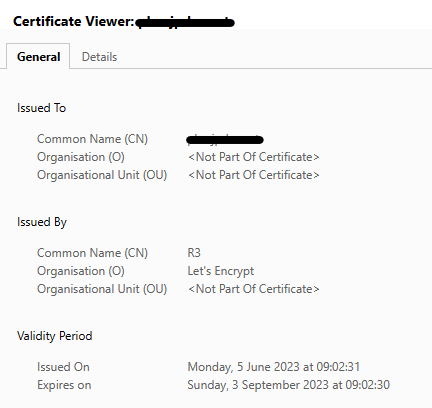
Plex server settings:

Certificate was exported using command:
openssl pkcs12 -export -out ../pkcs12/REDACTED.pfx \
	-certpbe AES-256-CBC -keypbe AES-256-CBC -macalg SHA256 \
	-inkey ./privkey.pem -in ./cert.pem \
	-name REDACTED\
	-passout pass:""
Anyone any idea how to fix this? It works fine on TV’s / mobile and also on LAN network which is expected because it uses LAN connection and not WAN.
Is the above command correct (I’m not using passout pass could that be the issue)? I see in the topics quite some confusion around what the actual correct export command is: SSL became broken after latest PMS Update - Plex Media Server / Remote Access - Plex Forum
Thanks!
