For ratio-changing movies you don’t necessarily need to keep ALL of the pixels, just enough to accommodate … oh, gosh. Yeah. I think all of the recent ratio-changing movies have had scenes in 16x9, but I’m not sure.
The Grand Budapest Hotel even has some “Academy Ratio” 1.37:1 scenes, which is about the same as old 4x3 TVs, and would have pillar boxing - black bars on the left and right - on a 16x9 TV.
The only reason I can imagine that changing the audio stream affected the video zoom is that you had some weird stuff going on with the video, and when you changed audio settings, stuff that was “fragile” just tipped over a little bit too far.
If you’ve had a chance to re-encode, did that make a difference?
It finished overnight and I tried it this morning and it does play normally. 1920x804 anamorphic set to none did the trick. I don’t know if it was just the resizing or the anamorphic setting. Not sure I want to take the 8+ hours to do it again for a 3rd time.
I still stand by the oddness of this. I probably have 30+ movies encoded the same way, but something about this instance.
I’m doing these today in 265 and they’re taking 50 minutes each - about as long as it takes to watch them and while an eternity - not bad really..:
General
Unique ID                                : 23305093462409756447875667885179178123 (0x118865D20011A9B9496B3458366E8C8B)
Complete name                            : H:\TV Vintage\Twin Peaks\Season 03\Twin Peaks - S03E04 - Part 4 ...Brings Back Some Memories.mkv
Format                                   : Matroska
Format version                           : Version 4
File size                                : 668 MiB
Duration                                 : 56 min 57 s
Overall bit rate                         : 1 638 kb/s
Encoded date                             : UTC 2020-07-19 12:24:36
Writing application                      : Lavf58.42.100
Writing library                          : Lavf58.42.100
ErrorDetectionType                       : Per level 1

Video
ID                                       : 1
Format                                   : HEVC
Format/Info                              : High Efficiency Video Coding
Format profile                           : Main@L4@Main
Codec ID                                 : V_MPEGH/ISO/HEVC
Duration                                 : 56 min 57 s
Bit rate                                 : 1 222 kb/s
Width                                    : 1 920 pixels
Height                                   : 1 080 pixels
Display aspect ratio                     : 16:9
Frame rate mode                          : Variable
Original frame rate                      : 23.976 FPS
Color space                              : YUV
Chroma subsampling                       : 4:2:0
Bit depth                                : 8 bits
Stream size                              : 498 MiB (75%)
Writing library                          : x265 3.2.1+1-b5c86a64bbbe:[Windows][GCC 9.2.0][64 bit] 8bit+10bit+12bit
Encoding settings                        : cpuid=1064959 / frame-threads=3 / numa-pools=8 / wpp / no-pmode / no-pme / no-psnr / no-ssim / log-level=2 / input-csp=1 / input-res=1920x1080 / interlace=0 / total-frames=0 / level-idc=0 / high-tier=1 / uhd-bd=0 / ref=1 / no-allow-non-conformance / no-repeat-headers / annexb / no-aud / no-hrd / info / hash=0 / no-temporal-layers / open-gop / min-keyint=24 / keyint=240 / gop-lookahead=0 / bframes=3 / b-adapt=0 / b-pyramid / bframe-bias=0 / rc-lookahead=5 / lookahead-slices=6 / scenecut=0 / radl=0 / no-splice / no-intra-refresh / ctu=32 / min-cu-size=16 / no-rect / no-amp / max-tu-size=32 / tu-inter-depth=1 / tu-intra-depth=1 / limit-tu=0 / rdoq-level=0 / dynamic-rd=0.00 / no-ssim-rd / no-signhide / no-tskip / nr-intra=0 / nr-inter=0 / no-constrained-intra / strong-intra-smoothing / max-merge=2 / limit-refs=0 / no-limit-modes / me=0 / subme=0 / merange=57 / temporal-mvp / no-hme / no-weightp / no-weightb / no-analyze-src-pics / deblock=0:0 / no-sao / no-sao-non-deblock / rd=2 / selective-sao=0 / early-skip / rskip / fast-intra / no-tskip-fast / no-cu-lossless / no-b-intra / no-splitrd-skip / rdpenalty=0 / psy-rd=2.00 / psy-rdoq=0.00 / no-rd-refine / no-lossless / cbqpoffs=0 / crqpoffs=0 / rc=abr / bitrate=1250 / qcomp=0.60 / qpstep=4 / stats-write=0 / stats-read=2 / cplxblur=20.0 / qblur=0.5 / ipratio=1.40 / pbratio=1.30 / aq-mode=1 / aq-strength=0.00 / cutree / zone-count=0 / no-strict-cbr / qg-size=32 / no-rc-grain / qpmax=69 / qpmin=0 / no-const-vbv / sar=1 / overscan=0 / videoformat=5 / range=0 / colorprim=1 / transfer=1 / colormatrix=1 / chromaloc=0 / display-window=0 / cll=0,0 / min-luma=0 / max-luma=255 / log2-max-poc-lsb=8 / vui-timing-info / vui-hrd-info / slices=1 / no-opt-qp-pps / no-opt-ref-list-length-pps / no-multi-pass-opt-rps / scenecut-bias=0.05 / no-opt-cu-delta-qp / no-aq-motion / no-hdr / no-hdr-opt / no-dhdr10-opt / no-idr-recovery-sei / analysis-reuse-level=5 / scale-factor=0 / refine-intra=0 / refine-inter=0 / refine-mv=1 / refine-ctu-distortion=0 / no-limit-sao / ctu-info=0 / no-lowpass-dct / refine-analysis-type=0 / copy-pic=1 / max-ausize-factor=1.0 / no-dynamic-refine / no-single-sei / no-hevc-aq / no-svt / no-field / qp-adaptation-range=1.00
Language                                 : English
Default                                  : Yes
Forced                                   : No
Color range                              : Limited
Color primaries                          : BT.709
Transfer characteristics                 : BT.709
Matrix coefficients                      : Identity
matrix_coefficients_Original             : BT.709

Audio
ID                                       : 2
Format                                   : AC-3
Format/Info                              : Audio Coding 3
Commercial name                          : Dolby Digital
Codec ID                                 : A_AC3
Duration                                 : 56 min 56 s
Bit rate mode                            : Constant
Bit rate                                 : 384 kb/s
Channel(s)                               : 6 channels
Channel layout                           : L R C LFE Ls Rs
Sampling rate                            : 48.0 kHz
Frame rate                               : 31.250 FPS (1536 SPF)
Bit depth                                : 16 bits
Compression mode                         : Lossy
Stream size                              : 156 MiB (23%)
Title                                    : Surround
Writing library                          : Lavc58.77.101 ac3_fixed
Language                                 : English
Service kind                             : Complete Main
Default                                  : Yes
Forced                                   : No

Menu
00:00:00.000                             : :00:00:00.000
00:01:39.099                             : :00:01:39.099
00:09:31.154                             : :00:09:31.154
00:19:40.513                             : :00:19:40.513
00:33:28.840                             : :00:33:28.840
00:42:06.733                             : :00:42:06.733
00:55:12.893                             : :00:55:12.851
Get this - if you don’t have it - you need it:
(Forum tip: once installed you right click on the file - Get MediaInfo - Ctl/A - Ctl/C - open forum post - click ‘Pre-Formatted Text’ - Ctl/V…)
I’m interested in what’s taking 8 hours.
I did some 480p Trash TV junk in 15 minutes per hour overnight (2 Pass!). Those things have wings…lol
Also - if you want to ‘test’ a settings change or experiment - a 4 minute Preview dropped in an Other Videos Library and viewed on everything you have is a LOT easier to deal with than an 8 hour encode:
your output isn’t the same as mine. I am doing 1080p at 23 frames (same as source), output file is 5gb. My computer is also not a power house, so that doesn’t help.
When just keeping the original size, it was under 4 hours for a full movie. Chopping each frame takes some processing I think.
What’s that Encoder Preset?
Note: Anything slower than Fast starts adding reference frames in order to pack the video tighter - and not by much. The problem is that reference frames take time and when you get 16 of them packed into each second - that takes a hundred years and you get video that won’t work on a whole bunch of things.
Cropping doesn’t take any more time than not cropping.
Complicated processing takes time.
The less you do - the faster it is.
For instance, I let HB figure out what it wants for Encoder Profile and Level. It’ll make the best and fastest decision it can. You’ll never see any difference anyway.
If you want to match the quality of the original - you can’t, but you can match the bit rate. I’d take it ‘almost there’ and call it a day. You’d also never see the difference at 50 or 75% of the original - and less bit rate means faster encode.
Those 240 second previews are really sweet - should you choose to employ them.
The advice to make short previews is golden. Nothing like waiting 4 hours to discover your cropping is wrong …
I agree that cropping doesn’t have much impact, in the scheme of things.
I agree Encoder Preset is probably the most important factor for how long things take. The names are terribly non-intuitive. “Fast” seems like it would mean “Do a lousy job” but it really doesn’t.
(Changing my comment about reference frames. I felt like I was snarky and didn’t intend to be. I think the threshold for “too many” (5+) is more like “slower” and “placebo”; Everything “medium” or faster is definitely fine.
I think refs >5 only start to cause problems if you’re playing back on really horrible hardware and didn’t set a Level, but I’m not certain. Mostly “slower” and “placebo” just make things slow.
There’s a great reference for ALL of the stuff that slider changes here. It’s in the x264 docs but this is formatted better.
Filters slow things down, if you’re using any. Some of them a LOT. Can make things look nice though.
Encoder Tune: Film slows things down, too, a tiny bit. Can make things look nice though. Leave it on.
ABR is significantly slower than CRF, like 50-100%, and it’s the wrong choice unless you have a specific file size in mind. Try CRF 18 if you’re looking for a crazy high-quality encoding from Blu-ray, or 20 if you want something sane.
Make a short preview at CRF 18, 20, and another with ABR, if you like. Compare quality and how long they take.
Thinking about refs and how they only start to cause issues in certain scenarios …
The problematic file - that zoomed weird - I wonder if it exceeded the h264 level supported by the Fire. (I probably shouldn’t care why a known-weird file behaved strangely.) Or more importantly, if it actually exceeded some real playback capacity limit in the Fire.
I know this used to be annoying, because the Fire (and other devices) reported they could only handle Level 4.0, and lots of media was labeled as 4.1. You could edit the media and it would usually work. Later on Plex got the ability to specify Level manually.
Usually you can avoid setting the h264 level in Handbrake. The level will be calculated based on what’s in your file. When you set a level you’re mostly putting some limits on features Handbrake can use.
I wonder - if you did a “slower” encode - with strange resolution - maybe there really were encoder features active the Fire didn’t like, and it was struggling to keep up.
But I’m just thinking out loud, and pretending to stay on topic.


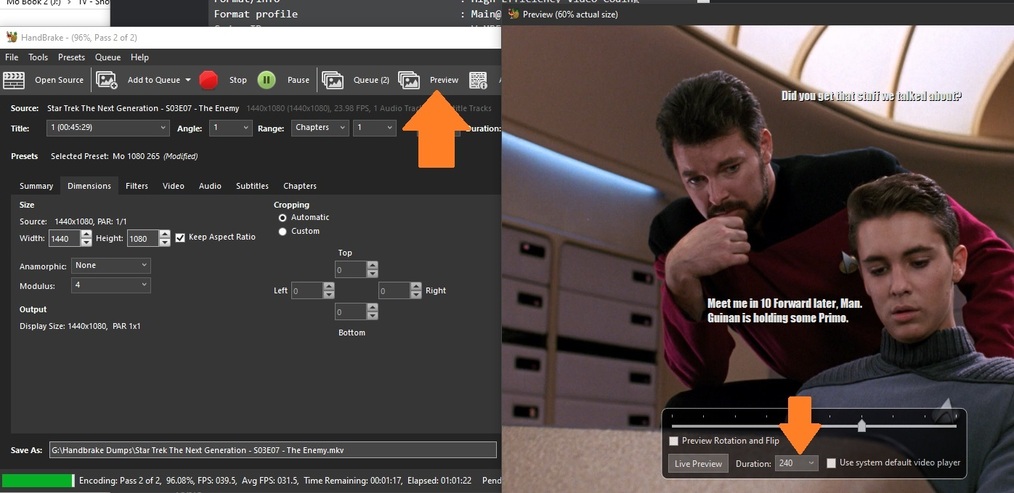

 Nothing like waiting 4 hours to discover your cropping is wrong …
