Getting Errors trying to repair Database, How do you invoke built in SQLITE3 in Unraid?

Server version: 1.22.1.4228 from Linuxserver.io docker
OS: Unraid

I am trying to check for corruption and im getting these errors…

Note: I move the db to do all this stuff so thats why the path has “clean” in it, thats where I copy my db to do work then put it back later.


root@MIKESDESKTOP:/mnt/disks/ADATA_1TB/PlexMediaServer/clean# sqlite3 com.plexapp.plugins.library.db "DROP index 'index_title_sort_naturalsort'"
Error: no such index: index_title_sort_naturalsort
root@MIKESDESKTOP:/mnt/disks/ADATA_1TB/PlexMediaServer/clean# sqlite3 com.plexapp.plugins.library.db "PRAGMA integrity_check"
Error: no such collation sequence: icu_root

In this post Chuck PA says you have to invoke built in SQLITE3 and later in the post says documentation will be updated once they go public version

When I try his method I get this…


root@MIKESDESKTOP:/mnt/disks/ADATA_1TB/PlexMediaServer/clean# "/usr/lib/plexmediaserver/Plex Media Server" --sqlite
bash: /usr/lib/plexmediaserver/Plex Media Server: No such file or directory
root@MIKESDESKTOP:~# "/usr/lib/plexmediaserver/Plex Media Server" --sqlite
bash: /usr/lib/plexmediaserver/Plex Media Server: No such file or directory

Am I missing something? I have the docker installed so does that make any difference?

I’m also getting weird errors in the log about libusb_int when I shut down the container. I also get libusb errors other times. These errors dont exist in the plexserver logs only in the container log themselves.

Sqlite3: Sleeping Critical: libusb_init failed

Anyone?

I’m also on unraid and just got a warning about a corrupt database.

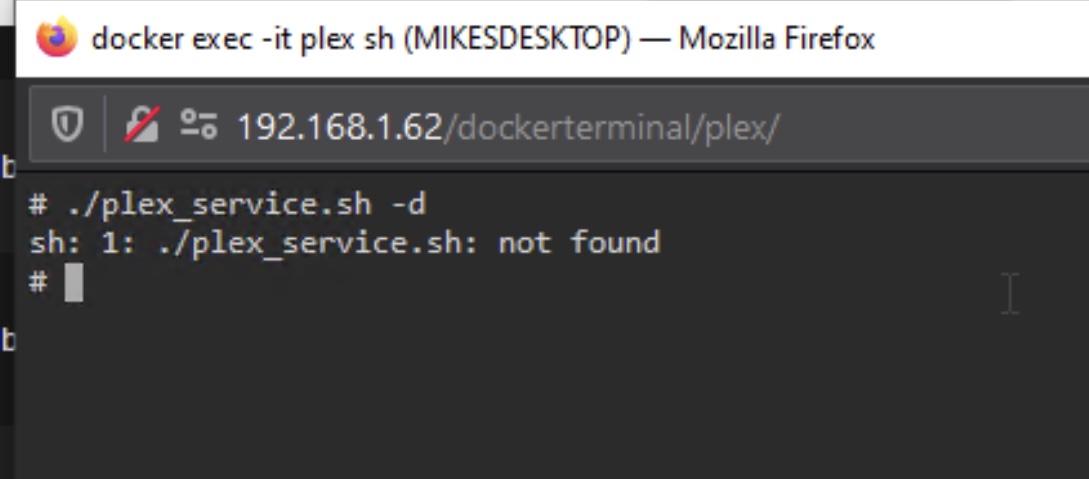
This is how i invoked it:
image

but its my understanding that we can’t attempt repairs on the DB while the docker is running and we have to use the built in sqlite version? Is it possible to stop plex as a service while keeping the docker up so we can attempt DB repairs? Can we get some updated instructions?

@ChuckPa or @anon18523487

EDIT: I’ve started my own thread for my issue so as not to hijack yours. Database Corruption - Need help

Your path to the executable is incorrect. That’s what the error bash: /usr/lib/plexmediaserver/Plex Media Server: No such file or directory means. Likely the LSIO container installs it in a different location.

I’m not sure which container you are talking about but the plex container uses s6 as its launch daemon which allows you to shutdown the plex service within the container. You should be able to stop it via the script at the root: /plex_service.sh -d. I’m not sure if the LSIO container uses the same but I expect there is a way to shut it down in their container as well.

Yes for me it is the LSIO container, I’ll have to ask them about it and see. Thanks.

Could we also get some clear instructions on what new commands should be run to try to identify and repair DB corruption?

EDIT: Well it sounds like they didn’t forsee this and don’t really support stopping the service separately from the container.

I’m running PMS_Docker on Unraid 6.8.3. To troubleshoot a db corruption issue that was causing my Library panes to be blank I did the following:

Opened a console to the container from the Docker menu on Unraid.

Stop the Plex services

./plex_service.sh -d

Made a backup of the com.plexapp.plugins.library.db in the following directory

/config/Library/Application Support/Plex Media Server/Plug-in Support/Databases/

Ran the following commands which uses the Plex compiled version of the sqlite tools:

cd "/config/Library/Application Support/Plex Media Server/Plug-in Support/Databases/"
"/usr/lib/plexmediaserver/Plex Media Server" --sqlite com.plexapp.plugins.library.db "PRAGMA integrity_check"
"/usr/lib/plexmediaserver/Plex Media Server" --sqlite com.plexapp.plugins.library.db .dump > dump.sql
rm com.plexapp.plugins.library.db
"/usr/lib/plexmediaserver/Plex Media Server" --sqlite com.plexapp.plugins.library.db < dump.sql
chown plex:plex com.plexapp.plugins.library.db

Basically follow the guide from Plex for Linux here but run the correct sqlite version.

Restart the container after this is done and it fixed my corrupt db issues.

2 Likes

This worked for me.

This was almost perfect for me, heres my horrible workaround when it didn’t work, probably because I did something wrong.

The stop services code didn’t work. I’m running the LSIO docker so maybe thats why but when I run it says service not found.

So to keep the docker running and be able to do the next steps this is what I did.

  1. Stopped docker and made a copy of .db and the blob but renamed them and added a 2 at the end of the name. Now I have 2 databases and 2 blobs.

  2. Restart the docker, do all the steps you said on the copy of the database I made. So change the commands to…

cd "/config/Library/Application Support/Plex Media Server/Plug-in Support/Databases/"
"/usr/lib/plexmediaserver/Plex Media Server" --sqlite com.plexapp.plugins.library2.db "PRAGMA integrity_check"
"/usr/lib/plexmediaserver/Plex Media Server" --sqlite com.plexapp.plugins.library2.db .dump > dump.sql
rm com.plexapp.plugins.library2.db
"/usr/lib/plexmediaserver/Plex Media Server" --sqlite com.plexapp.plugins.library2.db < dump.sql
chown plex:plex com.plexapp.plugins.library2.db
  1. Stop the docker and move the original copies of the database and blob to a folder called test, I didnt want to delete them just in case.

  2. Rename the copies I was working on to the proper names.

  3. Chown plex:plex doesnt work for me because there is no user plex in unraid. So I changed it to everyone had access to the file using…

chmod -R a+rwX com.plexapp.plugins.library2.db

Anyway it works now and yes for gods sake Plex needs to put out an official documentation change.

1 Like

This topic was automatically closed 90 days after the last reply. New replies are no longer allowed.