I take it AC3 Passthrough is incapable of maintaining Dolby Surround? PLEX is only recognizing the output as AC3 Stereo…? What is the best lossless alternative?


I take it AC3 Passthrough is incapable of maintaining Dolby Surround? PLEX is only recognizing the output as AC3 Stereo…? What is the best lossless alternative?
“Dolby Surround” is nothing more than Stereo (with some ‘simulated surround’ - basically useless on just about everything on Earth) and in my career Plex has never been able to do anything with it (if there’s anything useful about it - and I doubt it). If you passthru ‘Dolby Surround’ the track will be untouched. Personally, I convert all that nonsense to Vanilla AC3 2.0 Stereo.
Right, but
" The name Dolby Surround described the consumer passive matrix decoding technology; the professional, active matrix cinema technology bore the name Dolby Stereo. It was capable of decoding Dolby Stereo 4-channel soundtracks to 3 output channels (Left, Right, Surround). "
Passthru is stripping out data…? That’s not really passthru then, right…?
Edit: Also, is it just me or is this labeling for those disks deceptive?
That’s very likely just a difference in audio track description by Plex vs. Handbrake. Your receiver should be able to decode the signal into surround anyway.
If you’re curious, then try loading the finished file back into handbrake, just to see if the audio track description is correct, that’ll be the easiest way to confirm.
You’re 100% correct that the label is deceptive. That label makes it look like there is an AC3 5.1 track on board.
Don’t believe everything you read - especially if it’s dreamed up by somebody wanting you to buy something.
“Surround” is more than 2 specific information tracks. “Dolby Surround” is a Gimmick, A Promise, A Wish - and a PITA. Convert it to Stereo. You’ll never hear the difference anyway.
There must be more than 2 channels encoded b/c my Dolby Digital DTS Digital Surround system lite up all six speaker icons. I assume it gets confused in the grey area…?
TIL AC3 Stereo doesn’t necessarily mean just stereo on items in my library. Good to know.
When you passthru that stuff with HB your receiver might see it and be able to do something with it - if you’re passing thru HDMI audio on your device/client - taking Plex out of the audio picture. If Plex stands between your receiver and your magic ‘Surround’ - nothing useful is happening.
Otherwise - convert it. It’s just stereo with some hopeful magic - that’ll probably sound weird on things in your Plexiverse unable to decode the magic bits.
Brain Storming, but try this:
https://www.xmedia-recode.de/en/download.php
Xmedia Recode stands head and shoulders above almost everything else as a great manipulator of audio. XR may well be able to turn Dolby Surround into something useful - like AC3 3.0/4.0/5.0 or whatever it’s supposed to be behind the curtain.
XR can also maintain the original (passed through) HB track, while converting a new additional track or tracks for testing. Make some ‘versions’, plunk them down in an Other Videos Library and see what you can make happen - cap’n…lol
Basicallly:
Passthru some ‘Surround’ with HB.
Drop that on Xmedia Recode, select your container, then:
Copy Video
Convert Audio - as many times, in as many formats and for as many tracks as you like
Copy Subs - if there are any at the same time as well.
No documentation, but those Germans make it so easy to use no documentation is really necessary.
The track may be one of the variations of “Dolby Pro-Logic” (Wikipedia)
It’s really a stereo AC3 track, but if you have a receiver that can decode the extra channels, it will light up all of the speaker icons, because it has extracted the surround audio information. You won’t get any “weirdness” on a stereo device, so there’s no need to convert the audio to another format.
However, if you do convert, the “magic” will still be there if you have your receiver set to the decode the pro-logic audio. The receiver doesn’t care if it’s AAC, PCM or AC3.
I swear that’s what the old HB called it - maybe the new one as well, but I ended that years ago.
I feel about that the same way I feel about a 7.1 track on Casablanca (1942) - it’s all smoke and mirrors…lol
However - if one were to go a ‘little deeper’ into HB Selection area:
There it is - and more…
ac3 passthrough is just that.
it copies the existing audio stream as is.
I’m not a handbrake user, so I can’t comment on what they do with the pass-thru.
I do know that I have a lot of old DVD’s that had the “Pro-Logic” stereo track, as well as a real “5.1 AC3” track. The stereo was always the first track if I remember correctly. I copied both tracks, left them in that order for my Plex stuff, and all was good. A stereo track for stereo systems, a surround track for surround systems, and since everyone was using Rokus at the time, the correct one was auto-magically chosen for everyone.
As multiple folks already said, passthrough doesn’t manipulate the audio, so nothing has been stripped out. It passes it through directly to your file, unchanged.
(Also, if you can’t hear the difference yourself it seems academic, IMO).
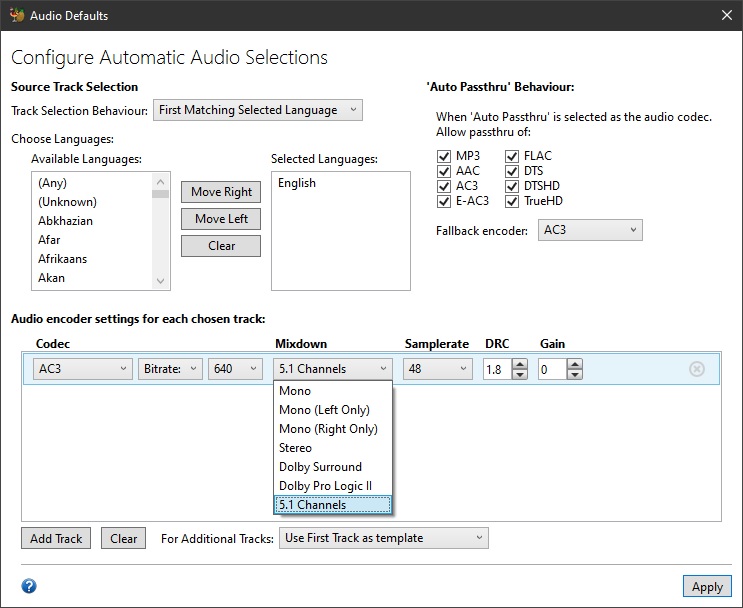
Handbrake still has “Dolby Pro Logic II” and “Stereo” settings. It’s just that newer releases now default to Stereo for the “mixdown” instead of DPL2. Probably because of the same pointlessness Juice mentioned for most users.
The documentation on the website hasn’t been updated yet, but if you read the Handbrake changelogs you can see the change.
tl;dr
You haven’t lost anything when you use passthrough.
It IS just stereo. So it’s identified correctly in Plex.
I think you’re confusing track name/track metadata for an actual change to the actual audio. It’s not the same.
For that reason, since Plex doesn’t actually display track names (although that would be nice Show names for audio tracks and subtitles) you’re not going to see “Dolby Surround” in the list.
If your system can interpret Dolby Pro Logic you can benefit from the “extra” channels (which seems to be what you’re describing). Even if it’s just a mixture of marketing and ventriloquism.
The original format is “lossy” so there’s no “loseless alternative”. But literally any other options except passthrough can only result is additional loss of quality, although for most of us it would probably be imperceptible if you use decent settings.