@ChuckPa can you provide some insight please to my above post?
Running PMS 1.29.2.6364 on an i7-7700 on a QNAP NAS (TVS-1282) is 100 % functional. A KabyLake with PMS 1.29.2.6364 is perhaps the most stable combination available.
Recreate the failure with DEBUG logging enabled (VERBOSE OFF).
Download the ZIP file and attach.
No probs here is the logs straight after streaming a HDR title with hw transcoding enabled. The stream was stalled while the logs were obtained.
Please note that the stream never successfully plays but rather displays a black screen as soon as you hit play (on any title that required hw transcoding).
Optimising a title at any quality setting also stalls.
Plex Media Server Logs_2023-05-04_22-33-23.zip (382.5 KB)
Error code: s1003 (Network) eventually appears during stalled stream.
Andrew,
Thanks for the logs. I see a few things.
-
This is 1.32.1.6999 , not 1.29.2.6364
-
You can turn off IPv6 in Settings - Server - Network - Show Advanced
Your LAN is IPv4. -
The transcode session started correctly.
May 04, 2023 22:32:08.580 [0x808883000] DEBUG - [Req#a9/Transcode] [FFMPEG] - Format 0x30313050 -> p010le.
May 04, 2023 22:32:08.580 [0x808883000] DEBUG - [Req#a9/Transcode] [FFMPEG] - Created surface 0.
May 04, 2023 22:32:08.580 [0x808883000] DEBUG - [Req#a9/Transcode] [FFMPEG] - Direct mapping possible.
May 04, 2023 22:32:08.581 [0x808883000] DEBUG - [Req#a9/Transcode] TPU: hardware transcoding: final decoder: vaapi, final encoder: vaapi
May 04, 2023 22:32:08.581 [0x808883000] DEBUG - [Req#a9/Transcode/JobRunner] Job running: FFMPEG_EXTERNAL_LIBS='/usr/local/plexdata-plexpass/Plex\ Media\ Server/Codecs/e51a01b-4528-freebsd-x86_64/' X_PLEX_TOKEN=xxxxxxxxxxxxxxxxxxxxxxxxxxxxxxxxxxxxxxxxxx "/usr/local/share/plexmediaserver-plexpass/Plex Transcoder" -codec:0 hevc -hwaccel:0 vaapi -hwaccel_fallback_threshold:0 10 -hwaccel_device:0 vaapi -codec:1 dca -analyzeduration 20000000 -probesize 20000000 -i "/media/Movies/Lone Survivor (2013)/Lone Survivor (2013).mkv" -filter_complex "[0:0]scale=w=2276:h=1280:force_divisible_by=4[0];[0]format=p010,tonemap=mobius[1];[1]format=pix_fmts=nv12[2];[2]hwupload[3]" -map "[3]" -codec:0 h264_vaapi -b:0 20000k -r:0 23.975999999999999 -force_key_frames:0 "expr:gte(t,n_forced*1)" -filter_complex "[0:1] aresample=async=1:ochl='stereo':rematrix_maxval=0.000000dB:osr=48000[4]" -map "[4]" -metadata:s:1 language=eng -codec:1 aac -b:1 256k -f dash -seg_duration 1 -dash_segment_type mp4 -init_seg_name 'init-stream$RepresentationID$.m4s' -media_seg_name 'chunk-stream$RepresentationID$-$Number%05d$.m4s' -window_size 5 -delete_removed false -skip_to_segment 1 -time_delta 0.0625 -manifest_name "http://127.0.0.1:32400/video/:/transcode/session/ky09oofkp09u2z6yec36iirv/0f5f9ae1-2f05-4b9c-b12f-2a8f50c9a887/manifest?X-Plex-Http-Pipeline=infinite" -avoid_negative_ts disabled -map_metadata -1 -map_chapters -1 dash -start_at_zero -copyts -vsync cfr -init_hw_device vaapi=vaapi: -filter_hw_device vaapi -y -nostats -loglevel quiet -loglevel_plex error -progressurl http://127.0.0.1:32400/video/:/transcode/session/ky09oofkp09u2z6yec36iirv/0f5f9ae1-2f05-4b9c-b12f-2a8f50c9a887/progress
May 04, 2023 22:32:08.581 [0x808883000] DEBUG - [Req#a9/Transcode/JobRunner] In directory: "/usr/local/plexdata-plexpass/Plex Media Server/Cache/Transcode/Sessions/plex-transcode-ky09oofkp09u2z6yec36iirv-0f5f9ae1-2f05-4b9c-b12f-2a8f50c9a887"May 04, 2023 22:32:08.580 [0x808883000] DEBUG - [Req#a9/Transcode] [FFMPEG] - Format 0x30313050 -> p010le.
May 04, 2023 22:32:08.580 [0x808883000] DEBUG - [Req#a9/Transcode] [FFMPEG] - Created surface 0.
May 04, 2023 22:32:08.580 [0x808883000] DEBUG - [Req#a9/Transcode] [FFMPEG] - Direct mapping possible.
May 04, 2023 22:32:08.581 [0x808883000] DEBUG - [Req#a9/Transcode] TPU: hardware transcoding: final decoder: vaapi, final encoder: vaapi
May 04, 2023 22:32:08.581 [0x808883000] DEBUG - [Req#a9/Transcode/JobRunner] Job running: FFMPEG_EXTERNAL_LIBS='/usr/local/plexdata-plexpass/Plex\ Media\ Server/Codecs/e51a01b-4528-freebsd-x86_64/' X_PLEX_TOKEN=xxxxxxxxxxxxxxxxxxxxxxxxxxxxxxxxxxxxxxxxxx "/usr/local/share/plexmediaserver-plexpass/Plex Transcoder" -codec:0 hevc -hwaccel:0 vaapi -hwaccel_fallback_threshold:0 10 -hwaccel_device:0 vaapi -codec:1 dca -analyzeduration 20000000 -probesize 20000000 -i "/media/Movies/Lone Survivor (2013)/Lone Survivor (2013).mkv" -filter_complex "[0:0]scale=w=2276:h=1280:force_divisible_by=4[0];[0]format=p010,tonemap=mobius[1];[1]format=pix_fmts=nv12[2];[2]hwupload[3]" -map "[3]" -codec:0 h264_vaapi -b:0 20000k -r:0 23.975999999999999 -force_key_frames:0 "expr:gte(t,n_forced*1)" -filter_complex "[0:1] aresample=async=1:ochl='stereo':rematrix_maxval=0.000000dB:osr=48000[4]" -map "[4]" -metadata:s:1 language=eng -codec:1 aac -b:1 256k -f dash -seg_duration 1 -dash_segment_type mp4 -init_seg_name 'init-stream$RepresentationID$.m4s' -media_seg_name 'chunk-stream$RepresentationID$-$Number%05d$.m4s' -window_size 5 -delete_removed false -skip_to_segment 1 -time_delta 0.0625 -manifest_name "http://127.0.0.1:32400/video/:/transcode/session/ky09oofkp09u2z6yec36iirv/0f5f9ae1-2f05-4b9c-b12f-2a8f50c9a887/manifest?X-Plex-Http-Pipeline=infinite" -avoid_negative_ts disabled -map_metadata -1 -map_chapters -1 dash -start_at_zero -copyts -vsync cfr -init_hw_device vaapi=vaapi: -filter_hw_device vaapi -y -nostats -loglevel quiet -loglevel_plex error -progressurl http://127.0.0.1:32400/video/:/transcode/session/ky09oofkp09u2z6yec36iirv/0f5f9ae1-2f05-4b9c-b12f-2a8f50c9a887/progress
May 04, 2023 22:32:08.581 [0x808883000] DEBUG - [Req#a9/Transcode/JobRunner] In directory: "/usr/local/plexdata-plexpass/Plex Media Server/Cache/Transcode/Sessions/plex-transcode-ky09oofkp09u2z6yec36iirv-0f5f9ae1-2f05-4b9c-b12f-2a8f50c9a887"
- I see the stall.
From what I can see, this is the web browser failing you just as it has for me.
( There is a known issue with it. I wrote it up a few weeks ago and am waiting for the Plex/web team to fix it )
I’d like to confirm whether or not you’re seeing the same Plex/web problem I am.
In the browser,
- Settings - Plex Web - Quality
- Home Streaming
- Uncheck the box - Use Recommended Settings
- Manually set the bit rate to 20 Mbps, 1080p
- Save the changes
Now retest
Legend appreciate you looking into this for me!
-
I was running version 1.29.2.6364 back in Nov of last year when I created this thread, but yes now running the latest available Plex build.
-
Thanks just disabled IPv6 to be safe - however same result.
-
Interesting, while the webplayer might be compounding the issue, there’s definitely something broken with transcoding - attached are the logs for the same crash experience when using Plex on my iPad Pro, rather than eventually throwing up an error dialog like the web player does, this just crashes to iOS homescreen.
Hope these logs paint more of the picture
Plex Media Server Logs_2023-05-06_13-01-34.zip (495.1 KB)
.
Here are the logs for when I select any other playback stream other than ‘original’ - eg this crash was when selecting quality convert to 4K (high) 40mbps.
Plex Media Server Logs_2023-05-06_13-26-16.zip (576.3 KB)
There’s something wrong with the Nvidia drivers for me.
I will research this.
Look at the memory usage. It’s incorrect.
[chuck@glockner ~.2000]$ nvidia-smi
Sat May  6 02:01:21 2023
+-----------------------------------------------------------------------------+
| NVIDIA-SMI 525.105.17   Driver Version: 525.105.17   CUDA Version: 12.0     |
|-------------------------------+----------------------+----------------------+
| GPU  Name        Persistence-M| Bus-Id        Disp.A | Volatile Uncorr. ECC |
| Fan  Temp  Perf  Pwr:Usage/Cap|         Memory-Usage | GPU-Util  Compute M. |
|                               |                      |               MIG M. |
|===============================+======================+======================|
|   0  Quadro P2200        On   | 00000000:07:00.0 Off |                  N/A |
| 49%   37C    P8     4W /  75W |     66MiB /  5120MiB |      0%      Default |
|                               |                      |                  N/A |
+-------------------------------+----------------------+----------------------+

+-----------------------------------------------------------------------------+
| Processes:                                                                  |
|  GPU   GI   CI        PID   Type   Process name                  GPU Memory |
|        ID   ID                                                   Usage      |
|=============================================================================|
|    0   N/A  N/A     11828      C   ...diaserver/Plex Transcoder       62MiB |
+-----------------------------------------------------------------------------+
[chuck@glockner ~.2001]$
EDIT: Found it. There is a bug in the 8.18 version of the iOS app and its interaction with PMS 1.32.2.6992. It doesn’t invoke HW transcoding when it should.
Observe iOS left and Plex/web on the right

Engineering is away for another week.
Tried Safari.
I’ll see if I can find a version of PMS which works with iOS
I don’t know if it’s Apples 16.4.1(a) update or not.
My once-stable testbed fails using Apple products.
That’s good you’ve identified a bug. I’ve just tried a stream through Safari on iPadOS 16.4.1 not (a), ensuring the stream is trying to transcode something and I’m still getting the same issue with the stream stalling… I feel as if there’s two separate bugs at play here?
Logs attached
Plex Media Server Logs_2023-05-06_14-31-37.zip (826.0 KB)
The problem seems to be anything Apple related, even safari.
I jump to android and everything works.
The only change I know of is the new iOS version 16.4.1.(a) – whatever that is.
IMHO, 16.4 has been the buggiest version of iOS probably since iOS 7.
(Personally, I will be hard pressed to buy apple devices again)
I’ll try Plex Web from Firefox on my PC and Brave on my Android phone and report back
I’m continuing to dig into this. It’s 3am here. I’ll continue tomorrow
Unfortunately I’m still getting the same crashing behaviour even on non-Apple devices (Android phone + PC Brave browser). Attached are the logs.
Plex Media Server Logs_2023-05-06_14-51-05.zip (889.1 KB)
No probs at all mate, appreciate you looking into this! Take care
PS: I hate FireFox. I use Chrome just fine. FireFox on Linux is painful and unstable for me.
Night.
All:
I have found a temporary solution for you.
1.29.2.6364 will work with iOS/tvOS 8.18 app.
I’m continuing to work my way forward until I find where and how it breaks but my results so far indicate that it fails when Tonemapping attempts to allocate CUDA memory, Fails, then falls all the way back to full software decoding.
Great stuff that’s good news. Do you think the bug you’re experiencing exists in my Intel QuickSync setup too? Or that they’re separate issues?
Cheers.
I’m starting up my QNAP to test QSV.
In the interrim, can you provide me the XML for a file which fails?
The <media> through </media> part posted in a </> (code/ preformatted text button) reply block.
This is a Nvidia problem.
Launching in Plex/web, QSV immediately plays and shows HW

Forcing the iPad to transcode, it immediately works as well.

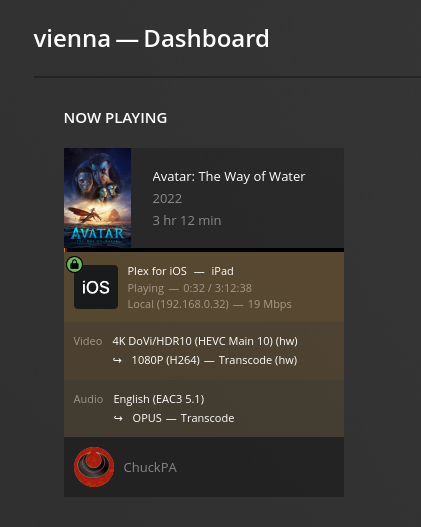
I am running PMS 1.32.2.6997 Engineer’s build which contains updated Intel Media Drivers. (we’re testing)
If you have a problem with QSV, and your XML shows the file should play, I’ll share the engineer’s build to try.
Is this what you’re after?
<Media id="448" duration="7276269" bitrate="63330" width="3840" height="2160" aspectRatio="1.78" audioChannels="8" audioCodec="dca-ma" videoCodec="hevc" videoResolution="4k" container="mkv" videoFrameRate="24p" audioProfile="ma" videoProfile="main 10">
<Part accessible="1" exists="1" id="448" key="/library/parts/448/1640717133/file.mkv" duration="7276269" file="/media/Movies/Lone Survivor (2013)/Lone Survivor (2013).mkv" size="57600911841" audioProfile="ma" container="mkv" deepAnalysisVersion="6" hasThumbnail="1" requiredBandwidths="117277,99096,95359,91459,89504,87781,80489,77386" videoProfile="main 10">
<Stream id="1216" streamType="1" default="1" codec="hevc" index="0" bitrate="60642" bitDepth="10" chromaLocation="topleft" chromaSubsampling="4:2:0" codedHeight="2160" codedWidth="3840" colorPrimaries="bt2020" colorRange="tv" colorSpace="bt2020nc" colorTrc="smpte2084" frameRate="23.976" height="2160" level="153" profile="main 10" refFrames="1" requiredBandwidths="111130,93932,90397,86647,84692,83026,75550,72409" title="Lone.Survivor.2013.2160p.BluRay.REMUX.HEVC.DTS-X.7.1-FGT" width="3840" displayTitle="4K HDR10 (HEVC Main 10)" extendedDisplayTitle="Lone.Survivor.2013.2160p.BluRay.REMUX.HEVC.DTS-X.7.1-FGT (4K HDR10 HEVC Main 10)"> </Stream>
<Stream id="1217" streamType="2" selected="1" default="1" codec="dca" index="1" channels="8" bitrate="1536" language="English" languageTag="en" languageCode="eng" audioChannelLayout="7.1" bitDepth="24" profile="ma" requiredBandwidths="5161,4929,4446,4385,4385,4385,4385,4385" samplingRate="48000" title="Lone.Survivor.2013.2160p.BluRay.REMUX.HEVC.DTS-X.7.1-FGT" displayTitle="English (DTS-HD MA 7.1)" extendedDisplayTitle="Lone.Survivor.2013.2160p.BluRay.REMUX.HEVC.DTS-X.7.1-FGT (English DTS-HD MA 7.1)"> </Stream>
<Stream id="1218" streamType="2" codec="dca" index="2" channels="2" bitrate="384" language="English" languageTag="en" languageCode="eng" audioChannelLayout="stereo" bitDepth="24" profile="dts" requiredBandwidths="385,385,385,385,385,385,385,385" samplingRate="48000" title="Lone.Survivor.2013.2160p.BluRay.REMUX.HEVC.DTS-X.7.1-FGT" displayTitle="English (DTS Stereo)" extendedDisplayTitle="Lone.Survivor.2013.2160p.BluRay.REMUX.HEVC.DTS-X.7.1-FGT (English DTS Stereo)"> </Stream>
<Stream id="1219" streamType="2" codec="dca" index="3" channels="6" bitrate="768" language="Spanish" languageTag="es" languageCode="spa" audioChannelLayout="5.1(side)" bitDepth="24" profile="dts" requiredBandwidths="768,768,768,768,768,768,768,768" samplingRate="48000" title="Lone.Survivor.2013.2160p.BluRay.REMUX.HEVC.DTS-X.7.1-FGT" displayTitle="Spanish (DTS 5.1)" extendedDisplayTitle="Lone.Survivor.2013.2160p.BluRay.REMUX.HEVC.DTS-X.7.1-FGT (Spanish DTS 5.1)"> </Stream>
<Stream id="1220" streamType="3" default="1" codec="pgs" index="4" bitrate="33" language="English" languageTag="en" languageCode="eng" headerCompression="1" requiredBandwidths="60,60,60,60,60,60,60,60" title="English-PGS" displayTitle="English (PGS)" extendedDisplayTitle="English-PGS"> </Stream>
<Stream id="1221" streamType="3" codec="pgs" index="5" bitrate="22" language="Spanish" languageTag="es" languageCode="spa" headerCompression="1" requiredBandwidths="32,32,32,32,32,32,32,32" title="Spanish-PGS" displayTitle="Spanish (PGS)" extendedDisplayTitle="Spanish-PGS (Spanish)"> </Stream>
<Stream id="1222" streamType="3" codec="pgs" index="6" bitrate="0" language="Spanish" languageTag="es" languageCode="spa" headerCompression="1" requiredBandwidths="19,19,19,19,19,19,19,19" title="Spanish-FORCED-PGS" displayTitle="Spanish (PGS)" extendedDisplayTitle="Spanish-FORCED-PGS (Spanish)"> </Stream>
</Part>
</Media>
Thanks very much, let’s see how we go. Let me know if that’s the wrong string.
PGS subtitles block HW transcoding .
You have to completely turn off subtitles before starting playback or deal with them differently.
Stream id=“1221” streamType=“3” codec=“pgs” index=“5” bitrate=“22” language=“Spanish” languageTag=“es” languageCode=“spa” headerCompression=“1”
create a test file, different name, with the PGS subtitles removed. Test HW transcoding with them removed.
