@RxBrad it can range from 1/2 to 3/4. on Average it appears to be 2/3 so that’s what I went with.
I think this makes sense, and it should help with high grain UHD ➜ 1080p/720p transcodes.
cat /etc/pve/lxc/304.conf
The command would look something like that. Replace the 304 with the VMID of your Plex LXC container.
OMG! This totally explains why my Mom, who always uses subtitles always has her video transcoded to her Roku TV!
Is this a HW or SW limitation on the playback devices?
I’m my mom’s case, PMS always reports that her feed is being HW transcoded from 1080p to “SD” - I’ve been wondering how to fix/improve her streaming quality, but it seems like this issue as expected/by design.
Thanks for this explanation to the subtle issue.
Windowsx64
Ryzen 7000 series
Intel A380
Clarification please,
When transcoding TO or FROM a 10-bit format?
Most all of the videos I personally add to my collection are x265 10-bit with srt or other text based subtitles (no vob, etc)
OMG! This totally explains why my Mom, who always uses subtitles always has her video transcoded to her Roku TV!
Roku devices typically have poor PGS subtitle support. You may want to download SRT subtitles for your content as they can be soft embedded in the stream and performance is often better on Roku devices.
Thanks for that bit of info, but all my subtitles are text based.
If they aren’t on the rip (like a lot of older TV series on DVD) and don’t include any subtitles, I use Whisper to generate them.
So I think the issue I’ve been experiencing is 100% related to all my content being in 10-bit video.
RE Roku, I find that Roku has the best client vs Android/TV, etc - I haven’t compared Features with Apple TV.
@jfreiman to 10 bit, so it should only be relevant to hevc encoding with this build. If a video is being transcoded to 8 bit then it will already be in the 8 bit format by the time subtitles are burnt in and hw can be used for the overlay.
Is it possible your mom is experiencing bandwidth limiting due to the use of relay?
No, she actually just switched a month ago from Spectrum/Charter NC to Google Fiber service…
I’m in California with Comcast and while I don’t know if a way to check and see who else might be using subtitles (Tatulli?) at times I have 6 or 8 simultaneous HD streams going, so I don’t think the bandwidth is a limitation on my end.
She’s 91, so I’ll try work with her to check and see that her Roku Plex app has subtitles set to “auto” and not burn in?
I know she used to have problems with subtitles and now she doesn’t. But I can’t remember if it’s because we changed something or if either the Plex client or server was improved/upgraded.
If you’ve got 6-8 streams going outbound on a cable internet connection, it could be your connection. In my experience, cable internet (Comcast, Spectrum, Charter) typically limit their upload bandwidth at a max of 20-30Mbps… which typically would be 2-3 streams. You might want to check your upload bandwidth to confirm.
@jfreiman Also, if her app cannot make direct connection to your Plex Media Server then Plex Relay is used. When Relay is used, then Free users are limited to 1 Mbps maximum for streams and Plex Pass subscribers are limited to 2 Mbps maximum for streams.
https://support.plex.tv/articles/216766168-accessing-a-server-through-relay/
I am intimately aware of the limitations of Comcast cable’s upload speeds and this is not that.
She can be the only one streaming from my server with a 2Mbps or 3Mbps video and still HW Transcode –
My sister and brother-in-law who live next door to her in NC (who also just switched Internet providers) stream many of the same shows (without subtitles) and they Direct Stream or Direct Play. 
I don’t think this is the appropriate thread for this subtitle topic, but thanks for your help/input on this matter.
Thankfully, my cheap ARC A380 is more than capable and doesn’t slow my server down. I just want her to get the best image possible.
I don’t think you would be wrong in doing so. My guess is that with constant bitrate and hardware transcoding 2/3rds is probably about right.
It depends on the file sizes and peak bitrates. Spectrum/Charter do 42Mbps upload on their “Gig” tier (unless you have fiber or the new high-split symmetrical cable).
You can run 5 streams 1080p direct play fairly comfortably on 42Mbps. Six is pushing it, but doable. They tend to take about 3-10Mbps each. It depends on the peak bitrates.
I’d just like to say some words of encouragement. HEVC is a game changer! I know fiber users could care less, but for the majority of us, it’s huge!
I’m excited Plex is starting to invest in HEVC. I see too many nay-sayers repeating the old “if your hardware supports it.” Most hardware does now.
You are impressing me with your thoughtfulness and diligence. I was surprised you had thought about our conversation over the weekend. That tells me coding and this project are in your blood.
I’m very much looking forward to seeing HEVC transcoding released. I probably won’t be a tester, but am thankful to all those who are.
This is the type of enhancement that Plex needs to be doing: empowering Plex admins to deliver top-notch media sources.
I’ve been saying for years that fiber would change the internet, but I’ve been extremely disappointed by companies choosing to be sources instead of empowering desktop users to become sources themselves. That is what the internet was established to be: a web site on every desktop. Fiber is really a LAN connection to anywhere in the world.
No Relay is involved.
I just spoke with my Mom and we verified that all her Plex Roku app video settings are set to Auto/Maximum, Direct Play is Auto, Allow Direct Stream is checked.
Subtitles is set to Auto and just to cover our bases, we changed the maximum H264 level (from 4.1) to the max 5.1.
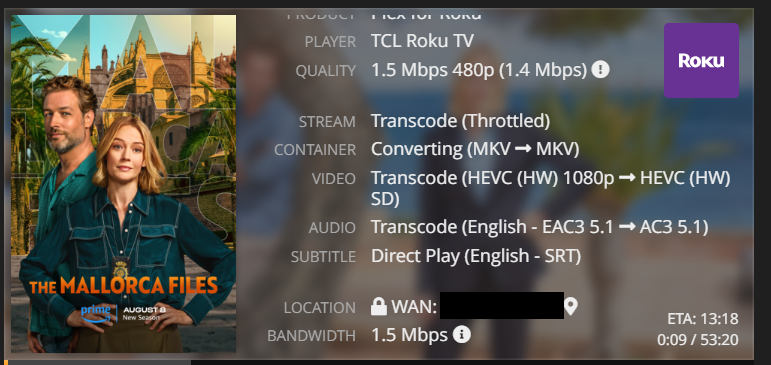

She says the video quality looks good… but she’s 90. 
Might wish to hide photos, names and ip addresses.
Thank you, I was a little slow on this one!
So I finally got the new HEVC transcoding option enabled.
It works when I play media to my iPhone transcoded to 3mbit.
However, when I try to play media on the Chrome browser as a client, at the same 3mbit quality, I get this error:

I thought Chrome supports HEVC these days. But if for some reason not, then shouldn’t it fall back to H264 instead of just not playing?
I can’t enable the new HEVC option yet then because some of my family watch on their laptop using Chrome and will not be able to watch when the setting is enabled right now.
Any ideas?
@ChuckPa figured this out.
For anyone using LXC in Proxmox with GPU passthrough. In order to get the GPU to show up in the dropdown and to unlock the HEVC settings:
All you should need to do, and what worked for me was to add this line to my Proxmox LXC conf:
lxc.mount.entry: /dev/dri dev/dri none bind,optional,create=dir
In fact, I found that all I need for everything related to GPU to work are these lines:
lxc.environment: NVIDIA_VISIBLE_DEVICES=all
lxc.environment: NVIDIA_DRIVER_CAPABILITIES=all
lxc.cgroup2.devices.allow: c 195:* rwm
lxc.cgroup2.devices.allow: c 511:* rwm
lxc.mount.entry: /dev/dri dev/dri none bind,optional,create=dir
And to find those 2 numbers, in my case, 195 and 511, you can use this command on the host.
ls -l /dev/nv*
