I’m glad to see somebody other than me keeps their original Blu Ray rips in their original codec/bitrate. I have a couple of hundred VC1 files in my library as well.
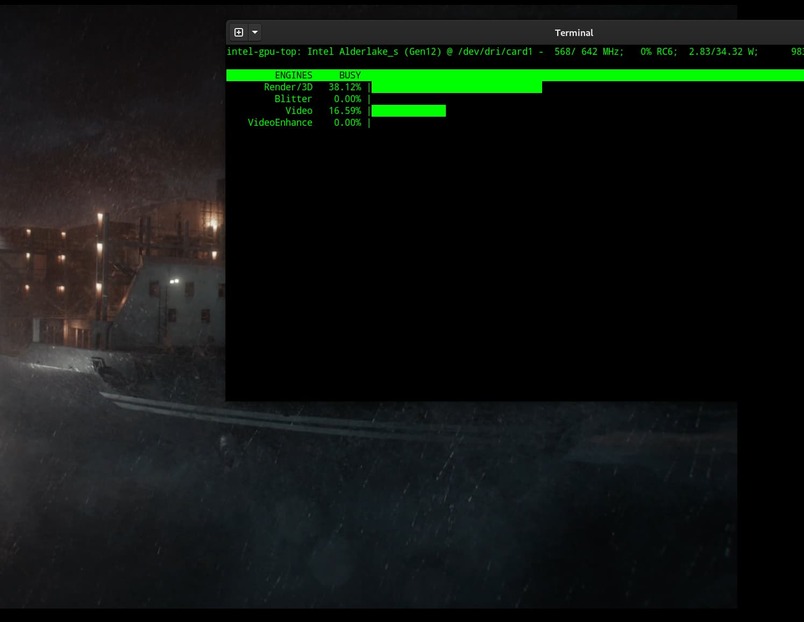
As much as the Intel fans want to say QSV is “the best”, I’m with ya about Nvidia. The quality all around is just better. With that said, in the interest of power saving, I am using QSV now. It’s “good enough.” The Alder Lake video engines aren’t bad. But don’t think the RTX 2000e ADA and the RTX 4000 SFF ADA cards haven’t caught my eye….
can you link me to your threads please? Because I’m having similar issues with the current trancoders with my Intel iGPU (Can’t transcode HDR10+/DoVi anymore if tonemapping is enabled).
@chris_decker08 It looks like in preparation of the new release, the Roku development team has disabled HW transcoding to temporarily resolve the issue I’ve referred to a couple of times.
Edit: I spoke too soon. It comes and goes. My server was using software decode/encode before I hit “Skip Ads” and then switched to HW decode/encode after I skipped the ads…. Not sure what’s going on. I’ll attach logs so you have a record.
I’m seeing something a bit different on my UHD 770 (i7-12700K). HEVC transcode of a 4K file has the render engine pegged between 80% and 100% the whole time, even after it’s built a modest buffer.
The people that access my server remotely who I am therefore transcoding for wouldn’t even notice the difference in quality between a QSV and NVENC transcode. If they did, I’m paying for the hardware and power, not them so they get what I decide to give them.
I recommend using the iGPU rather than a discrete GPU to most that ask as it is generally the cheapest and simplest option in terms of hardware and power costs, complexity, size and effort. Most wouldn’t notice the difference in picture quality unless it was pointed out to them, particularly if the stream is being compressed fairly heavily or the source media is already poor.
Discrete GPUs have their place but for most it I would only recommend them over an iGPU for specific use cases.
The only issue I have streaming to Roku devices is that anyone who streams using subtitles (srt, ass, ie not image) was that it forced transcoding (HW or SW) for all content.
After the user switches their Plex player app’s settings to Burn Subtitles “image formats only” all videos with text subs stream directly without conversion.
This is true on this dev build as well as the current public build.
Other than this issue, with my content/libraries, I have seen no issues transcoding or direct streaming x265 to Roku devices…
Setup:
Windows x64
Intel ARC A380
AMD Ryzen 7000 w/eGPU
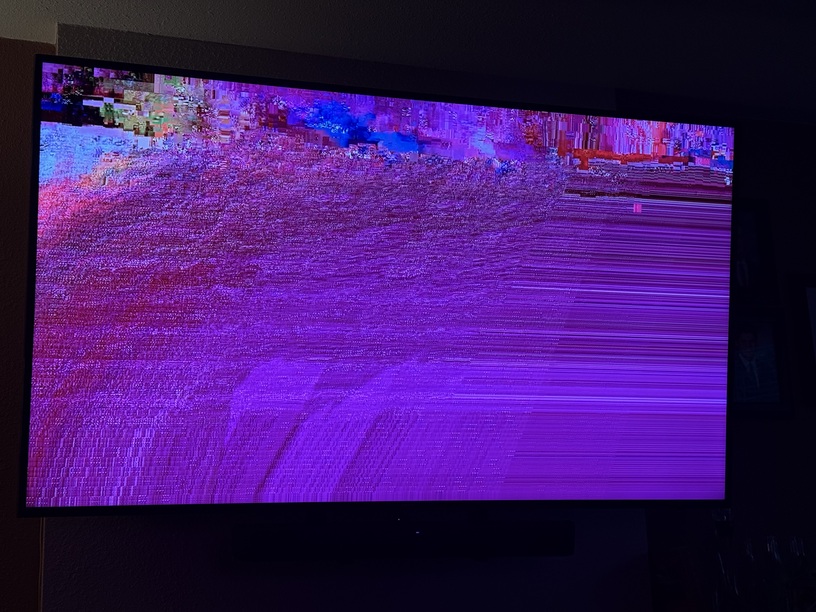
This is the issue I have while watching Live TV. Unfortunately Roku doesn’t handle MPEG2 very well so transcoding is a must. I had no problems prior to the transcoder overhaul. It starts out fine then after a minute or two looks like this. I haven’t tested it on other platforms. None of them have a problem with MPEG2 so I don’t need to transcode.
The only other issue I’ve been told by external users that use Xbox clients is a black screen with sound when HEVC is the codec.
The people that access my server remotely who I am therefore transcoding for wouldn’t even notice the difference in quality between a QSV and NVENC transcode. If they did, I’m paying for the hardware and power, not them so they get what I decide to give them.
As I said, it’s good enough. Yes, power consumption is why I use it. I went out of my way to find a i9-14900T CPU so that I would have the dual video engines in a 35 watt CPU.
But there are users out there that say QSV is superior quality video and that simply isn’t true.
Fortunately, Comcast broadcasts all channels to CableCard devices pre-transcoded to h264 first - at the detriment of lower quality and max 720p resolution…
… So I no longer have experience with ATSC broadcasts any longer.
I have two different PMS servers running DVR. My other is located at my parent’s house on their Charter cable. It’s a very old Scientific Atlanta/Cisco/Technicolor system. So virtually nothing has a DRM flag. Which is cool! But it always has things broken in the SDV system and runs MPEG2.
Is this with or without Settings → Video → Allow MPEG2 enabled on the client? Or does it matter? I’ve not used Roku as a client for a while (for reasons) but I found that this generally helped in my case.
Not to derail this thread too much farther, but you can also have PMS transcode live TV to H.264 with the “Convert Video While Recording” setting in your Live TV & DVR settings now. In the future it will support H.265.
Edit: Actually, I may not be correct here. That setting actually only appears to affect recordings (that transcoding in my image was happening for other reasons).
With the mention of Nvidia vs Intel encoders I just want to say that it would be nice to see some information on the qualitative differences between the two for the purpose of Plex transcoding. It would be very interesting if a public dataset could be compiled with video files encoded within PMS from each generation of the various hardware encoders out there.
Can Plex save the videos after transcoding somehow? If enough Plex users got together we could all do some testing with something like Big Buck Bunny or another free example of 4K HDR media with our own hardware. Being able to directly compare the differences would be really helpful for Plex users.
In March 2023, Tom’s Hardware published an encoding comparison using Intel, Nvidia, & AMD GPUs and also software.
It uses video from games, not movies/tv shows, so not an exact fit for Plex. However, it does give performance (fps) and quality (vmaf) information when encoding H.264, HEVC, & AV1 at 1080p and 4K.
Every time I open this page, Its awesome knowing that soon Ill finally be able to lower my outgoing bandwidth without loosing image quality by transcoding on the fly to x265/HEVC instead of x264. Cant wait to test this on my N100 Plex Server
My N100 Plex Server:
But in all seriousness, Brilliant work chris & everyone else involved, And thank you!!!
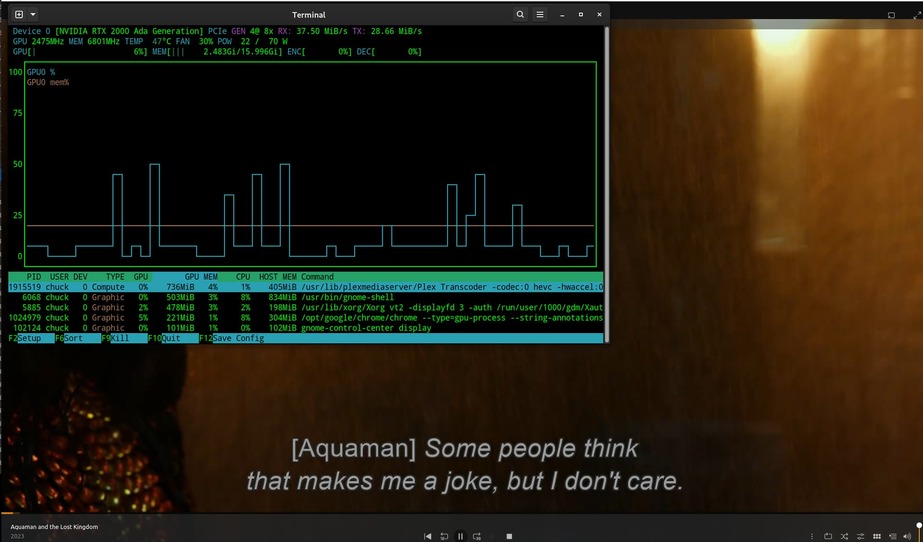
Thanks for this detailed reply Chuck! I really appreciate it. Exciting results indeed. It looks like you could do 3+ simultaneous transcodes of the same configuration then.
And I assume PGS shouldn’t be any worse then vs what looks like text based subs in your test?