I Strongly suspect this is not caused by the bitrate but by 24 bit encoded audio. Can anyone who had experienced this issue check the bitdepth of the audio and confirm or deny?
I’m using MediaInfo to pull this info from a couple files. Both are encodes of the same movie, one with the E-AC-3 at 1152kbps, the other at 768kbps.
This one stutters when remote playing with Plex and transcoding:
Audio
ID : 2
Format : E-AC-3
Format/Info : Enhanced AC-3
Commercial name : Dolby Digital Plus
Codec ID : A_EAC3
Duration : 1 h 37 min
Bit rate mode : Constant
Bit rate : 1 152 kb/s
Channel(s) : 6 channels
Channel layout : L R C LFE Ls Rs
Sampling rate : 48.0 kHz
Frame rate : 62.500 FPS (768 SPF)
Compression mode : Lossy
Stream size : 803 MiB (22%)
Title : English E-AC-3 5.1
Language : English
Service kind : Complete Main
Default : Yes
Forced : No
Dialog Normalization : -31 dB
dialnorm_Average : -31 dB
dialnorm_Minimum : -31 dB
dialnorm_Maximum : -31 dB
And this one does not:
Audio
ID : 2
Format : E-AC-3
Format/Info : Enhanced AC-3
Commercial name : Dolby Digital Plus
Codec ID : A_EAC3
Duration : 1 h 37 min
Bit rate mode : Constant
Bit rate : 768 kb/s
Channel(s) : 6 channels
Channel layout : L R C LFE Ls Rs
Sampling rate : 48.0 kHz
Frame rate : 31.250 FPS (1536 SPF)
Compression mode : Lossy
Stream size : 535 MiB (16%)
Title : Surround
Language : English
Service kind : Complete Main
Default : Yes
Forced : No
Dialog Normalization : -31 dB
dialnorm_Average : -31 dB
dialnorm_Minimum : -31 dB
dialnorm_Maximum : -31 dB
As you can see, bit depth is not listed. After searching around some to figure out where to look for it, it seems like there is not a set bit depth for E-AC-3? It uses a variable bit depth and so there isn’t really a single one that can be listed in the info to give to you.
Here’s someone asking about it on Handbrake’s (which is what was used to encode these) git, and they say bit depth isn’t something selectable when using E-AC-3.
Here’s a similar question on the MediaInfo sourceforge site, and their answer is pretty much the same - there is none listed because it isn’t a set value for many kinds of audio, especially lossy ones it seems.
Is there some tool you’d like us to use to try look it up? Or where else would we look for it (if it is possible/relevant)?
can you guys check that this build fixes the issue you were seeing?
Desktop Platforms
-
Windows
-
Ubuntu/Debian
-
RedHat/Fedora/CentOS
-
FreeBSD
-
macOS
NAS Devices
-
Asustor
-
Seagate
-
Synology (DSM 6)
- ARMv7_Neon (x15 Series (excluding DS115j, RS815), x16 Series (excluding DS216se), x17 Series, x18 Series, and DS414j)
- ARMv7 (x13 Series, x14 Series (excluding DS414j), DS115j, RS815, and DS216se)
- ARMv8 (x18 Series, x19 Series, x20 Series)
- Intel - 32-bit (x10 Series, DS415play, and DS214play
- Intel - 64-bit (DSM 6.0 or newer)
-
Synology (DSM 7)
-
QNAP
-
Unraid
-
Netgear
-
Western Digital (OS 3)
-
Western Digital (OS 5)
Wow, for me the issue is gone on my Debian 12 VM. WOW.
I’m on Debian 12 x86_64
I’ve just installed PlexMediaServer-1.41.7.9799-5bce000f7
I’m no longer seeing the issue with the file I was using prior, which has a 1536 kbps EAC3 audio
Hello,
I’m still experiencing transcoding with my Nvidia Shield. I have all the recommended settings configured to achieve direct play for both audio and video, but this only happens with the Nvidia Shield. For example, with the Fire Stick I had before, I didn’t have this issue.
I’m running version 1.42.0.9975.
I’m attaching a screenshot showing how it’s transcoding the audio.
Thanks!
Best regards,
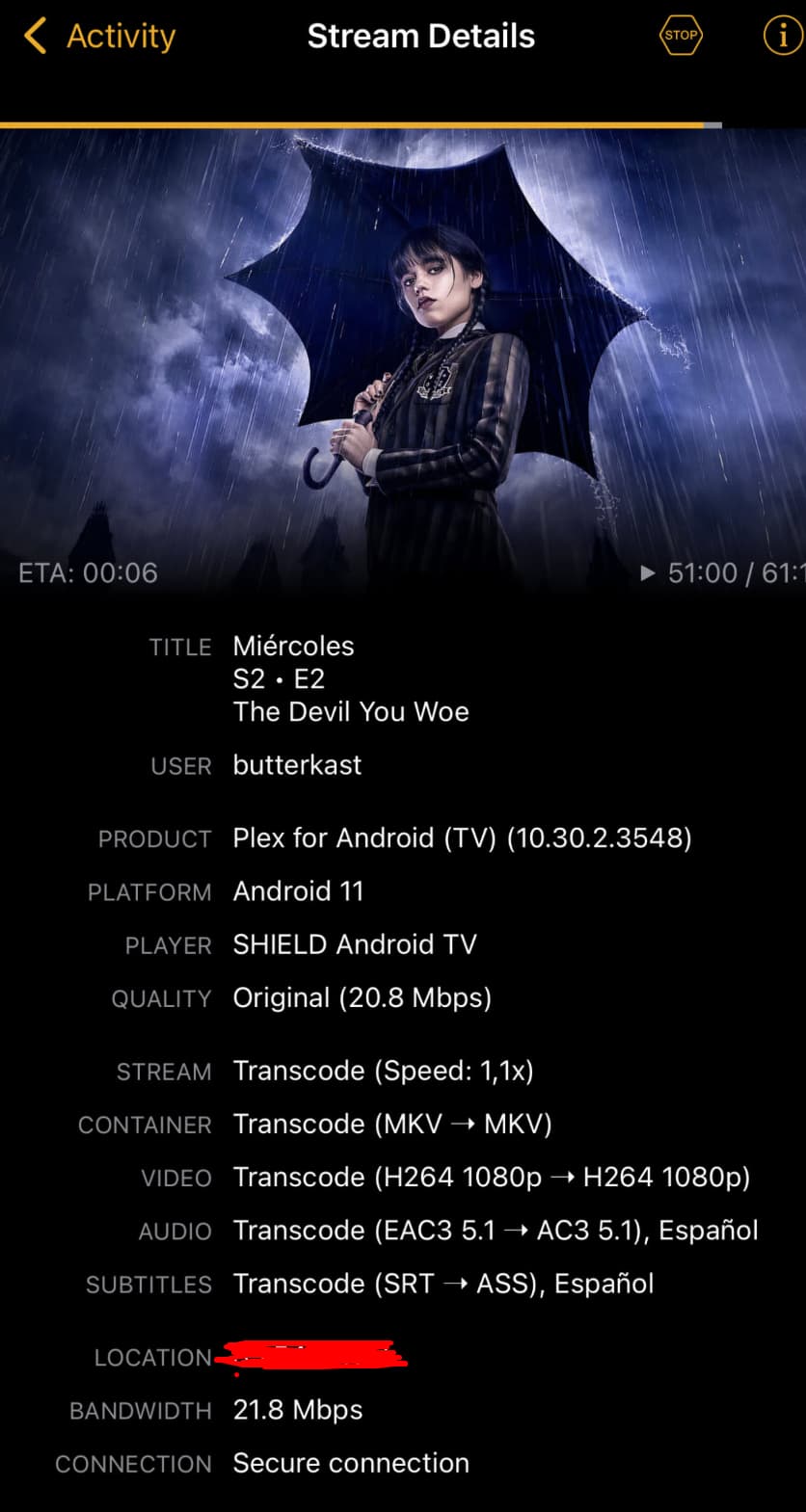
well, I’m facing the same issue now I think. If the audio is high-bitrate EAC3, PMS will transcode also the video track for nothing.
See log attached. First I played the movie with the high-bitrate EAC3 audio track, obtaining also video transcoding, and then I switched to the AC3 audio track, obtaining direct video playing.
Please fix this
Plex Media Server.log (779.4 KB)
Which Nvidia Shield is being used here ?
I have the Shield Pro 2019
- Everything from PMS is DirectPlay
- No stuttering of any kind
- Subtitles handled by the shield
I’ve DirectPlayed 100+ Mbps videos (2160p, 59.94 FPS + audio + subs) without a stutter
I know the transcoder stuttering problem is fixed.
We found where the error was occurring in how it accepted source stream data and fixed the math (it was broken there).
Here’s a testfile which caused it (the high bitrate + the LFE )
I have the same Debian PMS as always, and the problem is the high bitrate EAC3 audio track, not video (as the one you attached). Please see my logs.
I recap my issue:
high bitrate EAC3 audio track → both audio and video transcoding
AC3 audio track → both audio and video direct playing
The movie file is the same, I just switch audio track from player. My home theater system doesn’t support EAC3, so EAC3 to AC3 transcoding is right in the first scenario, but the video transcoding isn’t.
