Glad I found this chain as I have opened a topic about issues with 4K media. {4K Streaming PMS Reviews} You see this is almost 2020 and 4K content is very common. So when I try to play 4K I get constant buffering. Some say I need more powerful server - well I do: HP G9 Proliant 20 Core 2xE5-2660v3 2.6ghz and going by this chain’s opinion I should be able to transcode 4K since I have a server that can handle it. Well the server can handle it with an average of 87% CPU utilization but I am still getting buffering on my clients - all of them i.e. Windows, TV, Web. Some clients may have TVs/Displays that are 1080. What would happen to streaming 4K to them?
So if the high end Servers aren’t enough the question is can PLEX even pull off the Transcode=OFF solution suggested here for 4K content. I hope so. I mean even setting a server to ORIGINAL and client side to Direct Play still doesn’t do it for me. I have wired connection at home and plenty of bandwidth to handle 4K. You don’t want people going into registry or dealing with codes.
Can the plex team make it work? That would be greatly appreciated as I’d like to enjoy my PLEX for Holidays
I would also like to see this happening in Plex.
Thing is, there are several forum posts regarding turning off the transcoder, they should be merged into a single thread.
In my case its not even a CPU problem… my users (no very tech friendly) complain that the quality is bad, and I have to explain them that they need to select the quality to Original. I have no network problem, and Original quality is 99% of the time the best choice. But for Plex apparently it’s not… I’d rather just force my users to use Original quality so they dont have to even think about that.
Another +1 for this option. I’d like to keep conversion for sync but disable transcoding of live streams (ideally for certain users but I’d gladly take a global switch).
+1 also from me - there is no point for this ■■■■■■■ transcoding when server and client can flawlessly play every movie without efforts - this always-on-feature just causes more energy consumption and a server which is blocked without reason.
@elan sorry to bother you, but what do we need to do to get some attention from the Plex staff about this? How do you guys handle enhancement requests?
This is not only important because many folks deem it’s needed, but also because one of your competitors already implemented this, and people are starting to turn to Emby. Competition is great to improve the products.
Sorry, I’ve tried your trick, but I’m doing for sure some mistakes, it’s not working for me.
I have my Plex Server installed on Synology NAS. All my movies/cartoons are in /Media directory. I’ve created a /Media/temp directory with read permissions for plex user. Then I’ve configured properly Plex in order to have a new Transcoder temporary directory: /Volume1/Media/temp
Then I’ve tried with a movie that has a TrueHD audio track as first track, and AC3 as second, and the movie starts using the first track (AAC transcoding).
I would like to avoid any type of transcoding … What I can check/do?
Thanks for your support
Andrea
[edit]: well, the CPU usage is quite low (5%), so maybe Plex is not transcoding, but in the dashboard I see “transcode”. Or the audio transcoding is not as resource consuming as the video transcoding
Another question is: why Plex is not using automatically the second track that is AC3 (so transcoding is not required)?
I am sharing my library with my parents. They don’t know how to change settings and never will. If they run into an episode that doesn’t work it shouldn’t be a big deal.
I am sharing with a couple friends who are way more computer literate and they know to change their maximum higher. If those people need to transcode then it is because the file isn’t supported by their player.
Ideally this would be automatic. The client would try a direct stream first and if there wasn’t enough bandwidth, it would try transcoding instead. But there’s a lot of circumstances where it is transcoding when it doesn’t have to right now simply because the default setting for transcoding is 3 MBits/sec and both the server and the client have higher bandwidth than that.
In the scenario you’ve painted, why would you observe your parents transcoding and then just call them and tell them to raise the quality level, as opposed to them having the bad experience of videos randomly failing on them?
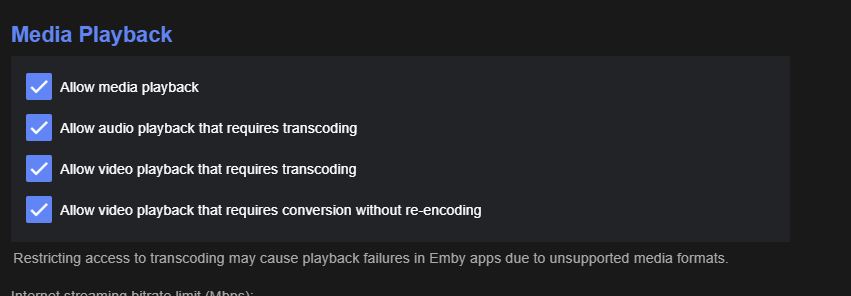
I was just mentioning the way Emby implemented the disabling of the transcoder, which is by user. If I try to guess, a valid scenario is that you could be sharing libraries with several users and might just want to avoid transcoding for users that do not know how to configure things properly at the client side. Another scenario could be that some users have a “higher priority” or importance than others and the server would not be able to handle transcoding for all, so turning transcoding off for some sounds like a good idea.
What I like about it is, it gives you finer granularity for disabling the transcoder, instead of disabling it completely for every one. For instance I would never want to disable the transcoding for my very own user.
Merci, @guillaumebriday, your advice was very helpful! I combined it with advice from another thread to ensure direct play was enabled, and all other settings dealing with anything remotely related to or hinting of the need to transcode was scrutinized and set.
This solved the playing of mpeg2 files from an RPi 3 with PMS to an old Fire TV with Plex client for me.
Correct me if I’m wrong here, but it seems the remote streaming quality settings are set on a per user per client basis. When a family member or friend of mine switches phones, gets a new fire stick, or logs in on any new device, they don’t know or remember to change that setting. I end up having to reach out to them every time they set up a new device. I know it’s not often, but it gets annoying having to constantly reach out.
@elan Thanks for responding to this thread on this topic.
I think the best way to put it is, I don’t mind my folks direct playing/streaming my libraries, but if they delve into the transcoding realm, I’m fine with denying the access. Eventually I’d help them get it working so they can direct stream or play but when I’m not monitoring the server, by default I don’t want it to transcode.
Transcoding takes CPU power and that generates heat, I don’t want a remote user to have that sort of power.