How to move view state to new install? (step by step)

I find it hard to understand the guide to move viewstate. Had to find tutorials on how to install the SQLite… now i’m having a hard time figuring out how to use the guide: https://support.plex.tv/articles/201154527-move-viewstate-ratings-from-one-install-to-another/

Any tips for a “non programmer”? This is all so very greek to me… but after 5+ years of running the current server i dont want to loose my viewstates.

(the 18.xx server version crashes all day long, hoping reinstall will help. Previous versions almost never crashed)

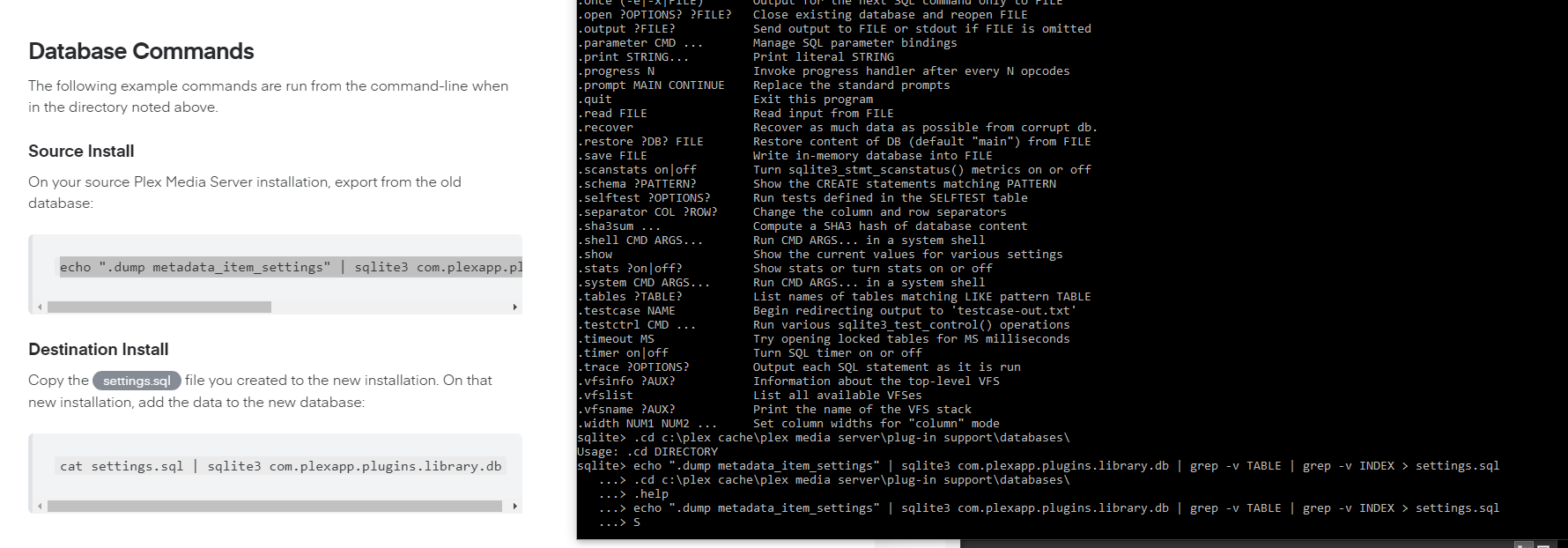
Me tring to figure our SQLite… the commands stop working…

Trying hard… no response what so ever on the commands… Sqlite only responds on the first command i send,.

image

You don’t do it from within sqlite, you do it at the command prompt , i take it your in Windows OS?
For some reason this whole process is not documented well for Windows.
The next problem is the fact there isn’t a grep command in windows.
Here are some pointers:

  1. install : GNU Grep For windows, Complete package, except sources, after install make sure to add the full path to the bin directory to your environment.
    2)Assuming you now have a command prompt with both Sqlite3 & grep available, the is:

sqlite3 com.plexapp.plugins.library.db “.dump metadata_item_settings” | grep -v TABLE | grep -v INDEX > settings.sql
Note: the metadata_item_settings table has a column (account_id) , the new system this will be imported to has to have matching accounts/id or your results will be off.
Cheers, hope this steers you in the right direction!
-TD
If you haven’t created libraries yet on the new server, simply copy over the whole db file.

This topic was automatically closed 90 days after the last reply. New replies are no longer allowed.
