How to use "Collections" with family home videos

I have figured out how to add “Collections” that show up on the “Collections” list. But, I have hundreds of such videos grouped into these 11 folders, which correspond to what I would want the “Collections” to be. Is there any way to select an entire folder of family videos and set them all into a specific “Collection” at once? This would be far easier than having to set “Collections” for each video one-at-a-time.

Thanks for your help on this.

Please advise. Thank you.

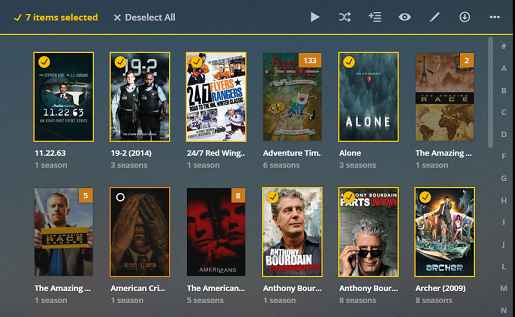
You can navigate your videos by folder. While there’s no select all option, you can manually select all items and then mass-edit them.

  1. check all items in the given folder
  2. click Edit in the top menu (pencil)
  3. switch to Tags and add the collection according to your liking
  4. save
    Now all those items will show in the corresponding collection.
1 Like

You can select an entire range of items by selecting the first, then hold Shift while clicking the last. This will select everything in between.

[HowTo] Selecting multiple items for edit, playlist, etc.

3 Likes

This topic was automatically closed 90 days after the last reply. New replies are no longer allowed.