Yes, it will… just not sure if the target folder will be the exact same in your new setup.
good point! I will let you know… Thanks
FYI… just merging the regedit file worked just fine … I did stop plex in the services before merging … worked great!
1 Like
Thank you so much !!!
How do I confirm that I am infact using the new location without deleting the old ?
Enable debug logging on the server, then restart the server.
After 2 minutes, look at the Plex Media Server.log
Worked flawlessly, a properly thought out and professional guide. Thanks
1 Like
Oh so check the time stamp in that file and confirm it is recent… it is thanks!
You can also look inside this log file. The data folder location is mentioned.
I can’t seem to get this to work. I’ve actually had it set up this way for years, but haven’t changed it since the security issue took it away from the front end. Now I want to do 2 things: Turn off the PMS as a service and switch from one user to another. My files are already in “e:\Plex”, but when I try to disable PMS as a service and just use the built in Plex service, it doesn’t find anything. I’ve rebooted into the new user account with the LocalAppDataPath set in the registry, but it still doesn’t work. I can’t figure out why. @OttoKerner Any thoughts on why it isn’t working? If I’m starting up Plex using the built-in service it should point to “e:\Plex”, but it doesn’t seem to be doing that. Any chance I need to set it to “e:\Plex\Plex Media Server”?
File access permissions?
Try to access your data location while logged in as the new user. Try read and write. If this fails, you know the reason.
I think I know what the issue is. My new user doesn’t have the correct registry entry for Plex. In fact, there is no Plex key at all! Should I back up the key from the user account Plex is currently running on and import it into the HKEY_CURRENT_USER for the new user account? I find it odd that the new user doesn’t have the Plex registry entry. Anything else I’m missing?
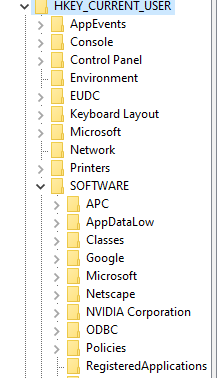
Edit: And the new user account doesn’t have any issue with read/write.
If the registry entry is created in a “First Run” it could be that that user for some reason isn’t doing the 1st run scenario for whatever reason, maybe because you had it as a service previously.
If you still have issues I’d suggest trying my alternative method I posted about July 30th.
I personally think it to be a superior method. Some people seem to dislike Junction commands mkLink, but I’m not actually sure why. In any case just follow the instructions from the post I quoted using your already moved location.
Oh, just a note, which may also be worth looking into with the other method too, you said the user has read & write permissions for the folder you’re trying to use, but look at who the owner is & make sure the advanced sharing settings are the same as a new folder you make on the C: drive root
This would be my recommendation.
Although these keys should be automaticlly created on first run. So @LostOnTheLine might be on to something with the Plex-as-a-service software.
Ah, good point. I forgot to “start” the Plex Media Server with my new user. Yea, the service has been setup for a very long time so it just runs all the time.
So, now that I’ve started the Plex Media Server with my new user, I do get a Plex registry entry, but it seems incomplete. This is all I’ve got.

I’m guessing there isn’t much there because it doesn’t realize that I’ve already set up the server and it wants me to set it up again. I could run through the set up process again, but a tad worried about what that will do to my existing setup. I’m guessing nothing, but I really don’t want to take the chance. It seems less drastic to just copy the Plex registry entry from my working user.
I’m not sure the merging of folders would do me any good as it would still lack the proper configuration entries in the registry.
So, it seems I have 2 choices: 1) copy Plex registry entry from existing “working” user; or 2) re-run setup. Thoughts on which option is best? Or did I miss a 3rd option that’s even better?
@OttoKerner Just saw your note from a few minutes ago. Yea, I think that’s the way to go. I’m guessing “first run” includes running through the setup process?
No, you export the registry branch from your old user account and import in on the new user account. (during which the server must not be running, of course).
Upon next start, plex will now use the imported values. A new set up routine is not necessary.
I would agree. Doing a setup could very well have a negative impact. But if you decide to try it I’d strongly recommend backing up 1st
1 Like
Right, I was just wondering why my new user account doesn’t have all of the registry keys. I’m guessing that those registry keys only get generated through a server setup, which is why restoring the registry from a working account would be safer in this situation.
Not only safer. If you perform a new server setup, your server is getting a new machine ID. Which means that all clients need to be reset (to use the “new” server as default) and all server shares you may have created need also to be re-created.
1 Like
I am getting a new machine soon if I export the registry key Computer\HKEY_CURRENT_USER\SOFTWARE\Plex, Inc.\Plex Media Server & install Plex on the new machine then close Plex then import the registry key to the new machine
I realize I’ll have to alter the Data path in the registry file but the rest of the settings should carry over right?
