it doesnt actually throw an error message it just says my library is empty 
This library is currently empty
Expecting more? Visit the Manage Libraries page to add folders and scan library files.
it doesnt actually throw an error message it just says my library is empty
This library is currently empty
Expecting more? Visit the Manage Libraries page to add folders and scan library files.
Well these instructions didn’t work for me at all. I am quite computer literate (software engineer) so I know I followed them properly, but after the process was complete, Plex showed an empty library and checking the disk showed it was still using the LocalAppData 
So instead I just made a junction and that worked fine. Instead of all these complex and unreliable instructions, it would be better to just tell people to symlink/junction it. Or better yet make the darn thing properly configurable! So tired of apps these days just assuming it’s ok to eat up my appdata drive. It isn’t!
i did this, now
plex wont even open
I got scared after some people said the OP instructions weren’t working. I used a junction as @agathorn suggested. Was way easier.
I added an SSD to my computer that is now my primary drive. I still have my HDD attached though. Can I take the contents from the HDD localappdata file and swap them out with the contents of the new localappdata on my SSD?
Does that mean that your computer is now booting off the SSD drive and you did install Windows completely anew?
Yes, you can indeed copy the whole folder off the old drive to the default location on your SSD.
Just make sure that Plex Server ins not running while you are doing this. (if you have already installed it onto the new Windows)
I’ve had PMS running on various hardware for what seems like forever, but probably only about 8 years or so. I’ve had it on Win7, WHS2011, Ubuntu, Mint, WS2016, and now finally settled onto W10Pro for a little while.
I’ve had my PMS Media and Data together on a slow HDD, and it sucked.
I’ve had them on separate HDDs, and that sucked just a little less.
I’ve had them together on a DrivePool, and that was as sweet as a pile of hot garbage.
I’ve had PMS Data on SSD (system drive) and Media on DrivePool. That works great!
I recently upgraded from a SATA SSD to NVMe, and at the same time carved out a slice of the SSD for PrimoCache to sit "in front of’ my pool disks. OMFG, it’s awesome.
Now my only problem is the noisy SMR disk I’ve been meaning to rip out and shoot to pieces since the day I installed it.
TLDR;
You don’t “have” to install Plex to an SSD, but your PMS experience will feel a whole lot smoother if you do just that.
The solution has always been and always will be to install {insert program name} to a sufficiently fast and spacious drive. That solution was around, OMG, before Plex was even a thing.
Not sure why you chose to take a condescending tone here.
It’s not about the size or speed of the drive. I want to be able to maintain the plex software independently from the OS. I can not do that if all of it’s app data is tied to the OS partition.
It’s not.
You can specify where plex data is located.
On windows or Linux (and probably Mac).
The first post of this thread shows how.
There is a difference between where you “install PMS” and where to you move its data folder.
I recommend to install the program files always to drive C:
It doesn’t matter whether this is a SSD or “spinning rust”.
But the Plex data folder should reside on an SSD if your media collection has grown to more than just a few hundred items.
It makes things easier if this is a dedicated device.
Most “pooling” solutions don’t support “hard links”, which are required for the data folder. So steer clear of those.
(This applies to both Microsoft’s own Storage Spaces and the 3rd-party Drivepool software.)
The media themselves can reside where you like.
Like I said, it’s not a reasonable way to have to do something that should be (and indeed used to be) handled via a basic configuration change.
The menu item for changing the location of the data folder was removed due to a security researcher who concluded that precisely this constituted a security issue.
you still can change the location of the data folder. This thread here is dedicated to the process.
please don’t pollute this thread here with discussion about what features Plex should or should not have.
You can open a new thread in the regular part of the forum. This subforum here is for How-to’s and practical guides.
A post was split to a new topic: Migrating Plex Media Server from Windows into Docker container
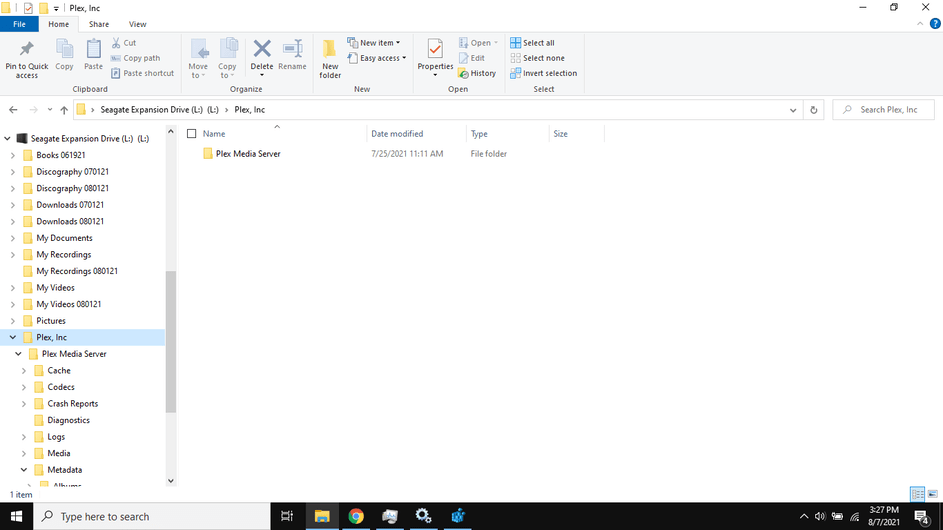
Hello all. I appreciate all the wisdom here. I am a newbie here. I have 200 GB of metadata filing up my PC’s Int. HD that is only 256GB. I have tried all the steps here to change the path of the Plex metadata to an external drive (L:). However when I rebooted and started Plex my libraries were gone. I reconstructed the libraries but the metadata is still be saved to the C drive. I do have several screenshots to show if needed. One in particular is the properties of the Plex Services Updater from the Services app. It does show the path as being to the C drive still. Any help would be greatly appreciated.
'
I’m not sure it’ll work that well pointing at an external drive. Can you try it on an internal drive? Even an HDD would be better than external. And what’s the exact file path to the Plex Media Server folder? Is it L:\Plex\Plex Media Server? It looks like it’s actually L:\Plex, Inc.\Plex Media Server which could be why it can’t find it.
Change your plex password immediately,
then sign out your server, restart it and sign it back in
You have posted your plex token, which is kinda as if you posted your username and your password publicly.
First of all, thank you for the detailed guide. I just have a few questions before I do anything and mess things up.
Mainly, I’m trying to move everything to an external hdd (both my media and the database) so I can easily move my server to different computers and get up and running by just installing the Media Server program on the new computer. Is this possible? I imagine I would have to edit the registry entry every time for the database location and maybe edit the drive letter for my external drive if its different on other computers? But other than that, will it be pretty much plug and play by following these steps?
Also, Is there anything in the Plex data folder that can be manually deleted to reduce size? Like any temp files or old file not needed? Or is everything there really needed? For example, I’ve noticed there are multiple server update files stored there (previous versions). Are those kept there for a reason? Do they get trashed eventually automatically?
What about the Sonic Analysis feature? What kinda files are stored for that and how much space do they take? I turned that feature off but Plex had already scanned around a hundred albums (never finished the whole library though) so I’m thinking maybe that might be taking up space for no reason.
Any other tips would be appreciated as well!
Yes and yes. But it’s not ideal to have both the media and the Plex data on the same mechanical drive.
I recommend you to set at least a folder on an internal drive to be the transcoder temporary folder.
No, you cannot reduce the size of the Plex data folder, except by disabling video preview thumbnails.
Once the sonic analysis has been performed it takes up only a few KB’s per album.
Do you mind elaborating on that please? I’m not exactly sure what that setup would look like. Is that a specific folder inside the Plex data folder that I should copy over to the internal drive and everything else can be on the external drive? Or are you saying that I should just copy over the whole data folder on the computer’s internal drive every time I want to move my server on a different device?
And why are you saying it’s not ideal to have the media and data folder on an external drive? Is it a speed/performance issue?