Yeah there were / are some Gemini Lake related issues left
Got Lucky and found a restore point of June 11, 2023 for PlexMediaServer, installed PlexMediaServer-1.32.3.7192 on it, and tested tone mapping but did not work. So I then upgraded to PlexMediaServer-1.32.8.7639 and still tone mapping was broken. So I just reverted back to PlexMediaServer-1.40.5.8897. Since with the downgrade my users lost their watched status along with other things; and it did not fix the tone-mapping issue, so there was no point sticking with the older PMS.
NAS (Model): DS920+
Operating System: Synology DSM 7.2.1-69057
Kernel: 4.4.302+
Processor: Intel Gemini Lake (J4125)
Please see this post regarding GeminiLake w/ tone mapping on Synology 7.2.1
(( My test machine will remain 7.2.1 for a little bit longer ))
Totally missed that. Thanks for the hint
Any news about Gemini Lake Tone Mapping fix?
It seems Arc GPUs are working again with tonemapping? 
I have an alderlake machine 12700k and I am not able to transcode with HDR tone mapping enabled on HDR movies.
Unraid 7 RC2
Plex docker linuxserver/plex, Version 1.41.3.9314
Getting these errors in plex:
Jan 02, 2025 00:08:40.120 [22525882825528] ERROR - [FFMPEG] - Failed to initialise VAAPI connection: -1 (unknown libva error).

Jan 02, 2025 00:08:40.120 [22525882825528] DEBUG - Codecs: hardware transcoding: opening hw device failed - probably not supported by this system, error: I/O error

Jan 02, 2025 00:08:40.120 [22525882825528] DEBUG - TPU: hardware transcoding: final decoder: , final encoder:

Jan 02, 2025 00:08:40.160 [22525910571832] ERROR - [Req#3a6a82/Transcode/102b24c8e56b] [AVHWDeviceContext @ 0x1496b4daa180] Failed to initialise VAAPI connection: -1 (unknown libva error).

Jan 02, 2025 00:08:40.161 [22525899676472] ERROR - [Req#3a6a83/Transcode/102b24c8e56b] Device creation failed: -5.

Jan 02, 2025 00:08:40.161 [22525901785912] ERROR - [Req#3a6a84/Transcode/102b24c8e56b] Failed to set value 'vaapi=vaapi:' for option 'init_hw_device': I/O error

Jan 02, 2025 00:08:40.161 [22525880716088] ERROR - [Req#3a6a85/Transcode/102b24c8e56b] Error parsing global options: I/O error

Jan 02, 2025 00:08:40.161 [22526660234040] DEBUG - Completed: [192.168.1.189:53781] 200 GET /status/sessions (26 live) #3a6a5e TLS GZIP 1ms 10233 bytes (pipelined: 49)

Jan 02, 2025 00:08:40.161 [22526667234104] DEBUG - Jobs: '/usr/lib/plexmediaserver/Plex Transcoder' exit code for process 115792 is 1 (failure)

Jan 02, 2025 00:08:40.162 [22525915052856] DEBUG - Streaming Resource: Terminating session 0x147 which is using 7958kbps of WAN bandwidth. Used is now 6247kbps

Jan 02, 2025 00:08:40.162 [22525915052856] DEBUG - Streaming Resource: Terminating session 0x147 which is using transcoder slot. Used slots is now 1

Jan 02, 2025 00:08:40.162 [22526046927672] DEBUG - Killing job.
I have the same question here as andrea809 regarding a Gemini Lake HDR Tone Mapping Fix for HW transcoding with QuickSync. I have a J5005 based plex server with Ubuntu. I’m running Version 1.41.3.9314 and would be happy to post some logs if that would be helpful for debugging.
Sorry for not seeing this.
We can’t support RC kernels . They’re still in the “Beta” category.
I’ve seen RC software get recalled at the last minute.
As for the Alderlake, I have an i9-12900 on native Ubuntu without issue so it’s not the CPU for either of us.
Gemini Lake is , and always will be, the problem child.
Intel didn’t do a good job / didn’t complete the work before they moved on to other processors.
There was upstream FFMPEG work done to compensate for GLK CPUs.
We are preparing for FFMPEG 6.1 upgrade – which will be a forum preview after the HEVC work goes public.
ALL:
I’m cleaning up my tasks in prep for what’s coming.
Retesting GLK CPU (DS920+) and it’s good - PMS 1.43.1.9314
Jan 15, 2025 12:21:19.962 [139988005030712] INFO - [Req#1cb/Transcode] Preparing driver ivd for GPU Intel GeminiLake [UHD Graphics 600]
Jan 15, 2025 12:21:19.962 [139988005030712] DEBUG - [Req#1cb/Transcode/DriverDL/ivd] Skipping download; already exists
Jan 15, 2025 12:21:19.962 [139988005030712] DEBUG - [Req#1cb/Transcode] TPU: hardware transcoding: final decoder: vaapi, final encoder: vaapi
Jan 15, 2025 12:21:19.963 [139988005030712] DEBUG - [Req#1cb/Transcode/JobRunner] Job running: EAE_ROOT=/var/packages/PlexMediaServer/shares/PlexMediaServer/AppData/tmp/pms-7d2c484b-5fab-4c33-87a6-72f6bdc5e37c/EasyAudioEncoder FFMPEG_EXTERNAL_LIBS='/var/packages/PlexMediaServer/shares/PlexMediaServer/AppData/Plex\ Media\ Server/Codecs/e613bce-3d5ad59c62e771ae9cb5738e-linux-x86_64/' LIBVA_DRIVERS_PATH="/var/packages/PlexMediaServer/shares/PlexMediaServer/AppData/Plex Media Server/Cache/va-dri-linux-x86_64" X_PLEX_TOKEN=xxxxxxxxxxxxxxxxxxxxxxxxxxxxxxxxxxxxxxxxxx "/volume1/@appstore/PlexMediaServer/Plex Transcoder" -codec:0 hevc -hwaccel:0 vaapi -hwaccel_fallback_threshold:0 10 -hwaccel_output_format:0 vaapi -hwaccel_device:0 vaapi -codec:1 truehd_eae -eae_prefix:1 3ej0l42bztvoy93q97bzofnv_ -analyzeduration 20000000 -probesize 20000000 -i "/volume1/Media/media/uhd/Avengers Infinity War (2018)/Avengers Infinity War (2018).mkv" -filter_complex "[0:0]hwupload[0];[0]scale_vaapi=w=2276:h=1280:format=nv12[1];[1]hwupload[2]" -map "[2]" -metadata:s:0 language=eng -codec:0 h264_vaapi -b:0 20000k -r:0 23.975999999999999 -force_key_frames:0 "expr:gte(t,n_forced*1)" -filter_complex "[0:1] aresample=async=1:ochl='stereo':rematrix_maxval=0.000000dB:osr=48000[3]" -map "[3]" -metadata:s:1 language=eng -codec:1 aac -b:1 256k -f dash -seg_duration 1 -dash_segment_type mp4 -init_seg_name 'init-stream$RepresentationID$.m4s' -media_seg_name 'chunk-stream$RepresentationID$-$Number%05d$.m4s' -window_size 5 -delete_removed false -skip_to_segment 1 -time_delta 0.0625 -manifest_name "http://127.0.0.1:32400/video/:/transcode/session/3ej0l42bztvoy93q97bzofnv/7bf16283-4bb1-4ba0-a95a-11a2d27f3020/manifest?X-Plex-Http-Pipeline=infinite" -avoid_negative_ts disabled -map_metadata -1 -map_chapters -1 dash -start_at_zero -copyts -vsync cfr -init_hw_device vaapi=vaapi:/dev/dri/renderD128,driver=i965 -filter_hw_device vaapi -y -nostats -loglevel quiet -loglevel_plex error -progressurl http://127.0.0.1:32400/video/:/transcode/session/3ej0l42bztvoy93q97bzofnv/7bf16283-4bb1-4ba0-a95a-11a2d27f3020/progress
Jan 15, 2025 12:21:19.963 [139988005030712] DEBUG - [Req#1cb/Transcode/JobRunner] In directory: "/var/packages/PlexMediaServer/shares/PlexMediaServer/AppData/Plex Media Server/Cache/Transcode/Sessions/plex-transcode-3ej0l42bztvoy93q97bzofnv-7bf16283-4bb1-4ba0-a95a-11a2d27f3020"
Jan 15, 2025 12:21:19.964 [139988005030712] DEBUG - [Req#1cb/Transcode/JobRunner] Jobs: Starting child process with pid 32368
Jan 15, 2025 12:21:19.970 [139988055653176] DEBUG - Request: [127.0.0.1:36202 (Loopback)] PUT /video/:/transcode/session/3ej0l42bztvoy93q97bzofnv/7bf16283-4bb1-4ba0-a95a-11a2d27f3020/progress?status=startup (15 live) #1ae Signed-in Token (ChuckPA) (range: bytes=0-)
Jan 15, 2025 12:21:19.970 [139988071938872] DEBUG - Completed: [127.0.0.1:36202] 204 PUT /video/:/transcode/session/3ej0l42bztvoy93q97bzofnv/7bf16283-4bb1-4ba0-a95a-11a2d27f3020/progress?status=startup (15 live) #1ae 0ms 203 bytes (pipelined: 1) (range: bytes=0-)
Jan 15, 2025 12:21:19.975 [139988066306872] DEBUG - Request: [127.0.0.1:36202 (Loopback)] PUT /video/:/transcode/session/3ej0l42bztvoy93q97bzofnv/7bf16283-4bb1-4ba0-a95a-11a2d27f3020/progress?status=startup (15 live) #1d1 Signed-in Token (ChuckPA) (range: bytes=0-)
Jan 15, 2025 12:21:19.976 [139988074048312] DEBUG - Completed: [127.0.0.1:36202] 204 PUT /video/:/transcode/session/3ej0l42bztvoy93q97bzofnv/7bf16283-4bb1-4ba0-a95a-11a2d27f3020/progress?status=startup (15 live) #1d1 0ms 203 bytes (pipelined: 2) (range: bytes=0-)
Jan 15, 2025 12:21:19.976 [139988053543736] DEBUG - Request: [127.0.0.1:36202 (Loopback)] PUT /video/:/transcode/session/3ej0l42bztvoy93q97bzofnv/7bf16283-4bb1-4ba0-a95a-11a2d27f3020/progress?status=opening (15 live) #1d2 Signed-in Token (ChuckPA) (range: bytes=0-)
Jan 15, 2025 12:21:19.976 [139988071938872] DEBUG - Completed: [127.0.0.1:36202] 204 PUT /video/:/transcode/session/3ej0l42bztvoy93q97bzofnv/7bf16283-4bb1-4ba0-a95a-11a2d27f3020/progress?status=opening (15 live) #1d2 0ms 203 bytes (pipelined: 3) (range: bytes=0-)
Jan 15, 2025 12:21:19.978 [139988055653176] DEBUG - Request: [127.0.0.1:36202 (Loopback)] PUT /video/:/transcode/session/3ej0l42bztvoy93q97bzofnv/7bf16283-4bb1-4ba0-a95a-11a2d27f3020/progress?status=opened (15 live) #1d3 Signed-in Token (ChuckPA) (range: bytes=0-)
Jan 15, 2025 12:21:19.978 [139988074048312] DEBUG - Completed: [127.0.0.1:36202] 204 PUT /video/:/transcode/session/3ej0l42bztvoy93q97bzofnv/7bf16283-4bb1-4ba0-a95a-11a2d27f3020/progress?status=opened (15 live) #1d3 0ms 203 bytes (pipelined: 4) (range: bytes=0-)
Jan 15, 2025 12:21:19.978 [139988066306872] DEBUG - Request: [127.0.0.1:36202 (Loopback)] PUT /video/:/transcode/session/3ej0l42bztvoy93q97bzofnv/7bf16283-4bb1-4ba0-a95a-11a2d27f3020/progress/stream?index=0&id=0&codec=hevc&type=video (15 live) #1d4 Signed-in Token (ChuckPA) (range: bytes=0-)
ChuckPa, it seems like you’re seeing transcoding working with tone mapping enabled. It’s not working on my system with the same server version. Would it be helpful to share logs or other information? Or, is it just a matter of time before the updates are rolled out?
Your server debug logs would indeed be helpful. It’ll show me what’s (not) happening.
- Restart PMS
- Wait 2 minutes for it to stabilize
- Start Playback
- Wait 30 seconds
- STOP playback
- Download Logs ZIP file
- Attach please for me to see.
For me,
chuck@ds920:~$ cat /proc/cpuinfo | grep 'model name' | uniq
model name	: Intel(R) Celeron(R) J4125 CPU @ 2.00GHz
chuck@ds920:~$

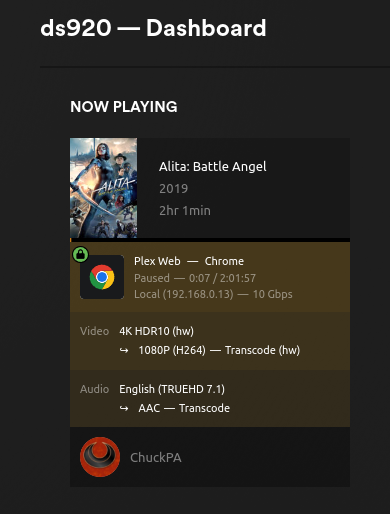
^^ The “10 Gbps” is the hint it’s being tone mapped (output piped to tone mapping stage)



Plex Media Server Logs_2025-01-15_21-23-57.zip (3.6 MB)
Model name : Intel Pentium Silver J5005 CPU @1.50GHz
I see the OpenCL (tonemapping error)
an 15, 2025 21:21:18.884 [138624265890616] VERBOSE - [TranscodeOutputStream] Waiting 100ms for more data...
Jan 15, 2025 21:21:18.984 [138624265890616] VERBOSE - [TranscodeOutputStream] Waiting 100ms for more data...
Jan 15, 2025 21:21:19.023 [138624114895672] DEBUG - Request: [127.0.0.1:47822 (Loopback)] POST /video/:/transcode/session/df819c23-e63f-473a-b174-4281e22ade6b-24/e5e03607-156d-49ed-a70f-84d993615e75/progress/log?level=0&message=%5BParsed_tonemap_opencl_3%20%40%200x7b2bfadb5980%5D%20Failed%20to%20finish%20command%20queue%3A%20-5. (13 live) #775 Signed-in Token (aaboorsma) (range: bytes=0-)  / Accept => */* / Connection => keep-alive / Host => 127.0.0.1:32400 / Icy-MetaData => 1 / Range => bytes=0- / User-Agent => Lavf/LIBAVFORMAT_VERSION / X-Plex-Http-Pipeline => infinite / X-Plex-Token => xxxxxxxxxxxxxxxxxxxxxxxxxxxxxxxxxxxxxxxxxx
Jan 15, 2025 21:21:19.023 [138624114895672] ERROR - [Req#775/Transcode/df819c23-e63f-473a-b174-4281e22ade6b-24/e5e03607-156d-49ed-a70f-84d993615e75] [Parsed_tonemap_opencl_3 @ 0x7b2bfadb5980] Failed to finish command queue: -5.
Jan 15, 2025 21:21:19.023 [138624265890616] DEBUG - Completed: [127.0.0.1:47822] 200 POST /video/:/transcode/session/df819c23-e63f-473a-b174-4281e22ade6b-24/e5e03607-156d-49ed-a70f-84d993615e75/progress/log?level=0&message=%5BParsed_tonemap_opencl_3%20%40%200x7b2bfadb5980%5D%20Failed%20to%20finish%20command%20queue%3A%20-5. (13 live) #775 0ms 195 bytes (pipelined: 72) (range: bytes=0-)
Jan 15, 2025 21:21:19.085 [138624270084920] VERBOSE - [TranscodeOutputStream] Waiting 100ms for more data...
Jan 15, 2025 21:21:19.185 [138624270084920] VERBOSE - [TranscodeOutputStream] Waiting 100ms for more data...
Jan 15, 2025 21:21:19.285 [138624270084920] VERBOSE - [TranscodeOutputStream] Waiting 100ms for more data...
Jan 15, 2025 21:21:19.385 [138624270084920] VERBOSE - [TranscodeOutputStream] Waiting 100ms for more data...
Jan 15, 2025 21:21:19.485 [138624265890616] VERBOSE - [TranscodeOutputStream] Waiting 100ms for more data...
This is what we see on the GLK processors.
Are you using Hable or Mobius tonemapping?
Out of curiosity, how much memory do you have installed in the machine?
8GB or 16GB ?
I’m using Hable and the machine has 32GB of RAM installed.
That’s what I thought.
Why do you have 32GB of RAM installed in a machine which only supports 8GB?
The system recognizes and uses all 32GB, and I have never seen any stability or other ram related issues that I’m aware of.
While it will read the SPD info off the RAM and so display it, the QSV hardware can only address 8GB. That’s why Intel so stated the limit. For non-graphics usage, you’re ok but the physical address of the buffer from application ↔ iGPU comes into play if higher than the 8GB point.
That notwithstanding, we have been looking here.
Would like you to try:
-
Ensure you’re using the iHD driver (remove
VaapiDriver="i965"from Preferences.xml if it’s there (Per the Intel devs) -
Temporarily disable GPU hang checking. This will tell us if there’s still an issue in that part of the code. (This will reset at next boot)
sudo sh -c "echo N> /sys/module/i915/parameters/enable_hangcheck"
There was no VaapiDriver="i965" in the Preferences.xml file.
Also, I received this error when running that command.
$ sudo sh -c “echo N> /sys/module/i915/parameters/enable_hangcheck”
sh: 1: cannot create /sys/module/i915/parameters/enable_hangcheck: Permission denied
