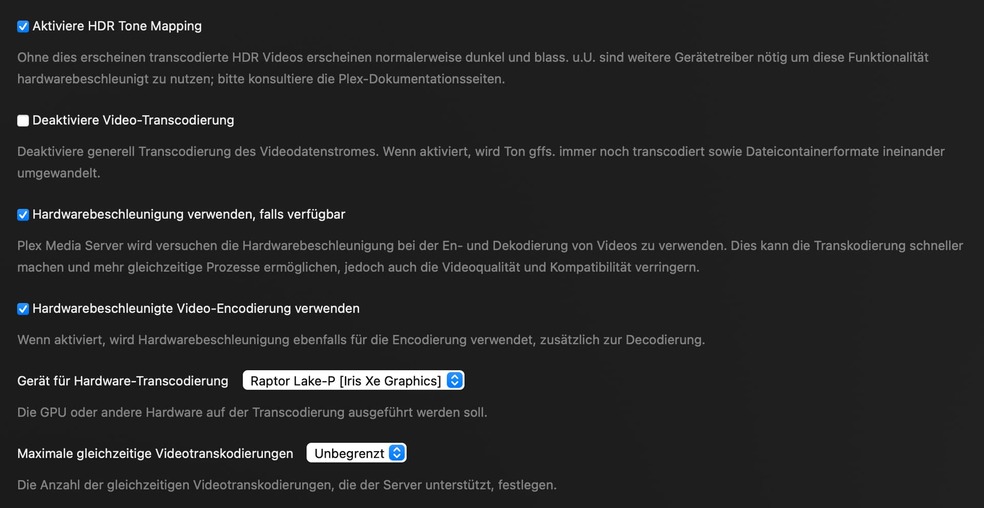
Please refrain from pinning this as a solution to this thread, as it pertains to an entirely different issue. The problem here lies with the host systems without any virtualization layers, not with the incorrect configuration of the Proxmox container vGPU.
Personally, I find it quite astonishing that such a significant bug has not yet been identified and resolved by a company like Plex Inc., which boasts over 100 employees and a profitability of $40M, even after more than six months.
Each time I visit this thread, I see requests for logs, mentions of setting up test benches, and discussions about waiting for a Linux kernel fix. In my honest opinion, all of this seems rather absurd.
Other software like Jellifin has consistently performed well. Your software functioned until version 1.28.1.6104 but fails to operate on newer versions. It’s quite straightforward - there’s no need to look beyond the “Plex media server” source code repository.
I have the same issue with hardware transcode not working when enabling HDR tone mapping. N100 iGPU, Ubuntu 23.10, 6.8.3-060803-generic, plex 1.40.1.8227
Jakyrian - that helped me out. I’m also running an N100 with Ubuntu 22.04. HW transcoding HDR tonemapping was not working in the 6.8.1 kernel but downgrading to 6.6.0 fixed it for me.
Your it’s certainly a valuable point to consider, but in my opinion, the behavior you’re currently experiencing may be related to the topic at hand, though not entirely synonymous. Otherwise, how can we explain the test I conducted some time ago on the same system, under identical environmental conditions (same kernel, same OS version), which resulted in a PASS with PMS 1.28.X and a FAIL with PMS 1.29.x+?
Confirming the 6.8 kernel and OpenCL do not work together.
Also confirming the 6.6 kernel, because Intel updated their libraries, works with OpenCL.
– GeminiLake is the only Not-Fully-Supported processor (also per the Intel documentation)
Having tested with other media servers, I confirm they are also not operational with 6.8.
It appears we all must wait until Intel updates its library (likely based on 24.04 LTS Update 1)
Lastly, Nvidia GPUs continue to function normally with all features
and AMD GPUs continue to function with SDR-only features
For those of us with GeminiLake processors (Synology DS920+ Intel Celeron J4125), which PMS version should we be on at this point? Or are they all broken old and new?
I’m still on 1.32.8.7639 because of a new-found fear of updating.
Just to inform you in case you are already not aware, this issue affects Intel Arc GPU’s as well. I’m running one on Debian Bookworm (with kernel 6.5) and I have the same issue.
I’m new to the HW transcoding, but bought a 13th gen intel NUC i7-1360P to be able to have a decent enough GPU and CPU for virtualization.
Like a lot of others, i am attempting through proxmox with LXC, and see similar results as those on the thread.
I can confirm with kernel 6.5.13-5-pve, i get HW transcoding with HDR tone mapping on HDR files as well as non-HDR files.
However, there are some outstanding issues with the 6.5 kernel line around latency and virtual machines that many have found goes away with a marked improvement in performance on the 6.8 kernel line. So while the 6.8 kernel is still in the proxmox testing branch, lots of users have reported great performance and I wanted to give it a shot.
Unfortunately on that 6.8.4-2-pve kernel, it breaks HW transcoding with HDR tone mapping on with HDR files. If i turn off HDR tone mapping, it’ll use hw decoding and it looks fine, but i’m not sure how that is.
So the ball is in intel’s court? Or do we know what is responsible here?
Let me interpret and reword your comment a little bit:
I never wrote to pin this comment as the solution, but to pin it as helpful comment that should be much easier to find. I found a solution in this comment to a problem I had and couldn’t find anywhere else. Kind of splitting hairs but not the same thing. And so I stand by my statement: This comment should be pinned!
And because many post their configurations here where it doesn’t seem to work, I’d like to give an example of one THAT works:
i7 1360P
Iris Xe Graphics
Proxmos 8.1.10 (Debian 12 “Bookworm”)
Linux K.: 6.5.13-3
Plex as LXC with PMS Version 1.40.2.8395
Are you sure you are only passing through RenderD128 and Card0?
I just stumbled across the update option from 8.1.10 to 8.2 when I wrote the last comment. This is also accompanied by the kernel upgrade from 6.5.13-3 to 6.8.4-2. You say that this is breaking HW tone mapping? Many thanks for your information. That almost went down the drain. I will probably suspend the update for the time being.