+1 for av1
1 Like
+1 for AV1.
The whole “debate” is moot. Where you got your video files (i.e., YouTube) is moot. How to download and convert into a Plex-readable file is moot. The only thing that matters is that Plex (in all their infinite wisdom) has not implemented the AV1 format.
My AV1 videos do not play on my Linux Plex Server which implements a web browser (i.e., Google Chrome) to play files. Furthermore, AV1 files do not play on my MacBook Pro using the native Plex software. In my house, we intentionally run all the primary platforms for cases just like this so that we can test and troubleshoot on Windows, Linux, Android, MacOS, iOS, and even Roku. After a file fails on any two platforms then there is no need to proceed further. After it fails on two MAJOR platforms (i.e., Linux and MacOS), there is no need to proceed further.
What bugs the shi!t out of me is that we have to hash out all these intricacies in these ridiculous forums instead of Plex just fixing the gosh-damn problem. VLC media player can play AV1 files - no problem. Being that VLC is OpenSource, it doesn’t take rocket science to decompile the code and copy-n-paste the codec into the Plex Server supported codecs. However, it does take a bit of programming language knowledge and that’s where I fall short. Otherwise, I would have done all this myself.
Which again, is a moot point because the loyal paying customer should not be faced with fixing problems of which Plex is being paid to fix. If I wanted to learn code and create my own media server then I would not have a lifetime Plex Pass - bottom line!!
3 Likes
nx6,
Perhaps your generalization that changes are measured in years is correct but it doesn’t have to be. And, as a matter of fact, as Plex competitors continue to shorten that turnaround, Plex grows further and further from customer satisfaction. As a result, they quickly progress at ever increasing rates closer and closer to the going-out-of-business finish line.
Not my idea of an enduring and prosperous business model and also not why I’ve personally invested my hard earned money into supporting this company.
nx6,
I would have to argue the point that up to this moment in time, Plex’s entire business has been about helping people to stream their private collections. Personally, I’ve never had any interest in any streaming corporatized business model. Not Netflix, not Amazon, not anybody. It’s an enormous waste of my money which is only being used to support corporate greed and to satiate the CEOs’ primal animalistic urges to live in a big house and drive a fast car.
I like my private collection and my private collection continues to increase exponentially through means of which I cannot disclose in these forums. Since Plex introduced streaming commercial media, I have not even considered exploring this option - not once. In fact, I find it obtrusive and obnoxious akin with the way I view commercials interlaced throughout a YouTube of which, once upon a time, used to be commercial free.
It’s truly irritating and annoying but a necessary daily expenditure. For that reason, I cannot fault Plex, but I can switch to a more community-minded and supported media server that more closely adheres to the principles upon which Plex used to implore if in the event that I find Plex too annoying to tolerate.
One such service currently under consideration is Kodi Media Server, so if Plex does not get back on-board with their community-minded principles then they will most certainly be losing my support. Likely, they will also be losing many others’ support since certainly I cannot be the only person on this planet that thinks this way.
1 Like
+1 for av1
1 Like
+1 for av1 codec. So badly need it. Most of my YouTube videos are now in av1 format.
+1. Have been planning to re-encode my entire video collection to AV1 as soon as it’s fully supported on Plex. Not much point in doing so before then, as this is the primary way we watch most of our entertainment. Pretty disappointed this still hasn’t been implemented yet - no one can claim licensing fees or contracts are holding things up anymore with AV1. It is so vastly superior to all that’s come before it (even x.265) the sooner the world shifts to it the better.
Be part of the solution, Plex, don’t get left behind due to slow implementation of such a crucial feature.
I’m also interested in AV1 support, but to curb your enthusiasm about AV1 a bit, it’s not vastly better than HEVC/H.265. It’s incrementally better, but it’s in the same class. It’s reasonable to think of AV1 as the best encoder that avoids HEVC patents & licensing, not the best possible encoder.
AV1 performs well on VMAF comparisons, perhaps 20% better than HEVC. But it’s much closer to equal on other benchmarks.
AV1 Has Arrived: Comparing Codecs from AOMedia, Visionular, and Intel/Netflix
Including VVC/H.266 for comparison is interesting:
And the quote from this paper (and well-designed study) in particular:
Overall, for the tested versions, HM and AV1 are not significantly different in terms of perceived quality at the same bit rates and all resolution-groups.
1 Like
Im gonna be very real, nobody except google can encode AV1 in realtime (remember that its over 500 times slower than HEVC for an on average bitrate saving of 2%), so implementing this seems moot.
But at least enabling decode and playback support seems reasonable.
1 Like
Another vote for av1 to be added to Plex. I noticed that using Youtube downloader, I no longer am offered H.264, however I can select MKV, (the container file) which, so far anyway, is accepted by Plex and shows the codec as being VP9. I guess this works although I am not savvy enough to explain the differences between H.264 and VP9.
Which downloader are you using?
Or are you willing to share a video URL? YouTube offers different codecs and resolutions for different videos.
I use a program called “4k video downloader” although I never select the 4k resolution (if offered). I try to select the best resolution up to 1080p. Over several years it has always given me the option of mp4-H.264-AAC but about maybe a month ago it only gives me “mp4-AV01-AAC”. Then I noticed a dropdown box that is titled “Format” with two choices, MP4 or MKV. When I select MKV I then see “MKV-VP9-AAC” next to each of the resolutions offered. It really doesn’t matter which file I try to download but here is one I tried just a while ago. https://www.youtube.com/watch?v=2WH4Nv32dH0&t=183s
Sorry to add to a long thread but I would like to point out that my situation is rare in that I live in the country with very few internet options. I have ViaSat satellite service which is capped at 100GB per month and I have CenturyLink DSL which is not capped but it sails along at 1.5Mb/s. I download the videos I want to watch, usually overnight, on CenturyLink because there is no cap. Then I watch them later on Plex in a higher quality (with no buffering) than I could if I was streaming live at 1.5Mb/s.
I wonder if the utility you are using has any other options to prefer certain codecs? It’s possible YouTube has simply changed the default order of codecs in the list.
That video has a perfectly lovely mp4 + avc option available, #137, or #22.
user@machine:/tmp % youtube-dl -F "https://www.youtube.com/watch?v=2WH4Nv32dH0"
[youtube] 2WH4Nv32dH0: Downloading webpage
[info] Available formats for 2WH4Nv32dH0:
format code  extension  resolution note
249          webm       audio only tiny   54k , opus @ 50k (48000Hz), 5.40MiB
250          webm       audio only tiny   70k , opus @ 70k (48000Hz), 6.87MiB
140          m4a        audio only tiny  131k , m4a_dash container, mp4a.40.2@128k (44100Hz), 14.71MiB
251          webm       audio only tiny  143k , opus @160k (48000Hz), 14.01MiB
394          mp4        256x144    144p   79k , av01.0.00M.08, 24fps, video only, 7.27MiB
278          webm       256x144    144p   97k , webm container, vp9, 24fps, video only, 10.13MiB
160          mp4        256x144    144p  112k , avc1.4d400c, 24fps, video only, 7.34MiB
395          mp4        426x240    240p  163k , av01.0.00M.08, 24fps, video only, 13.48MiB
242          webm       426x240    240p  226k , vp9, 24fps, video only, 15.60MiB
133          mp4        426x240    240p  280k , avc1.4d4015, 24fps, video only, 11.89MiB
243          webm       640x360    360p  416k , vp9, 24fps, video only, 27.77MiB
134          mp4        640x360    360p  536k , avc1.4d401e, 24fps, video only, 22.29MiB
396          mp4        640x360    360p  587k , av01.0.01M.08, 24fps, video only, 26.61MiB
244          webm       854x480    480p  757k , vp9, 24fps, video only, 42.55MiB
135          mp4        854x480    480p  902k , avc1.4d401e, 24fps, video only, 34.91MiB
397          mp4        854x480    480p 1034k , av01.0.04M.08, 24fps, video only, 47.29MiB
247          webm       1280x720   720p 1535k , vp9, 24fps, video only, 73.29MiB
398          mp4        1280x720   720p 1675k , av01.0.05M.08, 24fps, video only, 86.73MiB
136          mp4        1280x720   720p 1801k , avc1.4d401f, 24fps, video only, 59.39MiB
399          mp4        1920x1080  1080p 2327k , av01.0.08M.08, 24fps, video only, 150.44MiB
248          webm       1920x1080  1080p 2683k , vp9, 24fps, video only, 190.49MiB
137          mp4        1920x1080  1080p 4543k , avc1.640028, 24fps, video only, 211.00MiB
18           mp4        640x360    360p  560k , avc1.42001E, 24fps, mp4a.40.2@ 96k (44100Hz), 63.69MiB
22           mp4        1280x720   720p  651k , avc1.64001F, 24fps, mp4a.40.2@192k (44100Hz) (best)
(As always, I’m not suggesting that Plex NOT support AV1. Just hoping to help with the pain in the moment, too!)
Well now that is interesting. I don’t see that option. I will have to contact 4k video downloader support. I have a paid for license and they usually answer my inquires quickly. 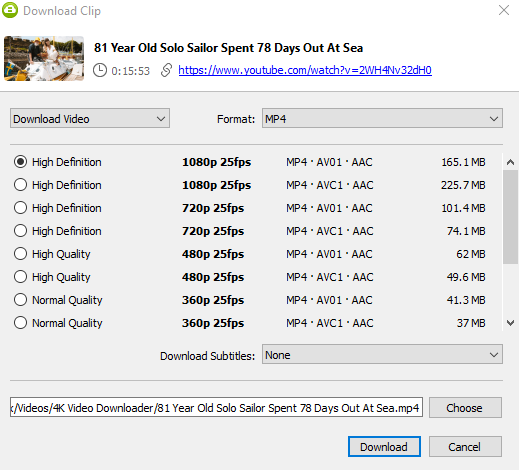
The second option in that list is AVC1 - that looks pretty good. (AVC == H.264)
AV01 and AVC1 sure look similar in a stacked list like that!
When I change the dropdown “Format” to MKV I get this. 
Oh! My eyes are playing tricks on me. Thank you. I must have glossed over this choice. I am not sure all the videos I’ve tried to download have this option but I will backtrack and let you know. I think I was only looking for H.264 and didn’t notice that AVC1 option. Thanks again.
I spent some time this morning reviewing files I downloaded as VP9 in the MKV wrapper v.s. AVC1 (H.264) in the MP4 wrapper. I can find no significant differences in video or audio quality. (Fire, rain and dark blacks in the image are the toughest to compress) Looking at the details in the Plex “get info” show very small differences in the bit rate and file sizes. I guess the important thing would be which codec will be the most universally accepted into the future. I believe if I had to transcode files down the road there would have to be a “hit” on the quality. Once again, thank you for straightening me out on AVC1 = H.264.
Anything on YouTube has probably been compressed at least 3 times, probably by different codecs, making it soooper duper hard to compare quality.
- Once when recorded
- When edited or uploaded
- By YouTube for distribution
And YouTube adjusts encoding bitrate to meet quality estimates. So AVC will be bigger than the more-efficient AV1/VP9, but will probably look very similar.
And that particular video is at a healthy bitrate for the content.
2 Likes
