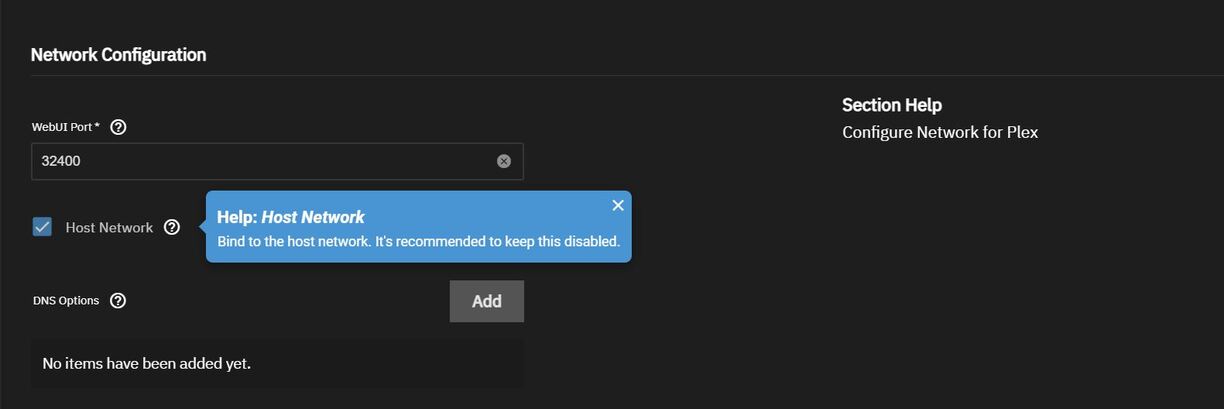
Hello everyone, I have a server running truenas, installed plex to stream movies and tv shows. The server IP address is 192.168.50.41
Inside the app setting, under local networks
10.0.0.0/8
172.16.0.0/12
192.168.0.0/16
192.168.50.0/24
When I open plex desktop app from my desktop (IP 192.168.50.5) I get an error saying this server is connected indirectly.
I went into my router, changed the DNS setting to google DNS disable DNS Rebinding.
From my desktop computer, I ran nslookup plex.direct and this is what i got
Server: RT-AX92U-E650
Address: 192.168.50.1
That’s expected. plex.direct by itself doesn’t resolve to anything (other than 0.0.0.0). You need to see what FQDN is being published for your server and perform a lookup on that. To find the connection info for your server (and clients for that matter), navigate to this page:
Once you’ve browsed to the resources page (it will be an XML document), find your server and have a look at the connection strings published for it. One of them will be tagged local="1". It will have a URL for the connection; grab the FQDN out of it, which will look something like:
192-168-50-41.1234567890abcdef.plex.direct
Perform an nslookup on that FQDN and it should resolve to 192.168.50.41. If it doesn’t, then you likely still have a DNS rebinding protection issue. If it does, then something else is going on (double NAT?).
thanks for the advice. I did everything lkike your instruction and the FQDN link is
172-16-1-2.ef8be0a90df346c1be7d9ebecafd742c.plex.direct
nslookup output
Server: RT-AX92U-E650
Address: 192.168.50.1
I will look into dns rebinding issue
my network map is
internet → router → switch → truenas + router (in AP mode)
so i don’t know if NAT is the problem.
Is your server multi-homed (connected to two separate networks)? You said your server’s IP address is 192.168.50.41, but the connection info you pulled from the resources link suggests it’s 172.16.1.2. It might help if you describe your network topology in some more detail. Is 192.168.50.41 perhaps the address of the TrueNAS host, and 172.16.1.2 the address of the Plex Media Server app/container?
Do you have multiple routers on your network? If so, how are they connected to each other and to your server and clients? Are you using VLANs? If so, are your server and clients on different ones?
While this isn’t a problem in and of itself, there are a couple of things you should note when configuring LAN networks in Plex:
When entering those network in the LAN networks field, ensure there are no spaces between any of the entries. If there are it will cause parsing errors and they will have no effect.
Since you have 192.168.0.0/16 included you don’t need 192.168.50.0/24; the former already includes the latter.
Finally, if you can, provide your Plex server logs from after a restart of Plex Media Server. Please ensure Debug is enabled and Verbose is disabled. This will show all the Ethernet/Wi-Fi interfaces PMS sees and the associated IP addresses.
Thank you very much. I figured it out. I used this option to bind with the host and everything works just fine.
I really appreciate you take your time to respond.