Server Version#: Version 1.19.1.2645
Plex for Mac#: Version 1.8.2.1192-89432618
Tuner Make/Model: HDHomeRun EXPAND
Guide/Lineup name: DVR—UPC - National Linup Austria Digital
Using XMLTV?:
Channel number/Name: All channels
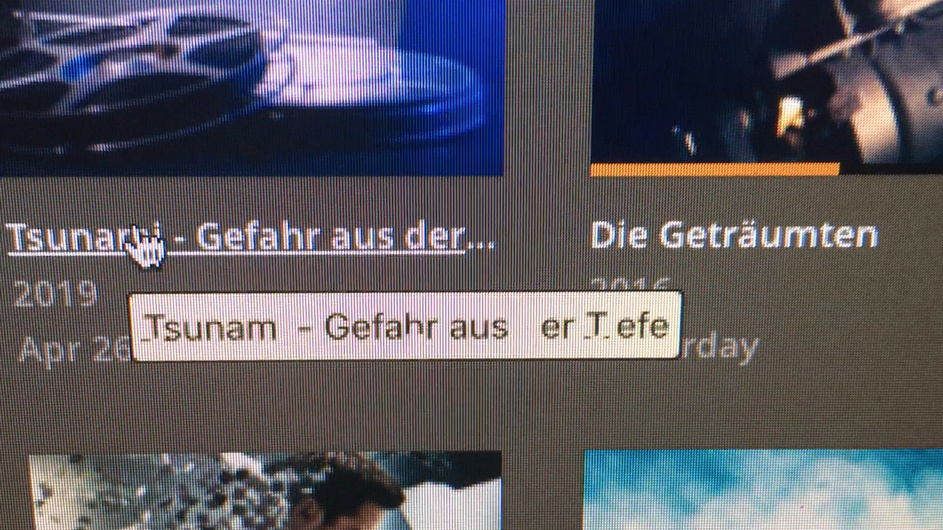
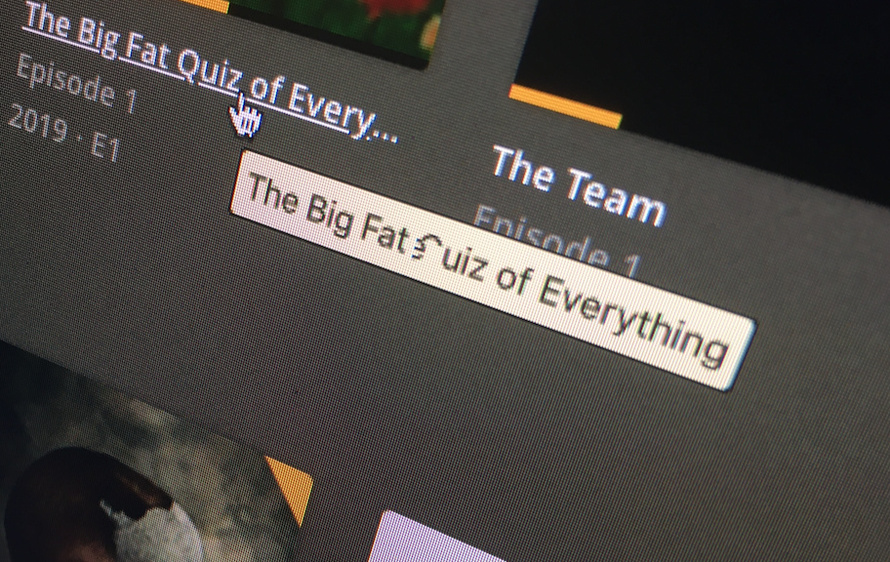
In the Live DVR - What’s On Section, when I hover the mouse over a title, the pop-up info box is displaying a cryptic text.
ok… I had overlooked that piece of information.
I tested this on my own Plex for Mac app… used to be on 1.8.0 where I couldn’t reproduce this behavior. Nor do I get this after updating to Plex for Mac 1.8.2 (just downloaded from plex.tv).
I’m on macOS Catalina 10.15.4 as well… also on German language.
I first thought this might be related to special characters… but as it’s working ok for tooltips with or without Umlaut on my end, I suppose that’s busted.
It’s not consistent and only for certain letters.
If you compare this with your previous screenshots you’ll notice that there’s other letters impacted… and some letters are cut off differently (e.g. have a look at the i … it’s almost entirely missing from Tsunami… just missing the lower half in your last post)
No idea what might cause this. Almost looks like holes punched into the tooltip.
I finally figured out who the culprit is. This strange thing only appears, when jDownloader is opened. Closing jDownloader restarting Plex App, all good again
the order the apps get started seems to be important. If jD is allready running and Plex gets started, this font bug is visible. If I start Plex first and then jD - no problem / bug.
the cryptic text bug is back. This time it appears in plex every time, no matter if jD is running or not. So it’s not jD but probably MacOS related. Since this bug is appearing only in plex (no other apps show up this bug) it must also have something to do with plex
I hate to disappoint.
Just verified this on Plex for Mac (version 1.14.0) on my macOS (version 10.15.6, Catalina). I’ve never seen it and it’s not showing like this now.
Have you tried running Plex for Mac on a new/clean macOS account with no other applications running (and ideally any plugins/add-ons shut off)?
nope. I will try to remember, to install only plex, next time I flatten the Mac. I don’t have any plugins installed for plex. It’s only showing up on the info boxes when you hover your mouse over a uri
I also upgradet to latest versions MacOS, plex for mac 1.14.0.1340 and 1.19.5.3112 QNAP plex server. Anyway, will update this post if I can find anything new.
I just downgraded to Plex for Mac Version 1.14.0.1340 (since the latest updatehas a playback issue) and the bug looks minor nearly gone in this version. Only the “Q” looks afftected in the previous version.
I originally posted about that bug. After month, maybe years I just set up my computer with no iCloud, no Microsoft Apps, no Adobe Apps. Nothing but open source apps. The bug is gone!
I know, not really helpful if you depend on those apps mentioned above, but maybe you want to try plex next time, before installing one of those apps that causes that bug