Looks like modifying the figure to use the constrained_layout options allows you to adjust padding and such.
Thanks @blacktwin - I got a compromise working for me with no legend using only the tiny bit of information I 100% understood - adding “constrained_layout=True” to the plt.figure vars.
With the legend, the border is still “huge”, as without my compromise, it gives errors I personally will likely never be able to correct, and creates a file with ONLY the legend (no map)
I’m not proficient in python, and worse, me trying to wrap my head around co-ordinates in a plot which I can’t see visually to begin with (only in complex code) is beyond my level.
    ## Map stuff ##
    const_choice = True
    if leg_choice:
        const_choice = False
    plt.figure(figsize=(16, 9), dpi=100, frameon=False, constrained_layout=const_choice)
WITH legend (normal = huge padding)

WITHOUT legend (good/little padding)
Also - realized you have incorrect remarks in beginning lines of ips_to_maps.
You have -l --location as setting map type. Though, --help and usage actually use -m or --map
Ok, so, my weekend’s almost over.
I’ve made lots of little edits to ips_to_maps that make it fit my preference.
Most of them were color choices.
My changes:
- Many of the existing client colors.
- Added many clients that were originally missing from my own client list.
- Changed the primary ‘output’ file background border, normally white, to Plex Gray
- Changed title text to Plex Orange
- Changed the continent gray to a lighter shade
- Changed Water bodies (oceans/lakes) from gray to blue.
- Fixed SSL error of SSL Tautulli servers using code you provided.
- When --no_legend is used, border/padding around map will not be so large
You’ll find the py script attached for anyone that wants it.
jamsflix_ips_to_maps.txt (19.5 KB)
Attached/renamed as a .txt file - save it as or rename it to .py
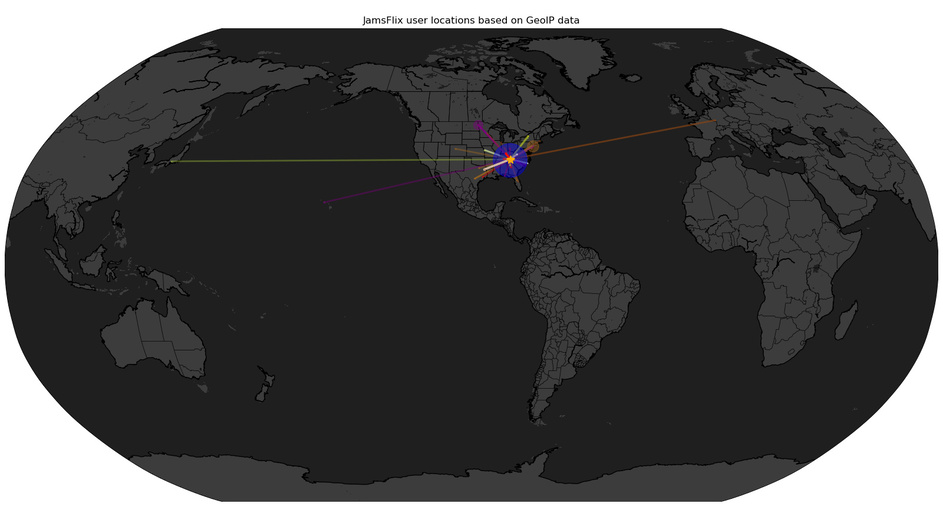
Example Globe output of running it >python jamsflix_ips_to_maps.py --map World --no_legend --headless

Still working on modifying maps for my own tastes, and in the meantime, having to learn some python.
I got it so that it doesn’t show lines, and the markers are larger.
In my mind, this makes it slightly more difficult to determine where the server is.
(NOT impossible, but, less precise than all the lines pointing to a spot)
Here’s my latest work in progress.
(if anyone wants, just ask)

One drawback - when using ‘world’ map, those ‘star’ markers are much too large.
I’m still working on whether to use a ‘dot’, or use some dynamic markersize math.
psuedo-code markersize = 12 \ if maptype == 'World': markersize = markersize * .75 = 9 if it’s world.
I’m still tinkering. 
@Blacktwin do you happen to know of a way to scan a certain libraries files via the plexapi?
I know that it could be done via the GUI manually or enabling plex to detect changes in the library, but for several reasons I want to be able to call that via a script. For example:
ScanLibrary.py -library Christmas Halloween
The above will scan the Christmas and Halloween library locations for media.
It seems that I can do this for individual libraries by identifying the database “section” and going to the URL like so:
http://[PMS_IP_ADDRESS]:32400/library/sections/29/refresh?X-Plex-Token=YourTokenGoesHere
I don’t think any of your current scripts do this. May this perhaps be considered as an enhancement via an additional script?
Thanks for the consideration.
plex.library.section('Halloween').refresh()
Iirc. Use the plexapi examples from its github page for setting up the plex. server instance.
Thanks much. I ended up stumbling across this which will meet my needs:
https://support.plex.tv/articles/201242707-plex-media-scanner-via-command-line/
Thanks again
@Blacktwin I am trying to use the plex_api_share.py script. When I run it I get the following:

Any ideas what could be the issue? I also get the same error if running the script with no parameters. Could there be something wrong in the code somewhere?
Thanks in advance.
Double check that you have the latest version of the script. Iirc that error is due to an empty Movie type library. Change these lines:
def get_ratings_lst(section_id):
    headers = {'Accept': 'application/json'}
    params = {'X-Plex-Token': PLEX_TOKEN}
    content = sess.get("{}/library/sections/{}/contentRating".format(PLEX_URL, section_id),
                           headers=headers, params=params)

    ratings_keys = content.json()['MediaContainer']['Directory']
    ratings_lst = [x['title'] for x in ratings_keys]
    return ratings_lst
to add a print for the section_id:
def get_ratings_lst(section_id):
    print(section_id)                    # <------- this line
    headers = {'Accept': 'application/json'}
    params = {'X-Plex-Token': PLEX_TOKEN}
    content = sess.get("{}/library/sections/{}/contentRating".format(PLEX_URL, section_id),
                           headers=headers, params=params)

    ratings_keys = content.json()['MediaContainer']['Directory']
    ratings_lst = [x['title'] for x in ratings_keys]
    return ratings_lst
This will print off the section_id number of the library that is causing the problem.
I had a couple of empty test libraries. Works like a charm. Thanks for pointing me in the right direction.
What’s up guys? Skimmed over this thread really quick. Looks very interesting. Was wanting to get the maps setup on my server. I have plex installed on the bare metal server, but I have plexpy containerized via docker. My question is this. With plexpy running in a docker container, is it possible to use these scripts, or will I need to setup plexpy baremetal?
You can run the ips_to_maps.py from anywhere that can reach Tautulli. The script accesses Tautulli’s data via it’s API. So, either on the same network or if you have remote access setup then you could access it from anywhere.
Hi,
This is my setup:
QNAP NAS: TS-453 Pro Firmware 4.3.6.0895
PMS: Version 1.15.4.919 (Running in QNAP NAS)
Tautulli: Version 2.1.25 (Running in QNAP NAS)
I´m trying to run the kill_stream.py script but I´m having the next errors in my log:
2019-04-25 23:10:27 - DEBUG   :: Thread-46 : Tautulli ActivityHandler :: Session 14 started by user 409166 (nickiman) with ratingKey 96535 (Fargo).
2019-04-25 23:10:27 - DEBUG   :: Thread-1 : Tautulli NotificationHandler :: Checking custom notification conditions for notifier_id 1.
2019-04-25 23:10:27 - DEBUG   :: Thread-1 : Tautulli NotificationHandler :: Custom condition evaluated to 'True'. Conditions: [True, True].
2019-04-25 23:10:27 - INFO    :: Thread-2 : Tautulli NotificationHandler :: Preparing notification for notifier_id 1.
2019-04-25 23:10:27 - DEBUG   :: Thread-1 : Tautulli NotificationHandler :: Checking custom notification conditions for notifier_id 5.
2019-04-25 23:10:27 - DEBUG   :: Thread-1 : Tautulli NotificationHandler :: Custom condition evaluated to 'True'. Conditions: [True].
2019-04-25 23:10:27 - INFO    :: Thread-1 : Tautulli NotificationHandler :: Preparing notification for notifier_id 3.
2019-04-25 23:10:27 - INFO    :: Thread-1 : Tautulli Notifiers :: Sending Telegram notification...
2019-04-25 23:10:28 - INFO    :: Thread-1 : Tautulli Notifiers :: Telegram notification sent.
2019-04-25 23:10:28 - INFO    :: Thread-1 : Tautulli NotificationHandler :: Preparing notification for notifier_id 5.
2019-04-25 23:10:28 - DEBUG   :: Thread-1 : Tautulli Notifiers :: Trying to run notify script, action: play, arguments: [u'--jbop', u'stream', u'--username', u'nickiman', u'--sessionId', u'tiyck97jmis1yi0mtfcpooll', u'--killMessage', u'Transcodificacion no permitida, por favor reproduce en calidad original para no saturar el servidor.']
2019-04-25 23:10:28 - DEBUG   :: Thread-1 : Tautulli Notifiers :: Full script is: ['python', u'/share/CACHEDEV1_DATA/.qpkg/JBOPS/killstream/kill_stream.py', '--jbop', 'stream', '--username', 'nickiman', '--sessionId', 'tiyck97jmis1yi0mtfcpooll', '--killMessage', 'Transcodificacion no permitida, por favor reproduce en calidad original para no saturar el servidor.']
2019-04-25 23:10:28 - DEBUG   :: Thread-1 : Tautulli Notifiers :: Executing script in a new thread.
2019-04-25 23:10:29 - DEBUG   :: Thread-49 : Tautulli Notifiers :: Script returned:
  Tautulli request failed for cmd 'terminate_session'. Invalid Tautulli URL?
2019-04-25 23:10:29 - INFO    :: Thread-49 : Tautulli Notifiers :: Script notification sent.
2019-04-25 23:10:29 - INFO    :: Thread-2 : Tautulli Notifiers :: Email notification sent.
2019-04-25 23:10:38 - DEBUG   :: Thread-46 : Tautulli ActivityHandler :: Session 14 stopped.
2019-04-25 23:10:38 - DEBUG   :: Thread-46 : Tautulli ActivityProcessor :: Play duration for session 14 ratingKey 96535 is 11 secs which is less than 120 seconds, so we're not logging it.
2019-04-25 23:10:38 - DEBUG   :: Thread-46 : Tautulli ActivityHandler :: Removing sessionKey 14 ratingKey 96535 from session queue
Since I was having problems to run the scripts because the Python embeded in QNAP hasn´t got all the modules wich the script requires I have modified it to point to another Python version installed in my NAS wich has all the modules needed:
#!/share/CACHEDEV1_DATA/.qpkg/QPython2/bin/python2
import os
import sys
import argparse
import json
import time
from datetime import datetime
import requests
Not sure what means:
2019-04-25 23:10:29 - DEBUG   :: Thread-49 : Tautulli Notifiers :: Script returned:
  Tautulli request failed for cmd 'terminate_session'. Invalid Tautulli URL?
Can someone help me?
Hi @nickman - I’m no developer, so this is just educated guessing.
Since the error actually mentions invalid Tautulli_URL, do you have the TAUTULLI_URL variable set in your kill_stream.py code at line 58?
It you are sure you’ve set, and it’s valid, know of any reason the python code couldn’t reach back out to the URL? (qnap firewall, etc)
@nickiman no modification of the script should be necessary if you pulled the latest version from the repo. Please make sure your API is enabled for Tautulli in settings.
Hi @JamminR and @Samwiseg0
Thanks for your answers and sorry for the late reply I had not enabled my notifications to “watch” the thread correctly.
This is my setup:
QNAP NAS: TS-453 Pro Firmware 4.3.6.0895
PMS: Version 1.15.4.919 (Running in QNAP NAS)
Tautulli: Version 2.1.25 (Running in QNAP NAS)
So, as you have seen, PMS and Tautulli are apps installed in my NAS directly and are not dockerized or something like that.
I´ve reinstalled Tautulli from scratch a couple of days ago and I´ve obtained the same file kill_stream.py wich is in GitHub page.
Inside the file I´ve written the common variables:
TAUTULLI_URL = https://192.168.10.12:8660
TAUTULLI_PUBLIC_URL = https://myurl.com:8660
TAUTULLI_APIKEY = The code generated in Settings -> Web Interface -> API -> API key
By the way… could you explain what does this variable?
VERIFY_SSL = False
I´m interested because I´m using https:// URLs, as you have seen above, and could be useful for me.
Regarding the custom arguments…
The custom arguments configured in tautulli for the script are copied from here:
--jbop stream --username {username} --sessionId {session_id} --killMessage 'Transcoding streams are not allowed.'
I´ve seen also these custom arguments written in the script itself (line 34) but I haven´t used them because I can´t understand some of them like:
–jbop SELECTOR
–notify notifierID
So, with all of this when I start to watch something forcing the transcode I see this lines in the log:
2019-05-01 20:29:56 - INFO    :: CP Server Thread-8 : Cleared the tautulli.log file.
2019-05-01 20:30:14 - DEBUG   :: Thread-3 : Tautulli ActivityHandler :: Session 142 started by user 409166 (nickiman) with ratingKey 80064 (Turbo).
2019-05-01 20:30:14 - DEBUG   :: Thread-2 : Tautulli NotificationHandler :: Checking custom notification conditions for notifier_id 1.
2019-05-01 20:30:14 - DEBUG   :: Thread-2 : Tautulli NotificationHandler :: Custom condition evaluated to 'True'. Conditions: [True, True].
2019-05-01 20:30:14 - INFO    :: Thread-1 : Tautulli NotificationHandler :: Preparing notification for notifier_id 1.
2019-05-01 20:30:14 - DEBUG   :: Thread-2 : Tautulli NotificationHandler :: Checking custom notification conditions for notifier_id 5.
2019-05-01 20:30:14 - DEBUG   :: Thread-2 : Tautulli NotificationHandler :: Custom condition evaluated to 'True'. Conditions: [True].
2019-05-01 20:30:14 - INFO    :: Thread-2 : Tautulli NotificationHandler :: Preparing notification for notifier_id 3.
2019-05-01 20:30:14 - INFO    :: Thread-2 : Tautulli Notifiers :: Sending Telegram notification...
2019-05-01 20:30:16 - INFO    :: Thread-1 : Tautulli Notifiers :: Email notification sent.
2019-05-01 20:30:16 - INFO    :: Thread-1 : Tautulli NotificationHandler :: Preparing notification for notifier_id 5.
2019-05-01 20:30:16 - DEBUG   :: Thread-1 : Tautulli Notifiers :: Trying to run notify script, action: play, arguments: [u'--jbop', u'stream', u'--username', u'nickiman', u'--sessionId', u'w1v78dkv6a21rrdort3kxogv', u'--killMessage', u'Transcoding streams are not allowed.']
2019-05-01 20:30:16 - DEBUG   :: Thread-1 : Tautulli Notifiers :: Full script is: ['python', u'/share/CACHEDEV1_DATA/.qpkg/JBOPS/killstream/kill_stream.py', '--jbop', 'stream', '--username', 'nickiman', '--sessionId', 'w1v78dkv6a21rrdort3kxogv', '--killMessage', 'Transcoding streams are not allowed.']
2019-05-01 20:30:16 - DEBUG   :: Thread-1 : Tautulli Notifiers :: Executing script in a new thread.
2019-05-01 20:30:16 - INFO    :: Thread-2 : Tautulli Notifiers :: Telegram notification sent.
2019-05-01 20:30:16 - DEBUG   :: Thread-49 : Tautulli Notifiers :: Subprocess returned with status code 1.
2019-05-01 20:30:16 - ERROR   :: Thread-49 : Tautulli Notifiers :: Script error:
  Traceback (most recent call last):
    File "/share/CACHEDEV1_DATA/.qpkg/Tautulli/lib/python2.7/site.py", line 67, in <module>
      import ssl
    File "/share/CACHEDEV1_DATA/.qpkg/Tautulli/lib/python2.7/ssl.py", line 95, in <module>
      from collections import namedtuple
    File "/share/CACHEDEV1_DATA/.qpkg/Tautulli/lib/python2.7/collections.py", line 21, in <module>
      from operator import itemgetter as _itemgetter, eq as _eq
  ImportError: /share/CACHEDEV1_DATA/.qpkg/Tautulli/lib/python2.7/lib-dynload/operator.so: undefined symbol: _PyUnicodeUCS2_AsDefaultEncodedString
2019-05-01 20:30:16 - INFO    :: Thread-49 : Tautulli Notifiers :: Script notification sent.
2019-05-01 20:30:16 - DEBUG   :: Thread-1 : Tautulli NotificationHandler :: Checking custom notification conditions for notifier_id 1.
2019-05-01 20:30:16 - DEBUG   :: Thread-1 : Tautulli NotificationHandler :: Custom condition evaluated to 'True'. Conditions: [True, True].
2019-05-01 20:30:16 - INFO    :: Thread-2 : Tautulli NotificationHandler :: Preparing notification for notifier_id 1.
2019-05-01 20:30:16 - INFO    :: Thread-1 : Tautulli NotificationHandler :: Preparing notification for notifier_id 3.
2019-05-01 20:30:17 - INFO    :: Thread-1 : Tautulli Notifiers :: Sending Telegram notification...
2019-05-01 20:30:18 - INFO    :: Thread-1 : Tautulli Notifiers :: Telegram notification sent.
2019-05-01 20:30:18 - INFO    :: Thread-2 : Tautulli Notifiers :: Email notification sent.
Looking at log it seems like there are several problems with the python embeded in Tautulli.
Correct me if I´m wrong.
These errors makes me wondering if I could call this script with a different python which I´ve installed in my QNAP NAS so, instead run the script like this:
Tautulli Notifiers :: Full script is: ['python', u'/share/CACHEDEV1_DATA/.qpkg/JBOPS/killstream/kill_stream.py
I would like to try to run the script like this:
Tautulli Notifiers :: Full script is: ['/share/CACHEDEV1_DATA/.qpkg/QPython2/bin/python2', u'/share/CACHEDEV1_DATA/.qpkg/JBOPS/killstream/kill_stream.py
Maybe in this way I could solve the python problems… just a guess.
Keep waiting your comments and thanks for your help.
Regards
You shouldn’t need to modify the script at all. What happens when the script triggers without modifying the script?
Yes, it´s true. I´ve configured the settings in the script because reading in the GitHub page I´ve understood that must be configured.
Now, I´ve used the script as it is from the GitHub page but, I´m still having the same errors:
2019-05-06 22:41:32 - DEBUG   :: Thread-3 : Tautulli ActivityHandler :: Session 2 started by user 409166 (nickiman) with ratingKey 111140 (Striptease).
2019-05-06 22:41:33 - ERROR   :: Thread-2 : Tautulli Helpers :: Cannot upload image to Imgur. No Imgur client id specified in the settings.
2019-05-06 22:41:33 - DEBUG   :: Thread-2 : Tautulli NotificationHandler :: Checking custom notification conditions for notifier_id 1.
2019-05-06 22:41:33 - DEBUG   :: Thread-2 : Tautulli NotificationHandler :: Custom condition evaluated to 'True'. Conditions: [True, True].
2019-05-06 22:41:33 - INFO    :: Thread-1 : Tautulli NotificationHandler :: Preparing notification for notifier_id 1.
2019-05-06 22:41:33 - DEBUG   :: Thread-2 : Tautulli NotificationHandler :: Checking custom notification conditions for notifier_id 5.
2019-05-06 22:41:33 - DEBUG   :: Thread-2 : Tautulli NotificationHandler :: Custom condition evaluated to 'True'. Conditions: [True].
2019-05-06 22:41:33 - INFO    :: Thread-2 : Tautulli NotificationHandler :: Preparing notification for notifier_id 3.
2019-05-06 22:41:33 - INFO    :: Thread-2 : Tautulli Notifiers :: Sending Telegram notification...
2019-05-06 22:41:34 - INFO    :: Thread-2 : Tautulli Notifiers :: Telegram notification sent.
2019-05-06 22:41:34 - INFO    :: Thread-2 : Tautulli NotificationHandler :: Preparing notification for notifier_id 5.
2019-05-06 22:41:34 - DEBUG   :: Thread-2 : Tautulli Notifiers :: Trying to run notify script, action: play, arguments: [u'--jbop', u'stream', u'--username', u'nickiman', u'--sessionId', u'88xjsg3nfffbr80et6g5vcxr', u'--killMessage', u'Transcoding streams are not allowed.']
2019-05-06 22:41:34 - DEBUG   :: Thread-2 : Tautulli Notifiers :: Full script is: ['python', u'/share/CACHEDEV1_DATA/.qpkg/JBOPS/killstream/kill_stream.py', '--jbop', 'stream', '--username', 'nickiman', '--sessionId', '88xjsg3nfffbr80et7h5vcxr', '--killMessage', 'Transcoding streams are not allowed.']
2019-05-06 22:41:34 - DEBUG   :: Thread-2 : Tautulli Notifiers :: Executing script in a new thread.
2019-05-06 22:41:34 - DEBUG   :: Thread-27 : Tautulli Notifiers :: Subprocess returned with status code 1.
2019-05-06 22:41:34 - ERROR   :: Thread-27 : Tautulli Notifiers :: Script error:
  Traceback (most recent call last):
    File "/share/CACHEDEV1_DATA/.qpkg/Tautulli/lib/python2.7/site.py", line 67, in <module>
      import ssl
    File "/share/CACHEDEV1_DATA/.qpkg/Tautulli/lib/python2.7/ssl.py", line 95, in <module>
      from collections import namedtuple
    File "/share/CACHEDEV1_DATA/.qpkg/Tautulli/lib/python2.7/collections.py", line 21, in <module>
      from operator import itemgetter as _itemgetter, eq as _eq
  ImportError: /share/CACHEDEV1_DATA/.qpkg/Tautulli/lib/python2.7/lib-dynload/operator.so: undefined symbol: _PyUnicodeUCS2_AsDefaultEncodedString
2019-05-06 22:41:34 - INFO    :: Thread-27 : Tautulli Notifiers :: Script notification sent.
2019-05-06 22:41:36 - INFO    :: Thread-1 : Tautulli Notifiers :: Email notification sent.
Best regards
You aren’t using the latest version of QNAP’s package for Tautulli. Try updating that. QNAP seems to roll their own packages so that would be between you and them.
@Blacktwin Thank you for work on these scripts. I am attempting to to implement limitter.py, but I’m running into a problem, which may be a limitation. I have some users who will start a shuffle play of a show and either fall asleep or just leave it running for hours.
If I enable the script once that threshold is met for number of plays, it will kill their stream after each episode for the rest of the day. Is there a way around that? I just want to limit them from sleeping with it playing, not penalize them if they just watch a lot of tv in a given day. I thought maybe using arguments would work, but the examples aren’t clear if they would.
