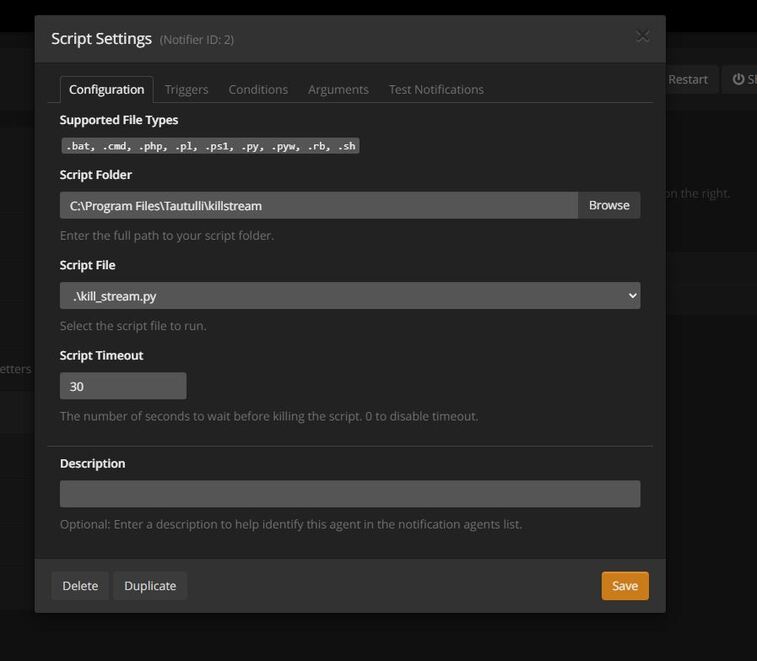
Hello i am trying to get my script to work, i want it to kill streams whenever anyone transcodes 4k content. I followed the guide online. I can’t figure out why it isn’t working at all. here are my logs:
2022-06-26 09:40:37 - DEBUG :: Thread-2 : Tautulli NotificationHandler :: Checking global notification conditions.
2022-06-26 09:40:37 - DEBUG :: Thread-2 : Tautulli NotificationHandler :: Global notification conditions evaluated to ‘True’.
2022-06-26 09:40:37 - DEBUG :: Thread-2 : Tautulli NotificationHandler :: Checking custom notification conditions for notifier_id 2.
2022-06-26 09:40:37 - DEBUG :: Thread-2 : Tautulli NotificationHandler :: {1} video_decision | is | ‘transcode’ > ‘transcode’ > True
2022-06-26 09:40:37 - DEBUG :: Thread-2 : Tautulli NotificationHandler :: {2} video_resolution | is | ‘4k’ or ‘2160p’ > ‘4k’ > True
2022-06-26 09:40:37 - DEBUG :: Thread-2 : Tautulli NotificationHandler :: Condition logic [blank]: {1} and {2} > True
2022-06-26 09:40:37 - DEBUG :: Thread-2 : Tautulli NotificationHandler :: Custom conditions evaluated to ‘True’. Conditions: [True, True].
2022-06-26 09:40:37 - INFO :: Thread-2 : Tautulli NotificationHandler :: Preparing notification for notifier_id 2.
2022-06-26 09:40:37 - DEBUG :: Thread-2 : Tautulli Notifiers :: Trying to run notify script: C:\Program Files\Tautulli\killstream\kill_stream.py, arguments: [‘–jbop’, ‘stream’, ‘–username’, ‘dmr’, ‘–sessionId’, ‘03d3ceb95bd8167fc0b49aa883b9c1ac’, ‘–killMessage’, ‘Transcoding streams are not allowed for 1080p streams.’], action: play
2022-06-26 09:40:37 - DEBUG :: Thread-2 : Tautulli Notifiers :: Full script is: [‘python’, ‘C:\Program Files\Tautulli\killstream\kill_stream.py’, ‘–jbop’, ‘stream’, ‘–username’, 'dmr’, ‘–sessionId’, ‘03d3ceb95bd8167fc0b49aa883b9c1ac’, ‘–killMessage’, ‘Transcoding streams are not allowed for 1080p streams.’]
2022-06-26 09:40:37 - DEBUG :: Thread-2 : Tautulli Notifiers :: Executing script in a new thread.
2022-06-26 09:40:37 - ERROR :: Thread-17 : Tautulli Notifiers :: Failed to run script: [WinError 2] The system cannot find the file specified
2022-06-26 09:40:41 - INFO :: (‘CP Server Thread-5’,) : Tautulli Config :: Writing configuration to file
2022-06-26 09:40:51 - DEBUG :: Thread-16 : Tautulli ActivityHandler :: Session 12 stopped.
2022-06-26 09:40:51 - DEBUG :: Thread-16 : Tautulli ActivityProcessor :: Play duration for session 12 ratingKey 48599 is 14 secs which is less than 120 seconds, so we’re not logging it.
2022-06-26 09:40:51 - DEBUG :: Thread-16 : Tautulli ActivityHandler :: Removing sessionKey 12 ratingKey 48599 from session queue
2022-06-26 09:40:51 - DEBUG :: Thread-3 : Tautulli NotificationHandler :: Notifiers enabled for notify_action ‘on_stop’.
2022-06-26 09:40:51 - DEBUG :: Thread-3 : Tautulli NotificationHandler :: Checking global notification conditions.
2022-06-26 09:40:51 - DEBUG :: Thread-3 : Tautulli NotificationHandler :: Global notification conditions evaluated to ‘1’.
2022-06-26 09:40:51 - DEBUG :: Thread-3 : Tautulli NotificationHandler :: Checking custom notification conditions for notifier_id 2.
2022-06-26 09:40:52 - DEBUG :: Thread-3 : Tautulli NotificationHandler :: {1} video_decision | is | ‘transcode’ > ‘transcode’ > True
2022-06-26 09:40:52 - DEBUG :: Thread-3 : Tautulli NotificationHandler :: {2} video_resolution | is | ‘4k’ or ‘2160p’ > ‘4k’ > True
2022-06-26 09:40:52 - DEBUG :: Thread-3 : Tautulli NotificationHandler :: Condition logic [blank]: {1} and {2} > True
2022-06-26 09:40:52 - DEBUG :: Thread-3 : Tautulli NotificationHandler :: Custom conditions evaluated to ‘True’. Conditions: [True, True].
2022-06-26 09:40:52 - INFO :: Thread-3 : Tautulli NotificationHandler :: Preparing notification for notifier_id 2.
2022-06-26 09:40:52 - DEBUG :: Thread-3 : Tautulli Notifiers :: Trying to run notify script: C:\Program Files\Tautulli\killstream\kill_stream.py, arguments: , action: stop
2022-06-26 09:40:52 - DEBUG :: Thread-3 : Tautulli Notifiers :: Full script is: [‘python’, ‘C:\Program Files\Tautulli\killstream\kill_stream.py’]
2022-06-26 09:40:52 - DEBUG :: Thread-3 : Tautulli Notifiers :: Executing script in a new thread.
2022-06-26 09:40:52 - ERROR :: Thread-18 : Tautulli Notifiers :: Failed to run script: [WinError 2] The system cannot find the file specified
2022-06-26 09:41:01 - WARNING :: (‘CP Server Thread-7’,) : Unable to retrieve data for get_sync.
2022-06-26 09:41:03 - INFO :: (‘CP Server Thread-6’,) : Tautulli Config :: Writing configuration to file
Looks like the issue is that the script file cannot be found:
2022-06-26 09:40:37 - ERROR :: Thread-17 : Tautulli Notifiers :: Failed to run script: [WinError 2] The system cannot find the file specified
Can you attach a screenshot of this screen from Tautulli please:
-Shark2k
Why not simply move your 4k stuff it a separate library and then unshared it with your users?
I know this is an option, if I can’t get the script to work this was my next plan. I just really don’t want a separate library for 4k stuff and having to look into both.
Here it is. I have the script in that location. I have even tried moving the location
Do you have Python installed? Do you have Python set to a Windows PATH? What do you get when you execute this command in your CMD? python --version
I’m thinking the .\kill_stream.py is causing the issue under the script file section.
Try changing that to just be \kill_stream.py and saving it and try running again.
Otherwise, you do have the creator of the script in here now, so that could be helpful.
-Shark2k
I tried to run that command in CMD it didn’t return anything
I did install python though. It’s installed on the computer. If it helps here is what I did:
Installed python.
Installed tautulli
Downloaded the script
And then set it up. That’s it.
Try following the steps here to confirm/add python as an environment variable in Windows:
You’ll have to restart any cmd windows you have open for it to take effect in those (might also need to logout/back in or just restart your computer for it to take effect for other programs, not 100% certain on that as I don’t have to add stuff as an environmental variable very often).
If Python isn’t an environmental variable, it means that when you want to use Python you would need to put the full path to the executable for it to be run. By adding it as an environmental variable, it means when you call Python, Windows will look to see if it is an environmental variable and if it is will basically put that path automatically allow whatever is calling Python to run without need to call it using, for example, “C:\Program Files\python\python.exe”.
-Shark2k
Ok I did that! I had to watch a youtube video that guide was missing one step but i got it! Here is the current debug log
2022-06-29 16:48:37 DEBUG Tautulli NotificationHandler :: Custom notification conditions not satisfied, skipping notifier_id 2.
2022-06-29 16:48:37 DEBUG Tautulli NotificationHandler :: Custom conditions evaluated to ‘False’. Conditions: [False, True].
2022-06-29 16:48:37 DEBUG Tautulli NotificationHandler :: Condition logic [blank]: {1} and {2} > False
2022-06-29 16:48:37 DEBUG Tautulli NotificationHandler :: {2} video_resolution | is | ‘4k’ or ‘2160p’ > ‘4k’ > True
2022-06-29 16:48:36 DEBUG Tautulli NotificationHandler :: {1} video_decision | is | ‘transcode’ > ‘direct play’ > False
2022-06-29 16:48:36 DEBUG Tautulli NotificationHandler :: Checking custom notification conditions for notifier_id 2.
2022-06-29 16:48:36 DEBUG Tautulli NotificationHandler :: Global notification conditions evaluated to ‘1’.
2022-06-29 16:48:36 DEBUG Tautulli NotificationHandler :: Checking global notification conditions.
2022-06-29 16:48:36 DEBUG Tautulli NotificationHandler :: Notifiers enabled for notify_action ‘on_stop’.
2022-06-29 16:48:36 DEBUG Tautulli ActivityHandler :: Removing sessionKey 1 ratingKey 36815 from session queue
2022-06-29 16:48:36 DEBUG Tautulli ActivityProcessor :: Play duration for session 1 ratingKey 36815 is 91 secs which is less than 120 seconds, so we’re not logging it.
2022-06-29 16:48:36 DEBUG Tautulli ActivityHandler :: Session 1 stopped.
2022-06-29 16:48:36 DEBUG Tautulli NotificationHandler :: Custom notification conditions not satisfied, skipping notifier_id 2.
2022-06-29 16:48:36 DEBUG Tautulli NotificationHandler :: Custom conditions evaluated to ‘False’. Conditions: [False, True].
2022-06-29 16:48:36 DEBUG Tautulli NotificationHandler :: Condition logic [blank]: {1} and {2} > False
2022-06-29 16:48:36 DEBUG Tautulli NotificationHandler :: {2} video_resolution | is | ‘4k’ or ‘2160p’ > ‘4k’ > True
2022-06-29 16:48:36 DEBUG Tautulli NotificationHandler :: {1} video_decision | is | ‘transcode’ > ‘direct play’ > False
2022-06-29 16:48:36 DEBUG Tautulli NotificationHandler :: Checking custom notification conditions for notifier_id 2.
2022-06-29 16:48:36 DEBUG Tautulli NotificationHandler :: Global notification conditions evaluated to ‘True’.
2022-06-29 16:48:36 DEBUG Tautulli NotificationHandler :: Checking global notification conditions.
2022-06-29 16:48:36 DEBUG Tautulli NotificationHandler :: Notifiers enabled for notify_action ‘on_change’.
2022-06-29 16:48:36 DEBUG Tautulli ActivityHandler :: Session 1 has changed transcode decision.
2022-06-29 16:48:35 DEBUG Tautulli ActivityHandler :: Session 1 buffer count is 4.
2022-06-29 16:48:35 DEBUG Tautulli ActivityHandler :: Session 1 is buffering.
2022-06-29 16:48:35 INFO Tautulli Pmsconnect :: Terminating session 1 (session_id ghr5fin9m4qve9nlctz7ixp4).
2022-06-29 16:48:35 INFO Tautulli Config :: Writing configuration to file
2022-06-29 16:48:07 DEBUG Tautulli ActivityHandler :: Session 1 buffer count is 3.
2022-06-29 16:48:07 DEBUG Tautulli ActivityHandler :: Session 1 is buffering.
2022-06-29 16:47:42 DEBUG Tautulli ActivityHandler :: Session 1 buffer count is 2.
2022-06-29 16:47:42 DEBUG Tautulli ActivityHandler :: Session 1 is buffering.
2022-06-29 16:47:25 INFO Tautulli Notifiers :: Script notification sent.
2022-06-29 16:47:25 ERROR Tautulli Notifiers :: Script error:
Traceback (most recent call last):
File “C:\Program Files\Tautulli\killstream\kill_stream.py”, line 52, in
from builtins import object
ImportError: No module named builtins
2022-06-29 16:47:25 DEBUG Tautulli Notifiers :: Subprocess returned with status code 1.
2022-06-29 16:47:25 DEBUG Tautulli Notifiers :: Executing script in a new thread.
2022-06-29 16:47:25 DEBUG Tautulli Notifiers :: Full script is: [‘python’, ‘C:\Program Files\Tautulli\killstream\kill_stream.py’]
2022-06-29 16:47:25 DEBUG Tautulli Notifiers :: Trying to run notify script: C:\Program Files\Tautulli\killstream\kill_stream.py, arguments: , action: resume
2022-06-29 16:47:25 INFO Tautulli NotificationHandler :: Preparing notification for notifier_id 2.
2022-06-29 16:47:25 DEBUG Tautulli NotificationHandler :: Custom conditions evaluated to ‘True’. Conditions: [True, True].
2022-06-29 16:47:25 DEBUG Tautulli NotificationHandler :: Condition logic [blank]: {1} and {2} > True
2022-06-29 16:47:25 DEBUG Tautulli NotificationHandler :: {2} video_resolution | is | ‘4k’ or ‘2160p’ > ‘4k’ > True
2022-06-29 16:47:25 DEBUG Tautulli NotificationHandler :: {1} video_decision | is | ‘transcode’ > ‘transcode’ > True
2022-06-29 16:47:25 DEBUG Tautulli NotificationHandler :: Checking custom notification conditions for notifier_id 2.
2022-06-29 16:47:25 DEBUG Tautulli NotificationHandler :: Global notification conditions evaluated to ‘1’.
2022-06-29 16:47:25 DEBUG Tautulli NotificationHandler :: Checking global notification conditions.
2022-06-29 16:47:25 DEBUG Tautulli NotificationHandler :: Notifiers enabled for notify_action ‘on_resume’.
2022-06-29 16:47:25 DEBUG Tautulli ActivityHandler :: Session 1 resumed.
2022-06-29 16:47:06 DEBUG Tautulli ActivityHandler :: Session 1 paused.
2022-06-29 16:46:47 DEBUG Tautulli ActivityHandler :: Session 1 buffer count is 1.
2022-06-29 16:46:47 DEBUG Tautulli ActivityHandler :: Session 1 is buffering.
2022-06-29 16:46:46 INFO Tautulli Notifiers :: Script notification sent.
2022-06-29 16:46:46 ERROR Tautulli Notifiers :: Script error:
Traceback (most recent call last):
File “C:\Program Files\Tautulli\killstream\kill_stream.py”, line 52, in
from builtins import object
ImportError: No module named builtins
2022-06-29 16:46:46 DEBUG Tautulli Notifiers :: Subprocess returned with status code 1.
2022-06-29 16:46:46 DEBUG Tautulli Notifiers :: Executing script in a new thread.
2022-06-29 16:46:46 DEBUG Tautulli Notifiers :: Full script is: [‘python’, ‘C:\Program Files\Tautulli\killstream\kill_stream.py’, ‘–jbop’, ‘stream’, ‘–username’, ‘im6’, ‘–sessionId’, ‘ghr5fin9m4qve9nlctz7ixp4’, ‘–killMessage’, ‘Transcoding streams are not allowed for 4kp streams.’]
2022-06-29 16:46:46 DEBUG Tautulli Notifiers :: Trying to run notify script: C:\Program Files\Tautulli\killstream\kill_stream.py, arguments: [‘–jbop’, ‘stream’, ‘–username’, 'im6’, ‘–sessionId’, ‘ghr5fin9m4qve9nlctz7ixp4’, ‘–killMessage’, ‘Transcoding streams are not allowed for 4kp streams.’], action: play
2022-06-29 16:46:46 INFO Tautulli NotificationHandler :: Preparing notification for notifier_id 2.
2022-06-29 16:46:46 DEBUG Tautulli NotificationHandler :: Custom conditions evaluated to ‘True’. Conditions: [True, True].
2022-06-29 16:46:46 DEBUG Tautulli NotificationHandler :: Condition logic [blank]: {1} and {2} > True
2022-06-29 16:46:46 DEBUG Tautulli NotificationHandler :: {2} video_resolution | is | ‘4k’ or ‘2160p’ > ‘4k’ > True
2022-06-29 16:46:46 DEBUG Tautulli NotificationHandler :: {1} video_decision | is | ‘transcode’ > ‘transcode’ > True
2022-06-29 16:46:46 DEBUG Tautulli NotificationHandler :: Checking custom notification conditions for notifier_id 2.
2022-06-29 16:46:46 DEBUG Tautulli NotificationHandler :: Global notification conditions evaluated to ‘True’.
2022-06-29 16:46:46 DEBUG Tautulli NotificationHandler :: Checking global notification conditions.
2022-06-29 16:46:46 DEBUG Tautulli NotificationHandler :: Notifiers enabled for notify_action ‘on_play’.
@Blacktwin think you might need to jump back in now based on this part (sorry if I’m wrong about you being the author of these scripts, but that’s what I’m remembering):
2022-06-29 16:46:46 ERROR Tautulli Notifiers :: Script error:
Traceback (most recent call last):
File “C:\Program Files\Tautulli\killstream\kill_stream.py”, line 52, in
from builtins import object
ImportError: No module named builtins
That portion is beyond my help because I haven’t done much with Python outside of attempting to learn it.
Also, good job on working out getting Python setup as an environmental variable @dmoseder!
Sorry that the link I provided was missing a step as I am familiar with that process so the missing step for you probably didn’t occur to me.
-Shark2k
What do you get when you run this? python --version
Sorry, I didnt ever answer this. It says Python 2.7.16
That’s what I thought. Please use 3.7. Python 2.7 has been EOL for a couple years.
Thank you!
I did this and I I had to install requests for python through command line. I did both of them, here is the error i get now:
2022-07-10 16:59:07 INFO Tautulli Config :: Writing configuration to file
2022-07-10 16:59:07 INFO Tautulli Config :: Writing configuration to file
2022-07-10 16:58:44 INFO Tautulli Notifiers :: Script notification sent.
2022-07-10 16:58:44 ERROR Tautulli Notifiers :: Script error:
usage: kill_stream.py [-h] --jbop {stream,allStreams,paused} [–userId USERID]
[–username USERNAME] [–sessionId SESSIONID]
[–notify NOTIFY] [–limit LIMIT] [–interval INTERVAL]
[–killMessage KILLMESSAGE [KILLMESSAGE …]]
[–richMessage {discord,slack}]
[–serverName SERVERNAME] [–plexUrl PLEXURL]
[–posterUrl POSTERURL] [–richColor RICHCOLOR]
[–debug]
kill_stream.py: error: the following arguments are required: --jbop
I was able to fix this by adding the script to the arguments i forgot, but still any error:
| 2022-07-10 17:06:36 |
INFO |
Tautulli Notifiers :: Script notification sent. |
| 2022-07-10 17:06:36 |
DEBUG |
Tautulli Notifiers :: Script returned: |
| Tautulli API cmd ‘terminate_session’ failed: Failed to terminate session: Invalid session_key () or session_id (c5ca9411fc507ad2-com-plexapp-android). |
|
|
| 2022-07-10 17:06:36 |
DEBUG |
Tautulli Notifiers :: Subprocess returned with status code 0. |
The error you are seeing in your last screenshot generally means that the stream has already been stopped or killed and no longer exists on the server.
Try again and see if you get the same error.
And to confirm, in the script arguments under the Arguments tab and then for the “Playback Start” and “Transcode Decision Change” options, you have “–sessionId {session_id}” in the script arguments, correct?
I just checked my logs and based on what I saw I would say you do, just want to confirm.
-Shark2k
Yes that is in there.
It is ending the stream, but i just get a general error on the server about checking my internet connection. It’s not sending the script message.
If i have two conditions will both have to be present or just one of them for the script to run?
–jbop stream --username {username} --sessionId {session_id} --killMessage ‘Transcoding streams are not allowed for {stream_video_resolution}p streams.’
that is what I have under each one