I am not sure if this is a ‘huge’ issue, but you know how you see all your movie posters on the Home screen, or in each folder, and when you hover over a poster in either place, three (3) icons are visible: Play (the big play button in the center of the poster), Edit (the little pencil looking thing on the bottom-left of the poster), and Details (the three dots on the bottom-right of the poster)
Well since the last, last update (so the one before today’s), the Details (or ‘More’) button doesn’t work (like you click on it and nothing happens/opens) in Firefox or Edge, but it does work in Chrome.
You can click on the folder to go directly into the movie and the three dots within the main menu under the poster work, but not the poster icon on the folder/home pages where all the movie posters show.
As I said, not really a ‘huge’ issue (or even an issue to some), but just thought I’d mention it
I cannot replicate this. Are you on the actual home page?
Does it happen in a particular hub? (Continue Watching, Recently Added, etc.)
Are you trying to do this on an item from your own personal library, or on an item from the free, ad-supported streaming library?
Are you using the hosted web app or the local web app from your personal server?
Which web browser are you using?
Have you tried
a) refreshing the whole “website”
b) disabling browser add-ons
?
I thought I’d test it out on my end here, to provide from details if I can reproduce it or just mention if I can’t repro.
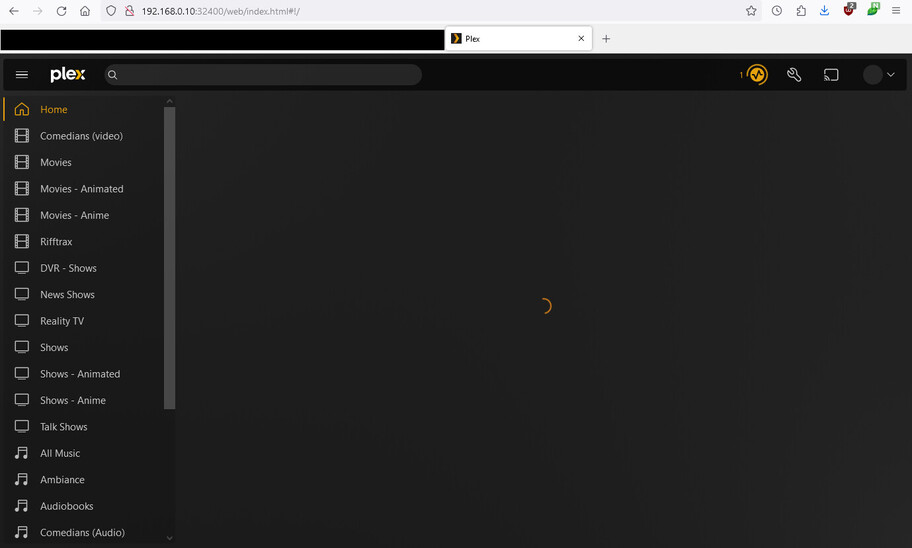
And… something hinky is happening. At first, I couldn’t get either the online or self-hosted web client to load, just the spinning circle of doom. The top bar (search, heartbeat icon, settings, account, etc) all loaded, but the main menu and the side bar don’t show up. Sometimes the side bar WILL load, but then vanish again without any page refresh.
After some time, the sidebar returns, but the main Home item entries don’t show up. If I click any library on the side, I get that library’s home page, and can view my recently added items. If I then point at and click the triple dot button, its menu fails to load (just like the OP’s report). The pencil icon works, but I did not test the play button.
As I type this, status.plex.tv reported an outage of some kind, but then flipped back to all green. The component appears to have been the Plex.Direct DNS servers, but it claims to be a 2 minute outage and - as of now - there is no incident related to it to report.
One final note: The self-hosted client still exhibits the No-Home-Screen-Contents issue for me on both Chrome and Firefox. The online web client seems to work fine. I am unable to reboot my Plex server at the moment, as it is recording TV and I do not want to interrupt that.
First off… you can ignore my post, cuz I’m an idiot
I was going to the local web app page and not the hosted web app page.
ASA I went to the hosted page, the dots worked as always, AND (and I didn’t even notice this) I also have the ‘Movies and Shows on Plex’ and ‘Live TV’ menu items (where those don’t appear in the local - DUH!!!).
I suppose if Divideby0’s post IS an issue, then at least my post wasn’t a complete waste for everyone.
Thanks and sorry for wasting valuable virtual paper
Well, it’s still an issue worth looking into, since the local web app should work as good as the hosted one. I see my server has finally finished recording, so I am rebooting it now.
One reboot later
Okay, looks like it’s back. Everything seems nominal. I think that the earlier DNS issues might be the reason the hosted failed to work, and until the reboot caused my local app to freak out.
Since the OP’s post was 7 hours earlier, before the DNS issue that plagued me, it’s possible something else happened, but if it’s all good now…? Then ok then. Maybe it was just two hiccups.
I can kinda see why the local page wouldn’t work like the hosted, in that the local is ‘seen’ as a direct IP connection to the local server, therefore that’s what it’s showing you.
From there, the ‘Play’ and ‘Edit’ buttons work, as these can pull directly from your server (i.e. you play directly from the server from a folder, you can upload your own posters, etc.), and even if it’s offline (i.e. your internet goes down), whereas the ‘Details/More’ buttons have a lot more web interaction/control (i.e. Refresh metadata, Analyse, View Play History, etc.).
Having said that though, that button used to work, so…
Either way, the ‘More’ button does work when you go directly into the movie or show locally, so not the worst thing
I’ve been having this issue for the past two public releases, on a Windows Plex server hosted on my local network. Clicking the three dots in the lower left of show’s card used to bring up a menu, now it does nothing.
I just completed a full re-install after uninstalling the app, deleting the AppData folder and deleting the Windows registry key, and it’s still happening. Also tried from other browsers/computers and same issue. Not sure what else to do.
Yah, I’m pretty sure it’s a bug/break that happened after the previous update. The ‘fix’ for me was just to use the hosted app URL and not my local IP URL.
It’d help a lot if we could see more of your screen. In particular, on what kind of item you are clicking.
I still cannot replicate this – even using the local web app.
btw: are you loading the local web app from a custom domain? If so, that’ll never work correctly. Only use the local IP address of your server machine.
It is also possible that your web browser is silently blocking popups – because the Info modal is technically a popup.
Interesting. Last night, I tested this under Chrome and couldn’t reproduce the issue. I logged into my server using my local web client and the triple dot in the lower right of an item worked fine. This morning, upon re-reading the title, I tried it under Firefox, and I cannot click the triple dot menu of any item on my home screen. I CAN click on the triple dot menu of a collection, but not any individual movie item.
Then, I noticed I am not logged in (profile in upper right is blank). So I logged in to my account, and something hinky happened like it did last night in Chrome: After “authenticating”, the Plex home screen appeared, but the profile pic is still blank, and I was not prompted to choose a managed account. The option to “sign in” still appeared in the profile menu, but it wouldn’t bring up the authentication option again, it just reloaded the home screen, and the profile remained blank. Very strange.
NOTE: Refreshing the page finally caused the managed account login popup to appear. Once I chose a profile, the home screen came up and I could FINALLY click the triple dot menu of any movie.
CONCLUSION: Seems some hijinks ensue if you are not properly logged in. I have my local network allowed without auth, but since I always use the official apps I am always logged in properly. If you are not using online authorization, this issue happens for me in Firefox.
Just to clarify this a bit (and sorry that I didn’t say this, so def my bad )…
This issue arises when you go to your local hosted version (so you put in your internal IP at home… i.e 192.168.x.x) and you click the three dots on ANY poster from your own ‘Home’ or parent folder (i.e. let’s say you created ‘My Movies’ or ‘My TV’ folder which shows ALL your movies/TV shows and you hover over and see/find the three dots on the bottom right).
You get NO response (like nothing opens, no window, no menu… NOTHING… it just sits there)
I’ve tested this thru Edge, FF, and Chrome, so unless there’s another browser you’d like me to try, and I’m TOTALLY game to do it (I love PLEX, so give me something to break ), but that’s the story with what I’m finding (and as of testing right now)
That’s what I did for testing and it worked for me.
Do you have a DNS rebinding protection issue? i.e. did you anything in your router/DNS resolver to have*.plex.direct addresses exempt from this protection?
AFA DNS goes, I’ve set my Primary/Secondary to the well-known CloudFlare DNS, which (if I’m not mistaken) setting your DNS fields bypasses DNS rebinding. Beyond that, I’m not aware of any exempt setting on my router (or at least I’ve never had to worry about it)
As I said, this was never an issue up until the last 2 Plex updates (3 now), and my router DNS has been set like this for the past 2-3yrs, so…
I logged out to see if the menu continued to work or not - thinking maybe logging in once might have “fixed something”. But logging out breaks the menu again… have to stay logged in. Ugh.
So just to make sure I’ve clarified this (and understand you correctly)…
My issue (or the issue we’re discussing) is that if I (or we) go to our Local page (so using our internal IP - i.e. 192.168.x.x) and we do not see/get the ‘Details/More’ menu when we click the three dots, BUT…
It does work when we (I) go to the Hosted page (i.e. app.plex.tv)
Based on your above, you’re saying they do work for you on your Local page ???
(just FYI, I’m always, and have always been, logged in on both pages)???
EDIT: Well HOLY $^&#!!. I just went and did another log out/log in with my Local page… and the three dots now work.
I’ve done this multiple times over the past couple weeks and nothing, and today… voila… HOWEVER…
I now have a catch-22 loop where I log in, the page refreshes, and the three dots work, but it shows me as NOT being logged in. I log in, the page refreshes, the three dots work, but it shows me as not logged in (and around and around I go)
I’m guessing Plex fixed it during their last update (??), but it’s still ‘broken’ (??)
After logging in, 3-dot menu works fine, even when using any of the local URLs listed above. Log out again and 3-dot menu breaks again (and I have to setup my Home Screen again, which is rather annoying).
This applies in any context: Home Screen, libraries, playlists, collections.
MacOS Ventura 13.6.6
Plex Media Server Version 1.40.2.8395-c67dce28e
Browsers: Safari and Firefox
As mentioned above, this issue only started with last 2 PMS releases.


 )…
)… ), but that’s the story with what I’m finding (and as of testing right now)
