I’m installing 11.4 now to try and catch up with you
OK… 5.10.0-16 is being installed.
I don’t know where the interference is coming from but something you have is interfering with basic BASH/sed variable editing.
I use the built-in sed editor to edit the variables. you’re getting nulls where you should be getting ‘debian’.
confirming stock Debian 11.4 also works.
chuck@debian11-4:~/Downloads$ sudo dpkg -i plexmediaserver_1.28.1.6041-738907df3_amd64.deb
Selecting previously unselected package plexmediaserver.
(Reading database ... 136639 files and directories currently installed.)
Preparing to unpack plexmediaserver_1.28.1.6041-738907df3_amd64.deb ...
PlexMediaServer install: Pre-installation Validation.
PlexMediaServer install: Pre-installation Validation complete.
Unpacking plexmediaserver (1.28.1.6041-738907df3) ...
Setting up plexmediaserver (1.28.1.6041-738907df3) ...
PlexMediaServer install: PlexMediaServer-1.28.1.6041-738907df3 - Installation starting.
PlexMediaServer install:
PlexMediaServer install: Now installing based on:
PlexMediaServer install:   Installation Type:   New
PlexMediaServer install:   Process Control:     systemd
PlexMediaServer install:   Plex User:           plex
PlexMediaServer install:   Plex Group:          plex
PlexMediaServer install:   Video Group:         render
PlexMediaServer install:   Metadata Dir:        /var/lib/plexmediaserver/Library/Application Support
PlexMediaServer install:   Temp Directory:      /tmp
PlexMediaServer install:   Lang Encoding:       en_US.UTF-8
PlexMediaServer install:   Processor:           Intel(R) Core(TM) i7-8809G CPU @ 3.10GHz
PlexMediaServer install:   Intel i915 Hardware: Not found
PlexMediaServer install:   Nvidia GPU card:     Not Found
PlexMediaServer install:
PlexMediaServer install: Completing final configuration.
Created symlink /etc/systemd/system/multi-user.target.wants/plexmediaserver.service → /lib/systemd/system/plexmediaserver.service.
PlexMediaServer install: PlexMediaServer-1.28.1.6041-738907df3 - Installation successful.  Errors: 0, Warnings: 0
Processing triggers for gnome-menus (3.36.0-1) ...
Processing triggers for desktop-file-utils (0.26-1) ...
Processing triggers for mailcap (3.69) ...
chuck@debian11-4:~/Downloads$ uname -r
5.10.0-16-amd64
chuck@debian11-4:~/Downloads$ date
Tue 09 Aug 2022 12:21:49 AM EDT
chuck@debian11-4:~/Downloads$
Hi ChuckPa,
If its not too much trouble, you be able to try to update through backports to kernel 5.16.0-0.bpo.4-amd64 using the sources.list and the bullseye-backports.list above to see if you are able to reproduce on the latest kernel available? Thanks so much for your time so far.
If you’ll give me the URLs/instructions, I’ll do it.
It’s best if you do it than me trying to guess your steps.
IIRC is should just be the following:
Update /etc/apt/sources.list to the following (only to add any extra packages that may be added during update):
deb http://deb.debian.org/debian/ bullseye main contrib non-free
deb-src http://deb.debian.org/debian/ bullseye main contrib non-free

deb http://security.debian.org/debian-security bullseye-security main contrib non-free
deb-src http://security.debian.org/debian-security bullseye-security main contrib non-free

# bullseye-updates, previously known as 'volatile'
deb http://deb.debian.org/debian/ bullseye-updates main contrib non-free
deb-src http://deb.debian.org/debian/ bullseye-updates main contrib non-free
Create /etc/apt/sources.list.d/bullseye-backports.list
deb http://deb.debian.org/debian bullseye-backports main contrib non-free
deb-src http://deb.debian.org/debian bullseye-backports main contrib non-free
run the following:
sudo apt-get update
sudo apt-get upgrade
sudo apt-get dist-upgrade
If that doesn’t pull the latest linux headers/kernel let me know, and I will dig up the exact instructions
Missing something
root@debian11-4:/etc/apt/sources.list.d#
root@debian11-4:/etc/apt/sources.list.d# apt update
Hit:1 http://security.debian.org/debian-security bullseye-security InRelease
Hit:2 http://deb.debian.org/debian bullseye InRelease
Hit:3 http://deb.debian.org/debian bullseye-updates InRelease
Get:4 http://deb.debian.org/debian bullseye-backports InRelease [49.0 kB]
Get:5 http://security.debian.org/debian-security bullseye-security/non-free Sources [632 B]
Get:6 http://security.debian.org/debian-security bullseye-security/non-free amd64 Packages [528 B]
Get:7 http://security.debian.org/debian-security bullseye-security/non-free Translation-en [344 B]
Get:8 http://deb.debian.org/debian bullseye/contrib Sources [43.2 kB]
Get:9 http://deb.debian.org/debian bullseye/non-free Sources [81.1 kB]
Get:10 http://deb.debian.org/debian bullseye/contrib amd64 Packages [50.6 kB]
Get:11 http://deb.debian.org/debian bullseye/contrib Translation-en [46.9 kB]
Get:12 http://deb.debian.org/debian bullseye/contrib amd64 DEP-11 Metadata [13.6 kB]
Get:13 http://deb.debian.org/debian bullseye/contrib DEP-11 48x48 Icons [47.2 kB]
Get:14 http://deb.debian.org/debian bullseye/contrib DEP-11 64x64 Icons [93.3 kB]
Get:15 http://deb.debian.org/debian bullseye/non-free amd64 Packages [97.6 kB]
Get:16 http://deb.debian.org/debian bullseye/non-free Translation-en [92.7 kB]
Get:17 http://deb.debian.org/debian bullseye/non-free amd64 DEP-11 Metadata [17.9 kB]
Get:18 http://deb.debian.org/debian bullseye/non-free DEP-11 48x48 Icons [741 B]
Get:19 http://deb.debian.org/debian bullseye/non-free DEP-11 64x64 Icons [27.7 kB]
Get:20 http://deb.debian.org/debian bullseye-backports/main Sources [317 kB]
Get:21 http://deb.debian.org/debian bullseye-backports/non-free Sources [4,152 B]
Get:22 http://deb.debian.org/debian bullseye-backports/contrib Sources [2,908 B]
Get:23 http://deb.debian.org/debian bullseye-backports/main amd64 Packages [328 kB]
Get:24 http://deb.debian.org/debian bullseye-backports/main Translation-en [253 kB]
Get:25 http://deb.debian.org/debian bullseye-backports/contrib amd64 Packages [4,908 B]
Get:26 http://deb.debian.org/debian bullseye-backports/contrib Translation-en [4,628 B]
Get:27 http://deb.debian.org/debian bullseye-backports/non-free amd64 Packages [11.6 kB]
Get:28 http://deb.debian.org/debian bullseye-backports/non-free Translation-en [9,020 B]
Fetched 1,598 kB in 1s (1,463 kB/s)
Reading package lists... Done
Building dependency tree... Done
Reading state information... Done
All packages are up to date.
root@debian11-4:/etc/apt/sources.list.d# apt upgrade
Reading package lists... Done
Building dependency tree... Done
Reading state information... Done
Calculating upgrade... Done
0 upgraded, 0 newly installed, 0 to remove and 0 not upgraded.
root@debian11-4:/etc/apt/sources.list.d# apt-get dist-upgrade
Reading package lists... Done
Building dependency tree... Done
Reading state information... Done
Calculating upgrade... Done
0 upgraded, 0 newly installed, 0 to remove and 0 not upgraded.
root@debian11-4:/etc/apt/sources.list.d#
Sorry about that, this should force the correct linux kernel to match with sources set and updated
apt install -t bullseye-backports linux-image-5.16.0-0.bpo.4-amd64
I have made myself a VM with 11.4 with updated to 5.16.0-0.bpo.4-amd64 and am unable to reproduce the error myself. Any ideas for things to check?
Hi ChuckPa,
Is there anything that can be checked to see why it is not pulling the correct information for distro release when used within the post-install script?
@Renegade9
Which CPU architecture installer are you using?
AMD or ARM

EDIT: Found issue. Verified fix with a Ryzen CPU. Change submitted. Hotfix / Patch of 1.28.1 requested
ChuckPa,
I just did the update through apt-get and verified no error this time
Preparing to unpack .../plexmediaserver_1.28.1.6104-788f82488_amd64.deb ...
PlexMediaServer install: Pre-installation Validation.
PlexMediaServer install: Pre-installation Validation complete.
Unpacking plexmediaserver (1.28.1.6104-788f82488) over (1.28.1.6041-738907df3) ...
Setting up plexmediaserver (1.28.1.6104-788f82488) ...
PlexMediaServer install: PlexMediaServer-1.28.1.6104-788f82488 - Installation starting.
PlexMediaServer install:
PlexMediaServer install: Now installing based on:
PlexMediaServer install:   Installation Type:   Update
PlexMediaServer install:   Process Control:     systemd
PlexMediaServer install:   Plex User:           plex
PlexMediaServer install:   Plex Group:          plex
PlexMediaServer install:   Video Group:         video
PlexMediaServer install:   Metadata Dir:        /var/lib/plexmediaserver/Library/Application Support
PlexMediaServer install:   Temp Directory:      /tmp
PlexMediaServer install:   Lang Encoding:       en_US.UTF-8
PlexMediaServer install:   Processor:           AMD Ryzen 5 3600 6-Core Processor
PlexMediaServer install:   Config file used:    /etc/systemd/system/plexmediaserver.service.d/override.conf
PlexMediaServer install:   Nvidia GPU card:     Found
PlexMediaServer install:
PlexMediaServer install: Completing final configuration.
PlexMediaServer install: Starting Plex Media Server.
PlexMediaServer install: PlexMediaServer-1.28.1.6104-788f82488 - Installation successful.  Errors: 0, Warnings: 0
Thanks so much for your time ChuckPa!
also verified with new beta as well:
dpkg -i samba/plexmediaserver_1.28.2.6103-4d7865763_amd64.deb
(Reading database ... 404090 files and directories currently installed.)
Preparing to unpack .../plexmediaserver_1.28.2.6103-4d7865763_amd64.deb ...
PlexMediaServer install: Pre-installation Validation.
PlexMediaServer install: Pre-installation Validation complete.
Unpacking plexmediaserver (1.28.2.6103-4d7865763) over (1.28.1.6104-788f82488) ...
Setting up plexmediaserver (1.28.2.6103-4d7865763) ...
PlexMediaServer install: PlexMediaServer-1.28.2.6103-4d7865763 - Installation starting.
PlexMediaServer install:
PlexMediaServer install: Now installing based on:
PlexMediaServer install:   Installation Type:   Update
PlexMediaServer install:   Process Control:     systemd
PlexMediaServer install:   Plex User:           plex
PlexMediaServer install:   Plex Group:          plex
PlexMediaServer install:   Video Group:         video
PlexMediaServer install:   Metadata Dir:        /var/lib/plexmediaserver/Library/Application Support
PlexMediaServer install:   Temp Directory:      /tmp
PlexMediaServer install:   Lang Encoding:       en_US.UTF-8
PlexMediaServer install:   Processor:           AMD Ryzen 5 3600 6-Core Processor
PlexMediaServer install:   Config file used:    /etc/systemd/system/plexmediaserver.service.d/override.conf
PlexMediaServer install:   Nvidia GPU card:     Found
PlexMediaServer install:
PlexMediaServer install: Completing final configuration.
PlexMediaServer install: Starting Plex Media Server.
PlexMediaServer install: PlexMediaServer-1.28.2.6103-4d7865763 - Installation successful.  Errors: 0, Warnings: 0
Processing triggers for desktop-file-utils (0.26-1) ...
Processing triggers for mailcap (3.69) ...
Are we FINALLY all good ?
Does your repo complain anymore ?
ChuckPa,
The apt-get repo and the deb package are all working for me, as far as my system is concerned we are all set. Thanks for all your help and for all your contributions, 9/10 you are the one solving the issues for us linux users on this forum and its very much appreciated. Will drink a beer in your honor!
I’m glad you’re working ok.
If you look at your repo definition now, (I think you should have it – haha)
Ubuntu 20+ now has GPG key security which the package installs (and updates) for you automatically.
If you look at the repo definition line, you’ll see it’s https and ‘secured-by’ 
Drink 2 or 3 for me please. I’m out of beers and too tired to go get some (was awake until about 4:30 am fixing it)
Yup looks like the /etc/apt/sources.list.d/plexmediaserver.list file updated to
deb https://downloads.plex.tv/repo/deb public main
with https and correct keys. ( I do the beta previews (with plex pass) with the deb packages when they are released but the main repo definitions are correct to what you are referring to)
I may be a few ahead of you on that point but I’ll be sure to put down a few extra for you for your efforts ChuckPa! Enjoy your night and keep up the good work brotha!
The key line you’ll see
deb [arch=$HostArch signed-by=/usr/share/keyrings/plexmediaserver.gpg] https://downloads.plex.tv public main
Detection code:
  # If Ubuntu 20.04+ or Debian 10+, switch from using apt-key to gpg trusted keyring
  UseGpg=0

  [ "$DistroName" = "ubuntu" ] && [ "$DistroVersion" -gt 2000 ] && UseGpg=1
  [ "$DistroName" = "debian" ] && [ "$DistroVersion" -ge 1000 ] && UseGpg=1

  if [ $UseGpg -gt 0 ]; then
    HostArch="$(dpkg --print-architecture)"
    wget -q -O - https://downloads.plex.tv/plex-keys/PlexSign.key | gpg --yes --dearmor -o /usr/share/keyrings/plexmediaserver.gpg

    if [ $? -eq 0 ]; then
      sed -i -e "s+deb https://downloads.plex.tv+deb [arch=$HostArch signed-by=/usr/share/keyrings/plexmediaserver.gpg] https://downloads.plex.tv+" \
            /etc/apt/sources.list.d/plexmediaserver.list
    else
      Output "WARNING: Unable to install Plex signing key in /usr/share/keyrings/plexmediaserver.gpg"
      Warnings=$((Warnings + 1))
    fi
  fi

  # Output final message
I put in the default repo definition.
If the host is eligible and I’m able to download the signing key, I dearmour it and install then upgrade the repo definition (independent of whether enabled or not)
Final repo looks like this:
[chuck@lizum sources.list.d.2009]$ cat plexmediaserver.list
# When enabling this repo please remember to add the PlexPublic.Key into the apt setup.
# wget -q https://downloads.plex.tv/plex-keys/PlexSign.key -O - | sudo apt-key add -
#deb [arch=amd64 signed-by=/usr/share/keyrings/plexmediaserver.gpg] https://downloads.plex.tv/repo/deb/ public main
[chuck@lizum sources.list.d.2010]$
I have a similar warning:
...
/var/lib/dpkg/tmp.ci/preinst: line 396: warning: command substitution: ignored null byte in input
...
(Reading database ... 26981 files and directories currently installed.)
Preparing to unpack .../plexmediaserver_1.28.1.6104-788f82488_amd64.deb ...
PlexMediaServer install: Pre-installation Validation.
/var/lib/dpkg/tmp.ci/preinst: line 396: warning: command substitution: ignored null byte in input
PlexMediaServer install: Pre-installation Validation complete.
Unpacking plexmediaserver (1.28.1.6104-788f82488) over (1.28.1.6092-87136b92b) ...
Setting up plexmediaserver (1.28.1.6104-788f82488) ...
PlexMediaServer install: PlexMediaServer-1.28.1.6104-788f82488 - Installation starting.
PlexMediaServer install:
PlexMediaServer install: Now installing based on:
PlexMediaServer install:   Installation Type:   Update
PlexMediaServer install:   Process Control:     systemd
PlexMediaServer install:   Plex User:           plex
PlexMediaServer install:   Plex Group:          plex
PlexMediaServer install:   Video Group:         video
PlexMediaServer install:   Metadata Dir:        /var/lib/plexmediaserver/Library/Application Support
PlexMediaServer install:   Temp Directory:      /tmp
PlexMediaServer install:   Lang Encoding:       en_US.UTF-8
PlexMediaServer install:   Processor:           Intel(R) Xeon(R) E-2288G CPU @ 3.70GHz
PlexMediaServer install:   Intel i915 Hardware: Found
PlexMediaServer install:   Nvidia GPU card:     Not Found
PlexMediaServer install:
PlexMediaServer install: Completing final configuration.
PlexMediaServer install: Starting Plex Media Server.
PlexMediaServer install: PlexMediaServer-1.28.1.6104-788f82488 - Installation successful.  Errors: 0, Warnings: 0
Processing triggers for mailcap (3.69) ...
@TuncTaylan
Can’t reproduce. Processor? Is this in a VM?
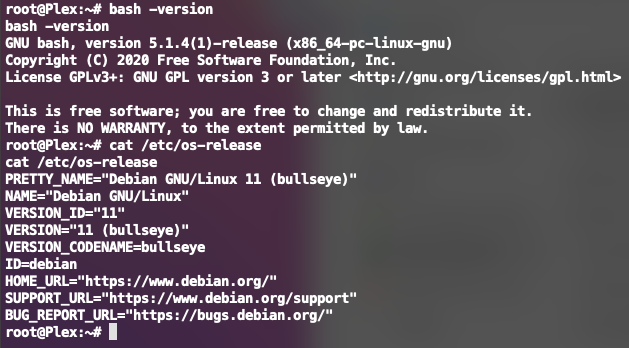
Did you substitute something for the default grep ?
(It’s complaining of null command substitution on a grep)
The processor is in the logs. It’s a LXC. Default Debian 11-Image and nothing substituted.
It’s GNU grep version 3.6.
Is it possible to share the pre install script?
I could help you debugging it.


