MKV files added to PMS after 1.19.3.2852 update, can't be played with REMOTE Web Player - CPU error is shown

Server Version#: 1.20.1.3252
Player Version#: 4.34.4

Since I’ve applied the PMS Update 1.19.3.2852-219a9974e all the MKV files added after that Update, can’t be played from Remote Web Player using Chrome, the following error is shown “Playback Error – Not enough CPU for conversion of this item.”

All the MKV files that were added prior to the mentioned update have no problem to be played, and neither all the MP4 added even after upgrade.

This issue also affects some TVs with old Player Versions, recent TV models (2018, 2019, 2020) are not affected.

For some reason there is a pattern of differences for these items in the database records.

Database: com.plexapp.plugins.library.db

Table: media_items

Field: color_trc

Value for media that plays without any issue: “” (Blank, not NULL)

Value for media that cannot be played: bt709

Table: media_streams

Field: extra_data

Value for media that plays without any issue:

VIDEO:

ma%3AbitDepth=8&ma%3AchromaLocation=left&ma%3AchromaSubsampling=4%3A2%3A0&ma%3AcodedHeight=560&ma%3AcodedWidth=1280&ma%3AcolorPrimaries=bt709&ma%3AcolorRange=tv&ma%3AcolorSpace=bt709&ma%3AcolorTrc=bt709&ma%3AframeRate=23%2E976&ma%3AhasScalingMatrix=0&ma%3Aheight=546&ma%3Alevel=31&ma%3Aprofile=high&ma%3ArefFrames=6&ma%3ArequiredBandwidths=1798%2C1415%2C1155%2C1155%2C1155%2C1155%2C1155%2C1155&ma%3AscanType=progressive&ma%3Awidth=1280

AUDIO:

ma%3AaudioChannelLayout=stereo&ma%3Aprofile=lc&ma%3ArequiredBandwidths=129%2C129%2C129%2C129%2C129%2C129%2C129%2C129&ma%3AsamplingRate=48000&ma%3Atitle=Stereo

Value for media that cannot be played:

VIDEO:

ma%3AbitDepth=8&ma%3AchromaLocation=left&ma%3AchromaSubsampling=4%3A2%3A0&ma%3AcodedHeight=544&ma%3AcodedWidth=1280&ma%3AcolorPrimaries=bt709&ma%3AcolorRange=tv&ma%3AcolorSpace=bt709&ma%3AcolorTrc=bt709&ma%3AframeRate=23%2E976&ma%3AhasScalingMatrix=0&ma%3Aheight=536&ma%3Alevel=31&ma%3Aprofile=high&ma%3ArefFrames=6&ma%3AscanType=progressive&ma%3Awidth=1280

AUDIO:

ma%3AaudioChannelLayout=stereo&ma%3Aprofile=lc&ma%3AsamplingRate=48000&ma%3Atitle=Stereo

The difference for the video stream seems to be the lack this section:

requiredBandwidths=1798,1415,1155,1155,1155,1155,1155,1155

for the audio stream:

requiredBandwidths=129,129,129,129,129,129,129,129

I have tried to complete the information in the indicated fields of the database for the affected content, but without success, the same error occurs.


UPDATE media_items SET color_trc = '' WHERE id = 23040;

UPDATE media_streams SET extra_data = 'ma%3AbitDepth=8&ma%3AchromaLocation=left&ma%3AchromaSubsampling=4%3A2%3A0&ma%3AcodedHeight=544&ma%3AcodedWidth=1280&ma%3AcolorPrimaries=bt709&ma%3AcolorRange=tv&ma%3AcolorSpace=bt709&ma%3AcolorTrc=bt709&ma%3AframeRate=23%2E976&ma%3AhasScalingMatrix=0&ma%3Aheight=536&ma%3Alevel=31&ma%3Aprofile=high&ma%3ArefFrames=6&ma%3ArequiredBandwidths=1798%2C1415%2C1155%2C1155%2C1155%2C1155%2C1155%2C1155&ma%3AscanType=progressive&ma%3Awidth=1280' WHERE (media_item_id = 23040) AND (codec = 'h264');

UPDATE media_streams SET extra_data = 'ma%3AaudioChannelLayout=stereo&ma%3Aprofile=lc&ma%3ArequiredBandwidths=129%2C129%2C129%2C129%2C129%2C129%2C129%2C129&ma%3AsamplingRate=48000&ma%3Atitle=Stereo' WHERE (media_item_id = 23040) AND (codec = 'aac');

The issue persists till the 1.20.1.3252 version.

No specific error message is recorded in the logs.

When the Web Player runs in the same local network, there’s no issue.
The requiredBandwidths data is added as the result of deep analysis of the media. As far as I know, deep analysis only happens automatically as part of the nightly scheduled maintenance Plex performs, if enabled. There’s a bit of discussion of deep analysis and the impact on bandwidth requirements if it hasn’t been performed near the end of this support article:

You can force deep analysis manually by invoking Plex Media Scanner from the command line:

Adding these values to your database manually probably won’t produce good results as each file likely has unique requirements. It would be best to allow deep analysis to be performed, either automatically via scheduled maintenance or manually by invoking the scanner, to add the correct values.

If that doesn’t help, debug logs from the server will likely be required to troubleshoot further. Reproduce the issue and then upload the logs here. Ensure that Debug is enabled and Verbose is disabled for logging in the server’s general settings before reproducing the problem.

2 Likes

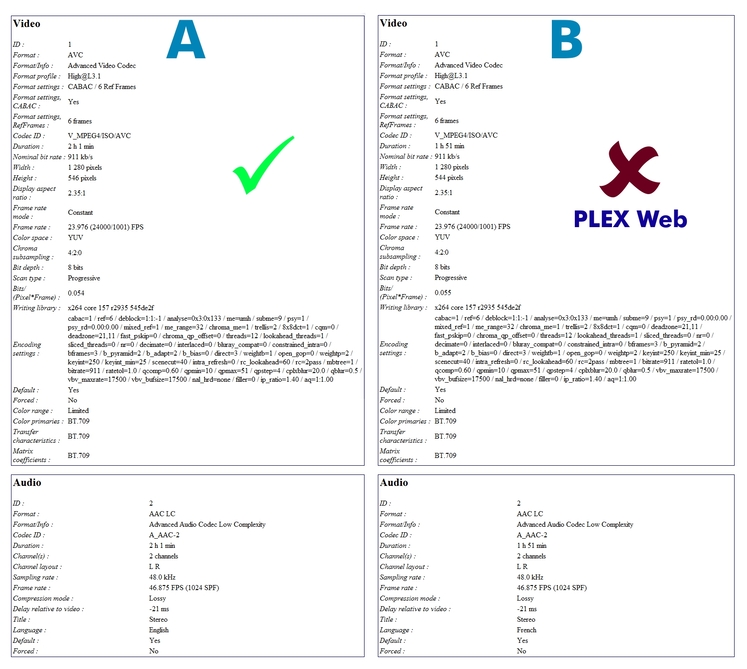
MKV Properties Comparison

As you could see, both have same properties, but the second one, “B” doesn’t play on Web Player.

The “A” (media_item_id = 20687) example corresponds to the last MKV that plays ok in Web Player.

The “B” (media_item_id = 20704) example corresponds to the first MKV that fails on Web Player.

An interesting finding when reviewing the data records of the database is that for the audio streams of the films that do not work in Web Player, the bitrate field has a NULL value in the media_streams table. Same case for all the content that fails.

Comparing the datamedia_items.csv.txt (906 Bytes) media_streams.csv.txt (1.5 KB)

I’ve tried before to obtain an error message enabling Debug, but no message is logged.

It doesn’t appear as though debug logging has been enabled. Make sure you’re enabling it in the server settings (Settings -> (Settings) General) and not the web client settings (Settings -> (Plex Web) -> Debug).

And it still doesn’t look like deep analysis has been performed on your media. To ensure it happens automatically during scheduled tasks, to to Settings -> Scheduled Tasks and make sure the following option is enabled:
image

To force deep analysis now, run Plex Media Scanner:

  1. Run Plex Media Scanner -l and note the ID of the library having issues.
  2. Run Plex Media Scanner -c ID --analyze-deeply; replace “ID” with the ID from step 1.

If you’re on Linux, FreeBSD, or a Mac, then additional environment information will have to be passed.

[Edit to correct]
As @Volts points out below the command above, as provided, won’t actually cause deep analysis to be performed on the library. You’ll need to have it run analysis on individual items. Volts provides a corrected command below:

You’ll still need to set the environment correctly for it to work.

1 Like

EUREKA!!! :star_struck:

Adding manually a bitrate value for the audio stream in media_streams table, solves the issue.

sqlite3 com.plexapp.plugins.library.db

UPDATE media_streams SET bitrate = 147512 WHERE (media_item_id = 20704) AND (codec = 'aac');

Solution

Now, I want to know what is causing that missing value. :thinking:

1 Like

Seems that I need to previously specify a Home Path for the PLEX Media Server configuration files:

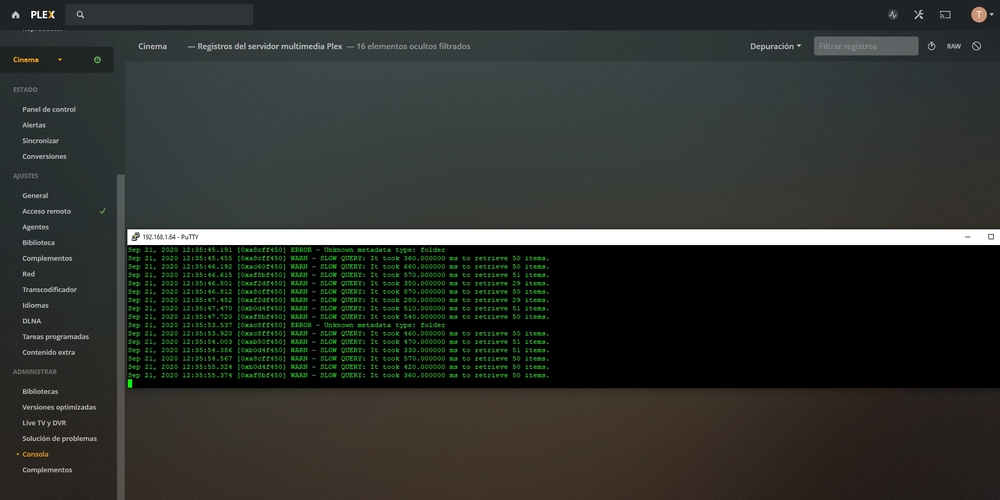
Sep 21, 2020 20:17:41.110 [0xb400f450] INFO - Plex Media Scanner v1.20.1.3252-a78fef9a9 - unknown PC unknown - build: linux-armv7sf - GMT -05:00
Sep 21, 2020 20:17:41.111 [0xb400f450] INFO - Linux version: 3.10.39 (#1 SMP Thu Aug 29 20:35:52 PDT 2019 2014T30p5 Build-gitad56653), language: C
Sep 21, 2020 20:17:41.111 [0xb400f450] INFO - Processor Arm
Sep 21, 2020 20:17:41.111 [0xb400f450] INFO - ./Plex Media Scanner -l
Sep 21, 2020 20:17:41.113 [0xb4832810] DEBUG - Opening 20 database sessions to library (com.plexapp.plugins.library), SQLite 3.26.0, threadsafe=1
Sep 21, 2020 20:17:41.114 [0xb4832810] DEBUG - Installing Library Database from ["/mnt/HD/HD_a2/Nas_Prog/plexmediaserver/binaries/Resources/com.plexapp.plugins.library.db"] to ["/home/root/Library/Application Support/Plex Media Server/Plug-in Support/Databases/com.plexapp.plugins.library.db"]
Sep 21, 2020 20:17:41.551 [0xb4832810] ERROR - SQLITE3:(nil), 1, no such column: library_sections.content_changed_at in "select library_sections.id as 'library_sections_id', library_sections.library_id as 'library_sections_library_id', library_sections.name as 'library_sect
Sep 21, 2020 20:17:42.268 [0xb4832810] DEBUG - Job running: '/mnt/HD/HD_a2/Nas_Prog/plexmediaserver/binaries/CrashUploader' '--directory=/home/root/Library/Application Support/Plex Media Server/Crash Reports/1.20.1.3252-a78fef9a9' '--version=1.20.1.3252-a78fef9a9' '--platform=Linux' '--platformVersion=3.10.39 (#1 SMP Thu Aug 29 20:35:52 PDT 2019 2014T30p5 Build-gitad56653)' '--serverUuid=' '--userId=NOUSERID' '--sentryUrl=https://sentry.io/api/1233455/minidump' '--sentryKey=xxxxxxxxxxxxxxxxxxxxxxxxxxxxxxxx' '--vendor=unknown' '--model=unknown' '--device=PC' '--allowRetries=0'
Sep 21, 2020 20:17:42.278 [0xb4832810] DEBUG - Jobs: Starting child process with pid 30847

On Linux (or Mac or FreeBSD) you must provide some environment (EAE_ROOT and FFMPEG_EXTERNAL_LIBS) on the command line when running Plex Media Scanner. The easiest way to find what values these should be set to is to perform a manual library scan through the web client and then search Plex Media Server.log for a line similar to the following (debug logging must be enabled):

Job running: EAE_ROOT='/tmp/pms-746f4d49-0527-4221-8755-16b3222a4ddd/EasyAudioEncoder' FFMPEG_EXTERNAL_LIBS='/config/Library/Application\ Support/Plex\ Media\ Server/Codecs/96550d8-3281-linux-x86_64/' X_PLEX_TOKEN='xxxxxxxxxxxxxxxxxxxx' '/usr/lib/plexmediaserver/Plex Media Scanner' '--scan' '--refresh' '--section' '2' '--activity' '91934142-121a-4647-acde-1766c93cd15b'

Then, when you run your own scan from the command line, preface the command with the EAE_ROOT and FFMPEG_EXTERNAL_LIBS values from the log. Something like:

EAE_ROOT="/some/path" FFMPEG_EXTERNAL_LIBS="/some/other/path" ./Plex Media Scanner -l

1 Like

At least on FreeBSD, I find I need to add some additional environment variables to run the Plex Media Scanner on the CLI:

LD_LIBRARY_PATH
PLEX_MEDIA_SERVER_APPLICATION_SUPPORT_DIR

I would expect you to need LD_LIBRARY_PATH on Linux, but that second one might be a FreeBSD environment thing.

Some other discussion, including from Plex folks here:

Media scanner cli is crashing [fixed] - needed env variable set

1 Like

Interesting. I do recall having to set those (at least LD_LIBRARY_PATH) to run Plex Transcoder manually; but the command above was taken from a scan of my PMS-under-Docker-on-Linux test server earlier tonight. Perhaps it does vary by operating system; my mention of FreeBSD above was an assumption, possibly incorrect.

1 Like

Variety, the spice of life … and bane of troubleshooting. :slight_smile:

Edit: oh, I think the scanner and transcoder need different things. That may be part of the difference too. I’ve spent more time torturing the transcoder than the scanner.

1 Like

To follow up further - does this work for you, can you trigger analysis on a library section?

I find that deep analysis only works on individual items, with the library item ID specified via -o.

./Plex Media Scanner -o 149599 --analyze-deeply -x

1 Like

Good catch. I just performed a quick test and see the same behavior. The command I suggested didn’t error when I tested it earlier, but it doesn’t appear to have actually deeply analyzed the new media either. However, when specifying an item instead of section, it worked as expected.

I feel like I knew this at some point and forgot. Thanks for reminding me!

Also, my main server’s (macOS) scheduled tasks just completed a while ago. Examine the logs bears this out as well; it performs deep analysis item-by-item for new items.

1 Like

Oh darn. I was hoping it was possible. :slight_smile: I don’t think it is. I even think Plex calls the Scanner over and over internally.

Edit: ahah, as you said. That.

This topic was automatically closed 90 days after the last reply. New replies are no longer allowed.