I’m going to guess that the original files had embedded metadata, you remuxing to mkv removed it and that is why it’s working and not an issue with m4v (mp4) containers.
In my case, I’m fairly certain it’s not the metadata, as I’ve not only tried this without using the local scanner, but actually gone so far as to rip the metadata out of the file completely using Atomicparsley. Further, my agents are set up such that local file names will override the internal metadata (I’ve had more than a few situations where thetvdb has episodes in a different order than they appeared on the original DVDs or in iTunes, for instance, and renaming the files overrides this just fine).
For whatever reason, the scanner handles MP4/M4V extensions differently for multi-episode files. It’s an odd inconsistency, although I’m not sure I care all that much in my case, since the way multi-episode files are handled seems a bit messy right now anyway.
I think that the “resume playback from hh:mm:ss” internal functionality could (and should) be extended to start such multi-episode files at their specified places, with the start time able to be specified in the episode’s Edit data. That would be cool.
@kappacrab said:
Hi there. I had the same problem.
When i used plex for the first time i had no clue how everything works. I didnt even use a guide to get to know and set everything up. For some reason i figured it out myself, even the naming scheme, where the little tool called “RenameMaster” came in very handy.
So for this particular problem in this thread i also tried to use a “-” to add another episode number for a single file. It didnt work for some reason, now i used a “+” instead, e.g. “[name of series] - S01E001+002”. Now plex seems to split both and shows the exact amount of episodes.
Visiting the single episode overview it still shows the doubled length on both episodes. I didnt try out watching them to see how seemless they play or if it will be played two times in a row.
I hope someone can make use of my findings.
EDIT: Works seemlessly.
I’ve been reading all kinds of posts and trying different naming schemes, but this one did it for me! Using + as described above made Plex correctly combine the episodes.
Since there’s no indication which episodes reside in which file aside from what starts playing when you select it, it’s really difficult to find an episode in a season that’s stretched across several files. Want to watch episode 14? If you can’t recall where it exists in relation to the files you have, you can only start playback and fast forward to try and find the episode.
Even more frustrating is if you watch all episodes in a file, say 1-5… Plex only shows that episode 1 has been watched! You could come back later, wanting to continue on, and have no idea where you were. If you accidentally select 5 again, you need to fast forward all the way through the file only to find out, “Hey, this looks familiar…”
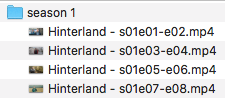
This is still a thing. Just added a series where all the files are double episodes and are MP4 files with names like “Show Name - 1x01x02 - Episode Title.mp4”, and Plex only adds it as a single episode (the first one listed in the file name, in the example just Episode 1). I’ve been using this naming format for years with no issues, that I’ve noticed, but suddenly with this new series I added half the episodes were missing! After much trial and error, Plex Dancing, etc, I figured out that all I have to do is change the extension from .mp4 to .mkv and it magically figures out they are double episodes and assigns them as it should (to both Episode 1 & 2 for example above). If I change it back to .mp4, then it thinks it is a single episode again and trashes the latter one. Frustrating!
My choices seem to be:
Leave as is and accept I’ll only see odd numbered episodes in Plex for that series.
Split all of them into the individual episodes and name accordingly.
Remux/convert all of them into mkv containers.
But really seems like the real option would be #4 - Plex fixes this issue and makes it act consistently after this has been a known issue in these boards for years!
This method worked for me (with Seinfeld, several two part episodes combined into single m4v files). I used + between episode numbers in the single file name and Plex correctly parsed and separated the episodes in the guide.
Make certain Local Media Assets is not the top-listed Agent prevents reading metdata from MP4 files and overruling what is discovered on the internet DB. (most important with MP4 files)
2 Naming
-rw-r--r-- 1 chuck chuck 7043886718 May 27 13:47 Star Trek The Next Generation - S07E25-E26 - All Good Things....mkv
If you use MKVtoolnix-GUI to open any of these files, does it pre-populate any of the descriptive fields with series / episode names? These will show in the Output tab