Those numbers represent the amount of bandwidth required for different client buffer sizes, from smaller (5MB) to larger (500MB) buffer sizes.
The traditional analogy is filling a leaky bucket. The bucket is the client buffer. Bits leak out the bottom of the bucket as the video is played. If the bucket is completely emptied, playback stops.
Because the bitrate of a video varies from scene to scene, the amount that the bucket leaks also varies. How big of a hose do you need to keep the bucket from emptying completely? Well, it depends on the size of the bucket.
If a client has a smaller buffer bucket, then more bandwidth needs to be available to replenish that buffer quickly. Otherwise during higher-bitrate portions of the video, the buffer may be drained completely and playback may stop.
If a client has a larger buffer, a few moments of high-bitrate video won’t drain it completely, and playback can continue.
TVs and older set-top boxes typically have smaller buffer buckets, so they require bigger hoses. They might need enough bandwidth to keep up with the peak momentary bitrate of the video.
PCs and newer devices have larger buffer buckets, so a longer period of high bitrate video doesn’t drain the bucket completely. This means they can get by with less bandwidth.
It might not be obvious just how much the bitrate of a video changes during playback, but it’s dramatic. A still scene requires almost no bits, and a busy scene requires a lot of bits to describe every pixel changing.
Here’s Interstellar:
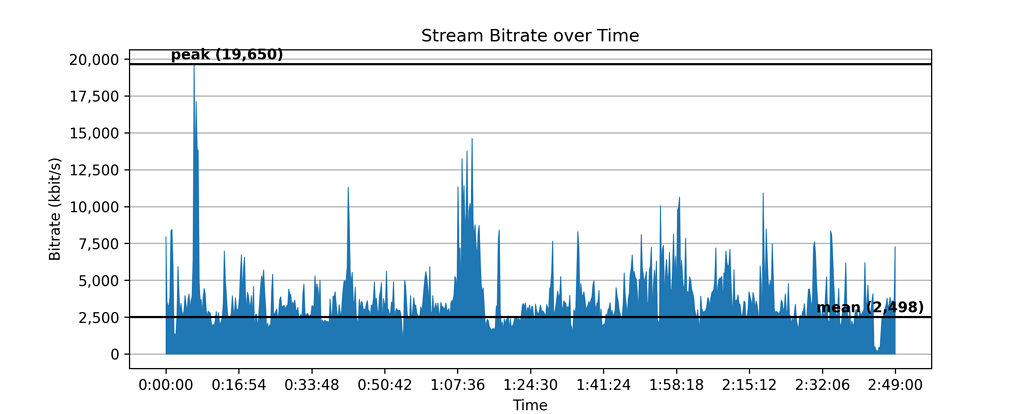
The mean bitrate of this file is just 2498 kbit/s. But check out the scene at 1:07:36. The bucket leaks really fast during this whole scene, so having a bigger bucket helps keep it from emptying completely. Or if you have a small bucket, having a bigger hose will keep it full.
