This version exists nowhere . It is Forum Preview only.
Your best course of action is to download from Plex.tv (public or beta) and post in those threads or create new. It sounds like you should turn off IPv6 on an IPv4-only network.
1.16.2.1311 does correspond to the latest beta (PlexPass) but is a build of my creation for development testing only. It is not certified for production use.
Great this works fine on my old wheezy server 
Is there a way to add this to sources.list to enable easy updates?
When this is public, it will be accessible for everyone through all normal distribution channels.
this is the public version now?
This thread is the final forum preview.
Since my last post here, it has been submitted for both Engineering and QA final review.
Shortly thereafter, it will be production unless an absolute show-stopper is found.
Do you have a problem or comment? I will address it as best I can.
Update:
The installer is now considered to be in an RC phase, and based off the same PMS 1.16.4 Plex Pass beta release. We are currently tracking to include this work in mainline PMS builds sometime in the next 3-4 weeks.
I request everyone reading here, please check one final time.
[chuck@lizum ~.295]$ cat /vtmp/PMS-installer-final
# apt install ./plexmediaserver_1.16.4.1484-6d5612c2f_amd64.deb
Reading package lists... Done
Building dependency tree
Reading state information... Done
Note, selecting 'plexmediaserver' instead of './plexmediaserver_1.16.4.1484-6d5612c2f_amd64.deb'
The following packages will be upgraded:
  plexmediaserver
1 upgraded, 0 newly installed, 0 to remove and 0 not upgraded.
Need to get 0 B/75.0 MB of archives.
After this operation, 17.8 MB disk space will be freed.
Get:1 /vtmp/plexmediaserver_1.16.4.1484-6d5612c2f_amd64.deb plexmediaserver amd64 1.16.4.1484-6d5612c2f [75.0 MB]
(Reading database ... 157364 files and directories currently installed.)
Preparing to unpack .../plexmediaserver_1.16.4.1484-6d5612c2f_amd64.deb ...
Removed /etc/systemd/system/multi-user.target.wants/plexmediaserver.service.
PlexMediaServer installer: Pre-installation Validation.
PlexMediaServer installer: Pre-installation Validation complete.
Unpacking plexmediaserver (1.16.4.1484-6d5612c2f) over (1.16.2.1311-4b7ace214) ...
Processing triggers for mime-support (3.60ubuntu1) ...
Processing triggers for desktop-file-utils (0.23-3ubuntu3) ...
Processing triggers for libc-bin (2.28-0ubuntu1) ...
Processing triggers for gnome-menus (3.13.3-11ubuntu2) ...
Setting up plexmediaserver (1.16.4.1484-6d5612c2f) ...
PlexMediaServer installer:
PlexMediaServer installer: Now installing based on:
PlexMediaServer installer:   Process Control:    Systemd
PlexMediaServer installer:   Plex User:          plex
PlexMediaServer installer:   Plex Group:         plex
PlexMediaServer installer:   Video Group:        video
PlexMediaServer installer:   Metadata Dir:       /var/lib/plexmediaserver/Library/Application Support
PlexMediaServer installer:   Temp Directory:     /var/lib/plexmediaserver/tmp_transcoding
PlexMediaServer installer:   Lang Encoding:      en_US.UTF-8
PlexMediaServer installer:   HW transcoding:     Not found
PlexMediaServer installer:
PlexMediaServer installer: Completing final configuration.
Created symlink /etc/systemd/system/multi-user.target.wants/plexmediaserver.service → /lib/systemd/system/plexmediaserver.service.
PlexMediaServer installer: PlexMediaServer-1.16.4.1484-6d5612c2f - Installation successful.
Processing triggers for libc-bin (2.28-0ubuntu1) ...
#
Download links.
Please give this one the hard push.
Please make any final comments; good, bad, or otherwise 
The new installer worked perfectly on my 64-bit AMD64 Xubuntu 19.04 server.
# Plex Media Server installation configuration info:  Thu 08 Aug 2019 07:54:24 PM EDT
Init=0
Systemd=1
IsEnabled=0
IsRunning=0
NewInstall=1
HaveOverride=0
OverrideFile=""
PlexUser="plex"
PlexGroup="plex"
VideoGroup="video"
AppSuppDir="/var/lib/plexmediaserver/Library/Application Support"
PlexTempDir="/var/lib/plexmediaserver/tmp_transcoding"
LangEncoding="en_US.UTF-8"
HaveHardware=1
NeedUser=0
NeedGroup=1
NeedVideo=1
Verbose=1
HI @ChuckPa
I installed over 1.16.4.1469 seemingly successfully, however the installer log appears to have some oddities…
root@proximo:/data/media# cat /tmp/plexinstaller.log
Plex Media Server installation configuration info: Thu 08 Aug 2019 07:15:48 PM CDT
Init=0
Systemd=1
IsEnabled=0
IsRunning=0
NewInstall=1
HaveOverride=0
OverrideFile=“”
PlexUser=“plex”
PlexGroup=“plex”
VideoGroup=“render”
AppSuppDir=“/var/lib/plexmediaserver/Library/Application Support”
PlexTempDir=“/var/lib/plexmediaserver/tmp_transcoding”
LangEncoding=“en_US.UTF-8”
HaveHardware=1
NeedUser=0
NeedGroup=1
NeedVideo=1
Verbose=1
root@proximo:/data/media#
- plex was enabled and running before starting the install, however the IsEnabled and IsRunning are 0.
- NewInstall is set to 1, however this is an existing installation.
- NeedGroup is set to 1, however this being an existing install, plex - should have already been in the proper user/group.
- finally, I have my transcoder temp set to /dev/shm so my question is that supposed to be different than the PlexTempDir specified in the install log?
That’s an interesting quirk
None of that logic has changed but may have found it.
  # Begin General validation
  # Is this a new installation (must have plex:plex and /var/lib/plexmediaserver to turn off)
  if [ $(grep -c ^plex /etc/passwd) -gt 0 ]; then
    NeedUser=0
  fi

  if [ $(grep -c ^plex /etc/group) -gt 0 ]; then
      Needgroup=0
  fi

  if [ -d /var/lib/plexmediaserver ] && [ $NeedUser -eq 0 ] && [ $NeedGroup -eq 0 ]; then
        NewInstall=0
  fi
Would you please tell me how grep -c works versus grep xxx | wc -l ?
edit: i created 2 test script, 1 as above and 2 with grep xxx | wc -l but not sure what supposed to happen;
test1
root@proximo:~# ./test.sh
./test.sh: line 12: [: -eq: unary operator expected
same with test2
root@proximo:~# ./test2.sh
./test2.sh: line 12: [: -eq: unary operator expected
maybe this is what you wanted?
root@proximo:~# grep -c ^plex /etc/passwd
1
root@proximo:~# grep ^plex /etc/passwd | wc -l
1
for reference proxmox 6 on debian
root@proximo:~# uname -a
Linux proximo 5.0.15-1-pve #1 SMP PVE 5.0.15-1 (Wed, 03 Jul 2019 10:51:57 +0200) x86_64 GNU/Linux
root@proximo:~# cat /etc/os-release
PRETTY_NAME=“Debian GNU/Linux 10 (buster)”
NAME=“Debian GNU/Linux”
VERSION_ID=“10”
VERSION=“10 (buster)”
VERSION_CODENAME=buster
ID=debian
HOME_URL=“https://www.debian.org/”
SUPPORT_URL=“Debian -- User Support”
BUG_REPORT_URL=“https://bugs.debian.org/”
I see your point about the NewInstall=1 detection flag.
I’ve gone ahead and changed that.
The new logic is:
-
Default values:
a. PlexUser=plex
b. PlexGroup=plex
c. AppSuppDir=/var/lib
-
If override exists, ingest it, Validate existence of OverrideUser and OverrideGroup + OverrideDir before accepting PlexUser, PlexGroup, and AppSuppDir if specified.
-
Perform final determination of New/Upgrade based on potentially updated PlexUser, PlexGroup, AppSuppDir
Installation will still be halted until it passes cleanly.
The gain here is the previous requirement that user plex:plex and /var/lib/plexmediaserver exist, has been removed in favor of a valid override specification.
I am building and testing locally to make sure nothing else has been removed.
Also, unrelated, the WSL2 detection restriction has been removed. Should someone want to install it, it will not be stopped. It’s not officially reported but won’t be blocked. (one of the engineers tried it and it worked for him… hahahaha)
nice, I will try wsl2 again soon when I have sufficient time to muck around with it.
sounds pretty exciting that someone got it to work!
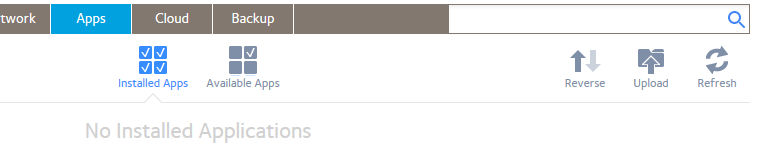
installed successfully 1.16.4.1484 on a fresh reset readynas 528x, os 6.10.1 via web gui
however, it does not show up on the INSTALLED apps page, so you cannot start/stop/uninstall.
even though I have installed the above test installer via the gui (upload button)
the last supported official version from the readynas app repository is

As far as ReadyNAS, this isn’t the NAS packaging. This is the debian desktop / workstation build  lol
lol
I may be good but can’t do it all in one DEB file. 
Here is an updated build, which I did myself, to verify a few changes.
Changes are:
- User plex:plex and directory /var/lib/plexmediaserver will no longer be created on the installation system if a valid override file is in place which supersedes these values.
- Timing error which prevented IsRunning detection to sometimes fail during upgrade has been corrected.
- Checking IsEnabled state has been removed. PMS is enabled when installed. The installer no longer makes any reference to Enabled status during any upgrade which leaves Enabled status as you set it
- It is now allowed to perform an initial installation with a valid override file defined. The values in the override file will be utilized in lieu of any default values.
Reconfiguring the installer this way lowers the PMS footprint on existing installations by better adapting to the existing configuration and per the original goal of this effort.
Test build of this, pending full CI update build:
Hi, I can confirm this build works on MX Linux 18.3 Continuum .
The “official” Plex download package does not work. I spend some hours before I realized MX does not enable systemd any more… luckily I found this forum post and the download. Super ! I hope this get’s into a “public” download somehow. Good work!
For those of you with AMD64 systems, the non-CI build, to which I made some functional adjustments, is how it’s going to go public.
This has been a long road, to which I apologize, but we’re here. The last thing I want to happen is breaking everyone’s system when it goes fully public.
Hi Chuck,
Can you let us know when this goes into an official build. I would appreciate it.