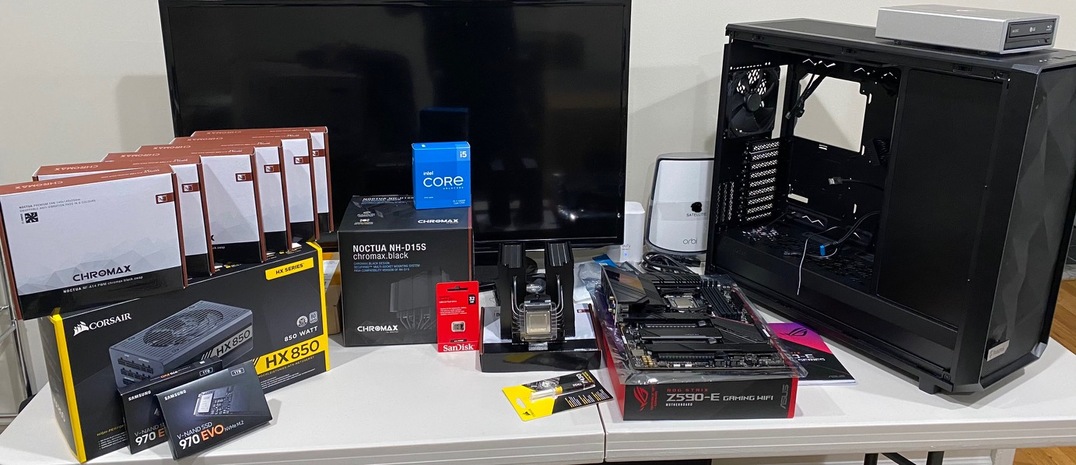
So first time posting and getting ready to order components for my first UNRAID/Plex Media Server build. Below are the components I am leaning towards at the moment and also I’ve listed out main use cases for this build to help with recommendations. Sincerely appreciate any recommendations or tips folks have.
Uses:
4K Streaming - I do share my Plex with friends and family but I cap all external streams to the 1080p library and have a separate 4K library only available on local devices which are all NVIDIA Shield TV Pros I already own. Currently have a single 14TB external drive most media is hosted on and want the security of Parity drives since I really don’t want to download everything again (nothing irreplaceable). On the 14tb drive there are about 1,500 movies and 35 TV series all 720p/1080p/4K now plus I have another 4TB of 4K movies on other hard drives. I would like to start sharing the 4K files with friends as well for those with 4K TVs and my gigabit fiber internet I’d hope is enough just afraid to try with SHIELD TV. I keep both 1080p and 4K copies of all the 4K content so if not direct playing 4K it’s starting with a 720p/1080p version that is easier to convert if needed.
Mobile Plex Downloads - I do have Plex Pass so would like to be able to download movies from my library for on-the-go (iPhone/iPad) use which the Shield TV Pro 16GB I host my PMS on today can’t do
Windows 10 VM - no immediate plans to game, just be an extra computer and something I could potentially set to download torrents for transfer to main share.
NAS - extra local storage for GF & myself to save files. Important stuff we backup on other external hard drives.
MOBO: TBD - Leaning towards a Z590 board for no particular reason but it’s the latest and enables PCI-e 4.0 with Intel. Priorities here are HDMI (may be using iGPU to start), 2.5GB/s LAN or more, 4 x m.2 slots, 1+ x USB 2.0 in Back I/O for UNRAID flash drive and either USB-C or Thunderbolt just so I do have newer generation connectivity possible without add-on card.
SSD: TBD- For cache drives should it be one for read and a second for write in perfect world? The 3rd could be for Plex Metadata and 4th I could assign to be strictly for VM? Can Plex Metadata live on same m.2 drive as VM or should they be separate? I figured since most Z590 boards have 2 Gen 4 m.2 slots I could use the Gen 4 slots for Plex Metadata and a VM and the Gen 3 slots for cache.
HDD: Starting with 6x16TB Seagate EXOS X16 with 2 in parity connected to LSI 9201-16i HBA card I am ordering to give me 64TB to start. I realize when active they will be loud but care more about them lasting in a 24/7 environment and it says when idle they are supposed to be quiet. Plan to add another 10 16TB drives over next 1-2 years to give me total of 192TB when all said and done
Optical Drive: LG WH16NS60 flashed to older firmware to be UHD-friendly housed in external enclosure connected via USB 3.0 since I don’t want to give up potential HDD slots in case for optical drive
I would like the 1,000W version so even if I added a 3070/3080 later and got big into games I wouldn’t have problem having 16 7200rpm SATA drives and everything else but good luck finding inventory here in USA without some ridiculous markup from reseller
GPU: TBD - This is another area I’m really stuck which has me thinking I would try and start with just the iGPU on the new 11th gen chips. Current GPU supplies are awful and while I thought a P2200 would be perfect as main goal today is native unlocked Plex streams (not gaming) I am not sure if in 2021 that is still where I should be looking as they are still $400+. I read about abilities to unlock NVIDIA cards so would like something that can handle at least 2-3 simultaneous 4K streams and another 3-4 1080p streams which may involve some transcoding due to format incompatibilities. The odds are slim I would have 3 4K and 4 1080p streams going at the same time but only takes one time for me to be annoyed that even after spending all this money on other components I am trying to watch a movie and it keeps buffering.
As you can probably tell I’m definitely not necessarily going for a budget build but rather since the last time I built a PC of any kind was 15 years ago and I don’t plan to regularly update outside of adding hard drives I’m comfortable to spend a bit more than is probably necessary to get bare minimum requirements met. Always fun to geek out and splurge a little bit when it is something I know will be heavily used and that I can have a lot of fun putting together and setting up.
I would do a bit of research on large capacity drives. You will find that you have much more of a failure issue than the smaller sized drives. This is due to the larger drive must have much tighter tolerances and can easily get damaged. Remember that with Unraid you can have up to 28 data drives so there is no need to go crazy on having large drives.
I use a m.2 SSD for cache and data. So don’t skimp on the size for it. My m.2 is used as a cache as well as contains my docker and vm images and stores all my docker container data which includes all the meta data for Plex. You really don’t need a separate drive for the Plex meta data if your using a SSD already for the m.2 as a cache and data drive.
Check your mother board because typically the m.2 slot will take up a couple of sata ports. So make sure your motherboard has enough sata ports for the drives you are going to start with and if not you will need to get sata expansion cards.
As for needing a VM you really won’t need it. All the support applications you will need can be run in docker containers.
For the GPU, all you need for Unraid is the onboard since you really are not going to use it. If you want a GPU for transcoding then get one that is supported by Plex and you can pass that through to the Plex container.
Thanks for replying back @Alucard1. My target with the 16TB drives was to maximize capacity without needing to look at a rack server setup so when thinking about fact I want to stay in tower case I’m capped around 16-18 3.5" hard drive spaces.
No worries on SATA ports since I ordered the LSI 9201-16i card already.
I do understand the concerns you bring up about the larger size drives though. What are largest size drives you would consider yourself? Would 10TB still be too large? I could get 8 10TB drives for price of 6 16TB drives and still start off with 60TB of usable space with potential for 140TB (16 drives maxing the LSI card I ordered with 2 acting in parity).
So a single m.2 drive is all that is needed for my use case? Any functional/noticeable benefit of Gen 3.0 vs Gen 4.0 here? I may want to start making use of thumbnails in Plex so would say a 1TB for Plex and 2TB for cache and everything else be worthwhile or still single 2TB should cover all needs size and performance wise?
I personally don’t use anything bigger than 4 TB but that is my preference. I am not sure what you are string that you that you will require that much storage. A full 4K movies can be about 100 Gigs and average 60-80 Gig for a good remux. There are only about 400 4K movies out right now and I doubt you want all of them.
I have a 500 Gig m.2 and is plenty for me. I have 21 docker containers running and 1 VM. My Movie library is large (been collecting for over 10 years) with quite a few 4K movies as well. I have about 18TB total with over 5TB still free. I also store backups of all my computers and other data such as all our photos and music as well.
I don’t really have a good rationale for needing that much space beyond just wanting to never run out of space again haha. I started my Plex adventures about 1.5 years ago with a 8TB drive never thinking I’d fill that up, then I moved to and filled up a 10TB drive and before I knew it here I am with a 14TB drive and under 200GB of free space left and it happened before I knew it.
I guess my come-to-Seagate moment was when I saw some files out there like Game of Thrones in 4K are over 300GB per season so would be almost 2TB for that one series. It was because of this I wanted to try and target as big a capacity as I could and I’d really like to keep all drives the same size (thanks OCD). Being a tower build I’m going to be limited to no more than 16 3.5" drive slots so while UNRAID supports more I am hesitant to want to get into a rack build.
Yeah I can see that with 4K series would eat that up very quickly, I typically don’t store series shows in 4K.
One thing to keep in mind is that as time passes technology gets better and so do drives. One great thing about Unraid is that it is easy to upgrade and expand drives as needed. When I first built my Unraid server the biggest drive you could get is 1TB and over the last few years they just keep getting bigger. I would only buy the number of drives for the amount of storage you may use over the 6 months or so because before you know it they will 20+TB drives and as time goes on the other smaller high capacity drives will become more reliable and cheaper.
Kinda stinks how much space 4K takes up but since we got the 4K TVs it’s like a “why not?” type of deal vs just relying on upscaling from 1080p. I do notice a visible difference in image sharpness quality starting with 4K file vs 1080p file though…
Just pulled the trigger on all the parts this afternoon. Excited for everything to arrive and to get started. Once GPUs are available I’ll pick up a 1660 Super and this build will be 100% in my eyes outside of additional HDDs later I’ll pick up as needed. Maybe grab a spare HDD at some point too just to have handy if one fails so I’m not out a disk during RMA.
CASE - Fractal Design Meshify 2 XL w/ Dark Tint Window + 7x Noctua NF-A14 PWM chromax.black.swap 140mm case fans
PSU - Corsair HX850 850w Platinum Rated
CPU - Intel 11600K 6-core + Noctua NH-D15S Chromax
MOBO - ASUS ROG Strix Z590-E Gaming WiFi
RAM - 64GB (4x16GB) Crucial Ballistix RGB CL16 DDR4 3600MHz
SSD - 2x 1TB Samsung 970 EVO m.2 (1TB Cache + 1TB Plex/Future VM)
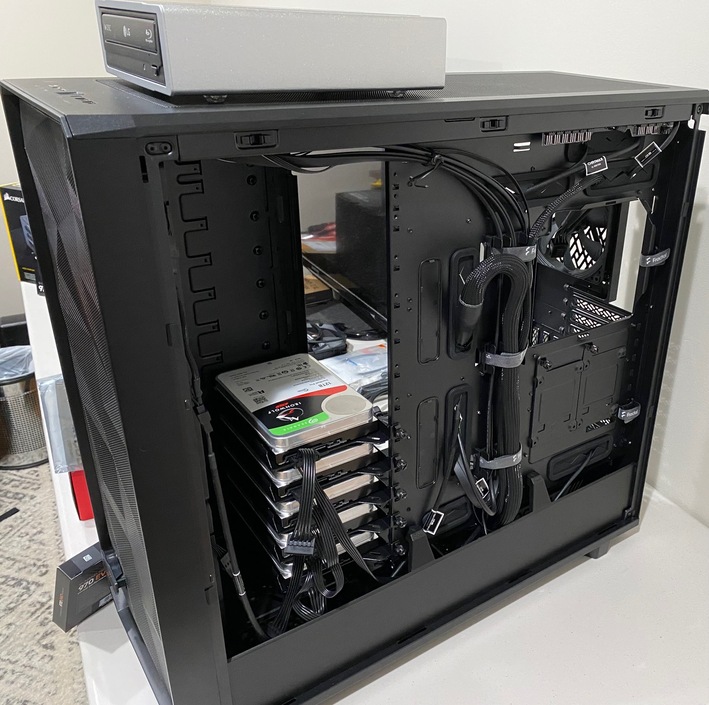
HDD - 5x 12TB Seagate Ironwolf Pro (will run as 3 data/2 parity) + LSI 9201-16i for future expansion
OPTICAL - LG Blu-Ray Burner WH16NS40K in OWC Mercury Pro Optical Drive Enclosure
Now to read up on moving my Plex PMS data from the NVIDIA Shield TV it is hosted on now to UNRAID once up and running.
I am still waiting on the memory to arrive - was supposed to be back in stock 3/31 and they still can’t tell me an ETA when I called Newegg today so waiting to be able to even boot it up still .
Once I get it up and running I will test stream a 4K REMUX and 1080p REMUX to an iPad Air 2 and also try in browser attempting multiple sessions and see what CPU utilization and all that is like on the 11600K.
I also switched up GPU plans and bought the cheapest available EVGA card with 3 year warranty ($40) so I can get on step up list with EVGA for 3060 XC and have that 12GB of VRAM available for transcoding power. I’m seeing 1660 Supers selling (out) for $350-400 with taxes/shipping in minutes when they are back in stock and a 3060XC through step up program would be ~$450 all-in with shipping, taxes, etc. so I’d have way more GPU and VRAM available for not a whole lot more money but a whole lot less stress of competing against bots for stock. Seems most in EVGA step up forums are trying to step up to 3070/3080/3090s so maybe I can luck out and get a 3060 quicker.
One surprise I found out the hard way along the way is when you put this case in storage mode layout that only 2 140mm fans fit on the top (not advertised 3) for total of 6 fans vs 7 so guess I got a spare fan not wanting to pay return shipping to Newegg. Had bought 7 case fans.
Some in process pictures below on my temporary work table (40" TV for scale of case - it’s not small). Stuck here until memory arrives to finish. Trying to pay attention to cable management mocking some stuff up ahead of putting mobo in - may be a server but still can take some pride in my work haha.
 .
.