Hi everyone,
Im hoping i have posted this in the correct place, i was hoping someone could help me with some information.
I have been looking at setting up a plex server, i have an old pc i was thinking about using
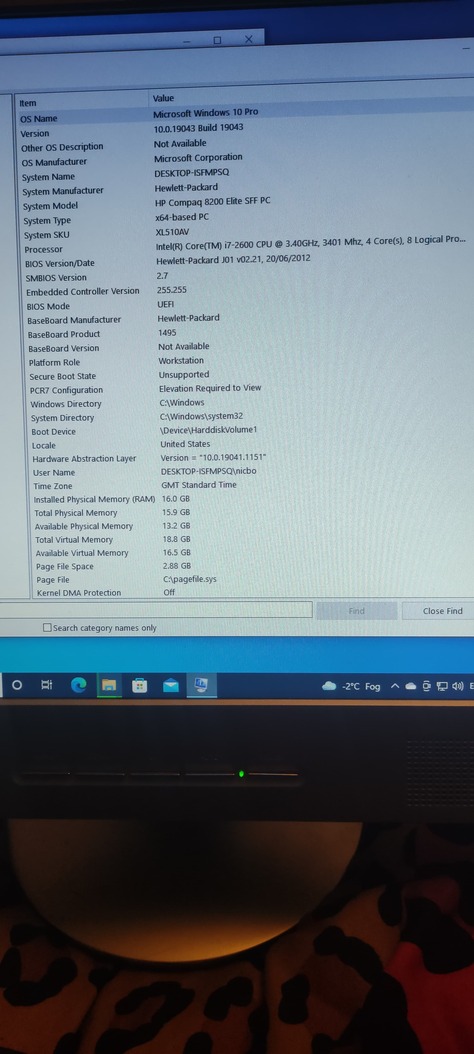
The pc i was going to use is a hewlett packard, Intel Core i7-26000 cpu @3.40ghz
16 gb ram I have hopefully attached a picture of the specs of the pc for reference
id like to know if this would run a plex server ok or would i need to add anything to it ?? I will be getting a couple big external drives, something like 2 x 10tb i will probaly increase the disk space in time
I would like to share my server between 4 - 6 people is this possible
Also can someone tell me what sort of internet speeds id need to run this.
Your good to go as is.
Just install the Plex server on your computer and go into your plex dashboard, settings, and set-up your libraries.
Make sure your drives are plugged in and you’ll manually direct a path to each library, videos, music, etc…
You can share or give access to your account to your family or friends.
At the moment my connection speeds are 70mbps download 20mbps upload will that speed and the computer I’m using be good enough for 4 people to view the videos at the same time ?
It depends on the media you have. full 1080p can vary from as low as 2-3 mbps data rate, to upwards of 60 or more uncompressed. If you have 4 people watching at once, and the video is sending at the rate of the video, you can only do a max of 20 mbps upload. That COULD be 4 remote users if the movies are 3 mbps bit-rate each. If you run 1080p, it’s worth looking into your media to see if it’s compressed enough that 4 people running your biggest movie won’t add up to your upload.
Thank you that explained it perfectly. I do have 1080p films but there not true 1080p as there file size is only around 2 - 3gb Ill give it a shot once I’ve got my collection up and see how it does with a few people connected to it. It’s only a few family members, I was going to share with. Thank you for your help.
I might purchase a Synology DS418 would it still be better to use the pc I mentioned as my Plex server and use the Synology for storage or would it run better running the Plex server off of the Synology ?
Welcome to Plex, after you set up and ready to add your content, it will be best to introduce you to one of the most important parts.
I can’t stress enough how important it is to get naming correct, read carefully if you want movies and TV shows to appear and have the correct metadata for a polished entertainment experience. It’s so easy when you start and well worth the effort.
I’ve got a 918+ which I used as my server for a while. With a Plex Pass, it can do hardware transcoding, which would probably allow up to 10 shows to be transcoded at once. Without plex pass, you will be restricted to software (CPU-only) transcoding, which uses 50% or more of the CPU to transcode. The CPU on those Synology’s are pretty weak compared to a dedicated machine, but they are surprisingly capable compared to a mobile-quality CPU. But if your friends stream the movie at original quality, the server will likely not have to do anything, so there will not be any transcoding, and the CPU will be unused.
For software encoding performance, refer to https://www.passmark.com/ and find the “passmark” score of your CPU models. (918+ Synology CPU passmark J4125. 3000 passmark)(Intel i7-2600. 5300 passmark). I hear for every 1500-2000 passmark you have, Plex is capable of transcoding a 1080p video. I might have had other CPU in use at the time, so I wasn’t quite capable of doing 2 at once myself.
I think the 2nd gen CPU’s didn’t have support for HW transcoding, so the standalone computer will be unable to use that even if you buy a Plex Pass. So if you don’t get a pass, the computer will perform better than the NAS IF you transcode (which may not ever happen, remember, if you stream at original quality). If you get a pass, the NAS might out-perform the computer itself when transcoding, but there is a bug with hardware transcoding and subtitles on the Synology NAS. There is a workaround for it though, just ask here or search.
If your content is between 2-3 GB in size, then you probably have the same content as me. Those are usually 2500 kbps (2.5 mbps) for the video, then an audio track that is 10% of that, for ~2750 kbps (2.75 mbps).