I’m new to Plex, and I’m starting by simply setting up a media library on a little external drive, with plans to do something more elaborate in the future. Right now, the drive that I’m using is a Seagate 5 TB portable drive. It’s pretty slow in general. Right now, when I try to stream videos from it to a Plex app on my Apple TV, high def videos stop and I get an error message about the server not being fast enough for the stream. I have very fast Internet and have no problems streaming video anywhere else, so I know that the problem is in my setup. I’m thinking of buying a Terramaster external hard drive enclosure with two 8 TB drives (set up as RAID 1). Do you think my problem is, in fact, just related to the slow portable drive and would therefore go away when i got the Terramaster, or might something else be going on? Thanks in advance for help!
Could be multiple things going on.
- First a set up of your PC might be helpful. PC or Mac.
2.) Processor being used. - Are you transcoding via the PC or not transcoding the stream. what transcoding X264 preset are you using. Or are you transcoding x265 or something else? Are you using Hardware Acceleration?
Thanks for the reply. I currently have the external drive attached to my Macbook Pro, although eventually I plan to get a dedicated Mac Mini so the server will be always up. The processor is a 3.5 GHz Intel Core i7, which from the Plex documentation that I’ve found seems to have enough juice for 1080 video.
As far as your transcoding questions go–transcoding is one of the things that I’m confused about. If I understand what I’ve read correctly, transcoding is not necessary for regular MP4 files, which is what I have. (I turned off subtitles on the Apple TV in case that was causing transcoding to be necessary.) But if what I understand is incorrect, I’d appreciate being educated. I’m not sure about Hardware Acceleration–I know that I didn’t change any of Plex’s default settings. I looked under Settings just now and don’t see a Hardware Acceleration option.
Thanks again!
FYI, Plex Pass only feature.
Transcoding depends on the technical capabilities of your client with regards to the media container (e.g. MP4) and the embedded media streams such as video, audio and subtitles.
Example from the Apple TV technical specifications:
Video Formats
- H.264/HEVC SDR video up to 2160p, 60 fps, Main/Main 10 profile
- HEVC Dolby Vision (Profile 5)/HDR10 (Main 10 profile) up to 2160p
- H.264 Baseline Profile level 3.0 or lower with AAC-LC audio up to 160 Kbps per channel, 48kHz, stereo audio in .m4v, .mp4, and .mov file formats
- MPEG-4 video up to 2.5 Mbps, 640 by 480 pixels, 30 fps, Simple profile with AAC-LC audio up to 160 Kbps, 48kHz, stereo audio in .m4v, .mp4, and .mov file formats
Audio Formats
HE-AAC (V1), AAC (up to 320 Kbps), protected AAC (from iTunes Store), MP3 (up to 320 Kbps), MP3 VBR, Apple Lossless, FLAC, AIFF, and WAV; AC-3 (Dolby Digital 5.1), E-AC-3 (Dolby Digital Plus 7.1 surround sound), and Dolby Atmos
So if the video stream in your MP4 isn’t H.264, has a higher frame rate or bitrate, this can require Plex to transcode the video.
If transcoding is required, the more powerful your processor is, the better. If you have a Plex Pass, you can also enable hardware accelerated streaming – this will use the GPU instead which has certain encoders “hard-wired”. The related config options are under Settings > Server > Transcoder (Use hardware acceleration when available).
Unless you’re using a USB2 connection for your external drive, the HDD speed / connection won’t be noticeable.
Thanks, that’s helpful. Since I had been planning to get Plex Pass, i just did, and I enabled hardware acceleration. So far, that seems to be working–the videos have been playing ok.
Another question: is there some software I can use to determine the video format details of my MP4 files? Just a simple “get info” doesn’t do it. Thanks!
Video transcoding hits the CPU hard. If you hear the Macbook fans kick in during playback, then there’s a good chance you’re transcoding, as the CPU is probably 90+%
To see if you are transcoding, look at the Dashboard via Plex’s web interface while you’re playing a movie. It will show you if the video or audio tracks are transcoding.
Plex Web → Activity → Dashboard
You can use the Plex for Mac or Plex Media Player clients in addition to Plex Web.
This can sometimes happen if there is a poor network connection.
Check your local network (Your Internet speed does not matter when streaming locally).
Check the wireless signal at the Apple TV (if wireless). If feasible, connect the AppleTV to the network via an Ethernet cable.
Connect your Macbook to the network via an Ethernet cable if possible. FYI, if/when you get a dedicated server, it should definitely have a cabled, not wireless, network connection.
As @tom80H mentions, unless you’re using USB2, the drive should not be an issue.
If you want to test, copy a movie to the internal Mac drive, create a new library and point it to the movie’s location. This takes the external drive out of the equation.
Media Info: MediaInfo
Also, the information is in Get Info. It shows codecs, bit rates, bit depth, etc.
https://support.plex.tv/articles/201998867-investigate-media-information-and-formats/
@boola_littlehats_net: I suppose you were referring to the Get Info of macOS. The Get Info described in the support article posted by FordGuy61 will give you much more detailed information (and the MediaInfo app will show you pretty much every bit & byte of the video’s technical specification).
You guys are all very helpful–thank you! I found the “Get Info” that Plex offers (yes, I was using the Mac OS one at first), and I see that my codec is indeed H.264. I’m playing a video now and my Macbook isn’t whirring. I found the Plex dashboard, but I’m unsure how to tell if video or audio is transcoding, since it doesn’t mention transcoding anywhere. Or does the fact that it doesn’t mention it mean that it’s not?
Thanks again!
When you’re opening the dashboard while playing a video, you can show some playback details.
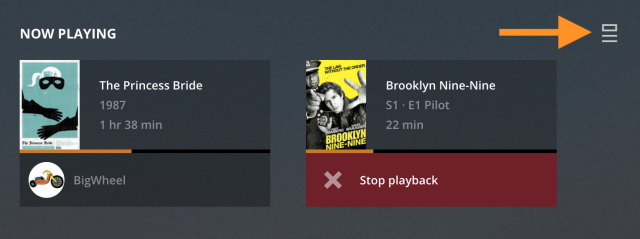

If it shows Direct Play (like in the screenshots above) or Direct Stream, you’re good.
If one of the streams is transcoding, it’ll say so.
Examples:
-
h264 -> h264 (hw)(transcoding from h264 to h264 using HW transcoding; this can e.g. show if the original bitrate is too high) -
DTS -> AC3(for audio transcoding)
It says Direct Play for both audio and video. Yay!
