Thanks for the tip. Was able to get past the URL syntax error, now dealing with user errors. I’ll give bumpy one more shot to see if I can pull off the SSO.
Any other projects you have identified as candidates for PlexAuth SSO? Since the tool is up and running, the items requested for your road-map in the next days, weeks, months:
-
Captcha ability (this will help with spammers/abusers, another tiny layer since there’s no 2 Factor).
-
Implementing PlexAuth SSO into some other web services geared towards your Plex guests (Plex for videos/music, PlexRequests for requests, Plexpy for guest analytics, Bumpy for help desk, and Ubooquity for ebooks, when the developer hopefully adds that functionality).
I can’t think of additional services for guests that would require them logging into a solution.
The wrong username/password is appearing because everytime you try and visit the page while not logged in BB will attempt to log you in. If you don’t yet have a user account it will fail.
If you click sign up (each user has to do this once) it shouldn’t ask for any details and then auto sign in every time you load the page.
I’ve begun work on PlexRequests still a while off though. I’ve also been integrating with GetGrav, I suspect that will be finisedh this week some time.
For Ubiquitoo I’ve just turned auth off and put it behind auth_request. That’s where I’ll leave it until the dev adds any extra functionality for logged in users. When he does it’s going to be tricky because it’s not an open source project.
Never heard of GetGrav, will check that out. Yes, that’s what I figured in regards to the sign-up but when I click sign-up link with the forked version it throws me this error:
“Fatal error: Call to a member function getUsername() on a non-object in /usr/share/nginx/html/muximux/bumpySSO/pages/signup.php on line 41”
Line 41: " "
I’ll attempt again later. Thanks.
Found the error. I’ve pushed a fix for that to github.
It should also be possible to link in Google OAuth or any OAuth for that matter.
https://developers.google.com/api-client-library/php/guide/aaa_idtoken
You’d just need somewhere to store an OAuth email address to Plex email address conversion table.
Thanks for the information. Is there a way to log in with either a username or e-mail address like on plex.tv? Having an issue to where some users (not all), correctly log in with their credentials (no incorrect credentials error thrown), it waits for a few seconds then gives them the PlexAuth page again. The issue occurs for them on multiple browsers.
@DallasHQ said:
Is there a way to log in with either a username or e-mail address like on plex.tv?
Yeah, there isn’t any form validation. It’s only done using HTML5. Within the login page just change;
<input id="email" name="PlexEmail" type="email" class="validate tooltipped" data-position="top" data-delay="50" data-tooltip="Use your Plex credentials" autocomplete="off">
to be:
<input id="email" name="PlexEmail" type="username" class="validate tooltipped" data-position="top" data-delay="50" data-tooltip="Use your Plex credentials" autocomplete="off">
You’ll need to update the CSS as well…
Having an issue to where some users (not all), correctly log in with their credentials (no incorrect credentials error thrown), it waits for a few seconds then gives them the PlexAuth page again. The issue occurs for them on multiple browsers.
I haven’t seen this error. Does it always happen for these users?
interesting…I’ll look through the CSS, could we do two types within an input ID (email or username) or would that be invalid?
If you change the type to username it will accept both username and email. When the type is set to email the HTML5 validation requires; @domain.com
If you change it to username it doesn’t. The code behind it will work with either.
Just pushed a fairly large number of commits. I’ve been running most of them for a while now but please let me know if you find any issues.
There have also been some updates to the config, nav and footer so keep an eye on those.
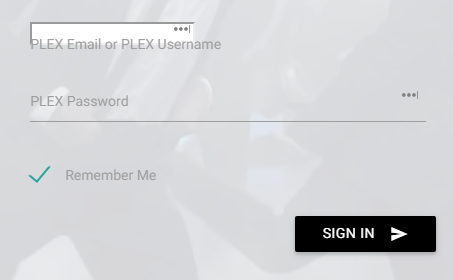
Okay I’ll check it out, need to figure out how to get rid of the white box when utilizing the “username” method for input ID, made some changes to the CSS
@DallasHQ said:
Okay I’ll check it out, need to figure out how to get rid of the white box when utilizing the “username” method for input ID, made some changes to the CSS
Just go to materialize.css and change all occurrences of email to username. That should fix it. 
@DallasHQ
I just made all the changes. If you download the latest materialize.css it should look correct when you change it from email to username.
great work, what were some of the new changes you made to your project? I’ll report back in regards to the CSS…
@DallasHQ said:
great work, what were some of the new changes you made to your project? I’ll report back in regards to the CSS…
There are a fair few. Just have a look at the commits from today.
okay, added your new CSS (i made those same changes before) and still the white box for login. The positives, able to log in with either a username or email address now.
hmmm turns out that file I edited isn’t even used. haha. I’m chatting with my mate who did all the CSS now. I’ll let you know.
okay, based on your feedback (changing email to username in the input ID):
I suspect based on inspection of the form element, we would have to change “email” to “username”…

Nah I think I’m just mixing my HTML up. Try changing email to text in the form.
Based on the CSS.php, the local materialize.css isn’t called.

