Plex Media Player’s lack of play list functionality is really super annoying and it’s why I use Winamp on my HTPC to play music, because Winamps play list functionality is so awesome. It would be great if play list functionality could be integrated into to Plex Media Player.
Plex play list functionality should include the ability to:
• Add whole folders or single tracks to a play list.

• Save a play list.

• Reorder tracks, i.e. move a play list item up or down.

• Remove a single track or clear the whole play list.

• Randomise play list.

• Reverse play list.

• Select multiple tracks to manipulate, i.e. reorder or remove.

• Show ID3 tag information for a particular track.

• Sort play list by:
    ◦ Artist
    ◦ Song title, i.e. alphabetical order
    ◦ Track length/play time, from longest to shortest or vice versa.
How it may work:
- In folder view there is a button to add a folder to a play list. Adding a folder to the play list will add everything in that folder to the play list.

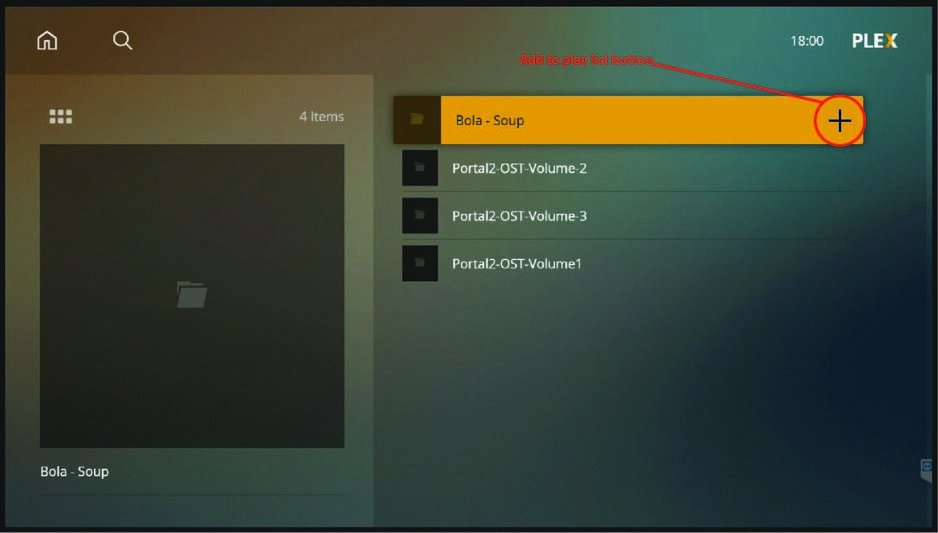
In the album view there is also an add to play list button for adding individual tracks to a play list

- When a folder or track is added to a play list a new screen opens that lists all of the tracks added to the play list.
This window has all the buttons needed to save, delete, and manipulate the play list.
I imagine the play list window will look something like this:

Button 1. Tickbox button for selecting multiple tracks.
Button 2. Track information button to show ID3 tag information.
Button 3. Re-order track, i.e. move the selected track(s) up or down in the play list.
Button 4. Delete button to delete the selected track(s) from the play list
Button 5-10. Buttons to control/manipulate the play list: Play/Pause, randomise play list, reverse play list, sort button, save play list, clear play list.
