
In fact, my friendly name is not “myplex”
This is the normal response. Always myPlex…
I figured out the bug… it seems that the error is related the number of users. When only one user is in the list the script fails. I will fix this with the next version.
Hi @timmyhome,
the issue is fixed with the latest version.
Thank you for your patience
I added a guestuser in plex,my photo library is called “pic” in plex,then i set
like this:PHOTOS_LIBRARY_PATH = ‘/share/pic/’. my path of the photo is “G:\picture”,i set in pptag.py like this :
if system == “Linux”:
photosPath = “/Photos/”
else: # Windows
photosPath = “G:\picture”
i dont know if the set is right , it shows error like this:

hi @timmyhome,
please use double backslashes: G:\\picture
In Python one backslash is a special character so you need to escape it.
Make sure '/share/pic/' is correct. As I have written before it is the path set up in Plex (manage library -> edit -> add folder: there is the path of the used folder.
I assume in your case it is G:\\picture as well (from what I see in your error messages).
Great. I created a new guest user in plex. I can read the tag information after setting the path according to your prompt. But there are new problems. When there are many photos and multiple directories, it can only read the tag information of some photos, and then a lot of information like “possibly corrupted field tag 0x0001 in makernote IFD” will appear, and then the following error will be reported
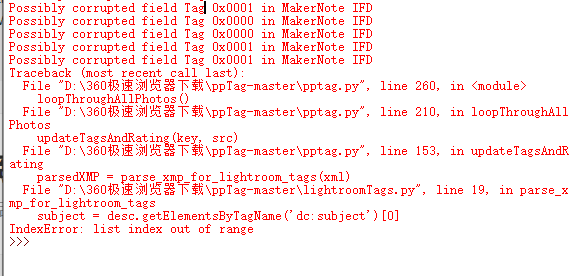
The metadata is corrupted.
Multiple folders are only supported if they are sub folders.
Please make sure that you use the latest version. The last error should not happen in the newest version.
I have solved the problem by adding folders one by one. I think it may be because it can’t read the information of some photos and it’s stuck there, and it won’t skip to continue scanning the next photos. When I delete the stuck photo, it can continue scanning. As you said, it may be because some photo metadata is corrupted, but I can’t locate the corrupted photo quickly, which should be the next problem to be solved. Anyway, now all my photos have labels. Thanks very much for your efforts. This is a very useful script. You are more efficient than the staff of plex. Thank you again!!!
@andreasrehbein thank you for fixing the issue where the script abended when photos have no tags. I was able to successfully run the pptag.py script (interactively) to process 28K files in 1100 directories! However, I ran into the following problem (likely due to running interactively and not using the docker and container files?):
Traceback (most recent call last):
File “pptag.py”, line 265, in
observer.start()
File “C:\Users\eedac\AppData\Local\Programs\Python\Python38\lib\site-packages\watchdog\observers\api.py”, line 253, in start
emitter.start()
File “C:\Users\eedac\AppData\Local\Programs\Python\Python38\lib\site-packages\watchdog\utils_init_.py”, line 110, in start
self.on_thread_start()
File “C:\Users\eedac\AppData\Local\Programs\Python\Python38\lib\site-packages\watchdog\observers\read_directory_changes.py”, line 66, in on_thread_start
self._handle = get_directory_handle(self.watch.path)
File “C:\Users\eedac\AppData\Local\Programs\Python\Python38\lib\site-packages\watchdog\observers\winapi.py”, line 307, in get_directory_handle
return CreateFileW(path, FILE_LIST_DIRECTORY, WATCHDOG_FILE_SHARE_FLAGS,
File “C:\Users\eedac\AppData\Local\Programs\Python\Python38\lib\site-packages\watchdog\observers\winapi.py”, line 113, in _errcheck_handle
raise ctypes.WinError()
FileNotFoundError: [WinError 3] The system cannot find the path specified.
I am clearly in over my head but am hopefully that you can help me over this last hurdle!!! 
I have installed Docker for Windows and it seems to be operational i.e. “Hello World” works. I’ve been unable to figure out how to run pptag insider docker. I would appreciate if you could provide further direction on setup and use of the docker file and containers. Thank You kindly in advance!
Hi @EEDacho,
It seems that there is a bug in the observer package with so many directories. My tests including far less files than your setup.
One question: did you modify then folder structure while the script was running?
Running it directly should work as well.
There is always a initial scan and processing. The observer is the most useful when you run it as a background service 24/7.
For docker you need to build the image and then run it. It is easier to do this using the docker-compose.
For this you need to modify the content of docker-compose.yml to fit your needs. I.e. paths.
I will extend the readme in the repository in the next days for some basic how to setup the docker container.
Thank you for your quick reply. As for your question, no I did not modify the folder structure while the script was running.
In case it matters I am running the script from this location:
C:\Users\eedac\Documents\My Python Scripts\ppTag-master
Here is some work I did to locate the error trap in the code.
Everything seem to be ok so far:

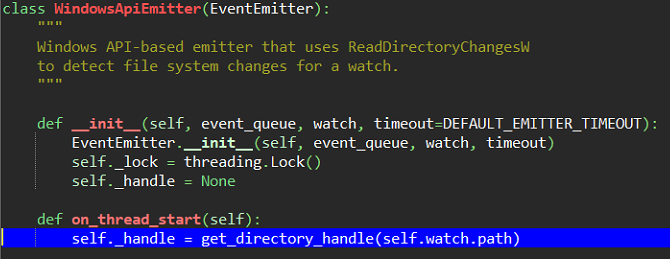

This is where the error trap occurs:



PS - The work you put into creating this script is impressive!
Hi @EEDacho,
it could be related to the path lengths. My script under Windows is even more deep in folders. But my photos are directly in a serperate partition/network drive. So the paths to the photos is quite short.
How did you specified your photo folder in the script? You need some escaping in windows (double backslashes).
I think I may have found the problem…
My current path: photosPath = ""
filename variable has correct path for each photo file being parsed…
However, a null path is passed to:

I changed my path to: photosPath = “C:\Users\eedac\Pictures\My Photo Archive” however this resulted in the path being duplicated in filename…
So I commented out: #filename = photosPath + filename
{ in def updateTagsAndRating(key, filename): }
Filename is still correct and photo tags are processed without error…
After the script finished its initial processing (and while the script was running “start the observer” loop… I created a new photo directory and added photos to the directory and then ran Plex command to Scan the photo Library Files. The new photo directory showed up in Plex as expected.
Unfortunately, the lightroom photo tags were not updated in Plex for the newly added photos.
Thoughts?
Hi @EEDacho,
please follow the readme in the repo. You don’t need to change the source code.
The script needs both paths. The first one is used in the plex installation ( manage library -> edit -> add folder: there is the path of the used folder. )
Put this one in plexUsers.py:
# path of the photo library in plex
PHOTOS_LIBRARY_PATH = '<path>'
The other one is the path to the photo library from the view of the script. When running in windows you need double backslashes!
ppTag.py:
if system == "Linux":
    photosPath = "/Photos/" # Running in Docker
else:
    photosPath = "P:\\some path" # Windows
The script needs both as is uses the path from plex to compare the files that were detected for changes. Because the path from ppTag.py could differ from the one used in Plex you need both paths so that the script can exchange the parts in the paths to convert between both paths.
If in your case both paths are equal just insert them in the correct places. The script will handle it correctly.
Hi @andreasrehbein, success!! I delimited both variable with paths with same path using double backslashes and all is well when I run the script, including when I add new photo directories.
However when I exit the DOS command window the script ends. Please educate me on how I can run the script during start up so that it remains active. Thank You
I cannot even get the script going at all as i cannot get the other tools into play(exifread and so on). I have tried all over the internet with no luck, can you please let me know how you setup the python enviroment in windows…thanks
I also see an opportunity for someone to turn this into a Windows Application, i for one would purchase it.
HI all,
there was a bug in script reading the rating from the xmp from lightroom. It is fixed with the latest version.
@George-Bakopoulos:
You can either install the needed packages global by using pip in a powershell or cmd
C:\Python3\Scripts\pip.exe install <package name>
Or you can setup a virtualenv follow a tutorial like this:
https://programwithus.com/learn-to-code/Pip-and-virtualenv-on-Windows/
In this virtualenv put the script and run it like
C:\Python3\python.exe .\pptag.py
@andreasrehbein - thanks for the XMP rating bug fix 
Also, would greatly appreciate if you (or others on this forum thread) could advise how I can run the script as a background service.
thanks in advance
Got it working thanks, however it stops after a while with this ‘Possibly corrupted field Tag 0x001A in MakerNote IFD’’ any suggestions ?
The file is corrupt. I can try to put some error checking there to prevent the script from failing. But the tags, etc will not be updated for this file then.
