Server Version#: 1.15.3.xxx
Player Version#: n/a
Since the release of 1.15 I haven’t been able to update my pms.
When I upgrade and restart the server it gives errors on curl (6) and tells me that the server cannot resolve host for (downloads.)plex.tv.
So when I start to play a movie and the server needs to download a transcoder it fails, since the server cannot be resolved.
The server packages are all up to date and when testing the download link from the log files regardless of which way (wget, curl) the file can be downloaded.
When downgrading to 1.14 all is ‘fine’ again.
The server also tells me connection refused when connection to 127.0.0.1:32600/devices/discover but that might not be related. This also happens with 1.14
Besides the logfiles, what kind of information do I need to provide, to get to the cause of the issue? Or is there something I can test?
Hope anybody will/can help me out here, since I’m stuck.
Kind Regards,
Wessel
devices (discover) on port 32600 is normal.
Curl error 6 is system error 6 as well. (DNS lookup failure at the host level).
If it cannot resolve host plex.tv, then your DNS lookup is too slow or misconfigured.
This isn’t a Plex issue.
Logs which you can provide (since DNS is failing), a tar.gz of the Logs directory under Plex Media Server
I’ll share the logfiles later tonight.
I was in the assumption that my dns was configured correctly. Since normally I don’t have these errors.
How do I test/confirm that? And what to watch out for to know if the configuration is correct?
Thanks for your already prompt reply.
Kind Regards,
Wessel
One of the easiest is to run a sustained ping to plex.tv for 60-120 seconds
The next is to do a nslookup plex.tv and run ping tests to each of IP addresses listed there.
I would look first at your DNS resolution, Your ISP might be slow / non-responsive. When all else fails, 8.8.8.8 and 8.8.4.4 (google dns) works well.
Hi,
I’ve attached my latest logs running 1.15.3.876
I’ve also done a ping to plex.tv. This returns nothing. Not from de server, not from my laptop or router. Pinging nu.nl (news site overhere) I get an instant response on all machines.
NSlookup plex.tv responds instantly. With and without a vpn running on the server. I’ve defined the router internally as DNS and the router will forward it to opendns.
Plex Media Server Logs_2019-04-10_23-11-46.zip (583.1 KB)
Hope you have time to help me trace the issue further. I appreciate any help.
Kind Regards,
Wessel
With regard to NSLookup returning IP addresses, this is good news.
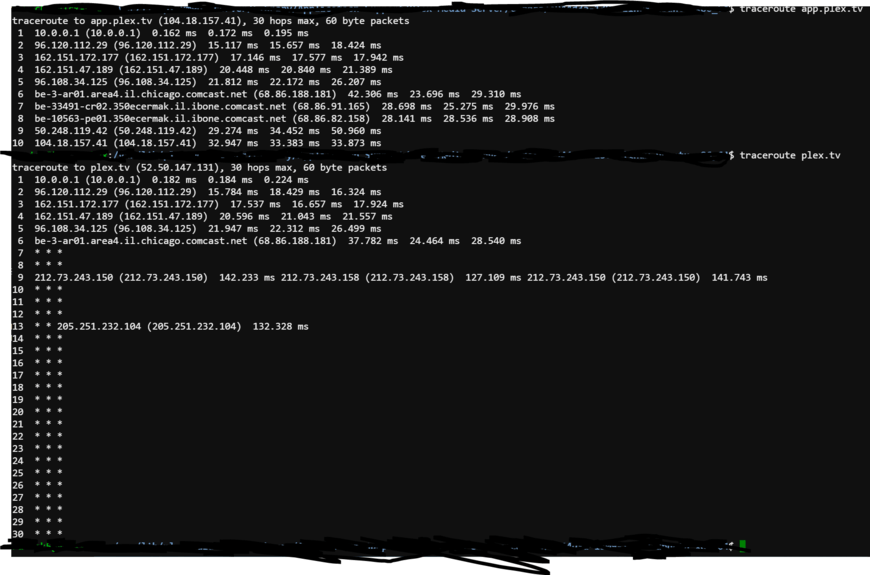
Next please traceroute -m 128 ip.addr.to.test plus ping ip.addr.to.test and see if/where it dies. Something tells me you won’t get a reply from one and somehow be a routing table issue.
netstat -r and netstat -rn
@ChuckPa, Sorry to jump in, but it looks (at least to me) like the plex infrastructure team may have disabled plex.tv from responding to ping requests. (fwiw, app.plex.tv is still pingable, although that resolves to a cloudflare address)
I have tried a few of the ip addresses returned from nslookup from a few different servers in different european countries and none of the ip addresses seem to be responding to pings.
I don’t know if it still works for you, if so then maybe they have made exceptions for you and other plex team members/staff
1 Like
Thank YOU for jumping in. GOOD catch!!
I will take it up with them as it should be pingable
This certainly puts a wrench in the diagnostic technique if we can’t establish the presence of plex.tv
Let’s switch to nslookup app.plex.tv It should be the same IP addresses.
Thanks! Happy to hear the ping isn’t working. I thought I was loosing it.
I’ll have to postpone further testing until tomorrow.
I’ll let you know where the traceroute dies.
Thanks again.
Kind regards,
Wessel
I am having this same issue did you resolve it?
1.15.3.876 has some problems it seems.
There is now 1.15.4
Since I can’t replicate the problem, I suggest you consider trying it
@ChuckPa I have also reproduced this on the 1.15.4 build. As this server has been around for a long time and been through many updates I am curious if its a combination of upgrades to Plex and Upgrades to other services on the Ubuntu that are making for a perfect storm. I would also like to point out if it Traceroute to plex.tv I get lost out side of my providers network but do not have the same problem to google.com
Drats. Now I need to be creative.
I have a controlled test bed Ubuntu 16.
No 3rd party software.
It works fine.
Suggestions?
This particular Ubuntu box is a VM that is running Plex only with connection to a Freenas for its storage. I have no other machines on my hosts experiencing issues and most applications a separated into their own VMs. Shy of standing up a brand new plex server to test with I am uncertain of what could possibly be causing this to occur. I have chmod nearly everthing i can think of to be completely open to ensure its not a permission issue so I am essentially at a loss.
My final thought was standing up a Windows machine to be the Plex but I would like to ensure I keep all the necessary watch history and I am uncertain on how to export that from Linux and import it into Windows if its even possible.
Here’s a thought:
- Stop PMS
- Rename Library to Library.keep
- Now stand up a new “Test” instance (with obvious Friendly hostname so you can delete it later)
- See what happens there.
How does the VM get DNS? Via the BSD host ? Is it a NAT or Bridge adapter in the VM?
Not yet. I did find some posts about ubuntu and a replacement for resolv.conf.
I haven’t been able to test it yet. But I second the fact that the server is long running and plex has been updated from early on.
I’ll keep you posted.
Kind regards,
Wessel
It is an ESXi VM, the VM gets DNS from its config file in /etc/network/interfaces where it is statically set for 8.8.8.8 and 8.8.4.4
I think we need split this thread out. There are two different issues here with two different problems for the same symptom it seems.
Has anyone tried PMS 1.14.1.5488 ?
Prior this incident I was running on 1.14.1 and did not have any issues I just can’t get back it.
Which packaging? Redhat or Debian?