Server Version#: 1.32.2.7100
Player Version#: 1.70.2.3845-31e96af6
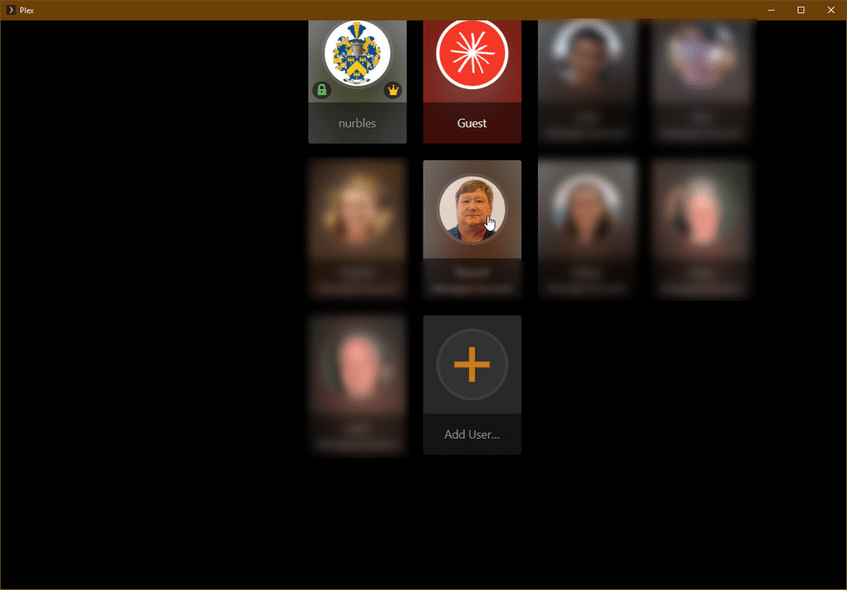
This is just a minor inconvenience, but… I run the Windows Plex App on the rightmost of my three displays. The display resolutions are (from left-to-right): 1080x1920, 3840x2160, 1280x1024. The scaling for each screen is 100%, 125% and 100%, respectively. When I move the Plex App from the primary (center) screen to the right screen, everything gets resized and repositioned correctly. However, since the Plex App saves and restores its size/position when closed and opened again, the initial scaling (and therefore positioning) of the visual elements is incorrect, while the scaling and positioning of the clickable areas (e.g. the user selection at startup, etc.) are correctly sized and positioned! In order to get the scaling fixed, I just need to move the Plex App window to the primary screen and then back to where I want it, which eliminates any usefulness of the app saving and restoring its size & position! Here’s what I see when it starts up:
In the image you can see that the mouse pointer is currently over my ugly mug, but the GUEST user is selected (that’s the white circle around the image). You can also see that everything is shifted up and to the right. It is less obvious, but the graphic elements are also larger then they are after I move the window away and back to get them reset.
So, my humble guess (based on my own mistakes in the past) is that, at startup, the program gets the scaling info from the primary display, regardless of which display it will appear on. When the window is moved however, the program gets the scaling for the new display as it should.
It would be nice if this was done correctly at startup, as well as when the window is moved. Otherwise, may I have a setting to have it always start with on the primary screen/default size/location, since I need to move it anyway and doing that only once would still be an improvement!  Thanks!
FWIW, I’ve been watching closely each morning when I open the Plex app and I have confirmed that it is always starting up just a little bit taller and wider that it was when closed the day before. This is only a few pixels, about 10-16 would be my guess.
If you’re open to an idea, here’s how we solved the save/restore position/size issue for our software: We get the virtual desktop dimensions from Windows and compute our app’s window position and size as percentages (double precision float) of the virtual desktop. We save the percentages to our INI or registry. On load, we do the reverse. All sizing, positioning and scaling within a window are done based strictly on that window’s dimensions. It may sound overly simple, but it has been working well for many years.
OK, one month down and not a single response. I guess the fact that the Plex app from the Windows Store bag noticeable bugs in its save/restore size/position code doesn’t have any interest to anyone.
So, like so many other little Plex annoyances, I must just learn to live with them because the developers are too busy adding new features for me to disable instead of fixing known issues.
On, after several app updates, I’m now at Version 1.72.2.3901-b7911c36 and the issue still exists, exactly as described.
Another month+ and still no response here, though the app seems to be updated almost daily, so someone must be working on the app. Too bad they’re happy with the broken features that are responsible for restoring the window size/position and scaling/positioning the content within it.
**Every. Single. Day. When I first start up the Plex App (on Windows 10) I see these two things:
- The window is about one “window border” larger than it was the previous day.
- The content (i.e. the ‘select user’ buttons) are larger than they should be and improperly positioned (as described and show in my original post) while the clickable areas those buttons represent and correctly sized and positioned.
Since the clickable areas are done correctly, it is inexcusable for the button images to be done wrong, since both should be using the exact same calculations!
Please, PLEASE consider fixing these relatively simple functions. I’m happy to help if the person responsible for this code wants to contact me privately. I’ll even help pro bono and forgo my standard consulting fee in order to get something this annoying issue that I see EVERY DAY corrected!
Two more updates to the Plex app for Windows in two days. Unfortunately, the thing still cannot correctly restore the previously saved window size/position or the graphics within the window.
If no one is ever going to bother to fix this simple issue, perhaps there could be an option no have the app always open in its default size/position? At least that way we wouldn’t be seeing clear, visual evidence of some poor code every time we start the app.