Hello all,
I have my Plex server running as a docker on Linux using Unraid and using Plex DVR to record Live TV. I found the Plex built in “convert video while recording” option to not reduce the file size much at all. I searched around for a post processing script to compress the video and finally figured out how to do it with Handbrake docker while preserving closed captioning.
post processing script used: jlesage/plex_dvr_post_processing.sh
Please read the description of the post processing script. Basically Handbrake and Plex both have access to “watch” and “output” folders. The Handbrake docker will continuously monitor the “watch” folder and automatically convert anything there to the output folder. The script copies the video file to “watch” folder when called by Plex, wait for Handbrake to convert it, copies the converted file back to Plex, then delete the converted file in “output” folders.
Settings changed for my script:
- Change the watch directory to whatever your setup, in my case it’s: VIDEO_CONVERTER_WATCH_DIR=“/transcode/hb_watch”
- Change the output directory to your setup, in my case it’s: VIDEO_CONVERTER_OUTPUT_DIR=“/transcode/hb_output”
- Set the converted video extension. In my case it’s “M4V” in ALL CAPS (linux is case sensitive) because once subtitles are put in Handbrake uses the M4V container. CONVERTED_VIDEO_EXT=“M4V”
- Made the TIMEOUT longer because my computer is slower: CONVERSION_TIMEOUT=15000
The modified script was copied into “/config” directory for Plex. In my case it’s /mnt/cache/appdata/plexmediaserver.
- IMPORTANT: if you are editing the script from Windows make sure you change the Text format/line endings to Unix using Notepad++. In Notepad++ click “Edit > EOL Conversion > UNIX Format.” Script will not run in DOS format.
- Also I “chmod 777” the script file from Unraid to make it executable.
Docker Setups:
Plex media server docker. My volume mapping are as follows:
/data ←→ /mnt/user/Media/
/config ←→ /mnt/cache/appdata/plexmediaserver/
/transcode ←→ /mnt/cache/appdata/plexmediaserver/transcode/
Set the “Post Processing Script” option in Plex DVR to location of your script, in my case it is:
/config/plex_dvr_post_processing.sh
Handbrake docker, I used jlesage/handbrake. Volume mapping below: NOTE the “watch” and “output” directories are those that can be seen by Plex Media server.
/watch ←→ /mnt/user/appdata/plexmediaserver/transcode/hb_watch/
/output ←→ /mnt/user/appdata/plexmediaserver/transcode/hb_output/
/config ←→ /mnt/user/appdata/HandBrake
/storage ←→ /mnt/user/Media/
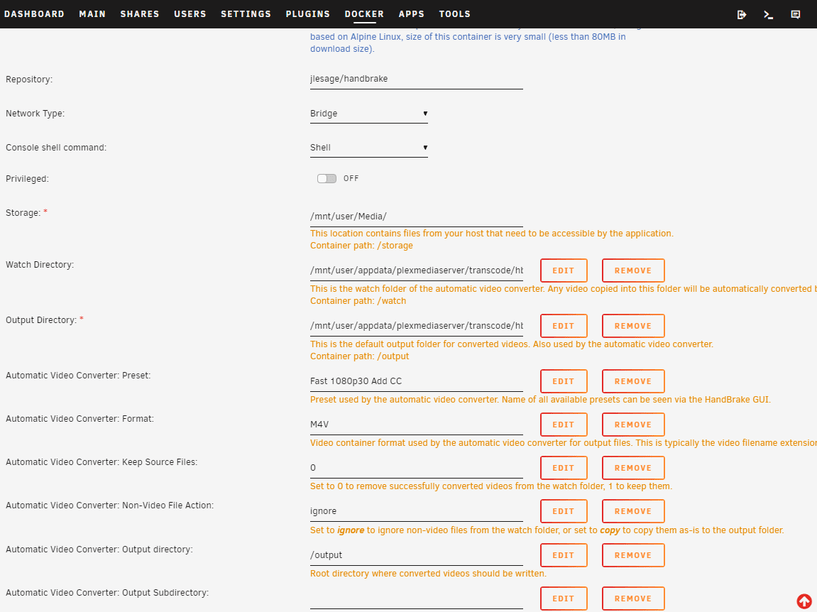
Settings for the Handbrake Docker (screenshotted below):
- Set the “Watch Directory” to your “watch” folder. In my case it is /mnt/user/appdata/plexmediaserver/transcode/hb_watch/
- Set the “Output Directory” to your “output” folder. In my case it is /mnt/user/appdata/plexmediaserver/transcode/hb_output/
- Set your “Automatic Video Converter: Preset” to a customized name, in my case it is “Fast 1080p30 Add CC” which I will define in Handbrake docker.
- Set your “Automatic Video Converter: Format: to “M4V” (note all CAPS).
- Set Video Converter: Keep Source Files: to “0”
- “Automatic Video Converter: Output directory” is “/output”
Start the Handbrake docker and modify the “Fast 1080p30” default in the subtitle section (my settings are screenshotted) so it will include the close caption in compressed video. “Subtitles->Track Selection.” Add “Any” language.” And check “Add Foreign Audio Scan Pass” plus “Add Close Caption when Available.” Save this preset name to “Fast 1080p30 Add CC” and set it as default.

At this point you should be good to go. Any video recorded by Plex DVR should now be automatically compressed by Handbrake with subtitles. You can adjust compression to what ever you want by adjusting the Handbrake compression options. Just make sure your preset name is set as default and also set up in “Automatic Video Converter: Preset” Option of the Handbrake Docker.
