Since a few months we have a problem that Plex keeps buffering the media it’s playing. Or sometimes it says our connection isn’t fast enough, which is weird because it’s wired internal gigabit network.
First we thought it was our Mac mini server. It was from 2012 and maybe getting to old. So we bought a new 2018/2019 one with 6 cores. Problem stayed the same.
Our media is hosted on a Synology 8 bay server that has 4 gigabit connection to the network. They are bundled in a bound with load balancing. So whe started to think it was that Synology NAS. It was also from 2013 so we just replaced the nas with a new 8 bay.
Problem stays the same.
It happens on serval devices. On the living room Apple TV, on the wired windows pc, on the Macs. Everywhere.
So I checked the logs I find several items of this (in the 10.000 lines)
Jan 10, 2020 14:18:30.117 [0x70000364d000] DEBUG - Failed to stream media, client probably disconnected after 44580864 bytes: 32 - Broken pipe
Jan 10, 2020 14:18:30.307 [0x70000364d000] DEBUG - Failed to stream media, client probably disconnected after 311296 bytes: 32 - Broken pipe
Jan 10, 2020 14:18:32.988 [0x7000035ca000] DEBUG - Failed to stream media, client probably disconnected after 1392640 bytes: 32 - Broken pipe
and so on.
Any idea how we can solve this? And please don’t tell me I have to buy new network gear My wife will hate me
I’m having this same issue on a FreeNAS Plex server to my desktop, also on a wired gigabit network. My router is a number of years old, but I haven’t had any other issues with local or remote streaming or transfers.
Seeing the same error message in the logs as well.
Sorry for the late reply, busy week at work.
You are correct that the latest version isn’t a version. Didn’t think about it like that.
The server is: 1.18.4.2171
Plex web player: 4.20.1
The network is managed by a Airport Express that only handles the dhcp and has two gigabit connections (one from the modem, one to the gigabit switch). The switch is connected to one Airport and one time capsule.
Although they are serval year also but can still handle larges files transfered of the network.
Also split the bound from the nas to 4 separate network ip, but that didn’t solve the problem.
Just sharing thoughts… have you switched or tested HDD… I have this same issue and the culprit was a hard disk under-performing, SMART reported everything was OK but for any reason the disk was not working well, as all the media was in a R5 array, it happened that reads/writes were all ok but when this disk must provide its part of information performance drastically fell down for a few seconds, enough for plex to stop playing files and for some clients to disconnect (if transcoding or direct streaming check also the path in which PMS creates the stream parts).
Thanks for the suggestion. Any idea how to check the performance, since they are 8 HDD, range from 4 to 8TB so it’s not quite cheap to replace these.
I also thought of a SSD cache, but the Synology cache advisor would suggest about 3 a 4TB which is simply a no go for our budget
Mmmm if multiple disks are set on the same array, and they are different sizes… if you are on a RAID setting the larger ones are using less capacity than the total, or unless I am wrong you are using a JBOD array.
Raids, use to strip the data between disks, meanwhile JBOD, just span the data. JBOD are difficult to check outside the manufacturer, and an error could end destroying or corrupting the data.
As we are talking about a Synology, I would recommend to check their specific FAQ, I am pretty sure that you can download a proper performance testing tool and check recommendations just before messing up something, sorry not to be of much help here but I have no experience at all with their devices.
On my case it was easy, as I was working with Windows, I extracted the HDDs one by one (allowing the controller to reconstruct the data first), and perform testings on a USB Box apart from the storage controller.
Never heard of SHR, but it seems like something clever, and as for the drive tests… definitely they seem all OK. Have you tried playing video from PLEX using DLNA? this is pretty much the same than Direct-Play but I think less PLEX components will be used, perhaps it will give us a clue.
By the way, you are transcoding or direct-playing media, do you notice any difference when using both methods?, sorry if you have already stated that.
So I think it is solved. When I logged in on the Mac mini server and did a simple speed test I would only get 1 a 3 Mbps instead of the normal 55 Mbps. So I restarted the connect Airport, but that didn’t change a thing. (Although the cache server, which is the old 2012 Mac mini, had the same low speedtest speeds).
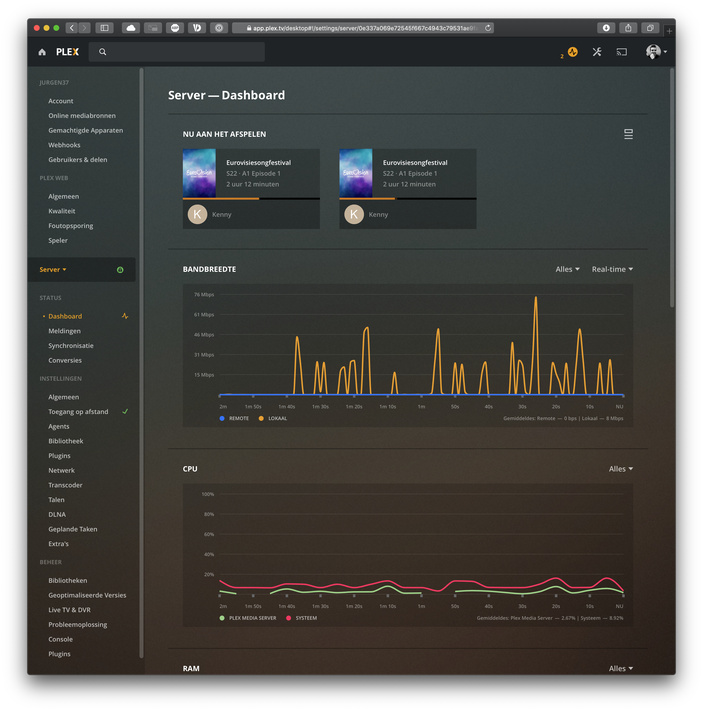
So I forced restarted the new server (what I already did a few times of the past days) and only started Plex and now I seems to run smoothly, it gets speeds in the dashboard around 23Mbps with highs of 46Mbps.
But I will keep testing it for the next days. And I will hear it fast enough when the wife starts to complain
Hehe yeah, but sadly it came back When the wife skips a few minutes it will starts buffering again for eternity.
When we go out of the movie a back in then it works again. So will keeps stress testing it.
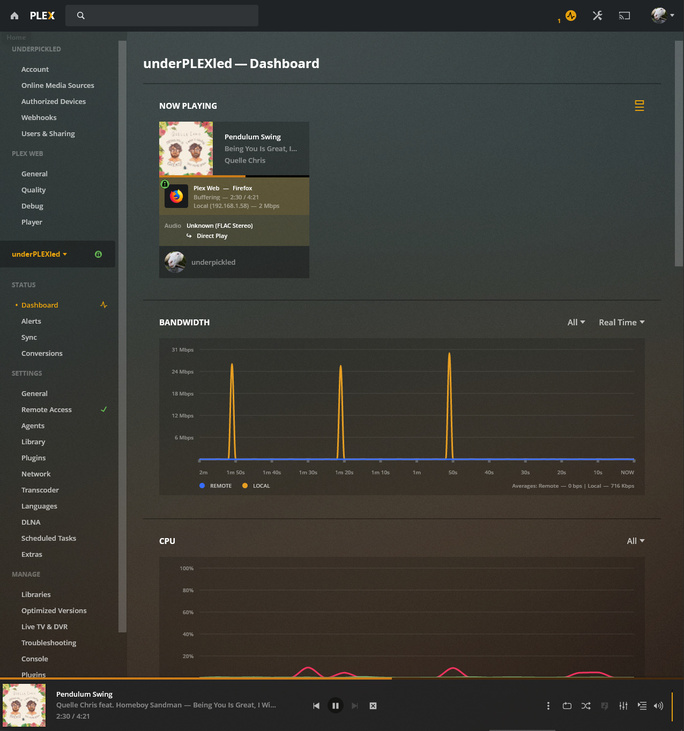
What I also noticed when it starts spinning for buffering the real time stats in the dashboard will drop to 0 Mbps.
Well now I feel curious about what could be going on there, maybe you should upload a full diagram of your setup, I can only think about two tests:
create a dummy library on local storage on PMS and copy a file there to play directly from the server, with no other devices involved.
try to use another computer to copy files between devices and check connectivity between different points, perform checks cabling and wireless to check behavior.
Will check for updates, because now I am out of ideas

 My wife will hate me


 When the wife skips a few minutes it will starts buffering again for eternity.